
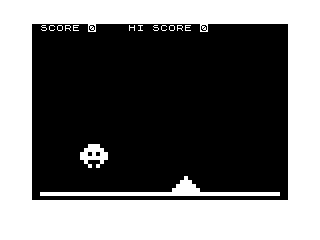
This program implements a Space Invaders-style arcade game in BASIC, featuring a single alien invader that descends the screen while the player controls a base along the bottom row. The alien sprite is drawn using five rows of block graphics characters, and the player fires a laser beam upward using a FOR/NEXT loop that draws and erases a column of block characters. Collision detection is handled by comparing the horizontal column positions of the laser beam against the alien’s bounding box across several lines (1040–1070 and 4015–4030). The program tracks both a current score (S1) and a high score (S2), updating the high score only when the current score exceeds it. Alien movement includes a random vertical speed-up mechanic controlled by a random variable Z1, and the alien also fires back at the player via a bomb drawn with a second sprite routine (lines 4000–4050).
Program Analysis
Program Structure
The code is organised into a series of functional sections accessed via GOTO and GOSUB:
- Lines 1–8: Entry point; asks for instructions and initialises scores.
- Lines 8–165: Game field setup — draws the border, scoreline, and initialises all game variables.
- Lines 165–320: Main game loop — reads player input, moves alien and base, fires alien bomb, checks for collision.
- Lines 1000–1200: Player laser fire subroutine.
- Lines 2000–2047: Game Over handler — updates high score and prompts to replay.
- Lines 4000–4050: Alien bomb subroutine.
- Lines 5000–5510: Alien animation subroutines (alternate leg positions for sprite).
- Lines 6000–6050: Player base destroyed handler.
- Lines 7000–7028: End-game alien victory animation loop.
- Lines 9000–9080: Instructions screen and title display;
GOSUB 9038from line 2 jumps into the middle of the subroutine, landing at line 9050.
Sprite Design
The alien is a six-row sprite (including blank guard rows) constructed from block graphic escape sequences. The five meaningful rows use variables G$, A$, B$, C$, and D$. The player base is two rows stored in E$ and F$. Animation of the alien’s “legs” is achieved by toggling D$ between two values through subroutines at lines 5000 and 5500, controlled by the frame counter F.
Key BASIC Idioms and Techniques
- Mid-subroutine entry:
GOSUB 9038at line 2 deliberately jumps into the middle of the subroutine block (between lines 9030 and 9050), bypassing theGOTO 6at 9030 and landing at thePRINTat line 9050. This is an intentional trick to share code. - Boundary clamping: Lines 200–212 clamp
D(base column),B(alien column), and are placed after input reading but before rendering — a typical guard pattern. - Random alien movement:
His set toINT(RND*3)each frame; line 205 maps the value 2 to −1, giving the alien a left/right random walk of {0, 1, −1}. VariableZ1(1–10) occasionally causes the alien to skip a row (ifZ1=10it subtracts 2 fromAbefore adding 1, but then does an extra iteration via a directGOTO 230bypassing the full loop). - Laser beam: The subroutine at line 1000 fires from the base upward using a
FOR I=17 TO A+4 STEP -1loop, drawing\ :(a half-block character) at each row, creating an animated upward beam. The beam is then erased in a second loop. - Score persistence within session:
S2stores the high score and is only updated at line 2030 whenS1>S2, persisting across replays without file I/O. - Inverse video for UI: All score and UI text uses
%Xinverse-video characters throughout, consistent with the ZX81/TS1000 display style of the era.
Collision Detection
Two collision systems are present. Player-laser-hits-alien is checked in lines 1040–1070 by comparing the laser column J (set to D+4) against four consecutive alien columns (B+1 through B+4); a hit triggers the kill sequence at line 1100. Alien-bomb-hits-base is checked in lines 4015–4030 by comparing B+3 against four base columns (D+3 through D+6); a hit triggers the base destruction at line 6000.
Anomalies and Notable Points
- Line 34 draws the bottom border using
\..\..block sequences (▄ characters) at row 21, but the main play area is also bounded by the alien reachingA+5=C(i.e. row 20), so the border is decorative rather than a collision barrier. - The alien bomb counter
Eis incremented by 0.2 per frame (line 318) and by 0.5 on a kill (line 1190). WhenE>=5(line 281), the bomb fires. After firing,Eis reduced by a random amount (line 4040:E=E-INT(RND*5)+1). Note that operator precedence means this computesE - (INT(RND*5)) + 1, so the minimum reduction is 1 and maximum is 4, not 0–4 as likely intended. - The
SLOWcommand at line 165 (ZX81/TS1000 specific) is called on every pass through the main loop rather than once at startup, which is redundant but harmless. - Line 9070 contains a
SAVE "1015%7"statement that is never reached by normal program flow; it exists purely to save the program to tape. - The victory animation loop at lines 7000–7028 is infinite with no exit path, requiring a manual break.
Variable Summary
| Variable | Purpose |
|---|---|
A | Alien top row position |
B | Alien column position |
C | Base row position (fixed at 20) |
D | Base column position |
E | Alien bomb charge counter |
F | Alien animation frame counter / bomb state flag |
H | Alien horizontal direction (−1, 0, 1) |
S1 | Current score |
S2 | High score |
G$–F$ | Sprite row strings for alien and base |
Image Gallery
Source Code
   1 REM * CLIVE INVADERS *
   2 GOSUB 9038
   3 IF INKEY$="Y" THEN GOTO 9000
   4 IF INKEY$="N" THEN GOTO 6
   5 GOTO 3
   6 LET S1=0
   7 LET S2=0
   8 CLS
  10 FOR A=0 TO 21
  20 PRINT "% % % % % % % % % % % % % % % % % % % % % % % % % % % % % % % % "
  30 NEXT A
  34 PRINT AT 21,1;"............................................................"
  35 PRINT AT 0,0;"% %S%C%O%R%E% ";S1;"% % % % %H%I% %S%C%O%R%E% ";S2
  36 PRINT AT 1,0;"% "
  45 LET G$="% % % % % % "
  50 LET A$="% :'  '% % "
  60 LET B$="%  ' '  :% "
  70 LET C$="% :. ' .% % "
  80 LET D$="% '.% :.':% "
  85 LET H=0
  90 LET A=1
 100 LET B=INT (RND*25)+1
 110 LET E$="% % % :' '% % % "
 120 LET F$="% % :'   '% % "
 130 LET C=20
 140 LET D=15
 150 LET E=0
 160 LET F=0
 165 SLOW
 170 IF INKEY$="D" THEN LET D=D+2
 180 IF INKEY$="A" THEN LET D=D-2
 190 IF INKEY$="L" THEN GOSUB 1000
 195 LET H=INT (RND*3)
 200 IF D<1 THEN LET D=1
 205 IF H=2 THEN LET H=-1
 210 IF D>=25 THEN LET D=25
 211 IF B<=1 THEN LET B=1
 212 IF B>=25 THEN LET B=25
 220 PRINT AT A,B;G$
 230 PRINT AT A+1,B;A$
 240 PRINT AT A+2,B;B$
 250 PRINT AT A+3,B;C$
 260 PRINT AT A+4,B;D$
 265 PRINT AT A+5,B;G$
 270 PRINT AT C,D;F$
 280 PRINT AT C-1,D;E$
 281 IF E>=5 THEN GOSUB 4000
 283 IF F=1 THEN GOSUB 5000
 284 IF F=2 THEN GOSUB 5500
 290 IF A+5=C THEN GOTO 2000
 295 LET Z1=INT (RND*10)+1
 300 LET A=A+1
 305 IF Z1=10 THEN LET A=A-2
 310 LET B=B+H
 315 LET F=F+1
 318 LET E=E+0.2
 319 IF Z1=10 THEN GOTO 230
 320 GOTO 170
 1000 PRINT AT C,D;F$
 1002 PRINT AT C-1,D;E$
 1005 LET J=D+4
 1010 FOR I=17 TO A+4 STEP -1
 1020 PRINT AT I,J;" :"
 1030 NEXT I
 1040 IF J=B+1 THEN GOTO 1100
 1050 IF J=B+2 THEN GOTO 1100
 1060 IF J=B+3 THEN GOTO 1100
 1070 IF J=B+4 THEN GOTO 1100
 1090 FOR I=A+4 TO 18 STEP 1
 1095 PRINT AT I,J;"% "
 1096 NEXT I
 1098 RETURN
 1100 PRINT AT A+1,B;G$
 1105 PRINT AT A,B;G$
 1110 PRINT AT A+2,B;G$
 1120 PRINT AT A+3,B;G$
 1130 PRINT AT A+4,B;G$
 1150 FOR I=A+5 TO 17 STEP 1
 1160 PRINT AT I,J;"% "
 1170 NEXT I
 1180 LET A=1+INT (RND*4)+1
 1185 LET B=INT (RND*25)
 1190 LET E=E+.5
 1195 LET S1=S1+15
 1196 PRINT AT 0,7;S1
 1200 RETURN
 2000 PRINT AT C,D;"% % % % % % % "
 2010 PRINT AT C-1,D;"% % % % % % "
 2020 PRINT AT 1,0;"% %G%A%M%E% %O%V%E%R% %,%A%N%O%T%H%E%R% %G%O%?% %(%Y%/%N%)% "
 2025 IF S1>S2 THEN GOTO 2030
 2026 GOTO 2035
 2030 LET S2=S1
 2032 PRINT AT 0,20;S2
 2035 LET S1=0
 2045 IF INKEY$="N" THEN GOTO 7000
 2046 IF INKEY$="Y" THEN GOTO 8
 2047 GOTO 2045
 4000 FOR J=A+5 TO 20
 4005 PRINT AT J,B+2;": "
 4010 NEXT J
 4015 IF B+3=D+6 THEN GOTO 6000
 4020 IF B+3=D+3 THEN GOTO 6000
 4025 IF B+3=D+4 THEN GOTO 6000
 4030 IF B+3=D+5 THEN GOTO 6000
 4035 FOR J=A+5 TO 20
 4036 PRINT AT J,B+2;"% "
 4037 NEXT J
 4040 LET E=E-INT (RND*5)+1
 4050 RETURN
 5000 LET D$="% :.':'.% % "
 5010 RETURN
 5500 LET D$="% '.% :.':% "
 5505 LET F=0
 5510 RETURN
 6000 PRINT AT C,D;"% % % % % % "
 6010 PRINT AT C-1,D;"% % % % % % "
 6020 FOR J=A+5 TO 20
 6030 PRINT AT J,B+2;"% "
 6040 NEXT J
 6050 GOTO 2020
 7000 PRINT AT 19,0;"% % % % %T%H%E% %C%L%I%V%E% %I%N%V%A%D%E%R%S% %R%U%L%E% % "
 7005 LET F=1
 7006 IF A=15 THEN LET A=14
 7010 PRINT AT A+1,B;A$
 7015 PRINT AT A+2,B;B$
 7020 PRINT AT A+3,B;C$
 7021 PRINT AT A+4,B;D$
 7025 IF F=1 THEN GOSUB 5000
 7026 IF F=2 THEN GOSUB 5500
 7027 LET F=F+1
 7028 GOTO 7010
 9000 CLS
 9001 PRINT AT 0,0;"   % %*%*%*% %C%L%I%V%E% %I%N%V%A%D%E%R%S% %*%*%*%     "
 9010 PRINT AT 2,0;"TO MOVE THE BASE LEFT, PRESS A   AND TO MOVE IT RIGHT, PRESS D    TO FIRE, PRESS L                                GOOD LUCK                      -----------"
 9020 FOR W=1 TO 100
 9021 NEXT W
 9030 GOTO 6
 9050 PRINT AT 1,0;"DO YOU WANT INSTRUCTIONS (Y/N)?"
 9060 PRINT AT 0,0;"  % %*%*%*% %C%L%I%V%E% %I%N%V%A%D%E%R%S% %*%*%*  "
 9065 RETURN
 9070 SAVE "1015%7"
 9080 RUN
Note: Type-in program listings on this website use ZMAKEBAS notation for graphics characters.