
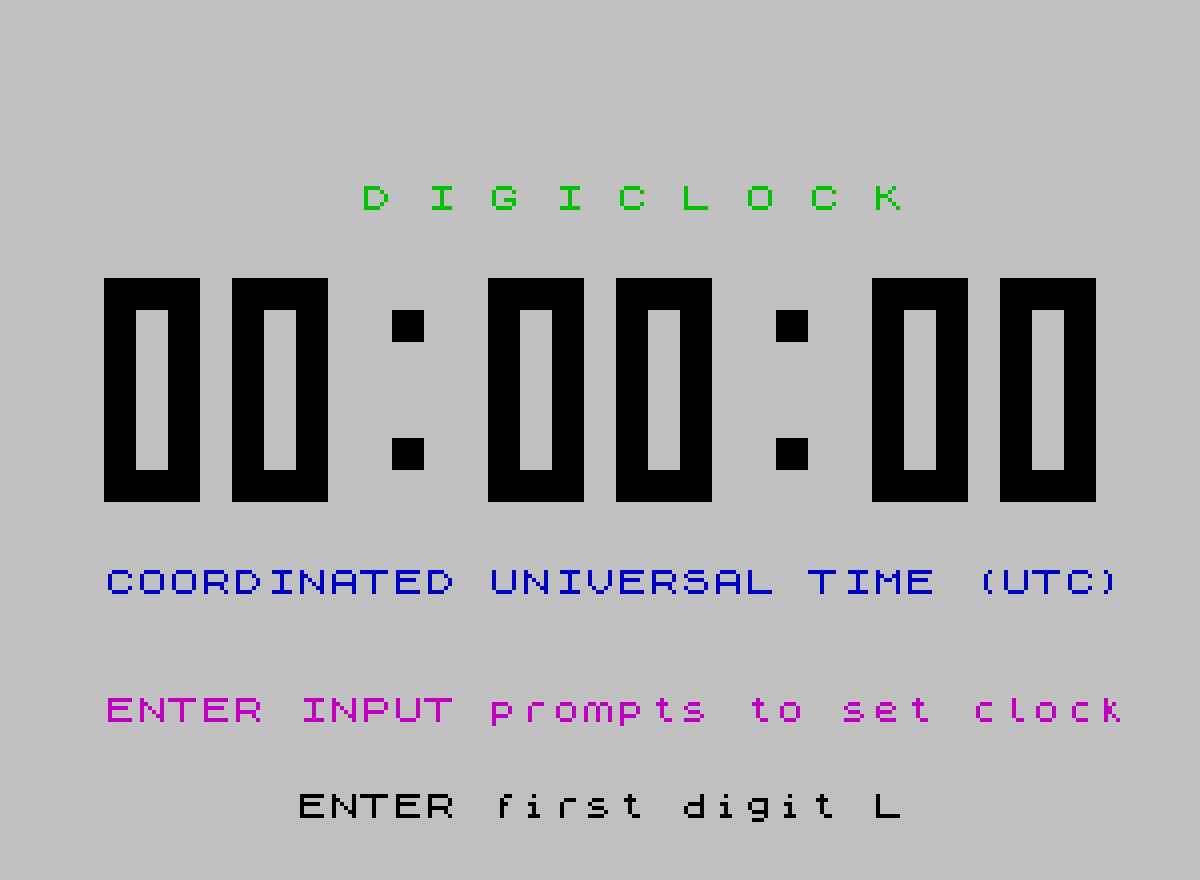
DIGICLOK 2 is a precision digital clock program that displays the time in large, seven-segment-style block-graphic digits across the screen, representing six digits (HH:MM:SS) in UTC. The clock is driven entirely by nested FOR/NEXT loops (variables A through F) where each loop level corresponds to one time digit, and timing is calibrated via a BEEP instruction at line 2010 with a carefully chosen duration of 0.05105 seconds. Fine-grained PAUSE corrections at line 2000 onward compensate for accumulated drift at rollover points (every second, 10 seconds, minute, 10 minutes, hour, and at 00:00:00, 10:00:00, and 20:00:00). Digit subroutines (lines 1010–1190) are addressed by storing line numbers in variables (G through S), allowing GO SUB to jump indirectly to the correct block-graphic digit renderer. The user sets the starting time via INPUT prompts validated for each digit position’s legal range.
Program Structure
The program is divided into clearly separated functional regions:
- Lines 10–90: REMs and initialisation entry via
GO SUB 4000. - Lines 100–240: The main timing engine — six nested
FORloops (A–F) that each represent one clock digit. - Lines 1000–1190: Ten digit-rendering subroutines (one per digit 0–9), each printing a 7-row block-graphic character using
AT X,Y. - Lines 2000–2080: Clock-speed correction subroutine called once per innermost loop iteration, applying graduated
PAUSEvalues at rollover boundaries. - Lines 3000–3310: Time-setting routine accepting INPUT for each of the four significant digits (the seconds tens and units default to 0).
- Lines 4000–4080: Initialisation: screen setup, colon separators, initial digit display, variable assignment, and call to the time-setter.
- Line 9999:
CLEAR : SAVE "DIGICLOK 2" LINE 1— standard auto-run save.
Timing Engine
The clock is driven by six nested FOR/NEXT loops. Each loop variable (A through F) ranges over subroutine line numbers with a STEP 20, stepping through exactly the line numbers that correspond to the digit renderers for 0–9 (or 0–5 for the tens-of-minutes and tens-of-seconds digits). This is a highly compact encoding: the loop itself selects which digit subroutine to call.
| Loop var | Digit position | Range (line nos.) | Count |
|---|---|---|---|
A | Hours tens | L to H (1010–1050) | 0–2 |
B | Hours units | M to W (1010–1190) | 0–9 (capped at 3 when tens=2) |
C | Minutes tens | N to J (1010–1110) | 0–5 |
D | Minutes units | T to K (1010–1190) | 0–9 |
E | Seconds tens | G to J (1010–1110) | 0–5 |
F | Seconds units | G to K (1010–1190) | 0–9 |
At the end of each loop body, IF x=limit THEN LET startvar=G resets the loop’s lower bound to G (1010, i.e. “0”) for the next full cycle, enabling carry propagation.
Indirect GO SUB via Line-Number Variables
All digit subroutine calls use the pattern GO SUB A, GO SUB B, etc., where the loop variable holds an actual BASIC line number. This is the indirect subroutine dispatch technique: variables G through S map to line numbers 1010–1190 in steps of 20, each corresponding to the PRINT block for one digit (0–9). This avoids a large IF/THEN chain for digit selection and is among the most space-efficient approaches available in Sinclair BASIC.
BEEP-Based Calibration and PAUSE Drift Correction
The fundamental timebase is the BEEP .05105,34 at line 2010, chosen so that 10 beeps ≈ 1 second given the overhead of the loop iteration. The subroutine at lines 2020–2080 then applies supplementary PAUSE values that compensate for the varying per-iteration overhead at rollover points — the more digits that roll over simultaneously, the more screen redraws happen and the larger the correction needed:
PAUSE 26at 00:00:00 (all six digits roll, once per 24 hours)PAUSE 28at HH:00:00 where H tens changes (10:00, 20:00)PAUSE 30at XX:00:00 (top of each hour)PAUSE 32every 10 minutesPAUSE 34every minutePAUSE 39every 10 secondsPAUSE 44every second (baseline correction)
Block-Graphic Digit Rendering
Each digit subroutine prints a 7-row × 3-column block-graphic image using Spectrum block characters (█, ▀, ▄, ▐, etc.) at absolute screen positions via AT X,Y. The variable X is set to 7 (the starting row) and Y is updated before each GO SUB call to position the digit horizontally. Six digit positions occupy columns 0, 4, 12, 16, 24, and 28, with colon separators pre-printed at columns 9 and 21.
Time-Setting Routine
Lines 3000–3310 walk the user through entering the hours tens, hours units, minutes tens, and minutes units digits via INPUT. Each entered value is range-checked and mapped to the corresponding subroutine line number stored in one of the loop-start variables (L, M, N, T). Seconds always start at 00. The hours-tens digit is restricted to 0–2 (line 3040), and if the tens digit is 2, the units digit is capped at 0–3 (line 3108). Minutes tens is restricted to 0–5 (line 3180).
Image Gallery
Source Code
   10 REM  "DIGICLOK 2"
   20 REM Precision Digital Clock
   30 REM  © By Frank Bouldin, 10/23/85; ALL RIGHTS RESERVED
   40 REM  To adjust clock speed,change value of BEEP duration   (clock "ticks") in line 2010    (Default value is .05105). De-  crease in value makes clock run faster. PAUSE values in lines   2020-2070 are fine trim inser-  tions (see documentation).
   50 REM  Follow INPUT prompts  to set clock time
   90 GO SUB 4000
  100 REM  NESTED TIMING LOOPS
  110 FOR A=L TO H STEP 20: LET Y=0: LET W=K: IF A=H THEN LET L=G
  120 IF A=1050 THEN LET W=1070
  130 GO SUB A
  140 FOR B=M TO W STEP 20: LET Y=4: IF B=W THEN LET M=G
  150 GO SUB B
  160 FOR C=N TO J STEP 20: IF C=J THEN LET N=G
  170 LET Y=12: GO SUB C
  180 FOR D=T TO K STEP 20: IF D=K THEN LET T=G
  190 LET Y=16: GO SUB D
  200 FOR E=G TO J STEP 20: LET Y=24: GO SUB E
  210 IF U=0 THEN PRINT FLASH 1; INK 1;AT 20,0;" -Press any key to start clock- "
  220 IF U=0 THEN PAUSE 0: LET U=1
  230 IF U=1 THEN PRINT AT 20,0;"                                ": LET U=2
  240 LET Y=28: FOR F=G TO K STEP 20: GO SUB F: GO SUB 2000: NEXT F: NEXT E: NEXT D: NEXT C: NEXT B: NEXT A: GO TO 110
 1000 REM  "0"
 1010 PRINT AT X,Y;"███";AT X+1,y;"█ █";AT X+2,Y;"█ █";AT X+3,Y;"█ █";AT X+4,Y;"█ █";AT X+5,Y;"█ █";AT X+6,Y;"███": RETURN
 1020 REM  "1"
 1030 PRINT AT X,Y;"▐█ ";AT X+1,Y;" █ ";AT X+2,Y;" █ ";AT X+3,Y;" █ ";AT X+4,Y;" █ ";AT X+5,Y;" █ ";AT X+6,Y;"▐█▌ ": RETURN
 1040 REM  "2"
 1050 PRINT AT X,Y;"███";AT X+1,Y;"▀ █";AT X+2,Y;"  █";AT X+3,Y;"███";AT X+4,Y;"█  ";AT X+5,Y;"█ ▄";AT X+6,Y;"███": RETURN
 1060 REM  "3"
 1070 PRINT AT X,Y;"███";AT X+1,Y;"▀ █";AT X+2,Y;"  █";AT X+3,Y;"▐██";AT X+4,Y;"  █";AT X+5,Y;"▄ █";AT X+6,Y;"███": RETURN
 1080 REM  "4"
 1090 PRINT AT X,Y;"█ █";AT X+1,Y;"█ █";AT X+2,Y;"█ █";AT X+3,Y;"███";AT X+4,Y;"  █";AT X+5,Y;"  █";AT X+6,Y;"  █": RETURN
 1100 REM  "5"
 1110 PRINT AT X,Y;"███";AT X+1,Y;"█  ";AT X+2,Y;"█  ";AT X+3,Y;"███";AT X+4,Y;"  █";AT X+5,Y;"▄ █";AT X+6,Y;"███": RETURN
 1120 REM  "6"
 1130 PRINT AT X,Y;"███";AT X+1,Y;"█ ▀";AT X+2,Y;"█  ";AT X+3,Y;"███";AT X+4,Y;"█ █";AT X+5,Y;"█ █";AT X+6,Y;"███": RETURN
 1140 REM  "7"
 1150 PRINT AT X,Y;"███";AT X+1,Y;"▀ █";AT X+2,Y;"  █";AT X+3,Y;"  █";AT X+4,Y;"  █";AT X+5,Y;"  █";AT X+6,Y;"  █": RETURN
 1160 REM  "8"
 1170 PRINT AT X,Y;"███";AT X+1,Y;"█ █";AT X+2,Y;"█ █";AT X+3,Y;"███";AT X+4,Y;"█ █";AT X+5,Y;"█ █";AT X+6,Y;"███": RETURN
 1180 REM  "9"
 1190 PRINT AT X,Y;"███";AT X+1,Y;"█ █";AT X+2,Y;"█ █";AT X+3,Y;"███";AT X+4,Y;"  █";AT X+5,Y;"▄ █";AT X+6,Y;"███": RETURN
 2000 REM  Clock speed adjust
 2010 BEEP .05105,34
 2015 REM  1 PAUSE every 24 hours    (AT 00:00:00)
 2020 IF A=G AND B=G AND C=G AND D=G AND E=G AND F=G THEN PAUSE 26: RETURN
 2025 REM 2 PAUSEs every 24 hours     (at 10:00:00 and 20:00:00)
 2030 IF B=G AND C=G AND D=G AND E=G AND F=G THEN PAUSE 28: RETURN
 2035 REM  1 PAUSE each hour on  the hour, (except at 00:00:00,       10:00:00 and 20:00:00)
 2040 IF C=G AND D=G AND E=G AND F=G THEN PAUSE 30: RETURN
 2045 REM  1 PAUSE every 10 min.     (except at the above times)
 2050 IF D=G AND E=G AND F=G THEN PAUSE 32: RETURN
 2055 REM  1 PAUSE each minute       (except for the above times)
 2060 IF E=J AND F=W THEN PAUSE 34: RETURN
 2065 REM  1 Pause every 10 sec.     (except for the above times)
 2070 IF F=W THEN PAUSE 39: RETURN
 2075 REM  1 PAUSE every second      (except for the above times)
 2080 PAUSE 44: RETURN
 2999 REM  Clock digit settings
 3000 LET Y=0: FLASH 1: GO SUB G
 3005 INPUT "      ENTER first digit ";V: FLASH 0
 3010 IF V=0 THEN LET L=G: GO SUB G
 3020 IF V=1 THEN LET L=O: GO SUB O
 3030 IF V=2 THEN LET l=H: GO SUB h
 3040 IF V>2 THEN GO TO 3000
 3050 LET Y=4: FLASH 1: GO SUB G
 3055 INPUT "      ENTER second digit ";Z: FLASH 0
 3060 IF Z=0 THEN LET M=G: GO SUB G
 3070 IF Z=1 THEN LET M=O: GO SUB O
 3080 IF Z=2 THEN LET M=H: GO SUB H
 3090 IF Z=3 THEN LET M=I: GO SUB I
 3100 IF Z=4 THEN LET M=P: GO SUB P
 3101 IF Z=5 THEN LET M=J: GO SUB J
 3102 IF Z=6 THEN LET M=Q: GO SUB Q
 3103 IF Z=7 THEN LET M=R: GO SUB R
 3104 IF Z=8 THEN LET M=S: GO SUB S
 3105 IF Z=9 THEN LET M=K: GO SUB K
 3106 IF Z>9 THEN GO TO 3050
 3108 IF V>1 AND Z>3 THEN LET Y=4: GO SUB G: GO TO 3000
 3110 LET Y=12: FLASH 1: GO SUB G
 3115 INPUT "      ENTER third digit ";Z: FLASH 0
 3120 IF Z=0 THEN LET N=G: GO SUB G
 3130 IF Z=1 THEN LET N=O: GO SUB O
 3140 IF Z=2 THEN LET N=H: GO SUB H
 3150 IF Z=3 THEN LET N=I: GO SUB I
 3160 IF Z=4 THEN LET N=P: GO SUB P
 3170 IF Z=5 THEN LET N=J: GO SUB J
 3180 IF Z>5 THEN GO TO 3110
 3190 LET Y=16: FLASH 1: GO SUB G
 3195 INPUT "      ENTER fourth digit ";Z: FLASH 0
 3200 IF Z=0 THEN LET T=G: GO SUB G
 3210 IF Z=1 THEN LET T=O: GO SUB O
 3220 IF Z=2 THEN LET T=H: GO SUB H
 3230 IF Z=3 THEN LET T=I: GO SUB I
 3240 IF Z=4 THEN LET T=P: GO SUB P
 3250 IF Z=5 THEN LET T=J: GO SUB J
 3260 IF Z=6 THEN LET T=Q: GO SUB Q
 3270 IF Z=7 THEN LET T=R: GO SUB R
 3280 IF Z=8 THEN LET T=S: GO SUB S
 3290 IF Z=9 THEN LET T=K: GO SUB K
 3300 IF Z>9 THEN GO TO 3190
 3310 RETURN
 4000 REM  Initialization
 4010 CLS : POKE 23609,100
 4020 BORDER 7: PAPER 7: INK 0
 4030 PRINT INK 4;AT 4,8;"D I G I C L O C K"; INK 3;AT 20,0;"ENTER INPUT prompts to set clock"; INK 1;AT 16,0;"COORDINATED UNIVERSAL TIME (UTC)"
 4040 PRINT AT 8,9;"█";AT 8,21;"█";AT 12,9;"█";AT 12,21;"█"
 4050 LET B=0: LET X=7: LET Y=0: GO SUB 1010: LET Y=4: GO SUB 1010: LET Y=12: GO SUB 1010: LET Y=16: GO SUB 1010: LET Y=24: GO SUB 1010: LET Y=28: GO SUB 1010.
 4060 LET G=1010: LET H=1050: LET I=1070: LET J=1110: LET K=1190: LET L=1010: LET M=1010: LET N=1010
 4070 LET O=1030: LET P=1090: LET Q=1130: LET R=1150: LET S=1170: LET T=1010: LET U=0: LET W=1190
 4080 GO SUB 3000: RETURN
 9999 CLEAR : SAVE "DIGICLOK 2" LINE 1
Note: Type-in program listings on this website use ZMAKEBAS notation for graphics characters.