
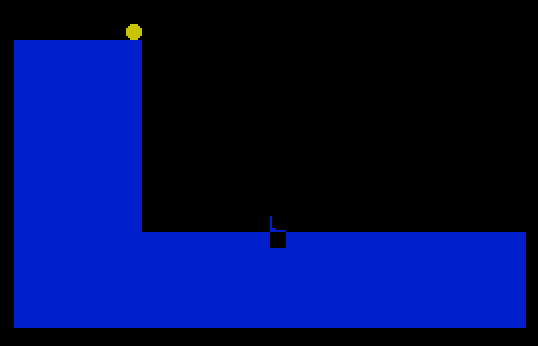
DROP-OUT is an arcade-style ball-drop game where the player selects a force value (1–9) and watches a ball animate across the top of the screen before falling down to a target row. The ball’s descent uses an accelerating step controlled by variable B, which increments by 0.5 each iteration inside the FOR/NEXT loop, simulating gravity. Two UDGs are defined at startup via READ/POKE USR: a circular ball shape (UDG-A) and a target/hole marker (UDG-B), each eight bytes wide. A randomly placed gap in the bottom wall determines the scoring position; if the ball lands in the correct column matching the gap, the score increments and a celebratory BEEP plays.
Program Structure
The program is organized into a main loop and two subroutines:
- Lines 330–380 (RETURN at 380): Initialization — resets score, sets colors, initializes bounce variable
B, and loads UDG data. - Lines 240–320 (RETURN at 320): Screen setup — draws the left wall, the floor, places the target marker (UDG-B), and randomly selects the gap position
H. - Lines 40–230: Main game loop — solicits a force input, animates the ball horizontally then vertically, checks scoring, and loops back.
Execution begins at line 10 (REM, effectively a no-op), calls initialization at line 330, then calls screen setup at line 240, before entering the main loop. After each drop, GO TO 30 at line 230 re-calls the screen setup subroutine, regenerating a new gap position each round without reinitializing the score.
UDG Definition
Two user-defined graphics are loaded at startup. Lines 360–380 loop 16 times, reading bytes from the DATA statements at lines 390–400 and POKEing them into USR "a" (UDG-A) and the next character slot (UDG-B). The token u in the DATA lines at 390 and 400 is a placeholder appearing in the raw listing; in context these represent repeated byte values to fill out the 8-byte UDG shapes — a circle/ball for UDG-A and a bracket/hole indicator for UDG-B. Line 410 contains a REM confirming the mapping: A=[UDG-A] B=[UDG-B].
Gravity Simulation
The falling animation in lines 90–140 uses an unusual technique: variable B, initialized to 0.5 in line 350, is incremented by 0.5 each iteration (line 120) and then added directly to the FOR loop variable A inside the loop body (line 140). Because the FOR/NEXT loop also increments A by 1 implicitly, the effective per-step increment grows as B accumulates, producing an accelerating descent that mimics gravitational acceleration.
A side effect of this approach is that B is not reset between rounds — only reset at full initialization (line 350). This means each successive drop is faster than the last, which may be intentional as a difficulty ramp or an oversight.
Input Validation
Line 40 uses LINE A$ to capture input as a string, then applies string comparison (A$>"9" OR A$<"1") to validate the entry is a single digit from 1 to 9. This avoids a numeric INPUT that could raise an error on non-numeric entry. The value is later retrieved with VAL A$ when needed arithmetically.
Screen Layout and Drawing
The screen is divided into functional zones:
- Row 3: Horizontal ball travel path (columns 0–8).
- Rows 4–15, column 8: Vertical fall path.
- Rows 4–15, column 0: A solid left wall drawn in INK 1 (blue), eight characters wide, using block graphic fills.
- Rows 16–21: The floor, drawn as a solid 32-character-wide band, also INK 1.
The gap in the floor is implemented by PRINTing a space at position AT 16, 8+(H*2) in line 310, where H is a random integer 1–9. The factor of 2 spaces the possible gap positions across the floor area.
Scoring Logic
Line 220 checks IF VAL A$=H — that is, whether the player’s chosen force value matches the randomly generated gap position. If so, UDG-A is printed at the landing position, SC is incremented, the score is displayed with PAPER 6; INK 9 styling, and a long BEEP at pitch 30 plays as a reward. This is a direct equality check, meaning only one force value out of nine will score on any given round.
Notable Techniques
BORDER sc: PAPER scin line 340 sets both border and paper to black (0) when score is reset, creating a clean dark background.- The horizontal animation (lines 50–80) erases the ball at each position by printing a space before advancing, a standard sprite-erase idiom.
VAL "number"is not present here; force is stored as a string and converted withVAL A$only when arithmetic is needed, saving variable memory.- Line 290 places UDG-B at the top of the fall column before play begins, marking the drop point visually.
Bugs and Anomalies
- Variable
B(the gravity accumulator) is only initialized in the one-time setup subroutine (line 350) and never reset between rounds. Successive drops will be increasingly fast, eventually causing the ball to skip rows or land inconsistently. - Line 140 uses lowercase
ainNEXT a, as does line 210 (NEXT a). On the Spectrum, BASIC is case-sensitive for variable names in some contexts; however, since all references use the same single-letter variable, this is cosmetic in the listing but may reflect inconsistent entry rather than a functional difference. - The DATA values use the token
uas a byte value, which evaluates numerically. Depending on the actual byte stored, the UDG shapes may not render as intended circles or markers — this is an artifact of the listing representation.
Image Gallery
Source Code
  10 REM DROP-OUT
  20 GO SUB 330
  30 GO SUB 240
  40 INPUT "FORCE ? ";  LINE A$:IF A$>"9" OR A$<"1" THEN GO TO 40
  50 FOR A=0 TO 8
  60 PRINT AT 3,A;"[UDG-A]"
  70 BEEP .1,A
  80 PRINT AT 3,A;" ":NEXT A
  90 FOR A=4 TO 15
 100 PRINT AT A,8;"[UDG-A]"
 110 BEEP .1,A
 120 LET B=B+.5
 130 PRINT AT A,8;" "
 140 LET A=A+B:NEXT a
 150 PRINT AT 15,8;"[UDG-A]"
 160 BEEP .2,5
 170 PRINT AT 15,8; INK 1;"[UDG-B]"
 180 FOR A=1 TO VAL A$+2
 190 PRINT AT 15,8+A;"[UDG-A]"
 200 BEEP .1,A
 210 PRINT AT 15,8+A;" ":NEXT a
 220 IF VAL A$=H  THEN PRINT AT 16,8+(H*2) ;"[UDG-A]":LET SC=SC+1:PRINT AT 21,12; PAPER 6; INK 9;"SCORE ";SC:BEEP 1,30
 230 GO TO 30
 240 REM
 250 FOR A=4 TO 15
 260 PRINT AT a,0; INK 1;"████████":NEXT a
 270 FOR A=16 TO 21
 280 PRINT INK 1; AT a,0;"████████████████████████████████":NEXT a
 290 PRINT AT 15,8, INK 1;"[UDG-B]"
 300 LET H= INT (RND*9)+1
 310 PRINT AT 16,8+(H*2);" "
 320 RETURN
 330 LET SC=0
 340 BORDER sc:PAPER sc:INK 6:CLS
 350 LET B=.5
 360 FOR A=0 TO 15
 370 READ U:POKE USR "a"+A,U
 380 NEXT A:RETURN
 390 DATA 60,126,255,u,u,u,126,60
 400 DATA 128,u,u,u,u,u,224,255
 410 REM A=[UDG-A] B=[UDG-B]
 420 SAVE "DROP-OUT" LINE 10
Note: Type-in program listings on this website use ZMAKEBAS notation for graphics characters.