
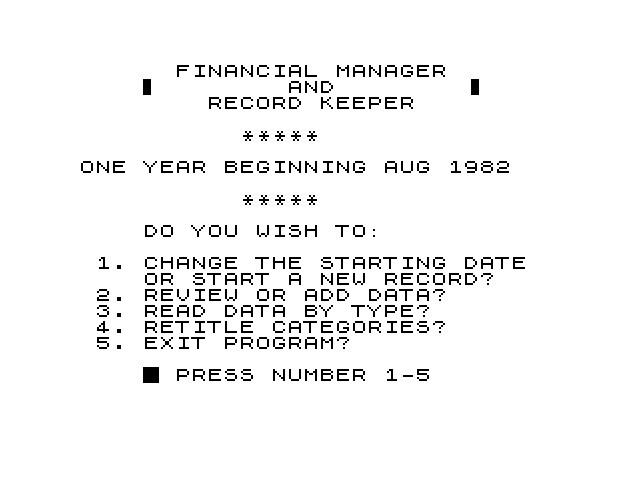
Keeps a year of household finances: income plus 18 expense categories such as rent, food, utilities, auto, loans, insurance, medical, child care and entertainment. For any month the user adds dollar amounts to a category, and the screen shows that month’s figure, its percentage of the month’s expenses, the year-to-date total and the yearly percentage, with totals at the foot. Other options list all twelve months for one category and its yearly total, and rename any of the 19 categories. The data is kept in arrays and saved to tape as part of the program.
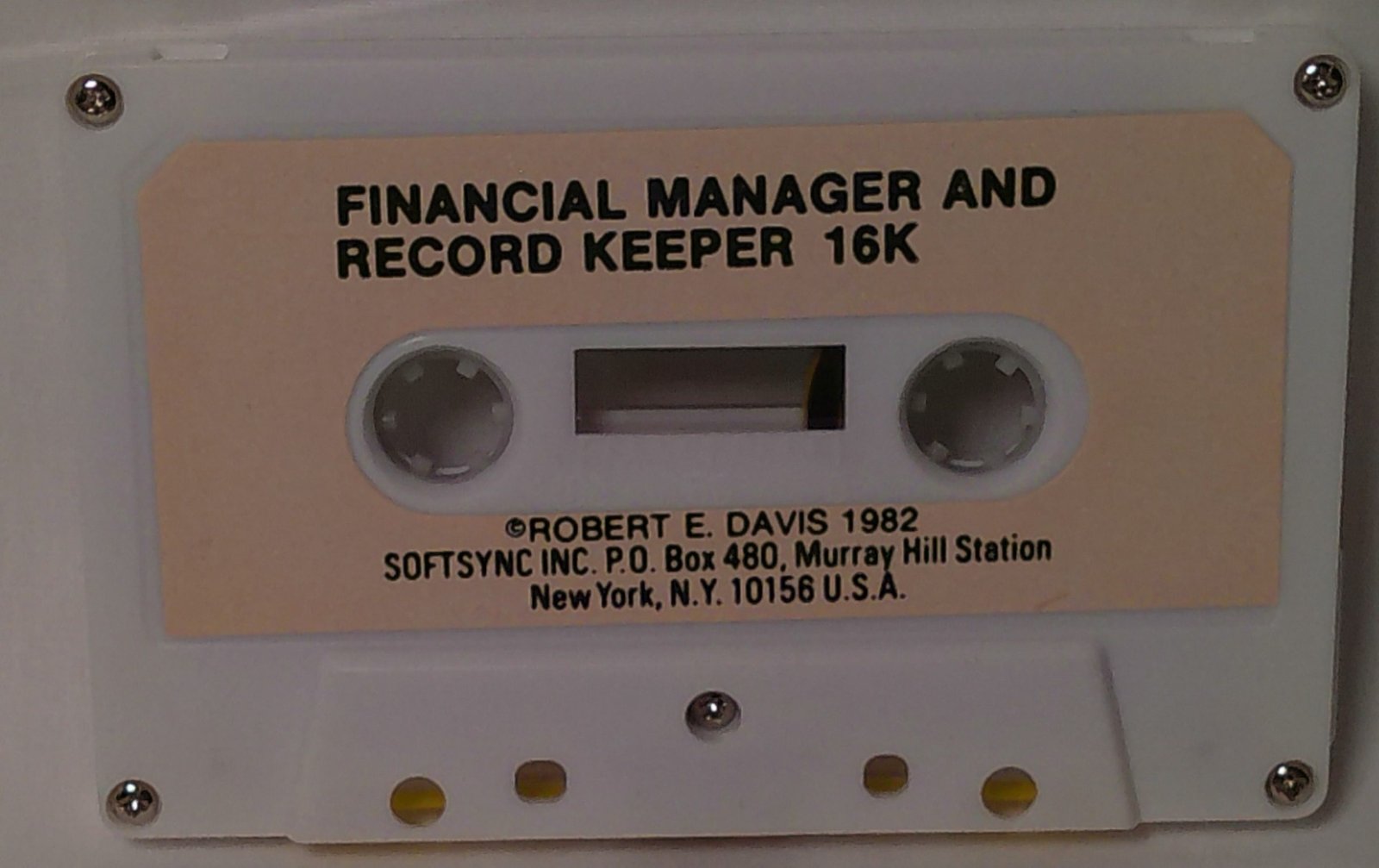
The label reads “(c) ROBERT E. DAVIS 1982 SOFTSYNC INC” and specifies 16K. The copyright REMs at the top of the listing give the author as Robert E. Davis Jr.
Program Analysis
Program Structure
- Lines 45–97: choose between starting a new record (which runs
CLEARand dimensions the arrays) and keeping the existing data - Lines 100–295: starting month and year, then a five-option main menu read with
INKEY$ - Lines 310–397 and 620–850: pick a month, show its table and add amounts
- Lines 430–550: exit menu with options to save,
NEWor return - Lines 560–1430: array dimensions and default category names
- Lines 2000–2240: read the data for one category month by month
- Lines 2750–3030: rename categories
Data Layout
A(20,13) holds the amounts: rows 1–19 are categories and row 20 is the expense total, while columns 1–12 are months and column 13 is the year. B(20,12) holds each category’s percentage of the month’s expenses, C(19) its percentage of the year, and T the year’s total expenses. Income (row 1) goes into the month and year columns but is left out of the expense totals and percentages. K$(20,10) holds the category titles, including their numbers.
Notable Techniques
- The program never uses
RUNafter setup, so the variables survive.SAVE "RECORD"at line 540 stores them with the program, and execution continues at line 550, which returns to the menu after the program is reloaded. - Display-heavy screens are drawn in
FASTmode and input is taken inSLOWmode. - Entering 21 at the category prompt, or at the “ENTER X” prompt in the category view, makes a
COPYto the printer. The on-screen prompts do not mention this. - Amounts are added to the existing figures, so a negative entry corrects a mistake.
Potential Issues
- The months are always listed January to December, so the starting month and year serve only as a heading.
- Line 820 divides by the month’s expense total
A(20,Q)whenever the yearly totalTis non-zero. If negative corrections bring that month’s total back to zero, the program stops with a division error. - The rename screen shows the label “T0:” with a zero in place of the letter O.
Image Gallery
Source Code
   1 REM X
   2 REM *******************
   3 REM ****COPYRIGHT******
   4 REM *ROBERT E DAVIS JR*
   5 REM ******1982*********
   6 REM *******************
  45 CLS
  50 PRINT AT 6,3;"DO YOU WISH TO:"
  55 PRINT
  60 PRINT "1. START A NEW RECORD?"
  65 PRINT "2. WORK WITH EXISTING DATA?"
  70 PRINT
  75 PRINT TAB 3;"█ PRESS NUMBER 1 OR 2"
  80 IF INKEY$ ="1" THEN GOTO 95
  85 IF INKEY$ ="2" THEN GOTO 100
  90 GOTO 80
  95 CLEAR
  97 GOSUB 560
 100 CLS
 110 PRINT AT 6,2;"ENTER STARTING MONTH:"
 115 PRINT TAB 4;"(1ST 3 LETTERS)"
 120 INPUT S$
 130 CLS
 140 PRINT AT 6,5;"ENTER YEAR:"
 150 INPUT SY
 160 CLS
 165 FAST
 170 PRINT AT 1,7;"FINANCIAL MANAGER"
 175 PRINT TAB 5;"▌        AND        ▐"
 180 PRINT TAB 9;"RECORD KEEPER"
 185 PRINT AT 5,11;"*****"
 190 PRINT
 200 PRINT " ONE YEAR BEGINNING ";S$;" ";SY
 202 PRINT AT 9,11;"*****"
 205 PRINT AT 11,5;"DO YOU WISH TO:"
 210 PRINT AT 13,2;"1. CHANGE THE STARTING DATE        OR START A NEW RECORD?"
 215 PRINT TAB 2;"2. REVIEW OR ADD DATA?"
 220 PRINT TAB 2;"3. READ DATA BY TYPE?"
 225 PRINT TAB 2;"4. RETITLE CATEGORIES?"
 230 PRINT TAB 2;"5. EXIT PROGRAM?"
 240 PRINT AT 20,5;"█ PRESS NUMBER 1-5"
 245 SLOW
 250 IF INKEY$ ="1" THEN GOTO 45
 260 IF INKEY$ ="2" THEN GOTO 310
 270 IF INKEY$ ="3" THEN GOTO 2000
 280 IF INKEY$ ="4" THEN GOTO 2750
 290 IF INKEY$ ="5" THEN GOTO 430
 295 GOTO 250
 310 CLS
 320 PRINT AT 4,5;"1. JAN   7. JUL"
 325 PRINT TAB 5;"2. FEB   8. AUG"
 330 PRINT TAB 5;"3. MAR   9. SEP"
 335 PRINT TAB 5;"4. APR  10. OCT"
 340 PRINT TAB 5;"5. MAY  11. NOV"
 345 PRINT TAB 5;"6. JUN  12. DEC"
 350 PRINT
 360 PRINT
 380 PRINT TAB 4;"█ ENTER NUMBER 1-12"
 385 INPUT Q
 387 IF Q<1 OR Q>12 THEN GOTO 385
 390 FAST
 395 GOSUB 1850
 397 GOTO 620
 430 CLS
 440 PRINT AT 5,2;"IF DATA HAS BEEN ADDED OR     CHANGED IT WILL BE LOST UNLESS  THIS PROGRAM IS SAVED ON TAPE."
 450 PRINT "PREPARE TAPE RECORDER, START    RECORDING, AND PRESS ""R""."
 460 PRINT
 470 PRINT TAB 2;"IF NO NEW DATA NEEDS SAVING   PRESS ""C"" TO CLEAR PROGRAM"
 480 PRINT
 490 PRINT TAB 2;"PRESS ""P"" TO RESTART PROGRAM  WITHOUT SAVING OR LOSING DATA."
 500 IF INKEY$ ="R" THEN GOTO 540
 510 IF INKEY$ ="C" THEN NEW
 520 IF INKEY$ ="P" THEN GOTO 160
 530 GOTO 500
 540 SAVE "RECOR[D]"
 550 GOTO 160
 560 LET T=0
 570 DIM A(20,13)
 580 DIM B(20,12)
 590 DIM C(19)
 600 DIM K$(20,10)
 610 GOTO 1240
 620 CLS
 630 FAST
 640 PRINT M$;TAB 10;"MONTH  PCT YEAR   PCT"
 645 PRINT K$(1);TAB 10;">";A(1,Q);TAB 21;">";A(1,13)
 650 FOR Z=2 TO 19
 660 PRINT K$(Z);TAB 10;A(Z,Q);TAB 18;B(Z,Q);TAB 21;A(Z,13);TAB 29;C(Z)
 670 NEXT Z
 680 PRINT TAB 6;"TOT ";A(20,Q);TAB 17;"TOT ";T
 690 SLOW
 700 PRINT "█ ENTER NBR 1-19 (20 TO RETURN)"
 710 INPUT Z
 712 IF Z<1 OR Z>21 THEN GOTO 710
 715 IF Z=20 THEN GOTO 160
 716 IF Z=21 THEN COPY
 717 IF Z=21 THEN GOTO 710
 720 PRINT AT 21,0;"█ ENTER DOLLAR AMOUNT (";Z;")      "
 721 SLOW
 730 INPUT G
 740 FAST
 750 LET A(Z,Q)=A(Z,Q)+G
 760 LET A(Z,13)=A(Z,13)+G
 765 IF Z=1 THEN GOTO 620
 770 LET A(20,Q)=A(20,Q)+G
 780 LET T=T+G
 790 IF T=0 THEN GOTO 620
 810 FOR Z=2 TO 19
 820 LET B(Z,Q)=INT (A(Z,Q)/A(20,Q)*100+.5)
 830 LET C(Z)=INT (A(Z,13)/T*100+.5)
 840 NEXT Z
 850 GOTO 620
1240 LET K$(1)="1  INCOME"
1250 LET K$(2)="2  RENT"
1260 LET K$(3)="3  FOOD"
1270 LET K$(4)="4  ELECT"
1280 LET K$(5)="5  NL GAS"
1290 LET K$(6)="6  PHONE"
1300 LET K$(7)="7  WATER"
1310 LET K$(8)="8  HSHOLD"
1320 LET K$(9)="9  AUTO"
1330 LET K$(10)="10 GASOLN"
1340 LET K$(11)="11 LOANS"
1350 LET K$(12)="12 INSUR"
1360 LET K$(13)="13 CLOTHG"
1370 LET K$(14)="14 MEDICL"
1380 LET K$(15)="15 CHLDCR"
1390 LET K$(16)="16 ENTERT"
1400 LET K$(17)="17 GIFTS"
1410 LET K$(18)="18 INVEST"
1420 LET K$(19)="19 MISCEL"
1430 RETURN
1850 IF Q=1 THEN LET M$="JAN"
1860 IF Q=2 THEN LET M$="FEB"
1870 IF Q=3 THEN LET M$="MAR"
1880 IF Q=4 THEN LET M$="APR"
1890 IF Q=5 THEN LET M$="MAY"
1900 IF Q=6 THEN LET M$="JUN"
1910 IF Q=7 THEN LET M$="JUL"
1920 IF Q=8 THEN LET M$="AUG"
1930 IF Q=9 THEN LET M$="SEP"
1940 IF Q=10 THEN LET M$="OCT"
1950 IF Q=11 THEN LET M$="NOV"
1960 IF Q=12 THEN LET M$="DEC"
1970 RETURN
2000 CLS
2005 FAST
2007 PRINT
2008 PRINT
2010 FOR L=1 TO 9
2020 PRINT TAB 2;K$(L);TAB 14;K$(L+10)
2030 NEXT L
2040 PRINT AT 11,2;K$(10);TAB 14;"20 TOTALS"
2060 PRINT AT 14,3;"█ ENTER NUMBER 1-20"
2065 SLOW
2070 INPUT Z
2075 IF Z<1 OR Z>20 THEN GOTO 2070
2080 FAST
2095 CLS
2100 PRINT TAB 1;K$(Z)
2102 PRINT AT 0,1;"  "
2105 PRINT
2110 FOR Q=1 TO 9
2120 PRINT TAB 4;Q;".  ";A(Z,Q)
2130 NEXT Q
2140 FOR Q=10 TO 12
2150 PRINT TAB 4;Q;". ";A(Z,Q)
2160 NEXT Q
2170 PRINT
2180 PRINT TAB 2;"TOTAL ";A(Z,13)
2190 PRINT
2200 PRINT TAB 2;"█ ENTER X"
2205 SLOW
2210 INPUT V$
2220 IF V$="X" THEN GOTO 160
2230 IF V$<>"X" AND V$<>"21" THEN GOTO 2210
2235 COPY
2240 GOTO 2210
2750 CLS
2755 FAST
2760 PRINT "SELECT CATEGORY FOR CHANGE"
2764 PRINT
2766 PRINT
2770 FOR L=1 TO 9
2775 PRINT TAB 2;K$(L);TAB 14;K$(L+10)
2780 NEXT L
2785 PRINT TAB 2;K$(10)
2790 PRINT
2795 PRINT
2800 PRINT TAB 2;"█ ENTER NUMBER 1-19"
2810 SLOW
2820 INPUT L
2825 IF L<1 OR L>19 THEN GOTO 2820
2830 CLS
2835 FAST
2840 PRINT AT 5,8;"CHANGE CATEGORY"
2845 PRINT TAB 13;"FROM:"
2847 PRINT
2850 PRINT TAB 9;"""";K$(L);""""
2855 PRINT
2860 PRINT TAB 14;"T0:"
2865 PRINT
2870 PRINT TAB 9;"""          """
2880 PRINT AT 15,2;"█ ENTER: NBR, SPACE, TITLE"
2882 SLOW
2885 INPUT K$(L)
2890 PRINT AT 12,10;K$(L)
2900 PRINT AT 15,4;"CORRECT?  -ENTER Y OR N "
3000 INPUT V$
3010 IF V$="N" THEN GOTO 2880
3020 IF V$="Y" THEN GOTO 160
3030 GOTO 3000
Note: Type-in program listings on this website use ZMAKEBAS notation for graphics characters.