
FLEXIGEN is a report-generation utility that loads tabular data from tape and assembles user-defined columnar reports for printing. The program allows users to define up to nine “blocks,” each specifying row and column ranges from a source data array, along with a print position and start line, which are stored in a two-dimensional array S(B,6). Data files are stored in two parts on tape: a parameters file (suffixed “P”) containing dimensions and a data file (suffixed “D”) holding the actual string array. The assembled report is built into a string array R$ dimensioned to accommodate all blocks, then printed in page-width slices using LPRINT, supporting printer widths from 20 to 132 characters. The function FN A() computes the end print position for a block, combining print-position and column-range data to streamline bounds calculations.
Program Analysis
Program Structure
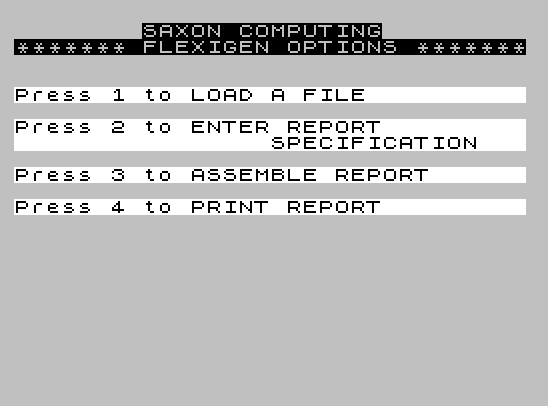
FLEXIGEN is organized as a menu-driven application with clearly separated functional modules, each anchored at a round line number. Control flow is handled almost entirely via GO TO and GO SUB, with the main menu at line 9000–9040 dispatching to one of four modules based on a keypress.
| Line Range | Module |
|---|---|
| 100–109 | Y/N/X confirmation subroutine |
| 110–149 | Block specification entry subroutine |
| 190–199 | “Press X to return to menu” handler |
| 200–204 | Error: no report specification present |
| 1010–1220 | Module 1: Load file from tape |
| 2010–2999 | Module 2: Enter report specification |
| 3005–3200 | Module 3: Assemble report |
| 4005–4110 | Module 4: Print report |
| 9010–9040 | Main menu |
Menu Dispatch
The menu at line 9030–9040 reads a keypress and validates it by checking CODE Z$ is in the range 49–52 (characters “1” to “4”). The dispatch uses GO TO VAL Z$*1000, which multiplies the numeric value of the keypress by 1000 to jump directly to the appropriate module entry point (1000, 2000, 3000, or 4000). This is an efficient single-expression dispatch that avoids a chain of IF statements. Note that the module entry points are actually at lines 1010, 2010, 3005, and 4005 — the GO TO targets non-existent lines 1000, 2000, 3000, 4000, which causes execution to fall through to the next available line in each block.
Data Storage and File Format
The program uses a two-file tape format. The parameters file (filename suffixed “P”) is saved as a numeric array A() containing at least three elements: the row count C, the column count C1, and a third value A. The data file (suffix “D”) holds the main string array S$(C, C1*10+1). The factor of 10 in the column dimension implies each logical column occupies 10 characters in the stored string, allowing fixed-width fields to be sliced by arithmetic rather than delimiter parsing.
User-Defined Function FN A()
Line 3 defines FN A() as:
S(L,5) + 10*(S(L,4) - S(L,3) + 1)
This computes the end print position for block L by adding the start print position (S(L,5)) to ten times the number of source columns in the block (S(L,4) - S(L,3) + 1). The factor of 10 again reflects the 10-characters-per-column convention. The function is referenced in lines 3030, 3100, and 3060 to find the maximum extent of all blocks and to assign substrings into the report array.
Line 3 also executes POKE 23609,65, which sets the keyboard repetition delay — a common idiom to tune key-repeat behavior at program start.
Report Assembly
Module 3 (lines 3005–3200) performs a two-pass assembly. The first pass (lines 3020–3050) scans all blocks to find the maximum print-position extent MX, the total output row count RO, and the minimum print position MN. The report string array R$ is then dimensioned to (RO, RL) where RL is rounded up to the next multiple of the printer width PW. The number of page columns CN is thus RL/PW.
The second pass (line 3100) iterates over all blocks and rows. For each source row, it first spaces-fills the relevant column range in S$, then copies the data slice into the correct position in R$ using string slicing. This handles overlap and ensures blank padding.
Report Printing
Module 4 (lines 4005–4110) prints the assembled report in vertical slices. The outer loop iterates over page columns (L=1 TO CN), and the inner loop iterates over output rows (K=1 TO RO). Each row slice is extracted as R$(K, L*PW-PW+1 TO L*PW) and sent to the printer via LPRINT. A blank LPRINT after each page column provides a page break or column separator.
Input Validation
All INPUT statements are followed by immediate validation loops. The pattern used throughout is:
- Check numeric bounds against known dimensions (
C,C1) - Check integer constraint with
INT x <> x - Check ordering constraints (e.g.,
FR < SR) to ensure end > start - Loop back to the same
INPUTline on failure
Notable Anomalies
- Line
2060branches toGO TO 2000on “N”, but line2000does not exist; execution falls to2010, restarting the report specification entry. This is consistent with the non-existent-line dispatch technique used elsewhere. - Line
140referencesGO SUB 100but the confirmation subroutine begins at line102. Line100does not exist, so execution starts at102— another intentional non-existent-line fall-through. - Line
3040references the variablePPdirectly rather thanS(L,5). At this point in execution,PPretains the value from the last block specification input (line134), so this comparison for minimum print positionMNonly reflects the last block entered, not all blocks. This appears to be a bug — the minimum across all blocks is not correctly computed. - The variable
MNis computed but never subsequently used in the program, making the minimum print-position calculation dead code. - Line
2010contains a typo in the print string: “SPECIFICATON” (missing an ‘I’), versus the correct spelling at line112.
Image Gallery

Source Code
    0 REM FLEXIGEN \* SAXON COMPUTING 1983
    1 REM VERSION 1.2
    3 DEF FN A()=S(L,5)+10*(S(L,4)-S(L,3)+1): POKE 23609,65
   10 GO TO 9000
  102 PRINT ''"ACCEPT ? (Press Y,N or X)"
  103 LET Z$=INKEY$: IF Z$="X" THEN GO TO 9000
  104 IF Z$<>"Y" AND Z$<>"N" THEN GO TO 103
  109 RETURN
  112 CLS : PRINT "** ENTER REPORT SPECIFICATION **"
  114 PRINT AT 3,10; BRIGHT 1;"BLOCK NO.";L
  116 PRINT ''"ENTER START ROW ";
  118 INPUT SR: IF SR<1 OR SR>C-1 OR INT SR<>SR THEN GO TO 118
  120 PRINT SR ''"ENTER LAST ROW ";
  122 INPUT FR: IF FR<2 OR FR>C OR INT FR<>FR OR FR<SR THEN GO TO 122
  124 PRINT FR ''"ENTER START COLUMN ";
  126 INPUT SC: IF SC<1 OR SC>C1-1 OR INT SC<>SC THEN GO TO 126
  128 PRINT SC ''"ENTER LAST COLUMN ";
  130 INPUT FC: IF FC<2 OR FC>C1 OR INT FC<>FC OR FC<SC THEN GO TO 130
  132 PRINT FC ''"ENTER START PRINT POSITION ";
  134 INPUT PP: IF INT PP<>PP OR PP<1 THEN GO TO 134
  136 PRINT PP''"ENTER START PRINT LINE ";
  138 INPUT SL: IF SL<1 OR INT SL<>SL THEN GO TO 138
  140 PRINT SL: GO SUB 100: IF Z$="N" THEN GO TO 110
  142 LET S(L,1)=SR: LET S(L,2)=FR: LET S(L,3)=SC: LET S(L,4)=FC: LET S(L,5)=PP: LET S(L,6)=SL
  149 RETURN
  190 PRINT FLASH 1;"   PRESS X TO RETURN TO MENU    "
  192 BEEP .5,8: LET Z$=INKEY$: IF Z$<>"X" THEN GO TO 192
  199 GO TO 9000
  204 PRINT AT 10,0; FLASH 1;"NO REPORT SPECIFICATION PRESENT ": GO TO 190
 1010 CLS : PRINT "********** LOAD A FILE *********"''"ENTER NAME OF FILE TO BE LOADED"'"(max 9 characters)  ";
 1020 DIM X$(10): INPUT N$: IF LEN N$>9 THEN GO TO 1020
 1030 PRINT N$ ''"START TAPE THEN PRESS ANY KEY" : PAUSE 4E4
 1100 PRINT AT 19,0; FLASH 1;"    LOADING PARAMETERS FILE     "
 1110 LET X$=N$+"P": LOAD X$ DATA A(): LET B=0: LET C=A(1): LET C1=A(2): LET A=A(3): DIM S$(C,C1*10+1)
 1120 PRINT AT 19,0; FLASH 1;"        LOADING DATA FILE       "
 1130 LET X$=N$+"D": LOAD X$ DATA S$()
 1200 PRINT AT 19,0; FLASH 1;"   TAPE OPERATIONS COMPLETED    "
 1210 GO TO 190
 1220 GO TO 9000
 2010 CLS : PRINT "*** ENTER REPORT SPECIFICATON **"
 2015 IF C>0 THEN GO TO 2020
 2016 PRINT AT 10,0; FLASH 1;''"        NO FILE PRESENT         ": GO TO 190
 2020 PRINT ''"HOW MANY BLOCKS OF DATA DO YOU  WANT TO USE (max 9)  ";
 2030 INPUT B: IF B<1 OR B>9 OR B<>INT B THEN GO TO 2030
 2040 PRINT B
 2050 PRINT ''"PRINTER WIDTH ? (min 20 max 132)"
 2055 INPUT PW: IF PW<20 OR PW>132 OR INT PW<>PW THEN GO TO 2055
 2060 PRINT PW: GO SUB 100: IF Z$="N" THEN GO TO 2000
 2090 LET RAF=0: DIM S(B,6)
 2100 FOR L=1 TO B: GO SUB 110: NEXT L
 2999 GO TO 9000
 3005 CLS : IF C>0 AND B>0 THEN GO TO 3010
 3006 GO TO 200
 3010 CLS : PRINT AT 10,0; FLASH 1;"     REPORT BEING ASSEMBLED     "
 3020 LET MX=0: LET MN=9E9: LET RO=0
 3030 FOR L=1 TO B: LET RB=S(L,2)-S(L,1)+1: IF FN A()>MX THEN LET MX=FN A()
 3035 IF RB+S(L,6)>RO THEN LET RO=S(L,6)+RB
 3040 IF PP<MN THEN LET MN=PP
 3050 NEXT L
 3060 LET RL=(INT (MX/PW)+1)*PW: DIM R$(RO,RL): LET CN=RL/PW
 3100 FOR L=1 TO B: LET RC=S(L,6): FOR K=S(L,1) TO S(L,2): FOR X=S(L,3)*10-9 TO S(L,4)*10 STEP 10: LET S$(K,X)=" ": NEXT X: LET R$(RC,S(L,5) TO FN A())=S$(K,S(L,3)*10-9 TO S(L,4)*10): LET RC=RC+1: NEXT K: NEXT L
 3200 LET RAF=1: PRINT AT 10,0; FLASH 1;"   REPORT ASSEMBLY COMPLETED    ": GO TO 190
 4005 CLS : IF C>0 AND B>0 AND RAF>0 THEN GO TO 4010
 4006 PRINT AT 10,0; FLASH 1;''"   REPORT FILE NOT ASSEMBLED    ": GO TO 190
 4010 CLS : PRINT AT 10,0; FLASH 1;"  REPORT PRINTING IN PROGRESS   "
 4030 IF MX>0 THEN GO TO 4100
 4040 PRINT AT 10,5; FLASH 1;"REPORT SPECIFICATION NOT ASSEMBLED": GO TO 190
 4100 FOR L=1 TO CN: FOR K=1 TO RO: LPRINT R$(K,L*PW-PW+1 TO L*PW): NEXT K: LPRINT : NEXT L
 4110 PRINT AT 10,0; FLASH 1;"      PRINTING COMPLETED        ": GO TO 190
 9010 CLS : PRINT TAB 8;"SAXON COMPUTING"'"******* FLEXIGEN OPTIONS *******"
 9020 PRINT BRIGHT 1;''"Press 1 to LOAD A FILE          "''"Press 2 to ENTER REPORT",,"SPECIFICATION   "''"Press 3 to ASSEMBLE REPORT      "''"Press 4 to PRINT REPORT         "
 9030 LET Z$=INKEY$: IF CODE Z$<49 OR CODE Z$>52 THEN GO TO 9030
 9040 GO TO VAL Z$*1000
Note: Type-in program listings on this website use ZMAKEBAS notation for graphics characters.