
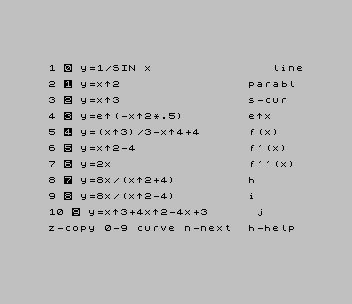
Plots mathematical functions on a pair of labelled axes. Three menu pages list thirty built-in curves, including parabolas, cubics, e^(-x^2/2), 1/SIN x, SIN x/x, a circle and an “airplane”. You pick one with a digit key, choose expansion factors for each axis (from x.01 to x10), and the curve is drawn while the bottom line reads P L O T T I N G. A side menu then lets you change the plot symbol (lines, dots, plus signs or small circles), the step size, the sign of the branch or the swap of x and y, and the start and end points. From there you can replot, copy the screen to the printer, save it to tape as a SCREEN$, or return to the menu. A help page explains the step-size trade-off between detail and speed.
A REM in line 1 dates this revision 3-27-85 and credits Ed Salter. A second REM is the author’s own note about lines that might be dropped.
Program Analysis
Structure
- Lines 10–90: the plotting loop,
FOR x=lo TO lp STEP sp*st, which calls the chosen function line and converts each point to screen coordinates. - Lines 91–120: the plot-menu key handler.
- Lines 200–228: one line per function, each setting
zand returning. The menu jumps to them withGO SUB lin. - Lines 400–950: the axes, with tick marks and digit labels; UDGs a–e give the minus-sign digits.
- Lines 3100–4300: the side menu, branch and step changes, and the axis-factor screens.
- Lines 6000–6090: the function menu, read from DATA lines 5100–5102. Lines 6500–6529 set each function’s plotting range and step.
- Lines 7250–7390: help pages and the SCREEN$ save.
Computed line numbers
Both the function and its range are reached by computed GO SUB. Line 6040 sets lin=r*10+VAL t$+200 for the function and calls GO SUB rt+VAL t$, where rt=10*(650+r), for the range of the menu page r. The program autostarts at line 1999, which defines the UDGs and then goes to the menu.
Notable Techniques
- One line per function and a computed
GO SUBstand in for user-defined functions selected at run time. - Each point is joined to the previous one with a relative
DRAWfrom the remembered position (mm,nn). SAVE s$SCREEN$keeps a finished graph on tape.
Potential Issues
- Lines 211 and 228 have no
RETURN, so those two functions fall through into the next line and plot the next function instead. - The side menu lists
v-saveandb-bend, but no key handlesv;bsaves the screen. - The author marked lines 3170–3192, which set the plot start and end points, “needs revision”. Line 3185 skips the range check.
- Line 7252 shows its target as
73followed by a graphic character. The hidden number still sends it to line 7300.
This program came from an Oliger (JLO SAFE) disk, a copy of the SNUG library disk 13/14, and was converted to load from tape. The SAVE / in line 7410 became a plain SAVE, and the author’s street address and telephone number were removed from the REM in line 1. Line 6040 also needed a repair. In the disk copy it added an undefined variable t, so choosing any curve stopped with “2 Variable not found”; it now uses VAL t$. It was tested in ZEsarUX, plotting y=x^3.
Image Gallery

Source Code
    1 GO TO 6000: REM   revision as of 3-27-85: REM written by EdSalter
    3 REM **Do we need lines 7200 & line 7215 & line                 In line 3110 we could have  an if statement to keep this    from being printed, but would   have to move step to bottom or  top
    4 CLS : GO SUB 7220: GO TO 7200
   10 CLS : GO SUB 400
   20 PRINT AT 9,2;y$;AT 19,17;x$;AT 21,8;" P L O T T I N G ": GO SUB 7220
   30 PRINT AT 0,PI;q$;"  ": IF sign=-1 THEN PRINT AT 0,PI;"y=(+-)";q$(3 TO )
   31 IF sign=1 AND in=1 THEN PRINT AT 0,3;"y=(+-)";q$(3 TO );AT 1,3;"f(y)=(+-)"
   51 FOR x=lo TO lp STEP sp*st
   52 GO SUB lin
   53 IF in=-1 THEN GO TO 75
   55 LET yp=x*a*8+92: LET xp=sign*z*b*8+132
   62 IF draw=3 THEN GO TO 1000
   63 IF draw=4 THEN GO TO 1020
   64 IF xp>255 OR xp<0 THEN GO TO 85
   65 IF yp>175 OR yp<0 THEN GO TO 85
   66 PLOT xp,yp
   67 GO SUB 330: GO SUB 300
   68 IF draw=1 THEN DRAW mmm,nnn
   69 GO TO 85
   75 LET xp=x*a*8+132
   76 LET yp=sign*z*b*8+92
   77 IF draw=3 THEN GO TO 1000
   78 IF draw=4 THEN GO TO 1020
   81 IF xp>255 OR xp<0 THEN GO TO 85
   82 IF yp>175 OR yp<0 THEN GO TO 85
   83 PLOT xp,yp: GO SUB 330: IF draw=1 THEN DRAW mmm,nnn
   84 GO SUB 300
   88 NEXT x
   89 GO SUB 400
   90 GO TO 3100
   91 IF draw=5 THEN LET draw=1
   92 IF draw=1 THEN PRINT AT 13,27;" ----"
   93 IF draw=2 THEN PRINT AT 13,27;" ...."
   94 IF draw=3 THEN PRINT AT 13,27;" ++++"
   95 IF draw=4 THEN PRINT AT 13,27;" oooo"
   96 PAUSE 20
   97 LET mm=0: LET nn=mm
   99 PRINT AT 14,27;" ";AT 14,28;st,
  100 PAUSE 0: BEEP .01,.01
  101 IF INKEY$="u" OR INKEY$="o" THEN GO TO 100
  102 IF INKEY$="b" THEN GO SUB 7360
  103 IF INKEY$="z" THEN GO TO 3200
  104 IF INKEY$="m" THEN GO TO 6000
  106 IF INKEY$="p" THEN CLS : GO SUB 400: GO TO 4005
  107 IF INKEY$="i" THEN GO TO 3125
  108 IF INKEY$="y" THEN GO TO 3131
  109 IF INKEY$="s" THEN GO TO 3150
  115 IF INKEY$="d" THEN LET draw=draw+1: GO TO 91
  116 IF INKEY$="w" THEN GO SUB 3170: REM begin & end plot points
  117 IF INKEY$="r" THEN GO TO 20: REM replots after changing -,+,o,. or "w"
  120 GO TO 100
  200 LET z=SQR ABS (SIN x): RETURN
  201 LET z=x*x: RETURN
  202 LET z=x*x*x: RETURN
  203 LET z=EXP (-x*x*.5): RETURN
  204 LET z=x*x*x/3-x*4+4: RETURN
  205 LET z=x*x-4: RETURN
  206 LET z=2*x: RETURN
  207 LET z=8*x/(x*x+4): RETURN
  208 LET z=8*x/(x*x-4): RETURN
  209 LET z=x*x*x+4*x*x-4*x+3: RETURN
  210 LET z=EXP -x*x*x: RETURN
  211 LET z=(x*x-1)^4*(x*x-1)/(x*x+1)*(x*x+1)^4
  212 LET z=1/SIN x: RETURN
  213 LET z=.5/SIN x*x: RETURN
  214 LET z=.1/SIN x*x*x: RETURN
  215 LET z=ASN x: RETURN
  216 LET z=.8*SQR (25-+x*x): RETURN
  217 LET z=ABS (SQR (4+x*x)-3): RETURN
  218 LET z=10*(SIN x)/x: RETURN
  219 LET z=x*x*x*x-5*x*x-3*x+4: RETURN
  220 LET z=1/(x*x): RETURN
  221 LET z=SIN x: RETURN
  222 LET z=5*(SIN x)*(SIN x)+4*(COS x): RETURN
  223 LET z=1200*x*x*SIN (1/x): RETURN
  224 LET z=SQR ABS x: RETURN
  225 LET z=(x^5/5)+(x^4/2)+(x*x*x/3): RETURN
  226 LET z=ABS (x)+2: RETURN
  227 LET z=ABS (2*x)+.5: RETURN
  228 LET z=.5/SIN x*x
  300 LET mm=xp: LET nn=yp: RETURN
  310 REM PRINT menu
  330 IF mm=0 THEN LET mm=xp
  331 IF nn=0 THEN LET nn=yp
  335 LET mmm=mm-xp: LET nnn=nn-yp: RETURN
  400 PLOT  252,12: DRAW -240,0: DRAW 0,160
  410 FOR h=12 TO 256 STEP 8: PLOT h,10: DRAW 0,5: PLOT h,92
  500 IF h<=172 THEN PLOT 10,h: DRAW 5,0: PLOT 132,h
  510 NEXT h
  800 FOR i=8 TO 0 STEP -2: PRINT AT 10-i,0;i;AT 18-i,0;8-i: NEXT i
  900 PRINT '"A"'" dcdbdad8d6d4d2 0 2 4 6 8 a b c"
  905 PRINT AT 0,0;"a"
  950 RETURN
 1000 REM DRAW ++++++
 1005 IF xp>250 OR xp<5 THEN GO TO 88
 1006 IF yp>170 OR yp<5 THEN GO TO 88
 1008 PLOT xp,yp
 1010 DRAW 2,0: DRAW -4,0: DRAW 2,0: DRAW 0,2: DRAW 0,-4: DRAW 0,2
 1012 GO TO 88
 1020 REM DRAW . . .
 1025 IF xp>250 OR xp<5 THEN GO TO 88
 1026 IF yp>170 OR yp<5 THEN GO TO 88
 1028 PLOT xp,yp: CIRCLE xp,yp,2
 1030 GO TO 88
 1990 REM  a=a b=b c=c d=d
 1999 CLS
 2000 FOR a=0 TO 39: READ u: POKE USR "a"+a,u: NEXT a:
 2010 DATA 0,158,146,u,u,u,158,0
 2012 DATA u,78,66,70,72,u,78,0
 2015 DATA u,74,u,79,66,u,u,0
 2018 DATA u,u,u,u,12,0,u,u
 2020 DATA u,16,48,127,u,48,16,0
 2025 GO TO 6000
 3100 REM PRINT menu
 3105 RESTORE 3100
 3110 FOR i=9 TO 19: READ i$: PRINT AT i,26;i$: NEXT i: DATA "b-bend","r-rplt","v-save","b-scrn","d-draw","s-step","p-plot","i-invr","y-f(y)","m-menu","z-copy": PAUSE 150: BEEP .1,.001: PRINT AT 0,28,: GO TO 91
 3124 REM sign change
 3125 LET sign=sign*-1: GO TO 20
 3130 REM change 'in'  value
 3131 PRINT AT 1,PI;"f(y)=";AT 19,PI;"scales=?": LET in=in*-1: GO TO 20
 3150 REM set STEP scale
 3158 IF st>=10 THEN LET st=0
 3160 LET st=st+.1
 3166 GO TO 99
 3170 REM  below needs revision  redefines lo(begin) & lp(end) of PLOT POINT loop
 3172 PRINT AT 0,28; FLASH 1;lo,AT 1,28;lp,
 3174 INPUT "Change begin plot point?(y/n)";q$: IF q$="n" THEN GO TO 3178
 3176 INPUT "Begin plot(-140 to 140) ";lo
 3178 PRINT AT 0,28;lo,AT 1,28; FLASH 1;lp,
 3180 INPUT "change end plot point?(y/n) ";q$: IF q$="n" THEN GO TO 3190
 3182 INPUT "End Plot(-140 to 140) ";lp
 3184 PRINT AT 0,28;lo,AT 1,28;lp,
 3185 GO TO 3190
 3186 IF lo>=lp OR lo<-140 OR lo>140 OR lp<-139 OR lp>140 THEN GO TO 3191
 3188 INPUT "Are these values OK?(y/n) ";q$
 3189 IF q$="n" THEN GO TO 3172
 3190 PRINT AT 0,28,AT 1,28,: RETURN
 3191 INPUT "Begin must be less than end ";q$: GO TO 3170
 3192 REM    above needs revision
 3200 REM   remove graph menu
 3205 GO SUB 3300
 3206 GO SUB 7220: COPY : GO TO 3100
 3300 FOR i=13 TO 19: PRINT AT i,24;"        ": NEXT i: RETURN
 4000 REM x axis
 4001 GO SUB 400
 4005 PRINT AT 9,2;y$; FLASH 1;AT 19,17;x$
 4006 LET sign=1: LET in=-1
 4010 PRINT AT 0,0;"   X  AXIS EXPANSION FACTOR "
 4015 GO SUB 5050
 4020 PAUSE 0: BEEP .01,.01
 4030 IF INKEY$="1" THEN LET x$="x.01": LET a=100
 4032 IF INKEY$="2" THEN LET x$="x.05": LET a=20
 4034 IF INKEY$="3" THEN LET x$="x.1": LET a=10
 4036 IF INKEY$="4" THEN LET x$="x.5": LET a=2
 4038 IF INKEY$="5" THEN LET x$="x1": LET a=1
 4053 IF INKEY$="6" THEN LET x$="x5": LET a=.2
 4060 IF INKEY$="7" THEN LET x$="x10": LET a=.1
 4100 REM y axis
 4105 PRINT AT 9,2; FLASH 1;y$: PRINT AT 19,17;x$;
 4110 PRINT AT 0,0;"   Y  AXIS EXPANSION FACTOR "
 4115 GO SUB 5050
 4120 PAUSE 0: BEEP .01,.01
 4130 IF INKEY$="1" THEN LET y$="x.01": LET b=100
 4132 IF INKEY$="2" THEN LET y$="x.05": LET b=20
 4134 IF INKEY$="3" THEN LET y$="x.1": LET b=10:
 4136 IF INKEY$="4" THEN LET y$="x.5": LET b=2
 4138 IF INKEY$="5" THEN LET y$="x1": LET b=1
 4153 IF INKEY$="6" THEN LET y$="x5": LET b=.2
 4160 IF INKEY$="7" THEN LET y$="x10": LET b=.1
 4200 PRINT AT 9,2;y$;
 4300 CLS : GO TO 10
 5050 REM  chart menu
 5051 GO SUB 3300
 5055 RESTORE 5055: FOR i=2 TO 8: READ i$: PRINT AT i,7;i$: NEXT i: DATA "1  x.01","2  x.05","3  x.1","4  x.5","5  x 1","6  x 5","7  x 10": PRINT AT 17,25;"default",AT 18,25;"  is",AT 19,25;" ENTER ": RETURN
 5100 DATA "y=1/SIN x","line","y=x^2","parabla","y=x^3","s-cur","y=e^(-x^2*.5)","e^x","y=(x^3)/3-x^4+4","f(x)","y=x^2-4","f'(x)","y=2x","f''(x)","y=8x/(x^2+4)","h","y=8x/(x^2-4)","i","y=x^3+4x^2-4x+3","j"
 5101 DATA "y=e^-x^3","210","y=4*SIN x","211","y=1/SIN x","c","y=.5/SIN x^2","d","airplane","e","u=ArcSIN x","f","y=.8*SQR(25-x^2)","circle","y=ABS(SQR(4x^2)-3)","217","y=10(sin x)/x","218","y=x^4-5x^2-3x^2+4","219"
 5102 DATA "y=1/x^2","220","y=SIN x","221","y=5*(SIN x)^2+4*(COS x)","222","y=1200x^2SIN(1/x)","223","y=SQR[ABS x]","224","y=x^5/5+x^4/2+x^3/3","225","y=ABS(x)+2","226","y=ABS(2*x)+.5","227","y=.5/SIN x*x","228","y=4x^3","j"
 6000 DIM x$(4): DIM y$(4)
 6002 CLS : LET x=0: LET a=1: LET sign=a: LET in=-a: LET st=a: LET b=a: LET x$="x1": LET y$=x$: LET mm=x: LET nn=x: LET draw=a
 6015 DIM e$(10,20): DIM f$(6)
 6020 FOR r=0 TO 2: RESTORE 5100+r: CLS
 6025 FOR i=1 TO 10: READ e$(i),f$: PRINT 'i+10*r;" ";i-1;" ";e$(i);" ";f$;"   ";: NEXT i
 6034 PRINT '"z-copy 0-9 curve n-next  h-help"
 6035 LET rt=10*(650+r)
 6038 PAUSE 0: BEEP .01,.01
 6040 LET t$=INKEY$: IF t$>="0" AND t$<="9" THEN LET lin=r*10+VAL t$+200: LET q$=e$(1+VAL t$): GO SUB rt+VAL t$: GO TO 10
 6060 IF INKEY$="z" THEN COPY
 6061 IF INKEY$="h" THEN GO TO 7250
 6088 NEXT r
 6090 GO TO 6020
 6500 LET lo=-20.1: LET lp=INT -lo: LET sp=.5: RETURN
 6501 LET lo=-4: LET lp=-lo: LET sp=.5: RETURN
 6502 LET lo=-4: LET lp=-lo: LET sp=.1: RETURN
 6503 LET lo=-4: LET lp=-lo: LET sp=.1: RETURN
 6504 LET lo=-6: LET lp=4: LET sp=.1: RETURN
 6505 LET lo=-4: LET lp=-lo: LET sp=.1: RETURN
 6506 LET lo=-10: LET lp=-lo: LET sp=.5: RETURN
 6507 LET lo=-10: LET lp=-lo: LET sp=.1: RETURN
 6508 LET lo=-10: LET lp=-lo: LET sp=.1: RETURN
 6509 LET lo=-10: LET lp=-lo: LET sp=.1: RETURN
 6510 LET lo=-4: LET lp=-lo: LET sp=.1: RETURN
 6511 LET lo=-1.8: LET lp=-lo: LET sp=.01: RETURN
 6512 LET lo=-4: LET lp=-lo: LET sp=.1: RETURN
 6513 LET lo=-13: LET lp=-lo: LET sp=.1: RETURN
 6514 LET lo=-4: LET lp=-lo: LET sp=.01: RETURN
 6515 LET lo=-1: LET lp=-lo: LET sp=.1: RETURN
 6516 LET lo=-4.99: LET lp=-lo: LET sp=.2: RETURN
 6517 LET lo=-4: LET lp=-lo: LET sp=.5: LET a=2: LET b=a: LET x$="x.5": LET y$=x$: RETURN
 6518 LET lo=-12.6: LET lp=-lo: LET sp=.5: RETURN
 6519 LET lo=-5: LET lp=-lo: LET sp=.1: RETURN
 6520 LET lo=-10: LET lp=-lo: LET sp=.1: RETURN
 6521 LET lo=-15: LET lp=-lo: LET sp=.5: RETURN
 6522 LET lo=-15: LET lp=-lo: LET sp=.3: RETURN
 6523 LET lo=-.12: LET lp=-lo: LET sp=.0005: LET a=100: LET b=1: LET x$="x.01": LET y$="x1": RETURN
 6524 LET lo=-20: LET lp=-lo: LET sp=1: RETURN
 6525 LET lo=-3.5: LET lp=1.5: LET sp=.1: LET a=10: LET b=a*a: LET x$="x.1": LET y$="x.01": RETURN
 6526 LET in=-1: LET lo=-5: LET lp=-lo: LET sp=-in: RETURN
 6527 LET lo=-5: LET lp=-lo: LET sp=1: RETURN
 6528 LET lo=-5: LET lp=-lo: LET sp=1: RETURN
 6529 CLS : PRINT e$(10): PAUSE 0: GO TO 1
 7200 REM set up initial x/y scale
 7215 DIM x$(4): DIM y$(4): LET x$="x1": LET y$="x1": LET a=1: LET b=a: GO TO 3110
 7220 PRINT AT 0,28;"WAIT": RETURN
 7250 CLS : REM  menu
 7251 PRINT " HELLO THERE!  THIS IS A PROGRAM"'"THAT PLOTS MATH EQUATIONS FOR"' INK 0'"ALGEBRA AND TRIGONOMETRY. IT HAS"'"SOME LIMITATION IN THAT IT CAN'T"'"COMPUTE WHEN CERTAIN NEGATIVE ORINVALID VALUES ARE PRESENT."''"  THE COMPUTER WILL PLOT BY DOTS"'"... OR LINES --- OR PLUS +++ ."
 7252 PRINT '"RESOLUTION OF THE PLOTTED GRAPH IS DETERMINED BY THE STEP SIZE. SMALL-VERY DETAIL & VERY SLOW."''"A LARGE STEP WILL NOT GIVE MUCH DETAIL BUT WILL PLOT VERY FAST.": LET page=7253: GO TO 73c0
 7254 CLS : PRINT "         PAGE  2"''"A MESSAGE CAN BE PUT HERE"'': LET page=page+2: GO TO 7300
 7255 CLS : PRINT "         PAGE  3"''"A MESSAGE CAN BE PUT HERE"'': LET page=page+2: GO TO 7300
 7257 REM you can repete line 7255 routines if more space needed
 7279 LET page=7282
 7280 PRINT AT 0,8;"PLOT MENU"''"d-draw symbol (...) (---) (+++) "'"s-step between plot points"''"   .1  lowest detail-fast"'"   .5  low detail-fast"'"    1  medium detail & speed"'"    5  detail-slow"'"   10  very detail & very slow"
 7284 PRINT AT 2,0;"d-draw";AT 13,26;"d-draw": PAUSE 0: BEEP .01,.01: PRINT AT 2,0;"d-draw";AT 13,26;"d-draw": PRINT AT 4,0;"s-step";AT 14,26;"s-step": PAUSE 0: PRINT AT 4,0;"s-step";AT 14,26;"s-step": LET page=page+2: GO TO 7300
 7290 GO TO 7200
 7300 PRINT #1;" z-copy   c-continue   m-menu"
 7310 PAUSE 0: BEEP .01,.01
 7320 IF INKEY$="z" THEN COPY
 7330 IF INKEY$="c" OR INKEY$="h" THEN GO TO page
 7340 IF INKEY$="m" THEN GO TO 1
 7350 GO TO 7300
 7360 REM SAVE SCREEN$
 7370 INPUT "screen name";s$: IF LEN s$>10 THEN GO TO 7370
 7380 SAVE s$SCREEN$
 7390 RETURN
 7410 SAVE "math" LINE 1999
Note: Type-in program listings on this website use ZMAKEBAS notation for graphics characters.