
This program implements a custom keyboard-scanning routine in machine code that allows multiple simultaneous keypresses to be detected, a feature not available through the standard BASIC INKEY$ function. The eight-byte routine (LD A,n / IN A,(254) / LD B,0 / LD C,A / RET) is POKEd into address 50000 from a DATA statement and called via USR. By POKEing a keyboard half-row mask into address 50001 (the operand of LD A,n), the caller selects which of the eight keyboard rows to scan; the returned value in BC reflects which keys in that row are pressed, with bits clear for active keys. The program includes a menu for saving the eight bytes to tape, a multi-page instruction section explaining the half-row encoding scheme, and an interactive test that requires G and H to be pressed simultaneously.
Program Structure
The program is organised into several logical regions:
- Lines 0–65: Header, commented disassembly of the MC routine, and loader that RESTOREs to line 9995 and POKEs eight bytes into address 50000.
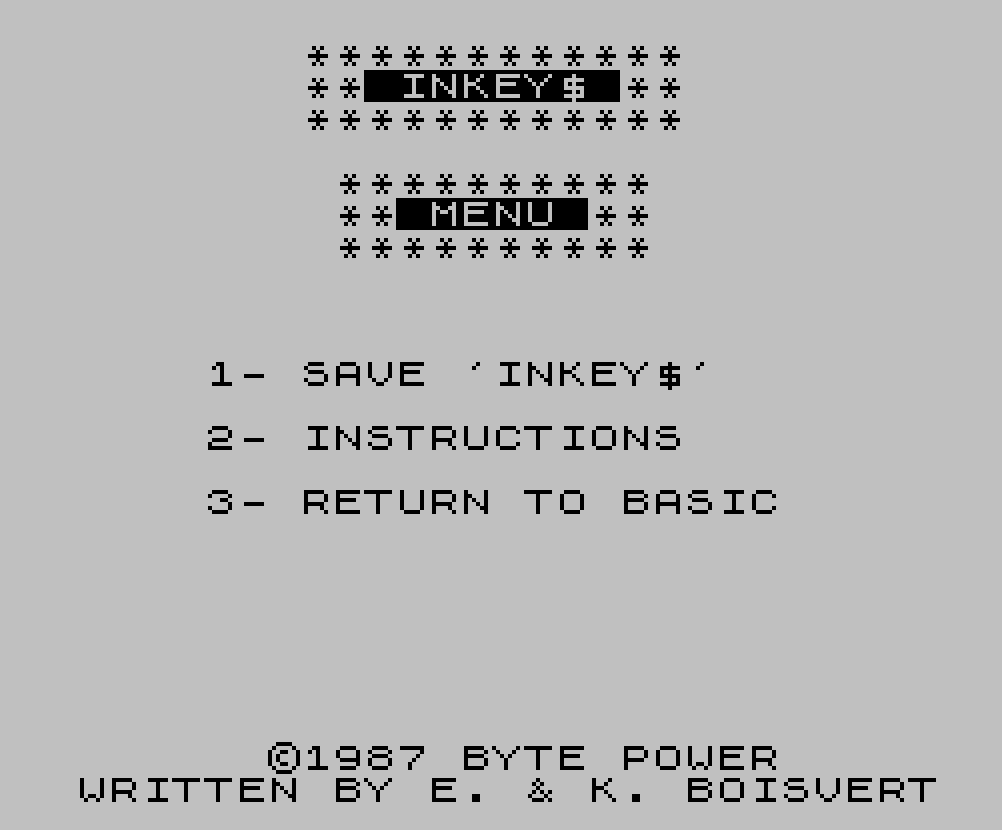
- Lines 70–110: Main menu display and single-key input loop.
- Line 110: Dispatch via
GO TO 500+(500*VAL A$)— choices 1/2/3 map to lines 1000/1500/2000. - Lines 1000–1070: Save/verify routine; writes the MC block to tape with SAVE…CODE and VERIFY…CODE.
- Lines 1500–1710: Multi-page instruction section explaining the half-row encoding, usage pattern, and a live demo.
- Lines 9000–9050: Test subroutine that loops until G+H are simultaneously pressed.
- Lines 9970–9985: Title-banner subroutine (CLS + header print).
- Line 9995: DATA for the MC routine.
- Line 9999: Self-saves the BASIC program with autostart at line 1.
Machine Code Routine
The eight bytes stored at 50000 form a minimal keyboard-scanner:
| Offset | Hex | Mnemonic | Purpose |
|---|---|---|---|
| 0 | 3E 00 | LD A, 00 | Load half-row mask (POKEd at runtime into offset +1) |
| 2 | DB FE | IN A, (254) | Read keyboard port; low 5 bits = key states |
| 4 | 06 00 | LD B, 0 | Zero B so BC holds the result cleanly |
| 6 | 4F | LD C, A | Move result to C |
| 7 | C9 | RET | Return BC to BASIC as USR value |
The self-modifying idiom POKE 50001, 255-KEYBOARD overwrites the immediate operand of LD A,n before each USR call, selecting the keyboard row. Because the Z80 keyboard port returns 0 for a pressed key and 1 for released, a row with no keys pressed returns 31 (all five low bits set); any value less than 31 indicates key activity.
Key BASIC Idioms
RESTORE 9995: FOR F=5E4 TO 50007: READ A: POKE F,A: NEXT F— uses floating-point scientific notation5E4for 50000 to save a few bytes.GO TO 500+(500*VAL A$)at line 110 — arithmetic dispatch replaces an IF/THEN chain; menu choices “1”–”3″ produce targets 1000, 1500, 2000.SAVE A$ CODE 5E4,8/VERIFY A$ CODE 5E4,8— saves and immediately verifies just the eight MC bytes independently of the BASIC program.PAUSE 0used throughout as a keypress wait before page turns.INPUT "FILE NAME:"; LINE A$usesLINEto accept any characters (including spaces) in the filename.PRINT #1; AT ...writes to the lower screen (stream 1 = bottom two lines), used for status messages without disturbing the main display area.
Simultaneous Keypress Detection
The ZX Spectrum keyboard port at 254 exposes eight half-rows selected by the high byte of the port address. The routine reads a single half-row per call; to detect two keys from different rows simultaneously, two separate USR calls are made with different POKEd masks, storing results in L and L1. The test at line 9030–9040 checks L+L1=30: row 253 (A–G) with G pressed returns 14, row 191 (H–ENTER) with H pressed returns 16, summing to 30. The instructions explicitly warn against mixing two rows in a single call, as overlapping bit patterns would produce ambiguous results.
Image Gallery
Source Code
    0 REM INKEY$                          BY E. & K. BOISVERT             ©1987 BYTE POWER
    1
    2
   10 REM LD A,00  (255-KEYBOARD)
   20 REM IN A,254 SCAN KEY
   30 REM LD B,00
   40 REM LD C,A   KEY IN REG BC
   50 REM RET      BACK TO BASIC
   55
   60
   65 RESTORE 9995: FOR F=5E4 TO 50007: READ A: POKE F,A: NEXT F
   70 GO SUB 9970
   80 PRINT AT 4,10;"**********";AT 5,10;"** MENU **";AT 6,10;"**********"
   90 PRINT AT 10,6;"1- SAVE 'INKEY$'"''TAB 6;"2- INSTRUCTIONS"''TAB 6;"3- RETURN TO BASIC"
  100 LET A$=INKEY$: IF A$<"1" OR A$>"4" THEN GO TO 100
  110 GO TO 500+(500*VAL A$)
 1000 REM SAVE 'INKEY$'
 1010 GO SUB 9970: PRINT AT 4,10;"**********";AT 5,10;"** SAVE **";AT 6,10;"**********"
 1030 INPUT "FILE NAME:"; LINE A$: IF LEN A$>10 OR A$="" THEN GO TO 1030
 1040 PRINT AT 10,0;"LOAD AT ANY REASONABLE ADDRESS"''"LENGTH OF CODES: 8 BYTES"''"POKE [ADDRESS+1],255-KEYBOARD"
 1050 PRINT '"PRESENT ADDRESS:50000"
 1055 PRINT '"TO CALL ROUTINE USE:            LET L=USR ADDRESS"
 1060 SAVE A$CODE 5E4,8: PRINT #1;AT 0,0;"REWIND TAPE TO VERIFY ";A$: VERIFY A$CODE 5E4,8
 1070 RUN
 1500 REM INSTRUCTIONS
 1510 GO SUB 3000
 1520 PRINT AT 8,0;"THIS SHORT ROUTINE WILL LET YOU PRESS TWO (OR MORE) KEYS AT THE SAME TIME..."
 1530 PRINT '"IT WORKS WITH THE INSTRUCTION   'IN A,(254)' A=[255-KEYBOARD]."
 1540 PRINT '"ALL YOU HAVE TO DO IS SAVE THIS SHORT ROUTINE (OPTION 1) AND    THEN LOAD IT BACK AT ANY        REASONABLE ADDRESS..."
 1550 GO SUB 3020
 1560 PRINT AT 8,0;"THE KEYBOARD WORKS LIKE THIS:"
 1570 PRINT '"KEYS SHIFT-V=1","KEYS A-G=2"'"KEYS Q-T=4","KEYS 1-5=8"
 1580 PRINT "KEYS 6-0=16","KEYS Y-P=32","KEYS H-ENTER=64","KEYS B-BREAK=128"
 1585 PRINT '"SPACE is the same as BREAK and  BOTH Caps Shift are together."
 1590 PRINT '"YOU POKE [ADDRESS+1],255-DATA"
 1595 GO SUB 3020
 1600 PRINT AT 8,0;"HERE IS A ROUTINE THAT USES     'INKEY$':"''" 10 POKE 50001,253 (A-G)"'" 20 LET L=USR 50000"'" 30 POKE 50001,191 (H-[ENTER])"'" 40 LET L1=USR 50000"
 1610 PRINT " 50 IF L=15 AND L1=15 THEN STOP "
 1620 PRINT " 60 GOTO 10"
 1630 PRINT '"THIS PROGRAM WOULD WAIT UNTIL   YOU PRESS G AND H BOTH AT THE   SAME TIME... LET'S TRY IT!...": PRINT #1;AT 0,0;TAB 31;" PRESS ANY KEY...";TAB 31;" ": PAUSE 0: GO SUB 9000
 1640 GO SUB 3000
 1650 PRINT AT 8,0;"YOU COULD HAVE 3 KEYS PRESSED ATTHE SAME TIME IF YOU WANTED...  JUST MAKE SURE YOU USE 3        DIFFERENT VARIABLES (1 FOR EACH KEY)."
 1660 PRINT '"YOU WILL GET NUMBERS RANGING    FROM 0 TO 31 WHEN YOU CALL THE  ROUTINE..."
 1665 GO SUB 3020
 1670 PRINT AT 8,0;"EXPERIMENT WITH THE OUTPUTS AND YOU WILL FIND THE RIGHT         COMBINATION FOR YOUR KEYS..."
 1680 PRINT '"IF YOU POKE [ADDRESS+1],0 THEN  YOU WILL BE ABLE TO PRESS ANY   KEY AT ALL ON THE KEYBOARD..."''"EVEN THE CAPS AND SYMBOL SHIFTS!"
 1685 PRINT '"WHEN YOU CALL THE ROUTINE, IF   THE OUTPUT ISN'T 31 THEN A KEY  WAS PRESSED!": PRINT #1;AT 0,0;TAB 31;" PRESS ANY KEY...";TAB 31;" ": PAUSE 0: GO SUB 3000
 1690 PRINT AT 8,0;"DO NOT MIX TWO ROWS TOGETHER OR ELSE YOU WILL GET THE SAME      OUTPUT FOR DIFFERENT KEYS!"
 1700 PRINT '"HERE IS THE PROGRAM IN MC:"''"LD A,00","(255-KEYBOARD)"'"IN A,(254)","SCAN KEYBOARD"'"LD B,00"'"LD C,A","BC=KEY IN REG A"'"RET","BACK TO BASIC"
 1710 PRINT AT 20,0;"PRESS ANY KEY...": PAUSE 0: RUN
 2000 STOP
 3000 GO SUB 9970: PRINT AT 4,6;"******************";AT 5,6;"** INSTRUCTIONS **";AT 6,6;"******************"
 3010 RETURN
 3020 PRINT AT 20,0;"PRESS ANY KEY...": PAUSE 0: GO SUB 3000: RETURN
 9000 GO SUB 9970
 9010 PRINT AT 4,10;"**********";AT 5,10;"** TEST **";AT 6,10;"**********"
 9020 PRINT AT 10,1;"PRESS G AND H AT THE SAME TIME"
 9030 POKE 50001,253: LET L=USR 5E4: POKE 50001,191: LET L1=USR 5E4
 9040 IF L+L1=30 THEN PRINT AT 12,9;"TEST PASSED...": BEEP .05,10: FOR F=1 TO 200: NEXT F: RETURN
 9050 GO TO 9030
 9960 STOP
 9970 CLS : PRINT AT 0,9;"************";AT 1,9;"** INKEY$ **";AT 2,9;"************"
 9980 PRINT #1;AT 0,8;"©1987 BYTE POWER";AT 1,2;"WRITTEN BY E. & K. BOISVERT"
 9985 RETURN
 9995 DATA 62,0,219,254,6,0,79,201
 9999 SAVE "INKEY$" LINE 1
Note: Type-in program listings on this website use ZMAKEBAS notation for graphics characters.