
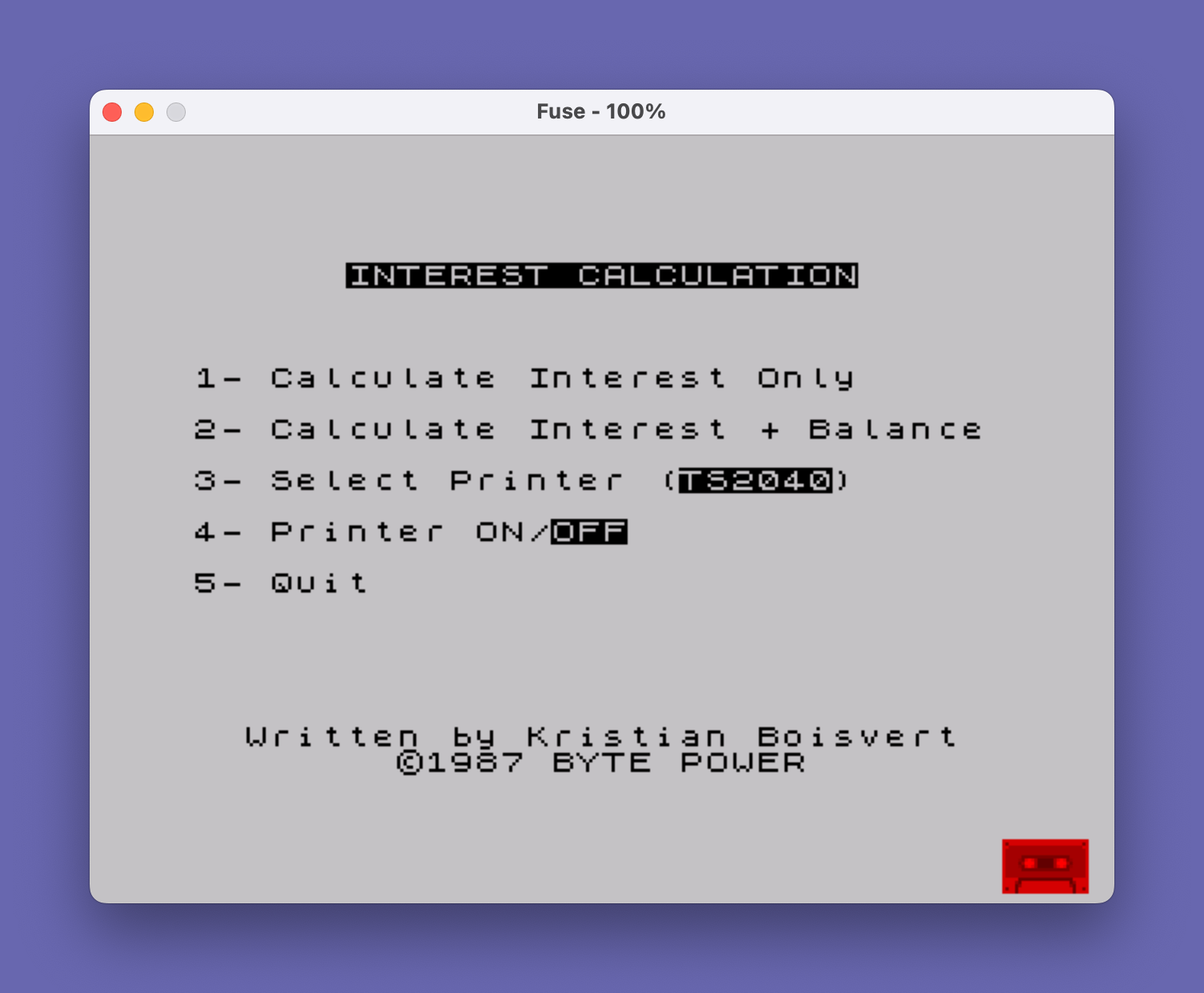
This program calculates loan amortization, computing monthly interest payments, principal reduction, and running balance over a user-specified term. It supports two modes: interest-only summary and a full month-by-month breakdown with running balance. The program includes dual printer support, toggling between a full-size 80-column printer and the TS2040 thermal printer, with formatting adjusted accordingly — notably, line 2220 trims the separator line to 32 or 80 characters based on the selected printer. A dedicated subroutine at line 8000 formats floating-point numbers into a two-decimal-place currency string, handling edge cases such as values less than 1 and numbers with only one decimal digit. Variable names with embedded spaces (e.g., `monthly interest`) are a valid BASIC identifier quirk on this platform.
Program Analysis
Program Structure
The program is organized into clearly delimited sections, each signposted with REM statements and occupying distinct line-number ranges:
| Line Range | Purpose |
|---|---|
| 1–90 | Initialization and main menu loop |
| 1000 | Interest-only entry point (sets TERM1=0, falls through to 2010) |
| 2000–2230 | Core amortization calculation and output |
| 3000–3020 | Printer type selection (Full Size / TS2040) |
| 4000–4020 | Printer on/off toggle |
| 8000–8040 | Currency formatting subroutine |
| 9000–9170 | User input collection subroutine |
| 9999 | SAVE with auto-run |
Dual-Mode Calculation
The flag variable TERM1 (also referenced as term1 — case is ignored) controls which of the two modes is active. When option 1 is chosen, line 1000 sets TERM1=0 and jumps directly into the amortization loop at line 2010, bypassing the LET term1=1 at line 2000. When TERM1=0, month-by-month output and balance tracking are suppressed, and only total interest is reported at the end. When TERM1=1, full per-month detail is displayed and optionally printed.
Currency Formatting Subroutine (Lines 8000–8040)
This subroutine accepts a value in dummy and returns a formatted string in d$. It handles three cases:
- Whole numbers: appends
".00"directly. - Values between 0 and 1 (exclusive): prepends a leading
"0"(e.g.,.5→"0.5"). - One decimal place: detects this by comparing
STR$ INT(dummy*10)withSTR$(dummy*10); if equal, appends a trailing"0".
The rounding at line 8005 (INT(dummy*100+.5)/100) is also applied within the main loop at lines 2026 and 2085, meaning some values are rounded twice before formatting — generally harmless for currency but slightly redundant.
Printer Support
Two printer flags control output behavior: OFF (1=printer disabled, 0=enabled) and PRINTER (1=TS2040 thermal, 0=full-size 80-column). These are toggled using NOT, which maps 0↔1 cleanly. The main output section at lines 2101–2105 branches based on both flags: when using the full-size printer, line 2102–2103 right-aligns numeric fields within a fixed 80-character string Z$ using slice assignment. When using the TS2040, values are printed one per line with labels. Line 2220 uses a slice expression ( TO 0+(32 AND printer=1)+(80 AND printer=0)) to trim the separator line to the correct width for each printer type.
Notable BASIC Idioms
- Boolean string selection: Expressions like
("s" AND term>1)and("FULL SIZE" AND PRINTER=0)exploit the fact that boolean conditions evaluate to 1 or 0, multiplying the string by that value to produce either the string or an empty result. - Dual-channel PRINT: Line 2210 uses
FOR g=2 TO 2+(1 AND off=0)combined withPRINT #gto print to both screen (channel 2) and printer (channel 3) in a single loop when the printer is enabled. - Right-justified field packing: Lines 2102–2103 use substring slice assignment (
LET Z$(21-LEN P$ TO )=P$) to right-align currency values within fixed column positions in the 80-character stringZ$. - Variable names with spaces: The identifier
monthly interest(used at lines 2025–2060) contains an embedded space, which is syntactically legal in this BASIC dialect.
Bugs and Anomalies
- Typo at line 2085:
LET aomunt=INT(amount*100+.5)/100assigns toaomunt(a misspelling ofamount), so the rounding has no effect. The variableamountcontinues with unrounded values in subsequent calculations, while the corrected value is silently discarded into an unused variable. - Line 2070 special case: When
amount < payment(final partial payment), the payment is capped at the remaining balance plus interest. This logic also reassignsPAYMENT,PRINCIPAL, and re-runs the formatting subroutine for both, but usesQ$for the adjusted payment — note thatQ$is also used elsewhere for the original payment, so context matters. - Line 2219 double-plus: The expression
STR$ m++contains a syntactic oddity (++); in practice the second+acts as a unary positive, so this is functionally equivalent toSTR$ m+which concatenates the string with an empty continuation — not a runtime error but unusual notation. - Line 3002 incomplete PRINT: The
PRINT AT 10,0;TAB 7;"FULL SIZE PRINTER";TAB 31;statement ends with a trailing semicolon and no closing value, which is syntactically acceptable but leaves the cursor positioned without printing a checkmark or indicator, unlike the TS2040 branch at line 3003.
Image Gallery
Source Code
    1 REM INITIALISE
    2 DIM Z$(80): LET OFF=1: LET printer=1
    5 REM PRINT MENU
   10 INK 0: PAPER 7: BORDER 7: CLS
   20 PRINT AT 2,6;"INTEREST CALCULATION"
   30 PRINT AT 6,0;"1- Calculate Interest Only"''"2- Calculate Interest + Balance"''"3- Select Printer ("+("FULL SIZE" AND PRINTER=0)+("TS2040" AND PRINTER=1);")"''"4- Printer "+CHR$ 20+CHR$ (NOT OFF)+"ON/"+CHR$ 20+CHR$ OFF+"OFF"''"5- Quit"
   32 PRINT AT 20,2;"Written by Kristian Boisvert"'TAB 8;"©1987 BYTE POWER"
   35 REM WAIT FOR ENTRY
   40 LET a$=INKEY$
   50 IF a$="1" THEN GO TO 1000:      REM SHOW INTEREST ONLY
   60 IF a$="2" THEN GO TO 2000: REM SHOW INTEREST + BALANCE
   80 IF a$="3" THEN GO TO 3000: REM SELECT PRINTER
   85 IF a$="4" THEN GO TO 4000: REM PRINTER ON/OFF
   86 IF a$="5" THEN STOP : REM      STOP PROGRAM
   90 GO TO 40
  997
  998 REM CALCULATE INTEREST ONLY
  999
 1000 LET TERM1=0: GO TO 2010: REM SAME FORMULA!
 1997
 1998 REM CALCULATE BAL+INTEREST
 2000 LET term1=1
 2010 LET INTEREST=0: GO SUB 9000: CLS
 2011 LET payment1=payment
 2015 IF term1=0 THEN PRINT '"Calculating..."
 2016 LET Z$="": IF TERM1=1 AND OFF+PRINTER=0 THEN LPRINT ''"MONTH      PRINCIPAL           PAYMENT          INTEREST           BALANCE"''
 2020 FOR m=1 TO term*12
 2025 LET monthly interest=amount*(rate/100)/12
 2026 LET monthly interest=INT (monthly interest*100+.5)/100
 2030 IF term1=1 THEN LET dummy=monthly interest: GO SUB 8000: LET m$=d$
 2040 LET principal=payment-monthly interest
 2050 IF term1=1 THEN LET dummy=principal: GO SUB 8000: LET p$=d$
 2060 LET interest=interest+monthly interest
 2070 IF amount<payment THEN LET PAYMENT=AMOUNT+MONTHLY INTEREST: LET PRINCIPAL=PAYMENT-MONTHLY INTEREST: LET DUMMY=PRINCIPAL: GO SUB 8000: LET P$=D$: LET DUMMY=PAYMENT: GO SUB 8000: LET Q$=D$
 2080 LET amount=amount-principal
 2085 LET aomunt=INT (amount*100+.5)/100
 2090 IF term1=1 THEN LET dummy=amount: GO SUB 8000: LET a$=d$
 2100 IF TERM1=1 THEN CLS : PRINT "Month:";m''"Principal: $";p$''"Payment: $";q$''"Interest: $";m$''"New balance: $";a$
 2101 IF TERM1=0 OR OFF+PRINTER<>0 THEN GO TO 2105
 2102 LET Z$(4-LEN STR$ M TO )=STR$ M
 2103 LET Z$(21-LEN P$ TO )=P$: LET Z$(39-LEN Q$ TO )=Q$: LET Z$(57-LEN M$ TO )=M$: LET Z$(75-LEN A$ TO )=A$
 2104 LPRINT Z$: GO TO 2108
 2105 IF term1<>0 AND PRINTER=1 AND OFF=0 THEN LPRINT '"Month:";m''"Principal: $";p$''"Payment: $";q$''"Interest: $";m$''"New balance: $";a$'"--------------------------------"
 2109 IF TERM1=1 AND OFF=1 THEN PRINT AT 21,0;"Press any key to continue": PAUSE 0
 2110 IF AMOUNT=0 THEN GO TO 2210
 2115 NEXT m
 2210 LET dummy=interest: GO SUB 8000: LET i$=d$: LET dummy=amount: GO SUB 8000: LET a$=d$: LET dummy=payment1: GO SUB 8000: CLS : FOR g=2 TO 2+(1 AND off=0): PRINT #g''"Amount of loan: $";l$''"Rate: ";rate;"%"''"Monthly payments: $";d$''"Term: ";term;" year"+("s" AND term>1)
 2219 PRINT #g;'(("Loan paid in "+STR$ m++" month"+("s" AND m>1)) AND AMOUNT=0);("Amount left on loan: $"+a$ AND amount<>0)''"Total interest paid: $";i$
 2220 NEXT g: IF OFF=0 THEN LPRINT ''"--------------------------------------------------------------------------------"( TO 0+(32 AND printer=1)+(80 AND printer=0))''
 2230 PRINT AT 21,0;"Press any key to go back to Menu": PAUSE 0: GO TO 10
 3000 REM SELECT PRINTER
 3001 CLS : PRINT ''TAB 9;"Select Printer"
 3002 IF PRINTER=0 THEN PRINT AT 10,0;TAB 7;"FULL SIZE PRINTER";TAB 31;
 3003 IF PRINTER=1 THEN PRINT AT 10,5;"TS2040 THERMAL PRINTER"
 3010 PAUSE 0: LET A$=INKEY$: IF A$=CHR$ 13 THEN GO TO 10
 3020 LET PRINTER=NOT PRINTER: GO TO 3002
 4000 REM PRINTER ON/OFF
 4001 CLS : PRINT ''TAB 9;"PRINTER ON/OFF"
 4005 IF OFF=1 THEN PRINT AT 10,10;"PRINTER OFF"
 4006 IF OFF=0 THEN PRINT AT 10,10;"PRINTER ON  "
 4010 PAUSE 0: LET A$=INKEY$: IF A$=CHR$ 13 THEN GO TO 10
 4020 LET OFF=NOT OFF: GO TO 4005
 8000 REM PUT IN 0.00 FORMAT
 8005 LET dummy=INT (dummy*100+.5)/100
 8010 LET d$=STR$ dummy: IF dummy<1 AND dummy<>0 THEN LET d$="0"+d$
 8020 IF INT dummy=dummy THEN LET d$=d$+".00": RETURN
 8025 LET y$=STR$ INT (dummy*10): LET x$=STR$ (dummy*10)
 8030 IF x$=y$ THEN LET d$=d$+"0"
 8040 RETURN
 9000 CLS
 9010 PRINT ''"Amount of loan: $";
 9020 INPUT "Amount:";amount: IF amount<=0 THEN GO TO 9020
 9030 LET dummy=amount: GO SUB 8000
 9040 LET l$=d$
 9060 PRINT l$
 9070 PRINT '"Interest rate (%): ";
 9080 INPUT "Rate:";rate
 9090 IF rate<0 OR rate>100 THEN GO TO 9080
 9100 PRINT rate;"%"
 9110 PRINT '"Term (Years): ";
 9120 INPUT "Term:";term: IF term<=0 THEN GO TO 9120
 9130 PRINT term;" Year"+("s" AND term>1)
 9136 PRINT '"Monthly payments: $";
 9137 INPUT "Payment:";payment
 9138 IF payment<=0 THEN GO TO 9137
 9139 LET dummy=payment: GO SUB 8000: LET q$=d$: PRINT q$
 9140 INPUT "Is this correct? "; LINE a$
 9150 IF a$="N" OR a$="n" THEN GO TO 9000
 9160 IF a$="y" OR a$="Y" THEN RETURN
 9170 GO TO 9140
 9999 SAVE "INTER" LINE 1
Note: Type-in program listings on this website use ZMAKEBAS notation for graphics characters.