
This program generates and renders a first-person 3-D maze game on a 25×25 grid stored as a string array. The maze is built procedurally at startup by randomly selecting from ten 5×5 tile templates (subroutines at lines 8200–8650), which are assembled into the full grid with optional axis-flipping controlled by variables ax/ay and bx/by. Navigation is text-command driven (“on,” “left,” “right,” “reverse”) with the current facing direction tracked as an integer 0–3, and the forward/left/right delta vectors read from a DATA table at line 9000. Walls are drawn using nested FOR/DRAW loops that scale depth perspective mathematically rather than using lookup tables. Two UDGs (characters 144 and 145) are defined via POKE USR for the map display in the “help” command, and elapsed time is tracked by reading the system frames counter at addresses 23672–23674 via a chained FN definition.
Program Analysis
Program Structure
The program is organized into clearly separated functional blocks:
- Lines 5–80: Initialization, direction-delta lookup via
RESTORE/READ, and cell-state evaluation. - Lines 90–590: First-person view renderer, drawing the corridor walls, side passages, and dead-end/exit markers using
PLOT/DRAWloops. - Lines 600–670: Exit sequence with victory fanfare and replay prompt.
- Lines 700–750: Special rendering for a one-open-side corridor variant.
- Lines 1000–1760: Input handler dispatching movement and auxiliary commands (compass, time, help/map).
- Lines 7000–8090: Maze generation: tile-template assembly into
z$(25,25). - Lines 8200–8670: Ten 5×5 tile templates stored as subroutines populating
y$(5,5). - Lines 8800–8880: Game state initialization, UDG setup, timer zeroing.
- Lines 9000–9110: DATA blocks for direction vectors and UDG bitmaps.
Maze Representation
The entire maze is stored as a 25×25 string array z$, where each cell contains the character "1" (wall) or "0" (passage). The grid is built by tiling ten randomly selected 5×5 templates, each defined as a y$(5,5) string array filled by a dedicated subroutine (lines 8200–8650). Before copying a tile into z$, the program randomly flips it horizontally and/or vertically by inverting the loop indices via ax/ay and bx/by, doubling the effective variety without extra templates.
A central 5×5 clear region is forced at lines 8090 (overwriting rows 11–15, columns 11–15) to guarantee a valid starting area around the spawn point x=13, y=13.
Direction and Movement System
Facing direction di is an integer 0–3 (North/West/South/East). At line 50, a RESTORE 9000+10*di followed by READ f1,f2,l1,l2,r1,r2 loads the six delta values for forward, left, and right movement from the DATA table at lines 9000–9030. Turning left increments di with wrap-around; turning right decrements it; reversing adds 2 with modular correction. The compass display at line 1550 slices into the string x$="NorthWest SouthEast." using 5-character fields indexed by di*5+1.
First-Person Renderer
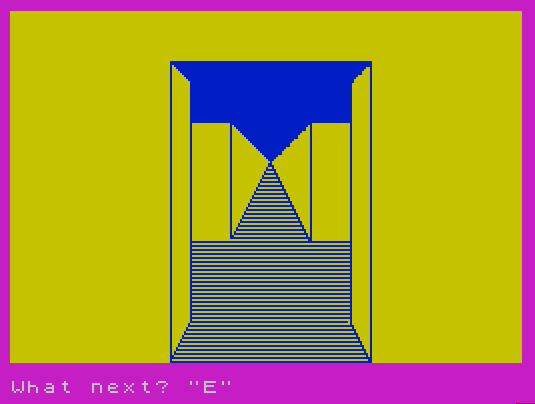
The view is drawn entirely with PLOT/DRAW loops—there are no pre-stored sprite data or machine code blitter calls. Depth is approximated by scaling loop variables: the forward corridor ceiling and floor converge toward a central vanishing point. Side-wall openings (left passage at line 200, right passage at line 300) are drawn as receding vertical lines with shading implied by dense DRAW INVERSE 1 fills. The dead-end case (line 500) fills the far wall solid and prints the words “DEAD END” using PRINT AT.
The special case at line 550 handles a corridor open only ahead (no side walls visible from behind), drawing a full-screen corridor with block-graphic fills using the \:: (solid block) character.
Timer Implementation
Elapsed time is tracked by reading the three-byte frames counter at addresses 23672–23674. Three chained DEF FN definitions implement this:
FN a()(line 8830): reads the 24-bit frames value and divides by 50 to get seconds.FN b(x,y)(line 8840): computesMAX(x,y)via the identity(x+y+ABS(x-y))/2.FN c()(line 8850): callsFN b(FN a(), FN a())— effectively returns the current seconds value, with the MAX trick ensuring a stable non-negative result despite potential counter read ordering.
The timer is zeroed at line 8870 by poking zeros into all three counter bytes immediately before returning to the game loop.
UDG Definitions
Two UDGs are defined at line 8860 using POKE USR CHR$(144+f)+g in a loop reading from DATA at lines 9100–9110:
| UDG | Char code | Usage |
|---|---|---|
| 144 | CHR$ 144 | Passage cell on the map display (open floor tile) |
| 145 | CHR$ 145 | Player position marker on the map (flashing) |
The map display (lines 1710–1750) shows a 18-row window of the maze centered on the player’s y-coordinate, printing either the solid block graphic \:: for walls, UDG 144 for open cells, or UDG 145 (with INK 0: FLASH 1) for the player’s position.
Maze Generation: Random POKE
Line 8010 contains an unusual technique: POKE 23000+RND*295, RND*255 is executed during the tile-loop setup. This writes a random byte to a random address in the range 23000–23295, which falls within the system variables / lower RAM area. This appears to be an attempt to seed extra randomness into the RNG by perturbing memory, but it risks overwriting system variables and could cause instability. It is arguably a bug or at minimum a risky idiom.
Notable BASIC Idioms
VAL z$(x+f1, y+f2)at line 70 converts the wall character"0"or"1"directly to a numeric value, avoiding an explicit comparison.al*(f/2+80)at line 710 uses the boolean numeric value ofal(0 or 1) as a multiplier to conditionally offset a plot position without anIFstatement.- The exit-boundary check
x=1 OR x=25 OR y=1 OR y=25appears at both lines 60 and 100, redirecting to the victory/exit sequence when the player reaches the maze border. - The map scroll window at line 1700 uses
fp=25-(y<13)*7to shift the displayed window upward when the player is near the top of the map.
Bugs and Anomalies
- Line 8650–8660 only sets
y$(1),y$(2), andy$(5);y$(3)andy$(4)are left with whatever values they held from the previous template call, making this tile template’s behavior dependent on call order — a likely bug. - The
POKE 23000+RND*295, RND*255at line 8010 writes to potentially sensitive system memory locations on every tile iteration (up to 25 writes), which is hazardous. - Lines 8060–8070 call
GO SUB 8200+INT(RND*10)*50, generating subroutine targets 8200, 8250, 8300, … 8650. However, line 8650 only partially initializesy$(see above), so the tenth template is incomplete. - At line 320,
PLOT 170, f-50withfranging 30 to -10 produces y-coordinates from -20 to -60, which are off-screen. The right-wall shading loop thus draws nothing visible, unlike its left-wall counterpart at line 210.
Image Gallery
Source Code
    5 REM 3-D Maze
   10 GO SUB 7000
   20 INK 1: PAPER 6: BORDER 3: CLS
   50 CLS : RESTORE 9000+10*di: READ f1,f2,l1,l2,r1,r2
   60 IF x=1 OR x=25 OR y=1 OR y=25 THEN GO TO 90
   70 LET af=VAL z$(x+f1,y+f2): LET al=VAL z$(x+l1,y+l2): LET ar=VAL z$(x+r1,y+r2)
   80 IF z$(x-f1,y-f2)="1" AND al+ar=1 THEN GO TO 700
   90 CLS : PLOT 80,0: DRAW 0,150: DRAW 50,-50: DRAW 50,50: DRAW 0,-150: DRAW -50,100: DRAW -50,-100
  100 IF x=1 OR x=25 OR y=1 OR y=25 THEN GO TO 600
  110 IF z$(x-f1,y-f2)="1" AND NOT al AND NOT ar THEN GO TO 550
  120 FOR f=100 TO 1 STEP -2: PLOT 130-f/2,100-f: DRAW f,0: NEXT f: IF x=1 OR x=25 OR y=1 OR y=25 THEN GO TO 600
  130 FOR f=100 TO 1 STEP -1.6: PLOT 130-f/2,f/2+100: DRAW f,0: NEXT f
  150 IF NOT al THEN GO TO 200
  160 IF NOT ar THEN GO TO 300
  170 IF af THEN GO TO 500
  180 GO TO 1000
  200 PLOT 90,20: DRAW 0,120: PLOT 90,60: DRAW 20,0: DRAW 0,60: DRAW -20,0
  210 PLOT 90,21: DRAW INVERSE 1;20,40
  220 FOR f=30 TO -10 STEP -2: PLOT 90,50-f: DRAW 30-f,0: NEXT f
  230 FOR f=20 TO 1 STEP -1: PLOT 90,140-f: DRAW f,0: NEXT f
  240 IF NOT ar THEN GO TO 300
  250 IF af THEN GO TO 400
  260 GO TO 350
  300 PLOT 170,20: DRAW 0,120: PLOT 170,60: DRAW -20,0: DRAW 0,60: DRAW 20,0
  310 PLOT 170,19: DRAW INVERSE 1;-20,40
  320 FOR f=30 TO -10 STEP -2: PLOT 170,f-50: DRAW f-30,0: NEXT f
  330 FOR f=20 TO 1 STEP -1: PLOT 170,140-f: DRAW -f,0: NEXT f
  340 IF af THEN GO TO 450
  350 GO TO 1000
  400 FOR f=61 TO 119: PLOT INVERSE 1;110,f: DRAW INVERSE 1;60,0: NEXT f
  410 PLOT 150,60: DRAW 0,60
  420 GO TO 1000
  450 FOR f=61 TO 119: PLOT INVERSE 1;110,f: DRAW INVERSE 1;59,0: NEXT f
  460 IF al THEN PLOT 110,60: DRAW 0,60
  470 GO TO 1000
  500 FOR f=60 TO 120: PLOT INVERSE 1;110,f: DRAW INVERSE 1;59,0: NEXT f
  510 FOR f=110 TO 150 STEP 2: PLOT f,60: DRAW 0,60: NEXT f
  520 PRINT AT 9,14;"DEAD";AT 10,14;"END"
  530 GO TO 1000
  550 FOR f=7 TO 14: PRINT AT f,8;"    ";AT f,21;"   ": NEXT f: FOR f=14 TO 21: PRINT AT f,0; PAPER 6-(f>18)*3;"                                ": NEXT f
  560 FOR f=24 TO 63 STEP 2: PLOT 0,f: DRAW OVER 1;255,0: NEXT f
  570 PRINT AT 0,0;: FOR f=0 TO 6: PRINT "\::\::\::\::\::\::\::\::\::\::\::\::\::\::\::\::\::\::\::\::\::\::\::\::\::\::\::\::\::\::\::\::": NEXT f
  580 FOR f=0 TO 1: PLOT 110+f*40,63: DRAW 0,57: NEXT f: FOR f=60 TO 100 STEP 2: PLOT 80+f/2,f: DRAW 100-f,0: NEXT f
  590 FOR f=100 TO 120: PLOT 230-f,f: DRAW f*2-200,0: NEXT f: GO TO 1000
  600 BORDER 4: FOR f=10 TO 0 STEP -10: PLOT 100-f,20: DRAW 0,80+f: DRAW 30+f,40+f: DRAW 30+f,-40-f: DRAW 0,-80-f: NEXT f
  610 FOR f=20 TO 100: PLOT 100,f: DRAW 60,0: NEXT f
  620 FOR f=100 TO 140: PLOT 25+f*3/4,f: DRAW 212-f*19/12.5,0: NEXT f
  630 FOR f=1 TO 30: PLOT OVER 1; PAPER 6;100+RND*60,20+RND*80: NEXT f
  640 PRINT AT 0,0;" You have reached the exit."'"You took"'FN c();" Seconds."
  650 FOR f=10 TO 67: BEEP .1,f-50: NEXT f: BEEP 2,18
  660 PRINT AT 21,0;"Another game? (y/n)": INPUT q$: CLS : IF q$="y" THEN RUN
  670 PRINT AT 12,2; FLASH 1;"OK, So long. Have a nice day!": STOP
  700 FOR f=19 TO 21: PRINT AT f,0; PAPER 3;"                                ": NEXT f
  710 FOR f=24 TO 63 STEP 2: PLOT al*(f/2+80),f: DRAW 180-f/2-al*5,0: NEXT f
  720 FOR f=60 TO 100 STEP 2: PLOT 80+f/2,f: DRAW 100-f,0: NEXT f
  730 FOR f=100 TO 120: PLOT 230-f,f: DRAW f*2-200,0: NEXT f
  740 FOR f=120 TO 140: PLOT al*(230-f),f: DRAW 30+f-al*5,0: NEXT f
  750 PLOT 110+al*40,63: DRAW 0,56: PLOT 170-al*80,24: DRAW 0,116
 1000 INPUT "What next? ";a$: BEEP 1,20
 1010 IF a$="on" THEN GO TO 1200
 1020 IF a$="left" THEN GO TO 1300
 1030 IF a$="right" THEN GO TO 1400
 1040 IF a$="reverse" THEN GO TO 1500
 1050 IF a$="compass" THEN GO TO 1550
 1060 IF a$="time" THEN GO TO 1600
 1070 IF a$="help" THEN GO TO 1700
 1080 GO TO 1000
 1200 IF af THEN GO TO 1000
 1210 LET x=x+f1: LET y=y+f2
 1220 GO TO 50
 1300 IF al THEN GO TO 1000
 1310 LET x=x+l1: LET y=y+l2
 1320 LET di=di+1: IF di>3 THEN LET di=0
 1330 GO TO 50
 1400 IF ar THEN GO TO 1000
 1410 LET x=x+r1: LET y=y+r2
 1420 LET di=di-1: IF di<0 THEN LET di=3
 1430 GO TO 50
 1500 LET di=di+2: IF di>3 THEN LET di=di-4
 1510 GO TO 50
 1550 PRINT AT 1,1;x$(di*5+1 TO di*5+5): GO TO 1000
 1600 PRINT AT 0,15;"Time so far";TAB 15;" = ";FN c();" secs.": GO TO 1000
 1700 LET fp=25-(y<13)*7
 1710 CLS : FOR f=fp TO fp-17 STEP -1: FOR g=1 TO 25: LET g$=CHR$ 144: IF z$(g,f)="1" THEN LET g$="\::"
 1720 IF x=g AND y=f THEN PRINT INK 0; FLASH 1;CHR$ 145;: GO TO 1740
 1730 PRINT g$;
 1740 NEXT g: PRINT : NEXT f
 1750 PRINT "You are at the figure, facing  "'x$(di*5+1 TO di*5+5);"."
 1760 GO TO 1000
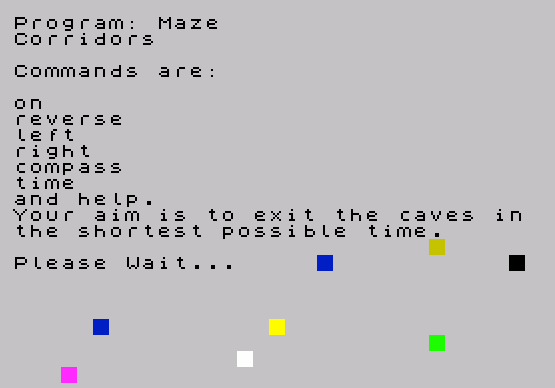
 7000 PRINT "Corridors"''"Commands are:"''"on"'"reverse"'"left"'"right"'"compass"'"time"'"and help."
 7010 PRINT "Your aim is to exit the caves inthe shortest possible time."
 8000 PRINT '"Please Wait...": RANDOMIZE : DIM z$(25,25): DIM y$(5,5)
 8010 FOR f=1 TO 25 STEP 5: FOR g=1 TO 25 STEP 5: POKE 23000+RND*295,RND*255
 8020 LET ax=1: IF RND<.5 THEN LET ax=5
 8030 LET ay=1: IF ax=5 THEN LET ay=-1
 8040 LET bx=1: IF RND<.5 THEN LET bx=5
 8050 LET by=1: IF bx=5 THEN LET by=-1
 8060 GO SUB 8200+INT (RND*10)*50
 8070 FOR j=0 TO 4: FOR k=0 TO 4: LET z$(f+j,g+k)=y$(j*ay+ax,k*by+bx): NEXT k: NEXT j
 8080 NEXT g: NEXT f: GO SUB 8200
 8090 FOR j=1 TO 5: LET z$(10+j,11 TO 15)=y$(j): NEXT j: GO TO 8800
 8200 FOR h=1 TO 5: LET y$(h)="11011": NEXT h
 8210 LET y$(3)="00000": RETURN
 8250 FOR h=1 TO 5: LET y$(h)="11011": NEXT h
 8260 LET y$(3)="11000": RETURN
 8300 LET y$(1)="11111": LET y$(2)=y$(1)
 8310 LET y$(4)="11011": LET y$(5)=y$(4)
 8320 LET y$(3)="00000": RETURN
 8350 LET y$(1)="11111": LET y$(2)=y$(1)
 8360 LET y$(4)="11011": LET y$(5)=y$(4)
 8370 LET y$(3)="00011": RETURN
 8400 LET y$(1)="11011": LET y$(5)=y$(1)
 8410 LET y$(2)="10001": LET y$(4)=y$(2)
 8420 LET y$(3)="00100": RETURN
 8450 LET y$(1)="11011": LET y$(5)=y$(1)
 8460 LET y$(2)="10101": LET y$(3)="00100"
 8470 LET y$(4)="10111": RETURN
 8500 LET y$(1)="11011": LET y$(2)="00101"
 8510 LET y$(3)="10100": LET y$(4)="10001"
 8520 LET y$(5)="11011": RETURN
 8550 LET y$(1)="11000": LET y$(2)="11010"
 8560 LET y$(3)="10001": LET y$(4)="00000"
 8570 LET y$(5)="11011": RETURN
 8600 LET y$(1)="11011": LET y$(5)=y$(1)
 8610 LET y$(2)="10011": LET y$(3)="10100"
 8620 LET y$(4)="10001": RETURN
 8650 LET y$(1)="11001": LET y$(2)="11100"
 8660 LET y$(5)="11011": RETURN
 8800 LET x=13: LET y=13
 8810 LET di=0
 8820 LET x$="NorthWest SouthEast."
 8830 DEF FN a()=INT ((PEEK 23672+256*PEEK 23673+65536*PEEK 23674)/50)
 8840 DEF FN b(x,y)=(x+y+ABS (x-y))/2
 8850 DEF FN c()=FN b(FN a(),FN a())
 8860 RESTORE 9100: FOR f=0 TO 1: FOR g=0 TO 7: READ a: POKE USR CHR$ (144+f)+g,a: NEXT g: NEXT f
 8870 FOR f=23674 TO 23672 STEP -1: POKE f,0: NEXT f
 8880 RETURN
 9000 DATA 0,1,-1,0,1,0
 9010 DATA -1,0,0,-1,0,1
 9020 DATA 0,-1,1,0,-1,0
 9030 DATA 1,0,0,1,0,-1
 9100 DATA 195,129,0,0,0,0,129,195
 9110 DATA 56,56,16,124,186,186,40,108
 9998 SAVE "Maze" LINE 1: BEEP .4,15
 9999 VERIFY ""
Note: Type-in program listings on this website use ZMAKEBAS notation for graphics characters.