
PIX FIX is a pixel-level screen editor that allows users to draw, erase, and manipulate graphics on a 256×192 canvas using two modes: a “Big Pix” cursor mode for cell-by-cell editing and a “Screen Mode” that pans a viewport box across the full image stored at memory address 50000. The program relies heavily on a companion machine code block loaded from tape as “pix.code” at address 36912, with numerous RANDOMIZE USR calls into routines at addresses such as 37061, 37149, 37163, 37173, 37183, 37237, 37253, 37268, 37334, 37349, 37361, and 37415 that handle pixel plotting, attribute setting, box drawing, screen display, and inversion. The picture data is stored as CODE at address 50000, with partial-save options allowing 1/3 (2048 bytes), 2/3 (4096 bytes), or the full screen (6144 bytes) to be written to tape. Attribute color information for the cursor and drawing modes is managed by POKEing system variables and machine code parameter locations directly, while the on-screen border/box overlay uses PLOT and DRAW commands alongside machine code routines. The program saves itself as a two-file tape package: the BASIC loader named “pix fix” with auto-run at line 2990, and the machine code block “pix.code.”
Program Analysis
Program Structure
The program is organized into clearly commented sections, navigated via GO TO and GO SUB. Execution begins at line 2990 on first load (tape load of the machine code block, then initialization), then jumps to line 3015 for subsequent re-entries. The main dispatch loop is the menu at line 820, from which all major modes are reached.
- Lines 10–220: Big Pix Mode — pixel-level cursor movement and drawing
- Lines 300–380: Screen Mode — viewport panning with box overlay
- Lines 390–410: Shared key-handler subroutine (uppercase arrow keys I/J/K/L)
- Lines 820–885: Menu and Help screens
- Lines 990–999: Utility subroutines (clear confirm, screen clear, border box)
- Lines 1020–1200: Save picture routines (SCREEN$ or CODE, with partial options)
- Lines 1400–1440: Tape verify helper
- Lines 1450–1470: Load picture routine
- Lines 2000–2010: Create/name picture entry point
- Lines 2990–3030: Initialization — CLEAR, machine code load, color attribute setup
- Line 9999: Save routine for the program itself
Machine Code Integration
The program is almost entirely dependent on a companion machine code block loaded at address 36912 (“pix.code”, 1544 bytes). Parameters are passed by POKEing specific memory locations immediately before each RANDOMIZE USR call. The following entry points are used:
| Address | Purpose |
|---|---|
37061 | Plot/read pixel at row/col (parameters at 37062, 37066) |
37149 | Set attribute at screen position (params at 36972, 37150, 37151) |
37163 | Attribute operation using GC/GR (params at 37164, 37165) |
37173 | Pixel draw with color (params at 37174, 37175, 37177) |
37183 | Copy machine code image buffer to display |
37237 | Invert the screen |
37253 | Clear picture buffer |
37268 | Draw title/header graphics element |
37334 | Restore display / reset mode (used in subroutine at line 40) |
37349 | Initialize display for menu/help screens |
37361 | Set up screen mapping (called at line 3015 with system variable POKEs) |
37415 | Attribute/flash pass (used before SCREEN$ save and in Screen Mode) |
37195 | Draw horizontal box line (part of box routine) |
37216 | Draw vertical box line (part of box routine) |
The subroutine at line 40 is a key reset helper: it POKEs 23658 (FLAGS2) to 0, sets 37295 to 1, calls USR 37334, then POKEs 23624 (BORDCR) to 56 (white border, white paper, black ink). This is called before returning from menu/help to drawing modes.
Drawing Modes
Big Pix Mode operates on a grid of character cells (GR, GC — row 0–23, column 0–31). Pixel coordinates SR and SC locate the pixel within the 256×192 space. The variable FL acts as the drawing color/mode flag: 0 = neutral (no draw), 14 = draw (INK), 17 = erase. These values correspond to attribute bytes passed to the machine code at address 36972. The border color gives visual feedback: border 7 (white) for neutral, border 5 (cyan) for erase, border 0 (black) for draw.
Screen Mode (line 300) displays the full image buffer via the machine code and overlays a box showing the current viewport position, drawn by the BASIC box routine at line 314 using additional machine code calls. Lowercase I/J/K/L move the grid cursor; uppercase I/J/K/L (generated by CAPS SHIFT) move the viewport by A pixels (1 or 8).
Attribute Cell Highlighting
The cursor position is highlighted by POKEing directly into the attribute file: POKE (22528+32*GR+GC),36 sets the cell to a specific color (paper 4, ink 4 — green on green, effectively a solid colored block as cursor). It is restored to 56 (white paper, black ink) after the keypress is read.
Picture Storage and Save Options
The picture is stored at address 50000 in memory (6144 bytes for the full pixel data). The save routine at line 1040 offers two paths: saving as a SCREEN$ file (which first renders the buffer to the display via USR 37183 and USR 37415) or saving as CODE from address 50000. The partial CODE save options (lines 1075–1090) allow saving 2048, 4096, or 6144 bytes, selected by pressing 1, 2, or 3, with the length computed as 2048*VAL K$ — an elegant single expression.
Initialization and Color Setup
Lines 3000–3010 initialize a border/frame region in the attribute file starting at address 47661 (which is 22528 + 32*156 + 13, i.e., well into the attribute area), using nested POKEs to set paper colors 7 (white), 4 (green), and 5 (cyan) for a decorative border around the drawing area. Lines 3013–3020 reset all working variables: SR=87, SC=121 (screen center in pixel coordinates), GR=11, GC=16 (grid center), PR=0 (row/column print off), FL=0 (neutral mode).
Line 3015 is a re-entry point used by LET ST=1: GO TO 3015 at line 10, allowing a warm restart that skips the tape load but re-runs the display initialization via USR 37361.
Key Handling Idioms
The program uses the PAUSE 0 / INKEY$ pattern at lines 860, 866, and 876 for help screen pagination. The main drawing loop at line 117 polls INKEY$ in a tight loop without PAUSE 0, which is standard for real-time cursor response. The menu and some dialogs use INPUT "" to flush the lower screen and position the cursor for PRINT #0 status messages.
The ST flag (initialized 0 at line 3013, set 1 at various points) guards actions that require a named picture to exist — save, return-to-edit from menu — preventing operations on an unnamed session.
Box Drawing Routine
The subroutine at line 314 calculates a viewport rectangle in pixel coordinates: BC=SC-1, BR=SR-1, EC=SC+32, ER=SR+24. It then handles clipping: if the left or right edge is out of range, it selects a different machine code sub-entry (address 37196 value 33 vs 34 for horizontal lines, 25 vs 26 for vertical). This clipping logic allows the viewport box to be drawn even when the view is near the edge of the 256×192 pixel canvas.
Notable Anomalies
- Line 215 contains a guard
IF GC<4 AND GR<3 THEN GO TO 70that skips the pixel-draw call when the grid cursor is in the top-left corner region, likely preventing a machine code out-of-bounds condition. - The verify routine at lines 1400–1440 has a logic issue: line 1410 loops until
INKEY$is “y” or “n”, but line 1425 checksIF INKEY$="n"immediately after — if the key was released between the two reads,INKEY$will return “” and neither branch fires, causing a fall-through to the tape wait at line 1430 even when “n” was intended. - The
QUIToption (line 839) usesPOKE 23692,25(REPPER — key repeat speed) and prints a warning message beforeSTOP, noting thatGO TO 1will re-enter the program without clearing variables.
Image Gallery
Source Code
    5 REM                          ______________________         \c                      \h        \c      \f PIX FIX \e     \h        \c                      \h        \c  BY John T. Nguyen   \h        \c  1000 Phillips Lane  \h        \c  Louisville,KY 40213 \h        \c  (502) 368 - 7051    \h        \c______________________\h
   10 LET ST=1: GO TO 3015
   40 POKE 23658,0: POKE 37295,1: LET A=8: RANDOMIZE USR 37334: POKE 23624,56: RETURN
   50 POKE 37062,SR: REM ROW/PIX
   55 POKE 37066,SC: REM COL/PIX
   60 RANDOMIZE USR 37061
   70 IF NOT PR THEN GO TO 114
  113 INPUT "": PRINT #0;"   ROW: ";SR+GR;"   COLUMN: ";SC+GC
  114 POKE (22528+32*GR+GC),36
  115 REM
  116 REM --- BIG PIX MODE ---
  117 LET K$=INKEY$: IF K$="" THEN GO TO 117
  118 POKE (22528+32*GR+GC),56
  120 GO SUB 390
  127 IF K$<"a" THEN GO TO 50
  130 IF K$="d" THEN LET FL=0: BORDER 7
  132 IF K$="s" THEN LET FL=17: BORDER 5
  134 IF K$="a" THEN LET FL=14: BORDER 0
  135 IF K$="p" THEN LET PR=1*(PR=0): BEEP .1,10: BEEP .1,15: INPUT "": IF NOT PR THEN RANDOMIZE USR 37334: GO TO 50
  140 IF K$="u" THEN GO TO 300
  150 IF K$="i" THEN LET GR=GR-1: IF GR<0 THEN LET GR=23
  160 IF K$="j" THEN LET GC=GC-1: IF GC<0 THEN LET GC=31
  170 IF K$="k" THEN LET GR=GR+1: IF GR>23 THEN LET GR=0
  180 IF K$="l" THEN LET GC=GC+1: IF GC>31 THEN LET GC=0
  185 IF K$="o" THEN RANDOMIZE USR 37237: GO TO 50
  186 IF K$="m" THEN GO SUB 40: GO TO 800
  187 IF K$="h" THEN GO SUB 40: GO TO 849
  190 IF NOT FL THEN GO TO 70
  200 POKE 36972,FL: POKE 37150,(SC+GC): POKE 37151,(SR+GR): RANDOMIZE USR 37149
  210 POKE 37164,GC: POKE 37165,GR: RANDOMIZE USR 37163
  215 IF GC<4 AND GR<3 THEN GO TO 70
  220 POKE 37174,(GC*8): POKE 37175,(GR*8): POKE 37177,133+8*(FL=17): RANDOMIZE USR 37173: GO TO 70
  290 REM --- SCREEN MODE ---
  300 RANDOMIZE USR 37183: POKE 36972,21: GO SUB 314
  301 LET K$=INKEY$: IF K$="" THEN GO TO 301
  302 IF K$="u" THEN GO SUB 40: GO TO 50
  303 IF K$="o" THEN RANDOMIZE USR 37237: GO TO 300
  304 IF K$="p" THEN GO SUB 314: COPY : GO SUB 314
  305 IF K$="m" THEN GO TO 820
  306 IF K$="y" THEN RANDOMIZE USR 37415: GO TO 301
  307 IF K$="h" THEN GO SUB 40: GO TO 849
  308 IF K$<"a" THEN LET A=8: GO TO 311
  309 LET K$=CHR$ (CODE K$-32): LET A=1
  311 GO SUB 314: GO SUB 390: GO SUB 314: GO TO 301
  312 REM
  313 REM --- BOX ROUTINE ---
  314 LET BC=SC-1: LET BR=SR-1: LET EC=SC+32: LET ER=SR+24
  315 IF BC<0 OR EC>255 THEN POKE 37196,33: GO TO 330
  320 POKE 37196,34
  330 IF BC<0 THEN POKE 37198,0: GO TO 340
  335 POKE 37198,BC
  340 IF BR>=0 THEN POKE 37199,BR: RANDOMIZE USR 37195
  345 IF ER<=255 THEN POKE 37199,ER: RANDOMIZE USR 37195
  350 IF BR<0 OR ER>191 THEN POKE 37217,25: GO TO 360
  355 POKE 37217,26
  360 IF BR<0 THEN POKE 37220,0: GO TO 370
  365 POKE 37220,BR
  370 IF EC<=255 THEN POKE 37219,EC: RANDOMIZE USR 37216
  375 IF BC>=0 THEN POKE 37219,BC: RANDOMIZE USR 37216
  380 RETURN
  388 REM --- GET KEY ---
  390 IF K$="I" THEN LET SR=SR-A: IF SR<0 THEN BEEP .1,8: LET SR=0
  395 IF K$="J" THEN LET SC=SC-A: IF SC<0 THEN BEEP .1,8: LET SC=0
  400 IF K$="K" THEN LET SR=SR+A: IF SR>168 THEN BEEP .1,8: LET SR=168
  405 IF K$="L" THEN LET SC=SC+A: IF SC>224 THEN BEEP .1,8: LET SC=224
  410 RETURN
  790 REM --- MENU ---
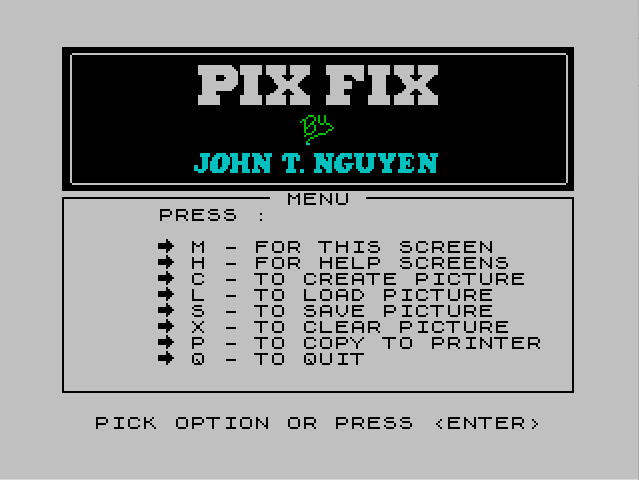
  820 GO SUB 1020: PRINT AT 10,6;"PRESS :"''TAB 6;"\f M - FOR THIS SCREEN"'TAB 6;"\f H - FOR HELP SCREENS"'TAB 6;"\f C - TO CREATE PICTURE"'TAB 6;"\f L - TO LOAD PICTURE"'TAB 6;"\f S - TO SAVE PICTURE"
  823 PRINT TAB 6;"\f X - TO CLEAR PICTURE"'TAB 6;"\f P - TO COPY TO PRINTER"'TAB 6;"\f Q - TO QUIT": GO SUB 999: PRINT AT 9,13;" MENU "
  824 INPUT "": PRINT #0;"  PICK OPTION OR PRESS <ENTER>"
  825 LET K$=INKEY$: IF K$="" THEN GO TO 825
  830 IF K$="h" THEN INPUT "": GO SUB 997: GO TO 850
  831 IF K$="c" THEN GO TO 2000
  832 IF K$="s" THEN IF ST THEN GO SUB 997: GO TO 1040
  834 IF K$="l" THEN GO SUB 1450: CLS : GO TO 820
  836 IF K$="p" THEN CLS : RANDOMIZE USR 37183: COPY : GO TO 820
  837 IF K$="x" THEN INPUT "": PRINT #0;"       ARE YOU SURE? (Y/N)": GO SUB 990: GO TO 824
  839 IF K$="q" THEN CLS : POKE 23692,25: PRINT AT 21,0;"* TYPE <GO TO 1> TO CONTINUE OR   VARIABLES WILL BE CLEARED FROM  MEMORY.": FOR J=1 TO 19: PRINT : NEXT J: STOP
  840 IF K$=CHR$ 13 THEN IF ST THEN GO SUB 40: GO TO 50
  846 GO TO 825
  847 REM
  848 REM --- HELP SCREENS ---
  849 GO SUB 1020
  850 PRINT AT 10,1;"<ARROW>"'TAB 2;"KEYS   IN BIG PIX MODE :"''"    \d    HOLD DOWN <CAPS SHIFT>"'"    I    & <ARROW> KEYS TO MOVE"'"  \eJ L\f  ENTIRE SCREEN."'"    K"'"    \g    USE <ARROW> KEYS ALONE"'TAB 9;"TO MOVE CURSOR."
  852 PRINT 'TAB 25;"Page 1"'#0;"   PRESS ANY KEY TO CONTINUE": PLOT 67,100: DRAW 0,-96: PLOT 74,78: DRAW 116,0
  860 GO SUB 999: PRINT AT 9,14;" HELP ": PAUSE 0: GO SUB 997
  862 PRINT AT 11,5;"PRESS :"''TAB 5;"\f A - FOR DRAW MODE"'TAB 5;"\f S - FOR ERASE MODE"'TAB 5;"\f D - FOR NEUTRAL MODE"'TAB 5;"\f P - TO PRINT ROW/COLUMN"'TAB 5;"\f O - TO INVERT SCREEN"
  864 PRINT TAB 5;"\f U - FOR SCREEN MODE"''TAB 25;"Page 2"
  866 GO SUB 999: PRINT AT 9,14;" HELP ": PAUSE 0: GO SUB 997: INPUT ""
  870 PRINT AT 10,1;"<ARROW>"'TAB 2;"KEYS   IN SCREEN MODE :"'"    \d"'"    I    <ARROW> KEYS"'"  \eJ L\f   \f MOVE BOX (STEP 1)"'"    K    <ARROW> & <CAPS>"'"    \g     \f MOVE BOX (STEP 8)"
  871 PRINT '"   PRESS: Y - FOR ATTRIBUTES"'TAB 10;"U - FOR BIG PIX MODE"
  873 PRINT TAB 25;"Page 3": PLOT 67,100: DRAW 0,-65: DRAW -67,0: PLOT 74,78: DRAW 108,0
  876 GO SUB 999: PRINT AT 9,14;" HELP "'#0;" PRESS <M> FOR MENU OR <ENTER>": PAUSE 0
  877 LET K$=INKEY$: IF K$="" THEN GO TO 877
  878 IF K$="m" THEN CLS : GO TO 820
  879 IF K$=CHR$ 13 THEN IF ST THEN GO SUB 40: GO TO 50
  885 GO TO 877
  980 REM ------
  990 IF INKEY$="y" THEN RANDOMIZE USR 37253: INPUT "": PRINT #0;TAB 13;"DONE": PAUSE 90: RETURN
  991 IF INKEY$="n" THEN RETURN
  992 GO TO 990
  996 REM ------
  997 FOR J=9 TO 21: PRINT AT J,0;"                                ": NEXT J: RETURN
  998 REM ------
  999 PLOT 0,100: DRAW 255,0: DRAW 0,-97: DRAW -255,0: DRAW 0,97: RETURN
 1010 REM ------
 1020 CLS : BORDER 7: LET FL=0: RANDOMIZE USR 37349: PLOT 4,108: INK 7: DRAW 0,3: PLOT 5,107: DRAW 246,0: PLOT 252,108: DRAW 0,3: RANDOMIZE USR 37268: PLOT 252,112: INK 0: POKE 37295,1: RETURN
 1030 REM --- SAVE PICTURE ---
 1040 PRINT AT 11,3;"PRESS :"''"   \f S - TO SAVE AS A SCREEN$ "''"   \f L - TO SAVE FROM MEMORY"
 1043 GO SUB 999: PRINT AT 9,13;" SAVE "
 1045 LET K$=INKEY$: IF K$<>"s" AND K$<>"l" AND K$<>CHR$ 13 THEN GO TO 1045
 1047 IF K$=CHR$ 13 THEN GO TO 820
 1050 IF K$="l" THEN GO TO 1070
 1053 FOR J=15 TO 11 STEP -1: PRINT AT J+1,3;"                            "'AT J,3;"\f    SAVE AS A SCREEN$     ": PAUSE 5: NEXT J
 1055 INPUT "BORDER COLOR? (0-7): "; LINE B$: IF B$="" THEN GO TO 820
 1057 IF B$<"0" OR B$>"7" THEN GO TO 1055
 1060 BORDER VAL B$: CLS : RANDOMIZE USR 37183: RANDOMIZE USR 37415: SAVE N$SCREEN$ : GO SUB 40: CLS : GO TO 820
 1070 FOR J=15 TO 11 STEP -1: PRINT AT J+1,3;"                            "'AT J,3;"\f    SAVE FROM MEMORY      ": PAUSE 5: NEXT J
 1075 PRINT AT 13,4;"PRESS :"''"  \f 1 - TO SAVE 1/3 OF SCREEN"'"  \f 2 - TO SAVE 2/3 OF SCREEN"'"  \f 3 - TO SAVE ALL OF SCREEN"
 1080 PLOT 0,60: DRAW 0,-50
 1085 LET K$=INKEY$: IF K$<>"1" AND K$<>"2" AND K$<>"3" AND K$<>CHR$ 13 THEN GO TO 1085
 1088 IF K$=CHR$ 13 THEN GO TO 820
 1090 INPUT "": SAVE N$CODE 50000,2048*VAL K$
 1120 INPUT "": PRINT #0;"      VERIFY CODES? (Y/N)"
 1125 GO SUB 1400: IF INKEY$="n" THEN GO TO 820
 1145 PRINT '"* VERIFYING :"'"  """;N$;""" CODE 50000,";2048*VAL K$: VERIFY N$CODE : PRINT ' FLASH 1;"TURN OFF RECORDER": PAUSE 60: GO TO 820
 1200 GO TO 1045
 1400 REM --- VERIFY ---
 1405 INPUT "": PRINT #0;"      VERIFY CODES? (Y/N)"
 1410 IF INKEY$<>"y" AND INKEY$<>"n" THEN GO TO 1410
 1425 IF INKEY$="n" THEN RETURN
 1430 CLS : PRINT "* REWIND TAPE AND PRESS PLAY TO   VERIFY"'
 1435 IF IN 254<>95 THEN GO TO 1435
 1440 RETURN
 1450 REM --- LOAD ---
 1460 CLS : PRINT "* ENTER NAME OF PICTURE.": INPUT N$
 1465 IF N$="" THEN RETURN
 1470 LET ST=1: PRINT '"* PRESS PLAY ON RECORDER.": GO SUB 1435: PRINT '"* LOADING :"'"  """;N$;""" CODE 50000": LOAD N$CODE 50000: PRINT ' FLASH 1;"TURN OFF RECORDER": PAUSE 120: GO SUB 40: GO TO 50
 1980 REM ------
 2000 INPUT "NAME OF PICTURE? ";N$: IF N$="" THEN GO TO 2000
 2005 IF LEN N$>10 THEN GO TO 2000
 2010 LET ST=1: GO SUB 40: GO TO 50
 2970 REM
 2980 REM --- PROGRAM STARTS                  HERE.
 2990 CLEAR 36911: LOAD "pix.code"CODE 36912: CLS : PRINT AT 11,7; FLASH 1;"TURN OFF RECORDER": PAUSE 120
 3000 LET N=47661: FOR J=1 TO 30: POKE (N+J),7: POKE (N+32+J),7: POKE (N+64+J),7: POKE (N+96+J),7: POKE (N+128+J),4: POKE (N+160+J),4
 3005 POKE (N+192+J),5: POKE (N+224+J),5: POKE (N+256+J),7: NEXT J
 3010 FOR J=0 TO 8: POKE (N+J*32),7: POKE (N+J*32+31),7: NEXT J
 3013 LET N$="PICTURE": POKE 37295,0: LET ST=0
 3015 POKE 23728,51: POKE 23729,146: RANDOMIZE USR 37361
 3020 POKE 23658,0: LET FL=0: LET SR=87: LET SC=121: LET GR=11: LET GC=16: LET PR=0
 3023 POKE 23658,0: POKE 23675,133: POKE 23676,144
 3030 GO TO 820
 9960 REM
 9970 REM --- SAVE ROUTINE ---
 9999 SAVE "pix fix" LINE 2990: SAVE "pix.code"CODE 36912,1544: CLS : PRINT "* REWIND TAPE AND PRESS PLAY TO   VERIFY.": VERIFY "pix fix": VERIFY ""CODE
Note: Type-in program listings on this website use ZMAKEBAS notation for graphics characters.