
Schematic is an interactive computer-assisted design (CAD) program that lets users draw electronic circuit schematics using PLOT and DRAW commands on a pixel coordinate grid. Supported components include resistors, capacitors, diodes, transistors (NPN and PNP), and connecting wire runs, each with directional variants (north, south, east, west). Component shapes are encoded entirely in DATA statements as sequences of relative DRAW coordinates, terminated by a 0,0 sentinel pair; RESTORE is used to select the correct dataset before rendering. The transistor section is the most elaborate, requiring four inputs (direction, connecting leg, polarity, and emitter side) and branching through dozens of IF statements to select among 16 distinct datasets covering all orientation and polarity combinations. A schematic border is drawn with PLOT/DRAW at startup, and the current pen position (X, Y) is tracked in variables and displayed at the top of the screen during component entry.
Program Structure
The program is organized into a main menu/initialization block, a central input dispatch loop, and a set of subroutine-like sections reached by GO TO. The top-level flow is:
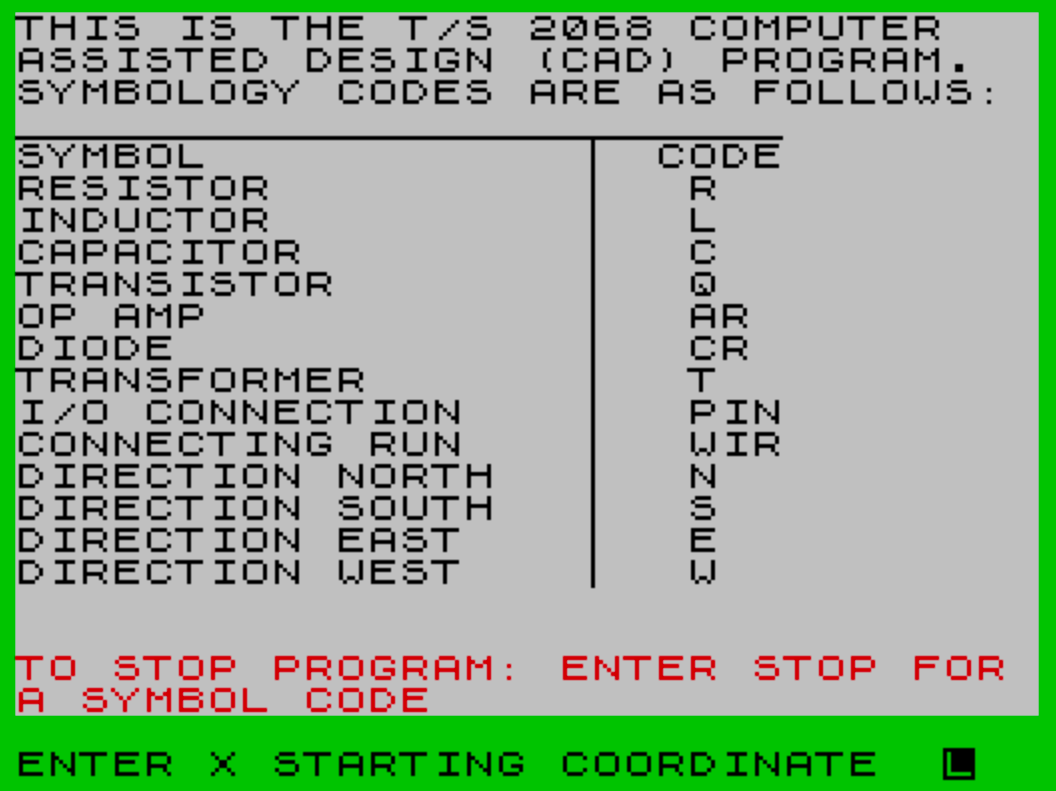
- Lines 1–40: Initialize variables, print a symbol code reference table from DATA, draw the display border.
- Lines 50–95: Accept starting coordinates, draw a canvas border, then loop accepting symbol codes and dispatching to component drawing sections.
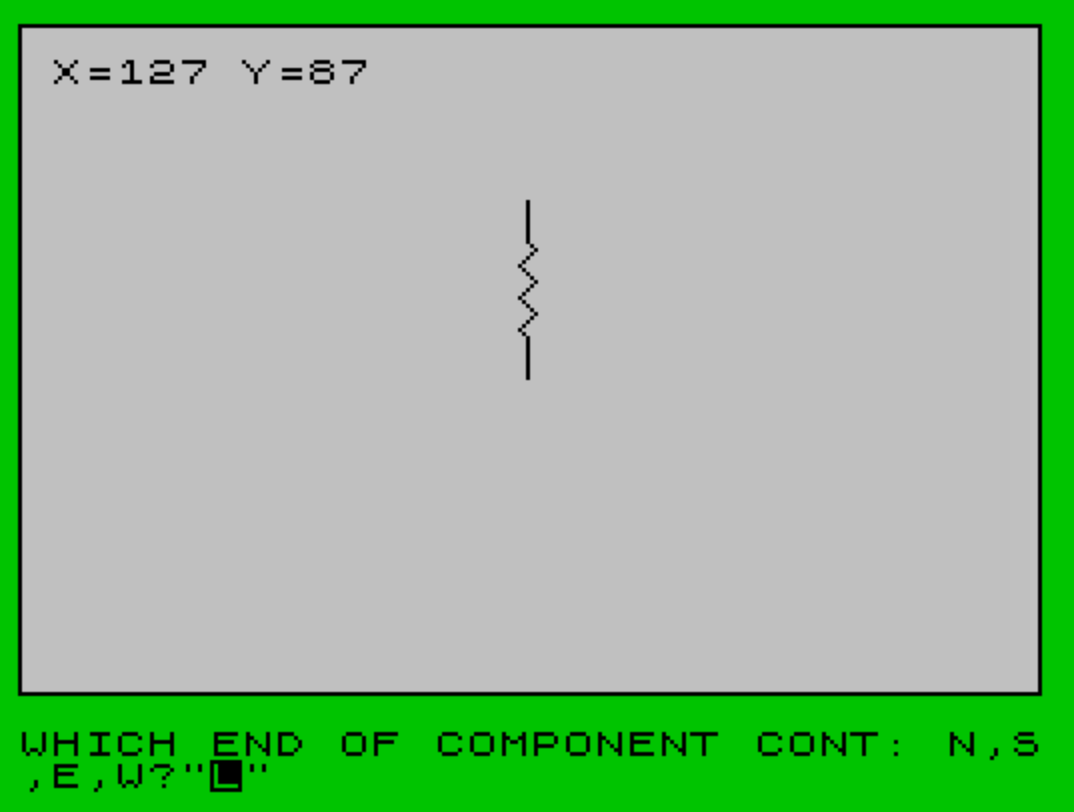
- Lines 300–390: Resistor drawing routine.
- Lines 400–495: Diode drawing routine.
- Lines 500–560: Connecting wire run routine.
- Lines 600–695: Capacitor drawing routine.
- Lines 700–896: Transistor drawing routine with 16 orientation/polarity DATA blocks.
- Line 2999:
STOPto end the program.
All component sections return to line 80, which prompts which end of the previously drawn component to continue from, then falls through to line 87 to accept the next symbol code.
Coordinate System and Canvas
The drawing canvas is established at line 67 with a border drawn by four DRAW calls starting from PLOT 0,8, giving a 255×167 pixel interior. The current pen position is tracked in variables a (X) and b (Y) and displayed at AT 1,1 during each component entry cycle. Component grid spacing is consistently 44 pixels, matching the height of two character rows, providing a natural snap grid for schematic layout.
DATA-Driven Shape Rendering
Every component shape is stored as a sequence of paired integers in DATA statements, representing relative DRAW arguments. A 0,0 pair acts as the end-of-shape sentinel. Before reading, RESTORE is pointed at the appropriate DATA line for the requested orientation and polarity. The reading loop (e.g., lines 340–370 for the resistor) is:
READ c:READ d— fetch next delta pairIF c=0 AND d=0 THEN GO TO 80— sentinel check, exit loopDRAW c,d— render segmentGO TO 340— repeat
The capacitor routine (lines 635–655) extends this with a secondary sentinel: the pair 1,1 signals a pen-lift (a PLOT to a new position) to draw the two parallel capacitor plates as disconnected line segments.
Transistor Orientation Dispatch
The transistor section (lines 700–860) is the most complex, requiring four inputs: direction (b$), connecting leg (c$: E, B, or C), polarity (d$: npn or pnp), and emitter side (x$). These four parameters combine to select among 16 DATA blocks (lines 865–896). The dispatch is handled by a cascade of 48 IF statements (lines 709–756), each setting the pen origin with coordinate adjustments and pointing RESTORE at the correct DATA block. A secondary input loop at lines 770–778 then positions the pen at the next connecting leg after drawing.
| DATA Line | Configuration |
|---|---|
| 865/866 | NPN, North entry, Emitter East |
| 867/868 | PNP, North entry, Emitter East |
| 869/870 | NPN, North entry, Emitter West |
| 871/872 | PNP, North entry, Emitter West |
| 873/874 | NPN, South entry, Emitter West |
| 875/876 | PNP, South entry, Emitter West |
| 877/878 | NPN, South entry, Emitter East |
| 879/880 | PNP, South entry, Emitter East |
| 881/882 | NPN, East entry, Emitter North |
| 883/884 | PNP, East entry, Emitter North |
| 885/886 | NPN, East entry, Emitter South |
| 887/888 | PNP, East entry, Emitter South |
| 889/890 | NPN, West entry, Emitter North |
| 891/892 | PNP, West entry, Emitter North |
| 893/894 | NPN, West entry, Emitter South |
| 895/896 | PNP, West entry, Emitter South |
Symbol Code Table Initialization
Lines 25–34 build the on-screen symbol reference table by reading pairs from the DATA block at line 100 in a loop, printing each symbol name and its code, and stopping when the pair “DIRECTION WEST” / “W” is encountered. This avoids hardcoding the table layout and makes it easy to extend by adding DATA entries before the terminal pair.
Notable Bugs and Anomalies
- Line 92 tests
a$="STOP "(with a trailing space) rather than"STOP". Users who typeSTOPwithout a trailing space will not trigger the exit and will fall through to an unmatched code, looping back to the prompt silently. - The symbol code table lists the diode as “CR” and the op-amp as “AR”, but the dispatch at lines 90–95 only handles codes
"r","cr","wir","c", and"q". Inductors (l), op-amps (ar), transformers (t), and I/O connections (pin) listed in the table have no corresponding drawing routines. - Line 40 contains a long sequence of color/attribute control escape codes followed by a
PRINTstatement for the stop-code instruction banner. The embedded control codes set paper and ink colors across the banner area. - The REM labels at lines 865, 867, 869, etc., are offset by one from the DATA lines they describe (e.g., REM at 865, DATA at 866), which is consistent but slightly counterintuitive as an indexing convention.
- Line 2990 (
SAVE "CAD" LINE 1) appears before theSTOPat 2999 but is not reachable in normal execution flow; it serves as a convenient save command that the user can manuallyGO TOor run selectively.
Image Gallery
Source Code
    1 REM CAD
    3 BORDER 4
    5 LET a=0:LET b=0:LET c=0:LET d=0:LET e=0:LET f=0
    6 CLS
   15 PRINT "THIS IS THE T/S 2068 COMPUTER   ASSISTED DESIGN (CAD) PROGRAM.";';"SYMBOLOGY CODES ARE AS FOLLOWS:"
   20 PRINT ';"SYMBOL"; TAB 20;"CODE"
   22 PLOT 0,144:DRAW 191,0
   25 READ a$:READ b$
   30 PRINT a$; TAB 21;b$
   34 IF a$ <>"DIRECTION WEST" AND b$ <>"W" THEN GO TO 25
   39 PLOT 144,144:DRAW 0,-112
   40 \{17}\{5}\{17}\{6}\{17}\{7}\{17}\{1}\{17}\{2}\{17}\{3}\{17}\{4}\{17}\{4}\{17}\{6} PRINT '';"\{16}\{2}TO STOP PROGRAM: ENTER STOP FOR A SYMBOL CODE"\{17}\{0}
   50 INPUT "ENTER X STARTING COORDINATE  ";a
   60 INPUT "ENTER Y STARTING COORDINATE  ";b
   66 CLS :PLOT 0,8
   67 DRAW 255,0:DRAW 0,167:DRAW -255,0:DRAW 0,-167
   70 PLOT a,b
   71 GO TO 87
   80 INPUT "WHICH END OF COMPONENT CONT: N,S,E,W?";e$
   81 IF e$="s" THEN LET b=b-44:PLOT a,b
   82 IF e$="w" THEN LET a=a-44:PLOT a,b
   87 PRINT AT 1,1;"            "
   88 PRINT AT 1,1;"X=";a;" Y=";b
   89 INPUT "ENTER SYMBOL CODE ";a$
   90 IF a$="r" THEN GO TO 300
   91 IF a$="cr" THEN GO TO 400
   92 IF a$="STOP " THEN GO TO 2999
   93 IF a$="wir" THEN GO TO 500
   94 IF a$="c" THEN GO TO 600
   95 IF a$="q" THEN GO TO 700
  100 DATA "RESISTOR","R","INDUCTOR","L","CAPACITOR","C","TRANSISTOR","Q","OP AMP","AR","DIODE","CR","TRANSFORMER","T","I/O CONNECTION","PIN","CONNECTING RUN","WIR","DIRECTION NORTH","N","DIRECTION SOUTH","S","DIRECTION EAST","E","DIRECTION WEST","W"
  300 REM RESISTOR
  301 INPUT "ENTER DIRECTION CODE";b$
  310 IF b$="s" AND b >=44 THEN LET b=b-44:PLOT a,b:LET b=b+44
  315 IF b$="n" THEN LET b=b+44
  320 IF b$="w" AND a >=44 THEN LET a=a-44:PLOT a,b:LET a=a+44
  325 IF b$="e" THEN LET a=a+44
  330 IF b$="n" OR b$="s" THEN RESTORE 390
  335 IF b$="e" OR b$="w" THEN RESTORE 380
  340 READ c:READ d
  350 IF c=0 AND d=0 THEN GO TO 80
  360 DRAW c,d
  370 GO TO 340
  380 DATA 10,0,2,2,4,-4,4,4,4,-4,4,4,4,-4,2,2,10,0,0,0
  390 DATA 0,10,-2,2,4,4,-4,4,4,4,-4,4,4,4,-2,2,0,10,0,0
  400 REM DIODE
  401 INPUT "ENTER DIRECTION CODE ";b$
  402 INPUT "ENTER BIAS: FWD.(F) or REVM(R) ";c$
  410 IF b$="s" AND b >=44 THEN LET b=b-44:PLOT a,b:LET b=b+26
  415 IF b$="n" AND b <=131 THEN LET b=b+26
  420 IF b$="w" AND a >=44 THEN LET a=a-44:PLOT a,b:LET a=a+26
  425 IF b$="e" AND a <=211 THEN LET a=a+26
  427 IF (b$="e" AND c$="f") OR (b$="w" AND c$="r") THEN RESTORE 480
  429 IF (b$="e" AND c$="r") OR (b$="w" AND c$="f") THEN RESTORE 485
  431 IF (b$="n" AND c$="f") OR (b$="s" AND c$="r") THEN RESTORE 490
  433 IF (b$="n" AND c$="r") OR (b$="s" AND c$="f") THEN RESTORE 495
  435 READ c:READ d
  440 IF c=0 AND d=0 THEN GO TO 470
  450 DRAW c,d
  460 GO TO 435
  470 PLOT a,b
  475 IF b$="n" OR b$="s" THEN LET b=b+18:DRAW 0,18
  477 IF b$="e" OR b$="w" THEN LET a=a+18:DRAW 18,0
  479 GO TO 80
  480 DATA 18,0,8,5,0,-10,-8,5,0,5,0,-10,0,0
  485 DATA 18,0,0,5,8,-5,0,5,0,-10,0,5,-8,-5,0,5,0,0
  490 DATA 0,18,-5,8,10,0,-5,-8,-5,0,10,0,0,0
  495 DATA 0,18,-5,0,5,8,-5,0,10,0,-5,0,5,-8,-5,0,0,0
  500 REM CONNECTING RUN
  510 INPUT "DIRECTION OF RUN? ";b$
  520 IF b$="n" THEN DRAW 0,44:LET b=b+44
  530 IF b$="s" THEN LET b=b-44:PLOT a,b:DRAW 0,44:LET b=b+44
  540 IF b$="e" THEN DRAW 44,0:LET a=a+44
  550 IF b$="w" THEN LET a=a-44:PLOT a,b:DRAW 44,0:LET a=a+44
  560 GO TO 80
  600 REM CAPACITOR
  605 INPUT "ENTER DIRECTION CODE";b$
  610 IF b$="s" THEN LET b=b-44:PLOT a,b
  620 IF b$="w" THEN LET a=a-44:PLOT a,b
  625 IF b$="e" OR b$="w" THEN RESTORE 690:LET a=a+25:LET b=b-5
  630 IF b$="n" OR b$="s" THEN RESTORE 695:LET a=a-5:LET b=b+25
  635 READ c:READ d
  640 IF c=1 AND d=1 AND (b$="w" OR b$="e") THEN LET a=a+19:LET b=b+5:GO TO 80
  642 IF c=1 AND d=1 AND (b$="n" OR b$="s") THEN LET a=a+5:LET b=b+19:GO TO 80
  645 IF c=0 AND d=0 THEN PLOT a,b:GO TO 635
  650 DRAW c,d
  655 GO TO 635
  690 DATA 19,0,0,5,0,-10,0,0,0,10,0,-5,19,0,1,1
  695 DATA 0,19,-5,0,10,0,0,0,10,0,-5,0,0,19,1,1
  700 REM TRANSISTOR
  701 INPUT "ENTER DIRECTION CODE  ";b$
  703 INPUT "ENTER CONNECTING TRANSISTOR LEG:E,B,C  ";c$
  705 INPUT "NPN or PNP?";d$
  707 INPUT "WHICH SIDE IS EMITTER:N, S, E, W?";x$
  709 IF b$="n" AND c$="b" AND d$="npn" AND x$="e" THEN RESTORE 866
  710 IF b$="n" AND c$="b" AND d$="pnp" AND x$="e" THEN RESTORE 868
  711 IF b$="n" AND c$="b" AND d$="npn" AND x$="w" THEN RESTORE 870
  712 IF b$="n" AND c$="b" AND d$="pnp" AND x$="w" THEN RESTORE 872
  713 IF b$="n" AND c$="e" AND d$="npn" AND x$="e" THEN LET a=a-22:LET b=b-44:PLOT a,b:RESTORE 865
  714 IF b$="n" AND c$="e" AND d$="pnp" AND x$="e" THEN LET a=a-22:LET b=b-44:PLOT a,b:RESTORE 867
  715 IF b$="n" AND c$="c" AND d$="npn" AND x$="e" THEN LET a=a-22:LET b=b-44:PLOT a,b:RESTORE 865
  716 IF b$="n" AND c$="c" AND d$="pnp" AND x$="e" THEN LET a=a-22:LET b=b-44:PLOT a,b:RESTORE 867
  717 IF b$="n" AND c$="e" AND d$="npn" AND x$="w" THEN LET a=a+22:LET b=b-44:PLOT a,b:RESTORE 870
  718 IF b$="n" AND c$="e" AND d$="pnp" AND x$="w" THEN LET a=a+22:LET b=b-44:PLOT a,b:RESTORE 872
  719 IF b$="n" AND c$="c" AND d$="npn" AND x$="w" THEN LET a=a+22:LET b=b-44:PLOT a,b:RESTORE 869
  720 IF b$="n" AND c$="c" AND d$="pnp" AND x$="w" THEN LET a=a+22:LET b=b-44:PLOT a,b:RESTORE 871
  721 IF b$="s" AND c$="b" AND d$="npn" AND x$="e" THEN LET a=a-22:LET b=b-44:PLOT a,b:RESTORE 878
  722 IF b$="s" AND c$="b" AND d$="pnp" AND x$="e" THEN LET a=a-22:LET b=b-44:PLOT a,b:RESTORE 880
  723 IF b$="s" AND c$="b" AND d$="npn" AND x$="w" THEN LET a=a-22:LET b=b-44:PLOT a,b:RESTORE 874
  724 IF b$="s" AND c$="b" AND d$="pnp" AND x$="w" THEN LET a=a-22:LET b=b-44:PLOT a,b:RESTORE 876
  725 IF b$="s" AND c$="e" AND d$="npn" AND x$="e" THEN LET a=a-44:PLOT a,b:RESTORE 878
  726 IF b$="s" AND c$="e" AND d$="pnp" AND x$="e" THEN LET a=a-44:PLOT a,b:RESTORE 880
  727 IF b$="s" AND c$="c" AND d$="npn" AND x$="e" THEN RESTORE 878
  728 IF b$="s" AND c$="c" AND d$="pnp" AND x$="e" THEN RESTORE 880
  729 IF b$="s" AND c$="e" AND d$="npn" AND x$="w" THEN RESTORE 874
  730 IF b$="s" AND c$="e" AND d$="pnp" AND x$="w" THEN RESTORE 876
  731 IF b$="s" AND c$="c" AND d$="npn" AND x$="w" THEN LET a=a-22:PLOT a,b:RESTORE 874
  732 IF b$="s" AND c$="c" AND d$="pnp" AND x$="w" THEN LET a=a-22:PLOT a,b:RESTORE 876
  733 IF b$="e" AND c$="b" AND d$="npn" AND x$="n" THEN LET a=a+44:LET b=b-22:PLOT a,b:RESTORE 882
  734 IF b$="e" AND c$="b" AND d$="pnp" AND x$="n" THEN LET a=a+22:LET b=b-22:PLOT a,b:RESTORE 884
  735 IF b$="e" AND c$="b" AND d$="npn" AND x$="s" THEN LET a=a+22:LET b=b-22:PLOT a,b:RESTORE 886
  736 IF b$="e" AND c$="b" AND d$="pnp" AND x$="s" THEN LET a=a+22:LET b=b-22:PLOT a,b:RESTORE 888
  737 IF b$="e" AND c$="e" AND d$="npn" AND x$="n" THEN LET b=b-44:PLOT a,b:RESTORE 882
  738 IF b$="e" AND c$="e" AND d$="pnp" AND x$="n" THEN LET b=b-44:PLOT a,b:RESTORE 884
  739 IF b$="e" AND c$="c" AND d$="npn" AND x$="n" THEN RESTORE 882
  740 IF b$="e" AND c$="c" AND d$="pnp" AND x$="n" THEN RESTORE 884
  741 IF b$="e" AND c$="e" AND d$="npn" AND x$="s" THEN RESTORE 886
  742 IF b$="e" AND c$="e" AND d$="pnp" AND x$="s" THEN RESTORE 888
  743 IF b$="e" AND c$="c" AND d$="npn" AND x$="s" THEN LET b=b-44:PLOT a,b:RESTORE 886
  744 IF b$="e" AND c$="c" AND d$="pnp" AND x$="s" THEN LET b=b-44:PLOT a,b:RESTORE 888
  745 IF b$="w" AND c$="b" AND d$="npn" AND x$="n" THEN LET a=a-44:LET b=b-22:PLOT a,b:RESTORE 890
  746 IF b$="w" AND c$="b" AND d$="pnp" AND x$="n" THEN LET a=a-44:LET b=b-22:PLOT a,b:RESTORE 892
  747 IF b$="w" AND c$="b" AND d$="npn" AND x$="s" THEN LET a=a-44:LET b=b-22:PLOT a,b:RESTORE 894
  748 IF b$="w" AND c$="b" AND d$="pnp" AND x$="s" THEN LET a=a-44:LET b=b-22:PLOT a,b:RESTORE 896
  749 IF b$="w" AND c$="e" AND d$="npn" AND x$="n" THEN LET b=b-44:PLOT a,b:RESTORE 890
  750 IF b$="w" AND c$="e" AND d$="pnp" AND x$="n" THEN LET b=b-44:PLOT a,b:RESTORE 892
  751 IF b$="w" AND c$="c" AND d$="npn" AND x$="n" THEN RESTORE 890
  752 IF b$="w" AND c$="c" AND d$="pnp" AND x$="n" THEN RESTORE 892
  753 IF b$="w" AND c$="e" AND d$="npn" AND x$="s" THEN RESTORE 894
  754 IF b$="w" AND c$="e" AND d$="pnp" AND x$="s" THEN RESTORE 896
  755 IF b$="w" AND c$="c" AND d$="npn" AND x$="s" THEN LET b=b-44:PLOT a,b:RESTORE 894
  756 IF b$="w" AND c$="c" AND d$="pnp" AND x$="s" THEN LET b=b-44:PLOT a,b:RESTORE 896
  762 READ c:READ d
  763 IF c=0 AND d=0 THEN GO TO 770
  764 DRAW c,d
  765 GO TO 762
  770  INPUT "CONNECTING LEG:E,B,C?";c$
  771 IF b$="n" AND ((c$="e" AND x$="e") OR (c$="c" AND x$="w")) THEN LET a=a+22:LET b=b+44:PLOT a,b
  772 IF b$="n" AND ((c$="e" AND x$="w") OR (c$="c" AND x$="e")) THEN LET a=a-22:LET b=b+44:PLOT a,b
  773 IF b$="s" AND ((c$="e" AND x$="w") OR (c$="c" AND x$="e")) THEN LET a=a+44:PLOT a,b
  774 IF b$="s" AND c$="b" THEN LET a=a+22:LET b=b+44
  775 IF b$="e" AND ((c$="e" AND x$="n") OR (c$="c" AND x$="s")) THEN LET b=b+44:PLOT a,b
  776 IF b$="e" AND c$="b" THEN LET a=a-44:LET b=b+22:PLOT a,b
  777 IF b$="w" AND ((c$="e" AND x$="n") OR (c$="c" AND x$="s")) THEN LET b=b+44:PLOT a,b
  778 IF b$="w" AND c$="b" THEN LET a=a+44:LET b=b+22:PLOT a,b
  855 PLOT a,b
  860 GO TO 89
  865 REM NPN,NORTH,EMITTER-EAST
  866 DATA 0,17,-12,0,4,0,-14,27,14,-27,20,0,-4,0,6,12,0,-5,-4,2,4,3,8,15,0,0
  867 REM PNP,NORTH,EMITTER-EAST
  868 DATA 0,17,-12,0,4,0,-14,27,14,-27,20,0,-4,0,4,8,0,5,4,-2,-4,-3,10,19,0,0
  869 REM NPN,NORTH,EMITTER-WEST
  870 DATA 0,17,-12,0,4,0,-6,12,0,-5,4,2,-4,3,-8,15,14,-27,20,0,-4,0,14,27,0,0
  871 REM PNP,NORTH,EMITTER-WEST
  872 DATA 0,17,-12,0,4,0,-4,8,0,5,-4,-2,4,-3,-10,19,14,-27,20,0,-4,0,14,27,0,0
  873 REM NPN,SOUTH,EMITTER-WEST
  874 DATA 8,15,0,5,4,-2,-4,-3,6,12,-4,0,12,0,0,17,0,-17,12,0,-4,0,14,-27,0,0
  875 REM PNP,SOUTH,EMITTER-WEST
  876 DATA 10,19,0,-5,-4,2,4,3,4,8,-4,0,12,0,0,17,0,-17,12,0,-4,0,14,-27,0,0
  877 REM NPN,SOUTH,EMITTER-EAST
  878 DATA 14,27,-4,0,12,0,0,17,0,-17,12,0,-4,0,6,-12,0,5,-4,-2,4,-3,8,-15,0,0
  879 REM PNP,SOUTH,EMITTER-EAST
  880 DATA 14,27,-4,0,12,0,0,17,0,-17,12,0,-4,0,4,-8,0,-5,4,2,-4,3,10,-19,0,0
  881 REM NPN,EAST,EMITTER-NORTH
  882 DATA -27,14,0,-4,0,12,-17,0,17,0,0,12,0,-4,12,6,-5,0,2,-4,3,4,15,8,0,0
  883 REM PNP,EAST,EMITTER-NORTH
  884 DATA -27,14,0,-4,0,12,-17,0,17,0,0,12,0,-4,8,4,5,0,-2,4,-3,-4,19,10,0,0
  885 REM NPN,EAST,EMITTER-SOUTH
  886 DATA -15,8,-5,0,2,4,3,-4,-12,6,0,-4,0,12,-17,0,17,0,0,12,0,-4,27,14,0,0
  887 REM PNP,EAST,EMITTER-SOUTH
  888 DATA -19,10,5,0,-2,-4,-3,4,-8,4,0,-4,0,12,-17,0,17,0,0,12,0,-14,27,14,0,0
  889 REM NPN,WEST,EMITTER-NORTH
  890 DATA 27,14,0,-4,0,12,17,0,-17,0,0,12,0,-4,-12,6,5,0,-2,-4,-3,4,-15,8,0,0
  891 REM PNP,WEST,EMITTER-NORTH
  892 DATA 27,14,0,-4,0,12,17,0,-17,0,0,12,0,-4,-8,4,-5,0,2,4,3,-4,-19,10,0,0
  893 REM NPN,WEST,EMITTER-SOUTH
  894 DATA 15,8,5,0,-2,4,-3,-4,12,6,0,-4,0,12,17,0,-17,0,0,12,0,-4,-27,14,0,0
  895 REM PNP,WEST,EMITTER-SOUTH
  896 DATA 19,10,-5,0,2,-4,3,4,8,4,0,-4,0,12,17,0,-17,0,0,12,0,-4,-27,14,0,0
 2990 SAVE "CAD" LINE 1
 2999 STOP
Note: Type-in program listings on this website use ZMAKEBAS notation for graphics characters.