
Sketcher is a screen-drawing utility. It opens with a page of tips and offers to redefine any of the 21 graphics characters, entered as eight decimal or 8-digit binary rows, then asks for paper and border colours and a pixel step. In pixel mode the cursor moves with the eight keys around G, and single letters choose plotting, unplotting, circles, rubber-band lines, rectangles, fills, colour and attribute changes, a grid overlay, a thick “tri-pixel” pen, saving and loading the picture as a SCREEN$, and a printer COPY. Pressing p switches to print mode, where a character cursor places text in normal, double-height, double-width, large and giant sizes, as well as block graphics and UDGs. Pressing ? in either mode shows the commands.
REMs at the end of the listing say Sketcher was typed from Which Micro, issue 84/4 page 34 and following issues, with additional routines developed by R.H. Mitchell of Willowdale, Ontario, in 1984. R.H. Mitchell is Bob Mitchell. A further REM says it was modified and copied by Algis E. Gedris on December 20, 1986. It was on the disk SNUG_7_8 as SKETCHER with two machine-code files: sketcher C (500 bytes at 64800, used by the fill command) and sketcher D (80 bytes at 58500, the tri-pixel plot and the grid toggle).
Program Analysis
Structure
- Lines 9850–9860: the loader. It sets
CLEAR 58499, loads both code files, redefines UDG a as a grid square (top row and left column set), sets up its variables and runs from the start withGO TO k, wherekis 0. - Lines 4–460: Module 0, with the tips screen, the UDG definer and the colour and pixel-step prompts.
- Lines 550–600 and 1000–1100: cursor movement and the pixel-mode main loop.
- Lines 2400–6450: the pixel-mode modules, numbered 1.1 to 1.15 in their REMs.
- Lines 7000–8900: print mode and its text, graphics, double-size and giant-character routines.
- Lines 9010–9600: the two help screens. Lines 9800–9830: the grid toggle.
Command Dispatch
In pixel mode, line 1100 runs GO SUB CODE i$*200-18000, so each command letter maps straight to its module: f fill (2400), h circle (2800), i border or ink (3000), j load (3200), k delete circle (3400), l lines (3600), m slow move (3800), n auto-repeat move (4000), o attributes (4200), q plot (4600), s save (5000), w unplot (5800), x rectangles (6000), y paper and ink (6200) and z COPY (6400). Line 1090 filters out letters with no module and the movement keys g, r, t and v. Print mode reads its own keys: 5–8 move the cursor, 1–4 choose the text size, 9 graphics characters and 0 giant characters.
Enlarged Text
For the larger text sizes, the routine at line 8600 reads the character’s eight bytes from the ROM character set at 15360 and turns each into an 8-character binary string in l$(8,8). Double-height, double-width and large text plot two or four pixels for each set bit. Giant text takes each 2×2 group of bits and prints the matching block graphic, CHR$ (128+k), so a character becomes 4×4 character cells.
Notable Techniques
- Common subroutines are called through variables:
GO SUB Sy(line 590) andGO SUB Sx(line 600, an error beep). NOT PIandSGN PIstand for 0 and 1 throughout to save memory.- Status messages go to the lower screen with
PRINT #1;o$, whereo$holds the AT 0,0 control codes. The help screens uset$, which holds a TAB 8. - The pixel cursor is drawn and removed with
PLOT OVER 1, so it does not disturb the picture. Unplot mode clears a pixel only if it is set. - In the UDG definer, an 8-character entry is read as binary and anything shorter as decimal, and each row’s decimal value is shown as it is entered.
Potential Issues
- At the rectangle prompt (x), any key other than y or n goes to line 6040, which does not exist. It lands on line 6050 and skips the X co-ordinate prompt; on first use
xsis not yet defined, so the program appears to stop with an error. - The digit checks at lines 4260 and 4300 compare the whole entry
i$with “9” instead ofi$(n), so some non-numeric entries reachVAL. The pixel-step check at line 10 tests only the first character. - Line 4235 is never reached, so declining the attribute change from print mode runs the pixel-mode reset and its pixel-step prompt.
- In print mode the £ key goes to line 9840, a
STOP. It is not on the help screen. - The rectangle and LOAD modules move the cursor back to 10,10 when they finish.
This program came from an Oliger (JLO SAFE) disk and was converted to load from tape. Line 2, which called a printer driver at 62000 that is not present on a stock machine, became a REM, and the disk LOAD / and SAVE / commands in lines 9850 and 9870 became plain tape commands. Line 590 was also fixed. It read GO SUB Sy: RETURN and so called itself until the machine ran out of memory at the first prompt; it is now a plain RETURN, since its original purpose (perhaps a short delay or click) is not known. It was tested in ZEsarUX on a stock TS2068 through the tips screen, the colour choices, three concentric circles and plot mode.
Image Gallery

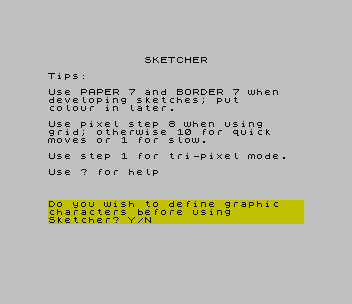
Source Code
    2 REM printer driver call removed (tape version)
    4 POKE 23658,NOT PI: LET thick=NOT PI
    5 GO TO 15
    7 REM Pixel STEP routine
    8 GO SUB Sy: INPUT "Enter pixel step (1-100)"; LINE i$
   10 IF CODE i$<49 OR CODE i$>57 THEN GO SUB Sx: GO TO 8
   12 LET k=VAL i$: RETURN
   14 REM Module 0 - Initialization & UserDefined Graphics
   16 LET mode=NOT PI
   20 BORDER 7: PAPER 7: INK NOT PI: OVER NOT PI: BRIGHT NOT PI: FLASH NOT PI: INVERSE NOT PI: CLS
   30 PRINT INK NOT PI;AT 0,12;"SKETCHER"''"Tips:"''"Use PAPER 7 and BORDER 7 when   developing sketches; put","colour in later."''"Use pixel step 8 when using","grid; otherwise 10 for quick    moves or 1 for slow."''"Use step 1 for tri-pixel mode."''"Use ? for help"
   40 PRINT ''' PAPER 6;"Do you wish to define graphic   characters before using","Sketcher? Y/N",,
   50 PAUSE VAL "0": LET i$=INKEY$
   60 IF i$="n" THEN PRINT AT 10,NOT PI,,,,,,,,: GO TO 400
   70 IF i$<>"y" THEN GO TO 50
   80 CLS : GO SUB Sy: PRINT AT 10,NOT PI,,,,,,,,
   90 FOR n=NOT PI TO 20: PRINT AT 2,n;CHR$ (65+n);AT PI,n;CHR$ (144+n): NEXT n
  100 PRINT AT 20,NOT PI;"Which character do you wish to  redefine?"
  110 PAUSE NOT PI: LET i$=INKEY$
  120 IF i$<"A" OR i$>"U" AND i$<"a" OR i$>"u" THEN GO TO 110
  130 IF CODE i$<86 THEN LET g=79
  140 IF CODE i$>96 THEN LET g=47
  150 GO SUB Sy: PRINT INK 2; FLASH 1;AT 3,CODE i$+g-144;CHR$ (CODE i$+g)
  160 PRINT AT 20,NOT PI,,,,
  170 PRINT AT 6,NOT PI;"Input the 8 decimal or binary   numbers defining the character. "
  175 FOR j=NOT PI TO 7
  180 INPUT LINE k$: IF k$="" OR (LEN k$>3 AND LEN k$<>8) THEN GO TO 180
  185 IF LEN k$=8 THEN GO TO 230
  190 LET m=NOT PI: FOR n=SGN PI TO LEN k$
  200 IF k$(n)>="0" AND k$(n)<="9" THEN LET m=m+1
  210 NEXT n: IF m<LEN k$ THEN GO TO 180
  215 IF VAL k$>255 OR VAL k$<NOT PI THEN GO TO 180
  220 LET byte=VAL k$: GO TO 270
  230 LET m=NOT PI: FOR n=SGN PI TO 8: IF k$(n)="0" OR k$(n)="1" THEN LET m=m+1: NEXT n
  240 IF m<8 THEN GO TO 180
  250 LET byte=NOT PI: LET m=7
  260 FOR n=SGN PI TO 8: LET byte=byte+(VAL k$(n)*(2^m)): LET m=m-1: NEXT n
  270 GO SUB Sy: PRINT AT 9+j,NOT PI;"Decimal code number ";j+1;" = ";byte
  280 POKE USR CHR$ (CODE i$+g)+j,byte
  290 NEXT j
  300 GO SUB Sy: PRINT INK 2;AT PI,CODE i$+g-144;CHR$ (CODE i$+g)
  310 PRINT INK PI; FLASH 1;AT 18,NOT PI;"Redefined character shown above. Do you wish to change another? "
  320 PAUSE NOT PI: LET i$=INKEY$
  330 IF i$="y" THEN GO SUB Sy: PRINT AT 2,NOT PI,,,,AT 6,NOT PI,,,,AT 9,NOT PI,,,,,,,,,,,,,,,,AT 18,NOT PI,,,,: GO TO 90
  340 IF i$<>"n" THEN GO TO 320
  350 GO SUB Sy: CLS : PRINT AT 15,NOT PI;"Do you wish a copy of the new   set of defined graphics? Y/N    "
  360 PAUSE NOT PI: LET i$=INKEY$
  370 IF i$="n" THEN GO TO 400
  380 IF i$<>"y" THEN GO TO 360
  390 FOR n=NOT PI TO 20: LPRINT CHR$ (65+n),CHR$ (144+n): NEXT n
  400 GO SUB Sy: CLS : PRINT AT 10,NOT PI;"Select paper colour (0-7) "
  410 PAUSE NOT PI: LET i$=INKEY$: IF i$<"0" OR i$>"7" THEN GO TO 410
  420 REM LET p=VAL i$: LET i=7*(p>=0 AND p<=2)
  423 LET p=VAL i$: LET i=9
  425 GO SUB Sy: PRINT AT 10,NOT PI;"Select border colour (0-7) "
  430 PAUSE NOT PI: LET i$=INKEY$: IF i$<"0" OR i$>"7" THEN GO TO 430
  440 LET b=VAL i$
  450 BORDER b: PAPER p: INK i: CLS
  455 LET k=1
  460 GO SUB 4000: GO TO 999
  550 LET x=x+k*(i$="t")+k*(i$="b")+k*(i$="g")-k*(i$="e")-k*(i$="d")-k*(i$="c")
  560 LET y=y+k*(i$="e")+k*(i$="r")+k*(i$="t")-k*(i$="c")-k*(i$="v")-k*(i$="b")
  570 LET x=x+k*(x<NOT PI)-k*(x>255): LET y=y+k*(y<NOT PI)-k*(y>175)
  580 RETURN
  590 RETURN
  600 BEEP .05,40: RETURN
 1000 REM Module 1.0, Main Loop Pixel Mode
 1001 POKE 23658,0
 1005 PRINT #1;AT 1,NOT PI;"Xplot=";x;"  -  Yplot=";y;" "; INVERSE 1;" df= ";k
 1010 IF NOT plot THEN PLOT OVER SGN PI;x,y: GO SUB Sy
 1015 IF plot AND thick THEN PLOT x,y: RANDOMIZE USR 58500: GO SUB Sy
 1018 IF plot THEN PLOT x,y: GO SUB Sy
 1020 IF NOT repeat AND INKEY$<>"" THEN GO TO 1020
 1030 LET i$=INKEY$: IF i$="" THEN GO TO 1030
 1035 IF i$="?" THEN GO SUB 9000
 1040 IF NOT plot AND NOT unplot THEN PLOT OVER SGN PI;x,y
 1045 IF unplot AND POINT (x,y)=1 THEN PLOT OVER SGN PI;x,y
 1070 GO SUB 500
 1075 IF i$="%" THEN LET thick=ABS (thick-1): GO SUB 4600
 1080 IF i$="p" THEN GO TO 7000
 1085 IF i$="#" THEN GO SUB 9800
 1090 IF i$<"f" OR i$="g" OR i$="p" OR i$="r" OR (i$>"s" AND i$<"w") OR i$>"z" THEN GO TO 1000
 1100 GO SUB CODE i$*200-18000: GO TO 1000
 2400 REM Module 1.8 - Fill
 2405 GO SUB Sy: PRINT #1;o$;"Fill routine - Confirm Y/N",,,
 2406 PAUSE NOT PI: LET i$=INKEY$
 2407 IF i$="n" THEN GO SUB 4000: RETURN
 2408 IF i$<>"y" THEN GO TO 2406
 2409 GO SUB Sy: PRINT #1; PAPER 2; INK 7; FLASH 1;o$;"              WAIT",
 2420 LET A=USR 64800
 2450 GO SUB 4000: RETURN
 2460 GO SUB Sy: PRINT #1; FLASH 1;o$;"             WAIT",: RETURN
 2800 REM Module 1.5, Draw Circle
 2810 GO SUB Sy: INPUT "Circle mode. Radius? "; LINE i$: IF i$="" THEN GO TO 2810
 2815 LET m=NOT PI: FOR n=SGN PI TO LEN i$
 2820 IF i$(n)>="0" AND i$(n)<="9" THEN LET m=m+1
 2825 NEXT n: IF m<LEN i$ THEN GO TO 2810
 2830 LET r=VAL i$: IF x-r<NOT PI OR x+r>255 OR y-r<NOT PI OR y+r>175 THEN PRINT #1; FLASH 1;o$;"CIRCLE TOO LARGE. PRESS ANY KEY ": PAUSE NOT PI: GO TO 2850
 2840 CIRCLE x,y,r
 2850 GO SUB 4000: RETURN
 3000 REM Module 1.13 - Border/Ink change
 3010 GO SUB Sy: PRINT #1;o$;"Change - border(B) - ink(I) -   or none of these(N) ?",
 3020 PAUSE NOT PI: LET i$=INKEY$
 3030 IF i$="n" AND NOT mode THEN GO SUB 4000: RETURN
 3035 IF i$="n" AND mode THEN RETURN
 3040 IF i$="i" THEN GO TO 3120
 3050 IF i$<>"b" THEN GO TO 3020
 3080 GO SUB Sy: PRINT #1;o$;"Choose new border colour (0-7)  ",,
 3090 PAUSE NOT PI: LET i$=INKEY$
 3100 IF i$<"0" OR i$>"7" THEN GO TO 3090
 3110 BORDER VAL i$: PRINT #1;o$,,,,
 3115 IF NOT mode THEN GO SUB 4000: RETURN
 3118 IF mode THEN RETURN
 3120 GO SUB Sy: PRINT #1;o$;"Choose new ink colour (not ";p;" )  ",,
 3130 PAUSE NOT PI: LET i$=INKEY$
 3140 IF i$<"0" OR i$>"7" OR i$=STR$ p THEN GO TO 3130
 3150 LET i=VAL i$: INK i
 3160 IF NOT mode THEN GO SUB 4000: RETURN
 3165 IF mode THEN RETURN
 3200 REM Module 1.10 - LOAD
 3210 GO SUB Sy: PRINT #1;o$;"Load routine - Confirm Y/N",,,
 3220 PAUSE NOT PI: LET i$=INKEY$
 3230 IF i$="n" THEN GO SUB 4000: RETURN
 3240 IF i$<>"y" THEN GO TO 3220
 3250 GO SUB Sy: INPUT "Filename? ";n$
 3260 IF LEN n$>10 THEN GO SUB Sx: PRINT #1;o$;"10 characters or less please    ": PAUSE 240: GO TO 3250
 3270 PRINT #1;o$;"Start tape, then press any key. "
 3280 PAUSE NOT PI: LOAD n$SCREEN$ : GO SUB Sy: PRINT #1;o$;"Loading compete - press enter   "
 3290 PAUSE NOT PI: IF INKEY$<>CHR$ 13 THEN GO TO 3290
 3295 LET x=10: LET y=10: LET r=NOT PI: LET xp=NOT PI: LET yp=NOT PI: GO SUB 4000: RETURN
 3400 REM Module 1.6 - Delete CIRCLE
 3410 IF NOT r THEN RETURN
 3420 IF x-r<NOT PI OR x+r>255 OR y-r<NOT PI OR y+r>175 THEN RETURN
 3430 GO SUB Sy: CIRCLE OVER SGN PI;x,y,r: GO SUB 4000: RETURN
 3600 REM Module 1.7 - LINE Drawing
 3604 GO SUB Sy: PRINT #1;o$; BRIGHT 1;"Line drawing mode:Confirm Y/N", BRIGHT 0,,
 3606 PAUSE NOT PI: LET i$=INKEY$
 3608 IF i$="n" THEN GO SUB 4000: RETURN
 3610 IF i$<>"y" THEN GO TO 3606
 3615 LET x1=x: LET y1=y
 3618 GO SUB 8
 3620 PRINT #1;o$; BRIGHT 1;"Line Mode:Move Pixel then KEY l "
 3625 LET i$=INKEY$: IF i$="l" OR i$="n" OR i$="y" THEN GO TO 3625
 3630 PLOT OVER SGN PI;x,y: PLOT x1,y1: GO SUB Sy
 3635 PRINT #1;AT 1,NOT PI;"Xplot=";x;"   -   Yplot=";y;"      "
 3640 LET i$=INKEY$: IF i$="" THEN GO TO 3640
 3645 IF i$="l" THEN GO SUB Sy: GO TO 3675
 3650 PLOT OVER SGN PI;x,y
 3655 GO SUB 550
 3670 GO TO 3630
 3675 PRINT #1;o$;"Is current position OK? Y/N     "
 3680 PAUSE NOT PI: LET i$=INKEY$
 3685 IF i$="n" THEN PLOT OVER SGN PI;x,y: GO TO 3620
 3690 IF i$<>"y" THEN GO TO 3680
 3695 GO SUB Sy: PLOT x1,y1: DRAW x-x1,y-y1
 3700 PRINT #1;o$;"Is line satisfactory? Y/N       "
 3705 PAUSE NOT PI: LET i$=INKEY$
 3710 IF i$="y" THEN GO SUB Sy: GO TO 3750
 3715 IF i$<>"n" THEN GO TO 3705
 3720 GO SUB Sy: PLOT x1,y1: DRAW OVER SGN PI;x-x1,y-y1
 3725 PRINT #1;o$;"Quit Line Drawing Routine? Y/N  "
 3730 PAUSE NOT PI: LET i$=INKEY$
 3735 IF i$="y" THEN GO SUB Sy: LET x=x1: LET y=y1: GO SUB 4000: RETURN
 3740 IF i$<>"n" THEN GO TO 3730
 3745 GO TO 3620
 3750 PRINT #1;o$;"Another line? Y/N",
 3755 PAUSE NOT PI: LET i$=INKEY$
 3760 IF i$="n" THEN GO SUB 4000: RETURN
 3765 IF i$<>"y" THEN GO TO 3755
 3770 LET x1=x: LET y1=y: GO TO 3620
 3800 REM Module 1.2 - Slow Pixel MOVE
 3810 LET plot=NOT PI: LET unplot=NOT PI: LET repeat=NOT PI
 3820 PRINT #1;o$; BRIGHT 1;"Slow Move Pixel Mode",: RETURN
 4000 REM                        Module 1.1 Autorepeat Pixel MOVE
 4010 LET plot=NOT PI: LET unplot=NOT PI: LET repeat=SGN PI
 4015 GO SUB 8
 4020 PRINT #1;o$; BRIGHT 1;"Auto-repeat move pixel mode",: RETURN
 4200 REM Module 1.15 - Change  Attributes
 4210 GO SUB Sy: PRINT #1;o$;"Change attributes - Confirm Y/N ",,
 4220 PAUSE NOT PI: LET i$=INKEY$
 4230 IF i$="n" THEN GO SUB 4000: RETURN
 4235 IF i$="n" AND mode THEN RETURN
 4240 IF i$<>"y" THEN GO TO 4220
 4250 GO SUB Sy: INPUT "Enter Yprint co-ord.", LINE i$: IF i$="" THEN GO TO 4250
 4260 LET m=NOT PI: FOR n=SGN PI TO LEN i$: IF i$(n)>="0" AND i$<="9" THEN LET m=m+1
 4270 NEXT n: IF m<LEN i$ THEN GO TO 4250
 4280 LET yattr=VAL i$: IF yattr>21 OR yattr<NOT PI THEN GO TO 4250
 4290 GO SUB Sy: INPUT "Enter Xprint co-ord.", LINE i$: IF i$="" THEN GO TO 4290
 4300 LET m=NOT PI: FOR n=SGN PI TO LEN i$: IF i$(n)>="0" AND i$<="9" THEN LET m=m+1
 4310 NEXT n: IF m<LEN i$ THEN GO TO 4290
 4320 LET xattr=VAL i$: IF xattr>31 OR xattr<NOT PI THEN GO TO 4290
 4330 GO SUB Sy: PRINT #1;o$;"Paper Colour? (0-7)",
 4340 PAUSE NOT PI: LET i$=INKEY$
 4350 IF i$>"7" OR i$<"0" THEN GO TO 4340
 4360 LET p=VAL i$: GO SUB Sy: PRINT #1;o$;"Ink Colour? (0-7, but NOT ";p;"!)"
 4370 PAUSE NOT PI: LET i$=INKEY$
 4380 IF i$>"7" OR i$<"0" OR i$=STR$ p THEN GO TO 4370
 4390 LET i=VAL i$: GO SUB Sy: PRINT #1;o$;"BRIGHT Attribute - 0 OR 1?",
 4400 PAUSE NOT PI: LET i$=INKEY$
 4410 IF i$<"0" OR i$>"1" THEN GO TO 4400
 4420 LET bright=VAL i$: GO SUB Sy: PRINT #1;o$;"FLASH attribute? - 0 OR 1?",
 4430 PAUSE NOT PI: LET i$=INKEY$
 4440 IF i$<"0" OR i$>"1" THEN GO TO 4430
 4450 LET flash=VAL i$
 4460 GO SUB Sy: PRINT #1;o$;"Choice: Bright ";bright;" Flash ";flash;" Ink ";i'"Paper ";p;" AT ";yattr;",";xattr;" Confirm Y/N"
 4470 PAUSE NOT PI: LET i$=INKEY$
 4480 IF i$="n" THEN GO TO 4200
 4490 IF i$<>"y" THEN GO TO 4470
 4500 GO SUB Sy: PRINT #1;o$;"Cursor to overlay, Enter to quit"'"Co-ords: Yprint=";yattr;" Xprint=";xattr;"      "
 4505 PRINT OVER SGN PI; BRIGHT bright; FLASH flash; PAPER p; INK i;AT yattr,xattr;" "
 4510 IF INKEY$<>"" THEN GO TO 4510
 4520 LET i$=INKEY$: IF i$="" THEN GO TO 4520
 4530 IF CODE i$=13 THEN GO TO 4570
 4540 LET xattr=xattr+(i$="8")+(i$="g")-(i$="5")-(i$="d"): LET yattr=yattr+(i$="6")+(i$="v")-(i$="7")-(i$="r")
 4545 IF xattr<NOT PI THEN GO SUB Sx: LET xattr=NOT PI
 4550 IF xattr>31 THEN GO SUB Sx: LET xattr=31
 4554 IF yattr<NOT PI THEN GO SUB Sx: LET yattr=NOT PI
 4556 IF yattr>21 THEN GO SUB Sx: LET yattr=21
 4560 GO TO 4500
 4570 GO SUB Sy: PRINT #1;o$;"Return to control loop (R) or   Change further attributes (C) ? "
 4575 PAUSE NOT PI: LET i$=INKEY$
 4580 IF i$="r" AND NOT mode THEN PRINT #1;o$,,,,: GO SUB 4000: RETURN
 4582 IF i$="r" AND mode THEN PRINT #1;o$,,,,: RETURN
 4585 IF i$<>"c" THEN GO TO 4575
 4590 GO TO 4250
 4600 REM Module 1.3 - PLOT Pixel
 4610 LET plot=SGN PI: LET unplot=NOT PI: LET repeat=NOT PI
 4620 IF NOT thick THEN PRINT #1;o$; BRIGHT 1;"Plot pixel mode",,: RETURN
 4630 IF thick THEN PRINT #1;o$; BRIGHT 1;"Plot"; PAPER PI;" tri-pixel"; PAPER 7;"  mode",: RETURN
 5000 REM Module 1.9 - SAVE
 5010 GO SUB Sy: PRINT #1;o$;"Save to tape. Confirm - Y/N",,,
 5020 PAUSE NOT PI: LET i$=INKEY$
 5030 IF i$="n" THEN GO SUB 4000: RETURN
 5040 IF i$<>"y" THEN GO TO 5020
 5050 GO SUB Sy
 5060 INPUT "Filename? ";n$: IF n$="" THEN GO TO 5060
 5070 IF LEN n$>10 THEN GO SUB Sx: PRINT #1;o$;"10 characters or less",: PAUSE 240: GO TO 5060
 5080 SAVE n$SCREEN$
 5090 GO SUB Sy: PRINT #1;o$;"Save one more copy? Y/N",
 5100 PAUSE NOT PI: LET i$=INKEY$
 5110 IF i$="n" THEN GO SUB Sy: GO SUB 4000: RETURN
 5120 IF i$<>"y" THEN GO TO 5100
 5130 GO SUB Sy: PRINT #1;o$,,: SAVE n$SCREEN$
 5140 GO SUB 4000: RETURN
 5800 REM Module 1.4 - Unplot Pixel
 5810 LET plot=NOT PI: LET unplot=1: LET repeat=NOT PI
 5820 PRINT #1;o$; BRIGHT 1;"Unplot pixel mode",: RETURN
 6000 REM Module - Shape/Fill
 6010 GO SUB Sy: PRINT #1;o$; BRIGHT 1;"Shape & fill mode - Confirm Y/N ",,
 6020 PAUSE NOT PI: LET i$=INKEY$
 6022 IF i$="n" THEN GO SUB 4000: RETURN
 6024 IF i$<>"y" THEN GO TO 6040
 6030 INPUT #1;AT 1,NOT PI;"Enter diagonal Xplot",xs
 6050 INPUT #1;AT 1,NOT PI;"Enter diagonal Yplot",ys
 6062 INPUT #1;AT 1,NOT PI;"Choose colour (0-7)",clr
 6066 INK clr
 6070 PLOT x,y
 6080 DRAW 0,ys-y
 6090 LET x=x+1
 6100 IF x>=xs THEN INK i: GO TO 6150
 6110 GO TO 6070
 6150 LET x=10: LET y=x
 6160 GO SUB 4000: RETURN
 6200 REM Module 1.14 - Change PAPER & INK
 6210 GO SUB Sy: PRINT #1;o$;"Change paper & ink Confirm Y/N",,,
 6220 PAUSE NOT PI: LET i$=INKEY$
 6230 IF i$="n" AND NOT mode THEN GO SUB 4000: RETURN
 6235 IF i$="n" AND mode THEN RETURN
 6240 IF i$<>"y" THEN GO TO 6220
 6250 GO SUB Sy: PRINT #1; FLASH 1;o$;"Choose paper colour (0-7)",
 6260 PAUSE NOT PI: LET i$=INKEY$
 6270 IF i$>"7" OR i$<"0" THEN GO SUB Sx: GO TO 6260
 6280 GO SUB Sy: LET p=VAL i$: PRINT #1; FLASH 1;o$;"Choose ink colour (0-7),NOT ";p;"!"
 6290 PAUSE NOT PI: LET i$=INKEY$
 6300 IF i$>"7" OR i$<"0" OR i$=STR$ p THEN GO SUB Sx: GO TO 6290
 6310 GO SUB Sy: LET i=VAL i$
 6315 PAPER p: INK i
 6320 INPUT "Enter starting row (0-21)"; LINE i$: IF i$="" THEN GO TO 6320
 6325 LET m=NOT PI: FOR n=SGN PI TO LEN i$: IF i$(n)>="0" AND i$(n)<="9" THEN LET m=m+1
 6330 NEXT n: IF m<LEN i$ THEN GO TO 6320
 6335 LET r0=VAL i$: IF r0<NOT PI OR r0>21 THEN GO TO 6320
 6340 INPUT "Enter finishing row"; LINE i$: IF i$="" THEN GO TO 6340
 6345 LET m=NOT PI: FOR n=SGN PI TO LEN i$: IF i$(n)>="0" AND i$(n)<="9" THEN LET m=m+1
 6350 NEXT n: IF m<LEN i$ THEN GO TO 6340
 6360 LET r1=VAL i$: IF r1>21 THEN GO TO 6340
 6365 IF r1<r0 THEN GO SUB Sx: PRINT #1;o$;"Finishing row above starting    row!     Try again.",: PAUSE 240: GO TO 6320
 6370 FOR n=r0 TO r1: PRINT OVER SGN PI;AT n,NOT PI;"                                ": NEXT n
 6380 IF NOT mode THEN GO SUB 4000: RETURN
 6385 IF mode THEN RETURN
 6400 REM Module 1.11 - COPY
 6410 GO SUB Sy: PRINT #1;o$;"Copy routine - Confirm Y/N",,,
 6420 PAUSE NOT PI: LET i$=INKEY$
 6430 IF i$="n" THEN GO SUB 4000: RETURN
 6440 IF i$<>"y" THEN GO TO 6420
 6450 GO SUB Sy: COPY : GO SUB 4000: RETURN
 7000 REM Module 2.0 - Secondary  Loop - Print Mode
 7005 LET mode=1
 7010 LET cursorp=p: IF p<=2 THEN LET cursorp=p+4
 7020 PRINT #1;o$;"Cursor move print mode","Yprint=";yp;"   -   Xprint=";xp,
 7030 PRINT PAPER cursorp; OVER SGN PI; BRIGHT 1;AT yp,xp;" ": GO SUB Sy
 7040 IF INKEY$="p" OR INKEY$=CHR$ 13 THEN GO TO 7040
 7050 LET i$=INKEY$: IF i$="" THEN GO TO 7050
 7060 PRINT OVER SGN PI;AT yp,xp;" "
 7070 LET yp=yp+(i$="6")-(i$="7"): LET xp=xp+(i$="8")-(i$="5")
 7080 IF xp<NOT PI THEN GO SUB Sx: LET xp=NOT PI
 7090 IF xp>31 THEN GO SUB Sx: LET xp=31
 7100 IF yp<NOT PI THEN GO SUB Sx: LET yp=NOT PI
 7110 IF yp>21 THEN GO SUB Sx: LET yp=21
 7120 IF i$="1" THEN GO SUB 7200
 7130 IF i$="3" THEN GO SUB 8300
 7140 IF i$="2" OR i$="4" THEN GO SUB 7700
 7145 IF i$="#" THEN GO SUB 9800
 7148 IF i$="`" THEN GO SUB 9840
 7150 IF i$="9" THEN GO SUB 7400
 7155 IF i$="?" THEN GO SUB 9400
 7157 IF i$="0" THEN GO SUB 8000
 7160 IF i$="p" THEN GO SUB 4000: GO TO 1000
 7165 IF i$="o" THEN GO SUB 4200
 7170 IF i$="i" THEN GO SUB 3000
 7175 IF i$="y" THEN GO SUB 6200
 7180 GO TO 7020
 7200 REM Module 2.1 - PRINT Text
 7210 PRINT #1;o$;"Print on screen print mode      Yprint=";yp;"  -  xprint=";xp;"  "
 7220 PRINT PAPER cursorp; OVER SGN PI; BRIGHT 1;AT yp,xp;" ": GO SUB Sy
 7230 IF INKEY$<>"" THEN GO TO 7230
 7240 LET p$=INKEY$: IF p$="" THEN GO TO 7240
 7250 IF CODE p$>=31 AND CODE p$<=122 THEN PRINT AT yp,xp;p$
 7260 IF CODE p$=12 THEN GO SUB 7600: GO TO 7210
 7270 IF CODE p$=13 THEN RETURN
 7280 LET xp=xp+1: IF xp>31 THEN LET xp=NOT PI: LET yp=yp+1
 7290 IF yp>21 THEN GO SUB Sx: LET yp=21: LET xp=31
 7300 GO TO 7210
 7400 REM PRINT defined graphics
 7410 PRINT #1;o$;"Defined graphics print mode","Yprint=";yp;;" - Xprint=";xp,
 7420 PRINT PAPER cursorp; OVER SGN PI; BRIGHT 1;AT yp,xp;" ": GO SUB Sy
 7430 IF INKEY$<>"" THEN GO TO 7430
 7440 LET p$=INKEY$: IF p$="" THEN GO TO 7440
 7450 IF CODE p$=12 THEN GO SUB 7600: GO TO 7410
 7460 IF CODE p$=13 THEN RETURN
 7470 LET g$=CHR$ ((CODE p$=56)*128+(CODE p$=11)*136+(CODE p$=10)*137+(CODE p$=8)*138+(CODE p$=5)*139+(CODE p$=4)*140+(CODE p$=6)*141+(CODE p$=7)*142+(CODE p$=9)*143): IF CODE g$>127 THEN GO TO 7530
 7480 IF CODE p$>=49 AND CODE p$<=55 THEN LET g$=CHR$ (CODE p$+80): GO TO 7530
 7490 IF CODE p$>=97 AND CODE p$<=117 THEN LET g$=CHR$ (CODE p$+47): GO TO 7530
 7500 IF CODE p$>=65 AND CODE p$<=85 THEN LET g$=CHR$ (CODE p$+79): GO TO 7530
 7510 IF p$=" " THEN LET g$=p$: GO TO 7530
 7520 GO TO 7420
 7530 PRINT AT yp,xp;g$
 7540 LET xp=xp+1: IF xp>31 THEN LET xp=NOT PI: LET yp=yp+1
 7550 IF yp>21 THEN GO SUB Sx: LET yp=21: LET xp=31
 7560 GO TO 7410
 7600 REM Module 2.3 - Delete    Normal size text
 7610 LET xpd=xp-1: LET ypd=yp: IF xpd<NOT PI THEN LET xpd=31: LET ypd=ypd-1-(i$="2")
 7620 IF ypd<NOT PI THEN GO SUB Sx: LET ypd=NOT PI: LET xpd=YPD
 7630 PRINT AT yp,xp;" ";AT ypd,xpd;" "
 7635 IF i$="2" THEN PRINT AT yp+1,xp;"  ";AT ypd+1,xpd;" "
 7640 LET xp=xpd: LET yp=ypd: RETURN
 7700 REM Module 2.4 - PRINT     double-height or large-size     characters
 7710 IF xp=31 AND i$="4" THEN LET xp=30
 7720 IF yp=21 THEN LET yp=20
 7730 IF i$="2" THEN PRINT #1;o$;"Double-height print mode",
 7740 IF i$="4" THEN PRINT #1;o$;"Large-size print mode",
 7745 PRINT #1;AT 1,NOT PI;"Yprint=";yp;" - Xprint=";xp,
 7750 LET xplot=xp*8: LET yplot=(21-yp)*8+7
 7760 PRINT PAPER cursorp; OVER SGN PI; BRIGHT 1;AT yp,xp;" ";AT yp+1,xp;" "
 7770 IF i$="4" THEN PRINT PAPER cursorp; OVER SGN PI; BRIGHT 1;AT yp,xp+1;" ";AT yp+1,xp+1;" "
 7780 GO SUB Sy
 7790 IF INKEY$<>"" THEN GO TO 7790
 7800 LET p$=INKEY$: IF p$="" THEN GO TO 7800
 7805 IF p$>"z" THEN GO TO 7790
 7810 PRINT OVER SGN PI;AT yp,xp;" ";AT yp+1,xp;" "
 7820 IF i$="4" THEN PRINT OVER SGN PI;AT yp,xp+1;" ";AT yp+1,xp+1;" "
 7824 IF p$=CHR$ 12 AND i$="2" THEN GO SUB 7600: GO TO 7720
 7826 IF p$=CHR$ 12 AND i$="4" THEN GO SUB 8700: GO TO 7720
 7830 IF p$=CHR$ 13 THEN RETURN
 7840 IF p$=CHR$ 32 THEN GO TO 7910
 7850 GO SUB 2460
 7855 PRINT AT yp,xp;" ";AT yp+1,xp;" ": IF i$="4" THEN PRINT AT yp,xp+1;" ";AT yp+1,xp+1;" "
 7860 GO SUB 8600
 7870 FOR r=SGN PI TO 8: FOR c=SGN PI TO 8
 7880 IF l$(r,c)="1" AND i$="4" THEN PLOT xplot,yplot: PLOT xplot+1,yplot: PLOT xplot,yplot-1: PLOT xplot+1,yplot-1
 7885 IF l$(r,c)="1" AND i$="2" THEN PLOT xplot,yplot: PLOT xplot,yplot-1
 7890 LET xplot=xplot+VAL i$/2: NEXT c
 7900 LET xplot=xplot-VAL i$*4: LET yplot=yplot-2: NEXT r
 7910 LET xp=xp+VAL i$/2
 7920 IF xp=31 AND i$="4" THEN LET xp=1: LET yp=yp+2
 7930 IF xp=32 THEN LET xp=NOT PI: LET yp=yp+2
 7940 IF yp>20 THEN LET xp=31: LET yp=21: GO SUB Sx: RETURN
 7950 GO TO 7730
 8000 REM Module 2.8 - PRINT     Giant Characters
 8010 IF xp>28 THEN LET xp=28
 8020 IF yp>18 THEN LET yp=18
 8030 PRINT #1;o$;"Giant-size print mode","Yprint=";yp;"  -  Xprint=";xp,
 8040 FOR c=xp TO xp+3: FOR r=yp TO yp+3: PRINT PAPER cursorp; OVER SGN PI; BRIGHT 1;AT r,c;" ": NEXT r: NEXT c
 8050 GO SUB Sy
 8060 IF INKEY$<>"" THEN GO TO 8060
 8070 LET p$=INKEY$: IF p$="" THEN GO TO 8070
 8075 IF p$>"z" THEN GO TO 8060
 8080 FOR c=xp TO xp+3: FOR r=yp TO yp+3: PRINT OVER SGN PI;AT r,c;" ": NEXT r: NEXT c
 8085 IF p$=CHR$ 12 THEN GO SUB 8800: GO TO 8030
 8090 IF p$=CHR$ 13 THEN RETURN
 8100 IF p$=CHR$ 32 THEN GO TO 8160
 8110 GO SUB 2460
 8120 GO SUB 8600
 8130 FOR r=SGN PI TO 4: FOR c=SGN PI TO 4: LET k=(VAL l$(r*2-1,c*2-1)*2)+VAL l$(r*2-1,c*2)+(VAL l$(r*2,c*2-1)*8)+(VAL l$(r*2,c*2)*4)
 8140 PRINT AT yp+r-1,xp+c-1;CHR$ (128+k)
 8150 NEXT c: NEXT r
 8160 LET xp=xp+4
 8170 IF xp=32 THEN LET xp=NOT PI: LET yp=yp+4
 8180 IF xp=31 THEN LET xp=3: LET yp=yp+4
 8190 IF xp=30 THEN LET xp=2: LET yp=yp+4
 8200 IF xp=29 THEN LET xp=1: LET yp=yp+4
 8210 IF yp>18 THEN LET xp=31: LET yp=21: GO SUB Sy: RETURN
 8220 GO TO 8030
 8300 REM Print double-width     characters
 8310 IF xp=31 THEN LET xp=30
 8320 PRINT #1;o$;"Double-width print mode","Yprint=";yp;" - Xprint=";xp;"   "
 8330 LET xplot=xp*8: LET yplot=(21-yp)*8+7
 8340 PRINT PAPER cursorp; OVER SGN PI; BRIGHT 1;AT yp,xp;" ";AT yp,xp+1;" ": GO SUB Sy
 8350 IF INKEY$<>"" THEN GO TO 8350
 8360 LET p$=INKEY$: IF p$="" THEN GO TO 8360
 8365 IF p$>"z" THEN GO TO 8350
 8370 PRINT OVER SGN PI;AT yp,xp;" ";AT yp,xp+1;" "
 8375 IF p$=CHR$ 12 THEN GO SUB 8700: GO TO 8320
 8380 IF p$=CHR$ 13 THEN RETURN
 8390 IF p$=CHR$ 32 THEN GO TO 8470
 8400 GO SUB 2460
 8410 PRINT AT yp,xp;" ";AT yp,xp+1;" "
 8420 GO SUB 8600
 8430 FOR r=SGN PI TO 8: FOR c=SGN PI TO 8
 8440 IF l$(r,c)="1" THEN PLOT xplot,yplot: PLOT xplot+1,yplot
 8450 LET xplot=xplot+2: NEXT c
 8460 LET xplot=xplot-16: LET yplot=yplot-1: NEXT r
 8470 LET xp=xp+2
 8480 IF xp=31 THEN LET xp=1: LET yp=yp+1
 8490 IF xp=32 THEN LET xp=NOT PI: LET yp=yp+1
 8500 IF yp>21 THEN LET xp=31: LET yp=21: GO SUB Sx: RETURN
 8510 GO TO 8320
 8600 REM Module 2.5 PEEK Character  bytes & decimal/binary conversion
 8610 FOR n=NOT PI TO 7: LET peek=PEEK (15360+8*CODE p$+n)
 8620 LET b$="": FOR m=SGN PI TO 8
 8630 LET b1=INT (peek/2): LET b2=peek-2*b1
 8640 LET q$=STR$ b2: LET b$=q$+b$: LET peek=b1: NEXT m
 8650 LET l$(n+1)=b$: NEXT n
 8660 RETURN
 8700 REM Delete double-width  & large print
 8710 LET xpd=xp-2: LET ypd=yp
 8720 IF xpd=-2 THEN LET xpd=30: LET ypd=ypd-1-(i$="4")
 8730 IF xpd=-1 THEN LET xpd=29: LET ypd=ypd-1-(i$="4")
 8740 IF ypd<NOT PI THEN GO SUB Sx: LET ypd=NOT PI: LET xpd=NOT PI
 8750 PRINT AT yp,xp;"  ";AT ypd,xpd;"  ": IF i$="4" THEN PRINT AT yp+1,xp;"  ";AT ypd+1,xpd;"  "
 8760 LET xp=xpd: LET yp=ypd: RETURN
 8800 REM Module 2.9 - Delete    Giant Characters
 8810 LET xpd=xp-4: LET ypd=yp
 8820 IF xpd=-1 THEN LET xpd=27: LET ypd=ypd-4
 8830 IF xpd=-2 THEN LET xpd=26: LET ypd=ypd-4
 8840 IF xpd=-3 THEN LET xpd=25: LET ypd=ypd-4
 8850 IF xpd=-4 THEN LET xpd=28: LET ypd=ypd-4
 8860 IF ypd<NOT PI THEN GO SUB Sx: LET ypd=NOT PI: LET xpd=YPD
 8870 FOR c=NOT PI TO 3: FOR r=NOT PI TO 3
 8880 PRINT AT ypd+r,xpd+c;" ";AT yp+r,xp+c;" "
 8890 NEXT r: NEXT c
 8900 LET xp=xpd: LET yp=ypd: RETURN
 9010 CLS
 9020 PRINT INK 6; PAPER 0;AT 1,6;"COMMANDS AVAILABLE"
 9030 PRINT 't$; PAPER SGN PI; INK 7;"m = slow pixel",
 9032 PRINT t$; PAPER SGN PI; INK 7;"q = plot pixel",
 9034 PRINT t$; PAPER SGN PI; INK 7;"w = unplot pixel",
 9036 PRINT t$; PAPER SGN PI; INK 7;"n = autorepeat pixel",
 9040 PRINT t$; PAPER 2; INK 7;"h = circle",
 9050 PRINT t$; PAPER 2; INK 7;"k = delete circle",
 9060 PRINT t$; PAPER 4; INK NOT PI;"l = draw lines",
 9065 PRINT t$; PAPER 4; INK NOT PI;"x = rectangles/fill",
 9070 PRINT t$; PAPER 4; INK NOT PI;"f = fill shapes",
 9100 PRINT t$; PAPER SGN PI; INK 5; BRIGHT 1;"s = save screen$",
 9110 PRINT t$; PAPER SGN PI; INK 5; BRIGHT 1;"j = load screen$",
 9120 PRINT t$; PAPER 6; INK 1;"z = copy",
 9130 PRINT t$; PAPER 4; BRIGHT 1; INK NOT PI;"i = change border/ink",
 9140 PRINT t$; PAPER 4; BRIGHT 1; INK NOT PI;"o = change attributes",
 9150 PRINT t$; PAPER 4; BRIGHT 1; INK NOT PI;"y = change paper & ink",
 9155 PRINT t$; PAPER PI; INK 6;"p = toggle to print mode"
 9157 PRINT t$; PAPER PI; INK 6;"% = toggle tripixel",
 9158 PRINT t$; PAPER PI; INK 6;"# = toggle grid overlay "
 9160 PRINT PAPER PI; BRIGHT 1;AT 4,2;"PIXEL";AT 5,2;"MODE "
 9200 PRINT AT 10,2; BRIGHT 1;"e r t";AT 11,2;"     ";AT 12,2;"d . g";AT 13,2;"     ";AT 14,2;"c v b"
 9210 PRINT AT 15,2; INVERSE 1;"PIXEL";AT 16,2;"MOVE ";AT 17,2;"KEYS "
 9300 PRINT #1;o$;"PRESS ANY KEY TO CONTINUE": PAUSE NOT PI: CLS : GO SUB 4000: RETURN
 9400 REM Help routine-print mode
 9410 CLS
 9420 PRINT INK 6; PAPER 0;AT 0,6;"COMMANDS AVAILABLE"
 9430 PRINT 't$; PAPER SGN PI; INK 7;"1 = normal print",
 9440 PRINT t$; PAPER SGN PI; INK 7;"2 = double-height print "
 9450 PRINT t$; PAPER SGN PI; INK 7;"3 = double-width print",
 9460 PRINT t$; PAPER SGN PI; INK 7;"4 = large print",
 9470 PRINT t$; PAPER 2; INK 7;"5 = cursor left",
 9480 PRINT t$; PAPER 2; INK 7;"6 = cursor down",
 9490 PRINT t$; PAPER 2; INK 7;"7 = cursor up",
 9500 PRINT t$; PAPER 2; INK 7;"8 = cursor right",
 9510 PRINT t$; PAPER PI; INK 7;"9 = graphics character",
 9515 PRINT t$; PAPER PI; INK 7;"0 = giant character",
 9520 PRINT t$; PAPER 4; INK 7;"p = toggle to pixel mode"
 9525 PRINT t$; PAPER 4; INK 7;"# = toggle grid overlay "
 9530 PRINT t$; PAPER 5; INK NOT PI;"o = change attributes   "
 9535 PRINT t$; PAPER 5; INK NOT PI;"    under cursor control"
 9540 PRINT t$; PAPER 5; INK NOT PI;"i = change ink or border"
 9550 PRINT t$; PAPER 5; INK NOT PI;"y = change ink & paper  "
 9555 PRINT t$; PAPER 5; INK NOT PI;"    over part or whole  "
 9558 PRINT t$; PAPER 5; INK NOT PI;"    of screen",
 9560 PRINT t$; PAPER 6; INK NOT PI;"ENTER= return to cursor "
 9565 PRINT t$; PAPER 6; INK NOT PI;"       move control loop"
 9580 PRINT PAPER PI; BRIGHT 1;AT 4,2;"PRINT";AT 5,2;"MODE "
 9600 PRINT #1;o$;"PRESS ANY KEY TO CONTINUE": PAUSE NOT PI: CLS : RETURN
 9800 REM Toggle grid
 9810 POKE 23692,-1: PRINT INK 8; PAPER 8; OVER SGN PI;"                                ";
 9820 RANDOMIZE USR 58562
 9830 RETURN
 9840 STOP
 9850 CLEAR 58499: PRINT FLASH 1;"Keep tape running": LOAD "sketcher C"CODE : LOAD "sketcher D"CODE : POKE USR "a",255: FOR n=1 TO 7: POKE USR "a"+n,128: NEXT n
 9860 LET k=NOT PI: LET x=10: LET y=x: LET r=k: LET xp=k: LET yp=k: DIM l$(8,8): LET o$=CHR$ 22+CHR$ k+CHR$ k: LET t$=CHR$ 23+CHR$ 8+CHR$ k: LET Sx=600: LET Sy=590: GO TO k
 9870 SAVE "SKETCHER" LINE 9850: SAVE "sketcher C"CODE 64800,500: SAVE "sketcher D"CODE 58500,80
 9880 REM SKETCHER
 9890 REM Typed from Which Micro  84/4 p34 and successive issues. Additional routines developed.   R.H. Mitchell Willowdale       Ontario 1984.
 9900 REM Modified and copied by ALGIS E. GEDRIS   DEC. 20, 1986
Note: Type-in program listings on this website use ZMAKEBAS notation for graphics characters.