
Superfile is a personal phone directory and restaurant menu program that stores contact information in DATA statements, organized into categories such as BBS systems, bike shops, pizza restaurants, friends, and veterinarians. Each DATA record consists of a name/number string, a category label, and a call-type flag (0=local, 1=area code, 2=toll) that is printed alongside search results. The program supports two search modes: category-based lookup using numeric shortcuts (1–12) or named category strings, and a substring name search that scans any portion of each record’s name field using a sliding window loop. Results are simultaneously output to both the screen and a printer via paired PRINT/LPRINT statements throughout. Several hidden keyword commands such as “listfile,” “dmenu,” “pmenu,” “cmenu,” and “palmenu” are accepted at prompts to access special functions including a full file listing and hardcoded pizza and food menus.
Program Structure
The program is divided into several functional regions, navigated primarily through GO TO jumps rather than subroutines:
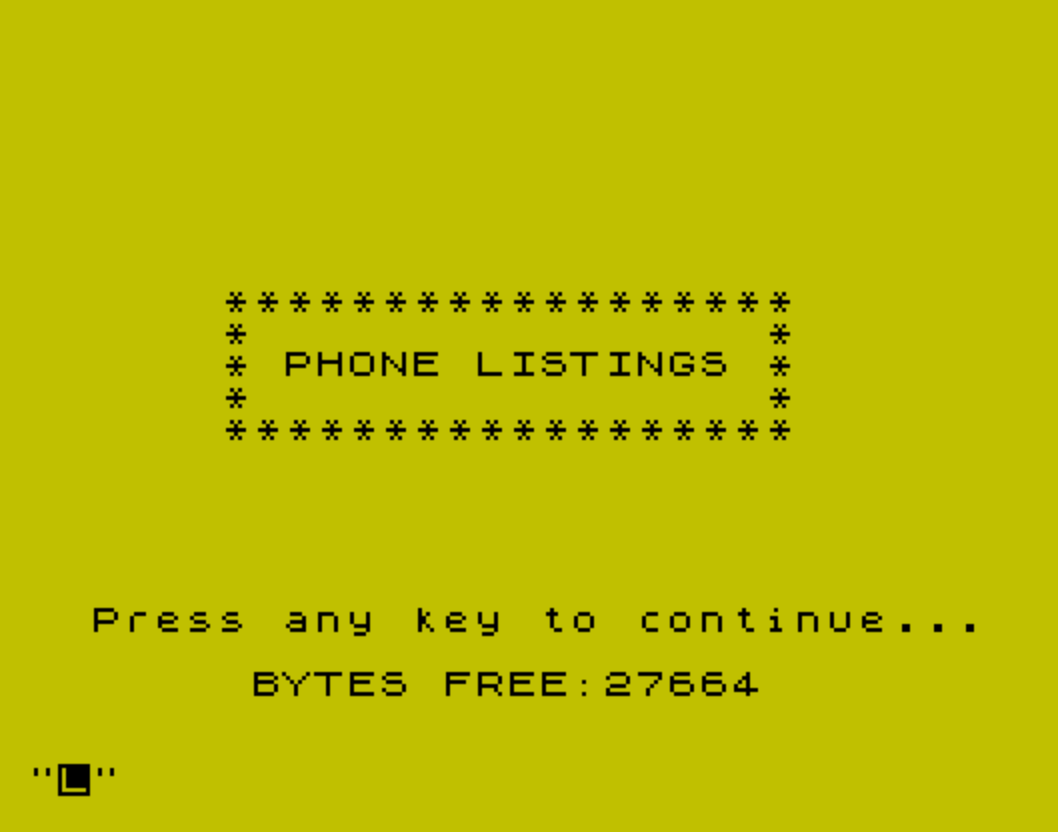
- Lines 1–6: Title screen with animated BEEP fanfare, FREE memory display, and a startup keypress wait.
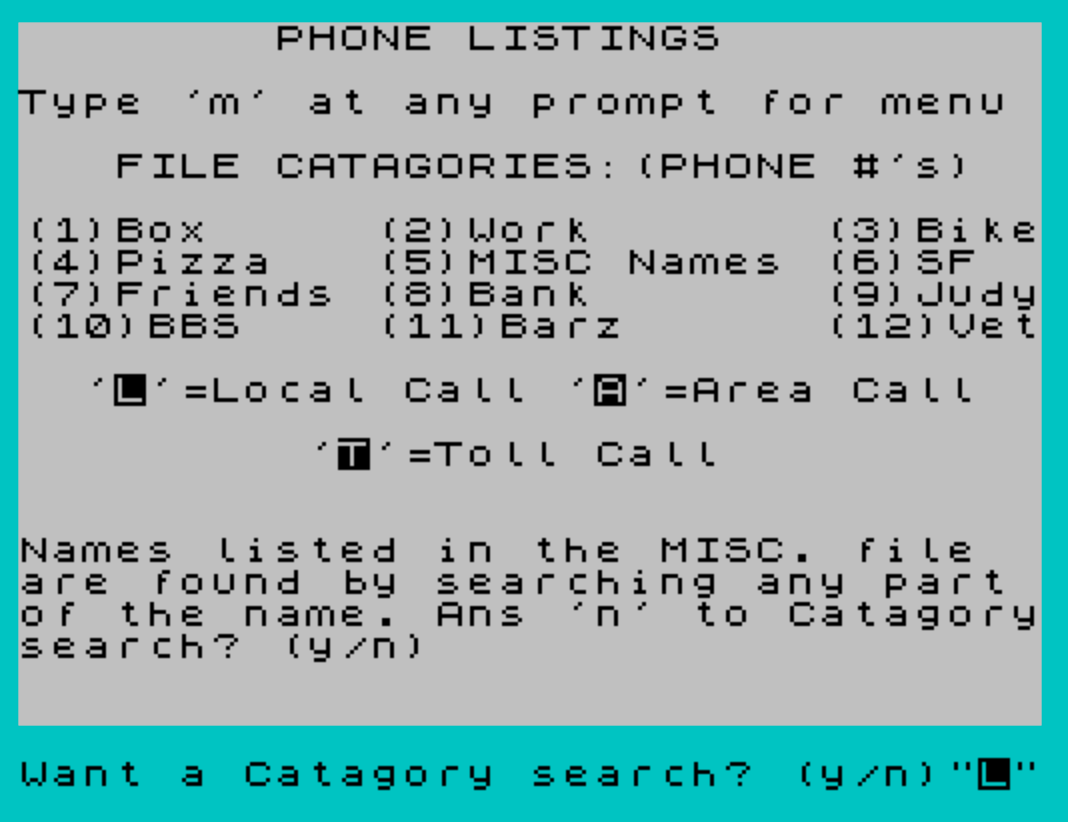
- Lines 19–50: Main menu display listing 12 named categories and call-type legend.
- Lines 100–150: Category search entry point; accepts special keyword commands and numeric/named category input.
- Lines 199–460: Name substring search loop and result display routing.
- Lines 500–621: Result formatting and output for both category and name searches.
- Lines 1000–7999: DATA statements containing the phone directory records.
- Lines 8000–8030: “listfile” mode — dumps all records sequentially to screen and printer.
- Lines 8500–8700: Numeric category alias translation (e.g., “1” → “Box”).
- Lines 9000–9996: Hardcoded pizza and food restaurant menus (Pizza Man, Doctor Munchies, and others implied by
cmenu/palmenu).
DATA Record Format
Each contact is stored as three DATA fields read into a$, b$, and f:
| Field | Variable | Contents |
|---|---|---|
| 1 | a$ | Name and phone number string (sometimes includes address) |
| 2 | b$ | Category label (e.g., “BBS”, “Bike”, “Pizza”, “Friends”) |
| 3 | f | Call type: 0=Local, 1=Area code, 2=Toll, 5=unlabeled |
The sentinel record at line 7999 uses a$="end" to signal end-of-file, after which RESTORE rewinds the DATA pointer for subsequent searches.
Substring Name Search
The name search (lines 400–460) implements a sliding-window substring match in BASIC. For a search string n$ of length x and a record name a$ of length y, a FOR loop iterates s from 1 to y-x+1, testing n$=a$(s TO s+x-1) at each position. This allows partial matches anywhere within the name field, which is why category 5 (“MISC Names”) is described in the menu as searchable by any part of the name. The search is case-sensitive, so capitalization must match the DATA entries exactly.
Dual Screen/Printer Output
Throughout the result display sections (lines 500–621), every PRINT statement is immediately followed by a matching LPRINT statement. This pattern is repeated for every combination of address flag (q$) and call-type flag (f), producing a total of around 20 paired output lines. The “listfile” mode at line 8000 similarly pairs PRINT a$, with LPRINT a$, on consecutive lines. Line 8000 also sets POKE 23692,255 to suppress the automatic scroll prompt, allowing continuous listing output without user intervention.
Navigation and Hidden Commands
The program accepts several special string commands at INPUT prompts that are not documented in the on-screen menu:
listfile— dumps the full DATA file to screen and printer (lines 8000–8030)pmenu— Pizza Man menu (line 9000)dmenu— Doctor Munchies menu (line 9200)cmenu— third restaurant menu (line 9400, not shown in listing)palmenu— fourth menu option (line 9500, not shown in listing)STOP(with trailing space) — cleanly halts executionm— returns to the main menu from most prompts
These commands are checked at both the top-level prompt (lines 108–114) and again after the category is entered (lines 121–124), providing two interception points.
Category Numeric Aliases
Lines 8500–8610 translate numeric inputs “1” through “12” into their corresponding category name strings before jumping to the search loop at line 199. Category “5” (MISC) is intentionally not translated — instead it displays a humorous scolding message and redirects to the name search, because MISC entries are only findable by substring name search, not by category match.
Call-Type Flag Value 5
The flag value f=5 appears in lines 503, 602, and 621, printing the name with trailing spaces but no call-type suffix. However, no DATA record in the listing actually uses f=5; values used are 0, 1, and 2. This code path appears to be dead code, possibly reserved for future use or a remnant of an earlier design.
Bugs and Anomalies
- Line 6 contains a sequence after the STOP:
LET i$=INKEY$:IF i$="" THEN GO TO 20. Because the precedingSTOPhalts execution, this code is unreachable under normal circumstances. - Line 150 reads
GO TO 8500but this is only reached when the category search path falls through without matching any special keyword command, which is the normal numeric/named category flow. This is correct behavior but the intermediate line 140 re-checks forlistfileredundantly, as it was already checked at line 112. - The DATA record at line 3760 for “John Peterson” uses a full address string as its category field rather than a category label like “Friends,” meaning it will never be found by category search but will appear in a name substring search displaying the address correctly as
b$. - Line 9290 contains corrupted data — the PRINT statement trails off into what appears to be garbled tokenized BASIC or machine code content, indicating a damaged or overwritten line in the original file.
- The remainder of the listing after line 9290 consists of apparent memory garbage or corrupted token sequences, and does not represent valid BASIC lines.
The original tape held the author’s own phone directory in the DATA lines. For this archive they were replaced with three sample entries, and leftover bytes after the last program line were removed; the program works the same way.
Image Gallery
Source Code
    1 INK 0: PAPER 6: BORDER 6: CLS
    2 BORDER 6: PAPER 6
    3 PRINT AT 20,7;"BYTES FREE:";: PRINT ~: PRINT AT 18,2;"Press any key to continue..."
    4 PRINT AT 9,6;"*": PRINT AT 9,23;"*": PRINT AT 11,6;"*": PRINT AT 11,23;"*"
    5 PRINT AT 8,6;"******************": PRINT AT 10,6;"* PHONE LISTINGS *": PRINT AT 12,6;"******************": LET m=12: BEEP .3,22: PAUSE m: BEEP .3,24: PAUSE m: BEEP .3,20: PAUSE m: BEEP .3,8: PAUSE m: BEEP 1.2,15
    6 INPUT i$: IF i$=" STOP " THEN STOP : LET i$=INKEY$: IF i$="" THEN GO TO 20
   19 PAPER 7: INK 0: CLS
   20 PAPER 7: CLS : BORDER 5: PRINT AT 0,8;"PHONE LISTINGS": PRINT : PRINT "Type 'm' at any prompt for menu"
   30 PRINT : PRINT "   FILE CATAGORIES:(PHONE #'s)"
   31 PRINT : PRINT "(1)Box     (2)Work       (3)Bike"
   32 PRINT "(4)Pizza   (5)MISC Names (6)SF"
   33 PRINT "(7)Friends (8)Bank       (9)Judy"
   34 PRINT "(10)BBS    (11)Barz      (12)Vet"
   40 PRINT : PRINT "  'L'=Local Call 'A'=Area Call"
   41 PRINT : PRINT "         'T'=Toll Call"
   50 PRINT AT 16,0;"Names listed in the MISC. file  are found by searching any part of the name. Ans 'n' to Catagorysearch? (y/n)"
  100 INPUT "Want a Catagory search? (y/n)";z$: IF z$=" STOP " THEN STOP
  101 PAPER 5
  108 IF z$="palmenu" THEN GO TO 9500
  109 IF z$="cmenu" THEN GO TO 9400
  110 IF z$="n" THEN GO TO 200
  111 IF z$="m" THEN GO TO 20
  112 IF z$="listfile" THEN GO TO 8000
  113 IF z$="pmenu" THEN GO TO 9000
  114 IF z$="dmenu" THEN GO TO 9200
  115 INPUT "Catagory Please?  ";m$
  116 CLS : IF m$="m" THEN GO TO 20
  117 IF m$="cmenu" THEN GO TO 9400
  118 IF m$=" STOP " THEN STOP
  119 PRINT "       SEARCHING FOR: ";m$: PRINT
  120 READ a$,b$,f
  121 IF m$="pmenu" THEN GO TO 9000
  122 IF m$="dmenu" THEN GO TO 9200
  123 IF m$="cmenu" THEN GO TO 9400
  124 IF m$="palmenu" THEN GO TO 9500
  130 IF a$="end" THEN RESTORE : PRINT : PRINT : PRINT b$: LPRINT : LPRINT : LPRINT b$: BEEP 1.4,20: BEEP .5,22: BEEP .9,23: BEEP 1.2,20: PAUSE 30: BEEP 1.4,20: BEEP .5,22: BEEP .7,23: BEEP .8,20: PAUSE 4: BEEP 2.8,27: GO TO 100
  140 IF m$="listfile" THEN GO TO 8000
  150 GO TO 8500
  199 GO TO 500
  200 INPUT "Name you are looking for?  ";n$
  205 IF n$=" STOP " THEN STOP
  206 IF n$="m" THEN GO TO 20
  210 INPUT "Do you want the addresses?  ";q$
  211 IF q$="m" THEN GO TO 20
  215 IF q$=" STOP " THEN STOP
  216 CLS
  250 PRINT "     SEARCHING FOR: ";n$: PRINT
  300 READ a$,b$,f
  310 IF a$="end" THEN RESTORE : PRINT : PRINT : PRINT b$: LPRINT : LPRINT : LPRINT b$: BEEP .05,40: BEEP .05,30: BEEP .05,40: BEEP .05,30: BEEP .05,40: BEEP .05,30: BEEP .05,40: BEEP .05,30: GO TO 200
  400 LET x=LEN n$: LET y=LEN a$
  410 FOR s=1 TO y-x+1
  420 IF n$=a$(s TO s+x-1) AND q$="y" THEN GO TO 600
  425 IF n$=a$(s TO s+x-1) AND q$="n" THEN GO TO 610
  450 NEXT s
  460 GO TO 300
  500 IF m$=b$ AND f=0 THEN PRINT a$;" L",
  501 IF m$=b$ AND f=0 THEN LPRINT a$;" L",
  503 IF m$=b$ AND f=5 THEN PRINT a$;"    ",
  510 IF m$=b$ AND f=1 THEN PRINT a$;" A",
  511 IF m$=b$ AND f=1 THEN LPRINT a$;" A",
  520 IF m$=b$ AND f=2 THEN PRINT a$;" T",
  521 IF m$=b$ AND f=2 THEN LPRINT a$;" T",
  599 GO TO 120
  600 IF q$="y" AND f=0 THEN PRINT a$,b$;" L",
  601 IF q$="y" AND f=0 THEN LPRINT a$,b$;" L",
  602 IF q$="y" AND f=5 THEN PRINT a$,b$;"    ",
  604 IF q$="y" AND f=1 THEN PRINT a$,b$;" A",
  605 IF q$="y" AND f=1 THEN LPRINT a$,b$;" A",
  607 IF q$="y" AND f=2 THEN PRINT a$,b$;" T",
  608 IF q$="y" AND f=2 THEN LPRINT a$,b$;" T",
  610 IF q$="n" AND f=0 THEN PRINT a$;" L",
  611 IF q$="n" AND f=0 THEN LPRINT a$;" L",
  612 IF q$="n" AND f=1 THEN PRINT a$;" A",
  613 IF q$="n" AND f=1 THEN LPRINT a$;" A",
  615 IF q$="n" AND f=2 THEN PRINT a$;" T",
  620 IF q$="n" AND f=2 THEN LPRINT a$;" T",
  621 IF q$="n" AND f=5 THEN PRINT a$;"      ",
  900 GO TO 300
 1000 DATA "Sample Pizza 555-0100","Pizza",0
 1010 DATA "Sample BBS 555-0199","BBS",1
 1020 DATA "Sample Friend 555-0123","Friends",0
 7998 DATA "                                TYPE ""dmenu"", ""pmenu"",""cmenu"",or""palmenu"" for Pizza food menus","Pizza",0
 7999 DATA "end","         END OF RUN",0
 8000 CLS : POKE 23692,255
 8001 READ a$,b$,f
 8005 IF INKEY$="p" THEN PAUSE 1000
 8010 IF a$="end" THEN RESTORE : GO TO 100
 8020 PRINT a$,
 8025 LPRINT a$,
 8030 GO TO 8001
 8500 IF m$="1" THEN LET m$="Box"
 8510 IF m$="2" THEN LET m$="Work"
 8520 IF m$="3" THEN LET m$="Bike"
 8530 IF m$="4" THEN LET m$="Pizza"
 8540 IF m$="5" THEN PRINT AT 7,0;"Look AIRHEAD...I'm gonna let youslide this time, but please readthe instructions before you use me again!  (They're in the menu)         ...DUMMY!": GO TO 200
 8550 IF m$="6" THEN LET m$="SF"
 8560 IF m$="7" THEN LET m$="Friends"
 8570 IF m$="8" THEN LET m$="Bank"
 8580 IF m$="9" THEN LET m$="Judy"
 8590 IF m$="10" THEN LET m$="BBS"
 8600 IF m$="11" THEN LET m$="Barz"
 8610 IF m$="12" THEN LET m$="Vet"
 8700 GO TO 199
 9000 CLS : PRINT AT 0,12;"MENU"
 9010 PRINT AT 2,7;"PIZZA MAN 466-9121"
 9020 PRINT : PRINT "LARGE PIZZA": PRINT "Cheese    1        2       3"
 9030 PRINT "$6.99    $7.99   $8.89  $9.79"
 9040 PRINT "Sausage Pepperoni Salami Onion"
 9041 PRINT "Bell Pepper Olive Jalapenos"
 9042 PRINT "THE WORKS! $10.59 (ANYTHING)"
 9043 PRINT "CHICAGO PIZZA (Pan) add $1.25"
 9050 PRINT : PRINT "MISC.  Potato Salad, Green Salad"
 9051 PRINT "Baked Beans $.95  Fries $.75"
 9052 PRINT "Garlic Bread $.80  Potato $.85"
 9060 PRINT "Chicken, Cole Slaw,  $.99"
 9070 PRINT : PRINT "DESSERTS: Cheesecake $1.20 "
 9080 PRINT "Brownies $.90 Carrot Cake $.99"
 9090 PRINT "Puddings $.75  Pies $1.20"
 9100 PRINT : PRINT "SUBMARINES $3.79-$3.99"
 9110 PRINT "Sausage and Peppers  Meatball"
 9120 PRINT "Cold Cuts  Half Pound Hamburger"
 9130 PRINT "Fish w/fries  Cold or Hot Ham"
 9140 PRINT : PRINT  "DINNERS $3.99-$6.99"
 9150 PRINT "CHICKEN/REGULAR,RANCH,SOUTHERN"
 9160 PRINT "RIBS BBQ/$5.99  BBQ COMBO/$4.99"
 9170 PRINT "PLUS MANY MANY MORE GOODIES!"
 9180 INPUT "Press ""t"" to back to the top of the menu";o$
 9182 IF o$="t" THEN GO TO 9000
 9190 GO TO 9996
 9200 CLS : PAPER 5: PRINT AT 0,13;"MENU"
 9210 PRINT : PRINT "   DOCTOR MUNCHIES  666-1944"
 9230 PRINT : PRINT "         10""       12""      16"""
 9240 PRINT "CHEESE $4.15     $6.30    $8.40"
 9250 PRINT "1 TOP   4.95      7.25     9.60"
 9260 PRINT "2 TOP   5.75      8.20    10.75"
 9270 PRINT "3 TOP   6.55      9.15    11.95"
 9280 PRINT : PRINT "Pepperoni, Sausage, Onions"
 9290 PRINT "Green Peppers"CHR$ PLOT AND hfW2 ERASE E STOP @R%g NEW V
Note: Type-in program listings on this website use ZMAKEBAS notation for graphics characters.