
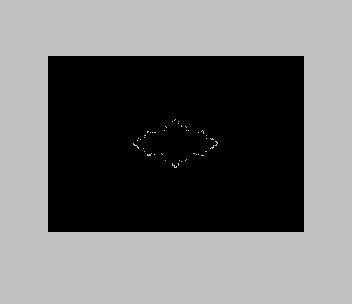
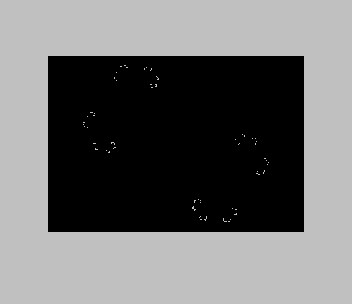
Draws fractal curves point by point on a black screen. You enter a complex constant lambda as two numbers (real part, then imaginary part) and a scale; the larger the scale number, the smaller the picture. The program then runs the map z → λz(1−z) backwards, picking one of the two square roots at random each step, and plots every point it lands on. The points settle onto the boundary of the map’s Julia set, so a dragon- or ring-shaped outline slowly fills in. It runs until you press BREAK; the REMs warn that a picture can take an hour.
The program is saved as “Tracks”. Its REMs explain the prompts and say that the suggested input 3, 0, 3 “does make a circle as stated in the article in SYNTAX”, so it is a type-in from an article in the SYNTAX newsletter; the author is not named. This copy comes from a Larken disk of magazine type-ins.
Program Analysis
Structure
- Lines 5–8: REMs explaining the inputs.
- Lines 10–180: set the screen centre (127, 88) and a starting point, read the inputs, discard the first ten points, then loop forever: plot, iterate.
- Line 1000: complex square root of
x+jy. - Line 2000: replaces lambda with 4/lambda once, at input time.
- Line 3000: complex multiply.
- Line 4000: one backward step: multiply by 4/lambda, subtract from 1, take the root, choose its sign at random (
IF RND<0.5), and halve 1 minus the root. - Lines 7000–7060: a leftover random-number test that is never called.
Notable Techniques
- Complex arithmetic is done in separate real and imaginary variables with small subroutines, a common approach in BASIC fractal programs of the time.
- The random choice of root is the standard way to draw a Julia set by inverse iteration: the two branches together cover the whole boundary.
Potential Issues
- A small scale number with a large set can put points off the screen, which appears to stop the program with an “Integer out of range” error at
PLOT. - Lines 4020 and 4050 form 1−z as
x=1-xwithout changing the sign ofy, so for complex lambda the steps strictly work on the complex conjugate. The pictures are still Julia-type curves, but they may be mirror images of the textbook ones. - There is no way out of the plotting loop except BREAK.
This program came from a Larken disk and was converted to run from tape: the LKDOS save and load lines and the LOGICALL load were removed, and it is saved without variables. It was tested in ZEsarUX with lambda 3, 0 at scale 3 and lambda 1, 1.5 at scale 2.
Image Gallery
Source Code
    5 REM This program plots patterns on a black screen. Sometimes it takes an hour to complete.
    6 REM In reply to "What is lambda?", enter the first number and key ENTER then enter second number and key ENTER."
    7 REM In repy to "scale?", enter another number and key ENTER. The size of the picture varies inversely to the number entered.
    8 REM A suggested try of 3, 0, 3 does make a circle as stated in the article in SYNTAX.
   10 LET cx=127: LET cy=88
   20 LET x=0.50001: LET y=0
  100 GO SUB 5000
  110 PAPER 0: INK 3: CLS
  120 FOR i=1 TO 10: GO SUB 4000: NEXT i
  140 GO SUB 6000
  160 GO SUB 4000
  180 GO TO 140
  999 STOP
 1000 REM Square Root of (x+jy)
 1005 LET t=y
 1010 LET s=SQR (x*x+y*y)
 1020 LET y=SQR ((-x+s)/2)
 1030 LET x=SQR ((+x+s)/2)
 1040 IF t<0 THEN LET x=-x
 1050 RETURN
 2000 REM Four Over lx+jly
 2010 LET s=lx*lx+ly*ly
 2020 LET lx=+4*lx/s
 2030 LET ly=-4*ly/s
 2040 RETURN
 3000 REM x+jy Times lx+jly
 3010 LET tx=x: LET ty=y
 3020 LET x=tx*lx-ty*ly
 3030 LET y=tx*ly+ty*lx
 3040 RETURN
 4000 REM Function of x+jy
 4010 GO SUB 3000: REM *lambda
 4020 LET x=1-x
 4030 GO SUB 1000: REM Take Root
 4040 IF RND<0.5 THEN LET x=-x: LET y=-y: REM Choose Root to Plot
 4050 LET x=1-x
 4060 LET x=x/2: LET y=y/2
 4070 RETURN
 5000 REM Get Values
 5010 CLS
 5020 INPUT "What is lambda? (x,y) ";lx,ly
 5030 GO SUB 2000
 5040 INPUT "What is scale? ";sc
 5050 LET sc=2*cx/sc
 5060 RETURN
 6000 REM Plot x,y
 6010 PAPER 0: INK 7: PLOT sc*(x-0.5)+cx,cy-sc*y
 6020 RETURN
 6999 STOP
 7000 REM RND test
 7010 LET zx=140
 7020 LET zy=96
 7030 LET dx=20*RND
 7040 LET dy=20*RND
 7050 PRINT zx+dx,zy+dy
 7060 GO TO 7030
 7099 STOP
 9000 SAVE "Tracks": PRINT ''"Press any key to VERIFY ": PAUSE 0
 9010 VERIFY "Tracks"
 9992 SAVE "Tracks.B1" LINE 1
 9998 REM  was LKDOS-only
Note: Type-in program listings on this website use ZMAKEBAS notation for graphics characters.