
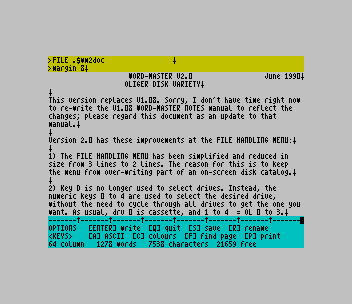
A 64-column word processor written in machine code that can hold many files in memory at once: texts, graphics, fonts, extension programs and page layouts. Embedded commands such as >margin and >graphic control the printout, and a graphic named in a text is printed in place on an Epson-type dot-matrix printer. The file-handling menu lists the files in memory with their sizes, and loads, saves, renames, links and erases them. This package adds the TYPELINER desktop-publishing extension (with standard, IBM and HR-5 versions), HEADLINER and smaller extensions for saving, customising, printing, converting, patterns, sliding text and editing. It also includes print drivers for the AERCO, Tasman B and C, and A&J interfaces, Graphmate (a separate program for bar, horizontal and pie charts) and CONFIG, which sets Word-Master and TYPELINER up for a chosen printer brand and model.
Word-Master was written for the ZX Spectrum by Paul Sneesby and Barry Parkinson; the code reads “WORD-MASTER V2.00: (C) 1987/88 Cardex Computer Software”, and Graphmate’s title screen credits B M Parkinson. Jack Dohany customised, sold and supported it in the US for the TS2068 with a Spectrum emulator. This is his V2.0 “Oliger Disk Variety” of June 1990, from two disks. The program disk includes Dohany’s update notes ($wm2doc), the CONFIG help file ($HELP, CONFIG dated 4-25-91) and demonstration texts. The second disk adds about 40 TYPELINER and HEADLINER fonts and 37 shareware graphic files by Steve Spalding, Dottie Bundy and William J. McBrine III, catalogued in $files. The update notes, the CONFIG help and the catalogue are in the download as text files.
Word-Master needs the Spectrum ROM: on a TS2068 that means a Spectrum emulator, and it also runs on a ZX Spectrum 48K.
Program Analysis
WORD2
The 19-line loader does CLEAR 24733, loads the WM2 code at 53930 and starts it with RANDOMIZE USR 54052. The machine code calls BASIC for all file work: it sets a$, s, l and a return address x, then continues at line 20 (LOAD a$CODE s,l) or line 30 (SAVE), and each line ends with RANDOMIZE USR x. Line 6 sets the default print options (POKE 23615) and the keyboard repeat and click, line 200 limits the drive keys and line 300 is the “Zap” command, which clears all files. The file area runs from 24734 to 53739, which is why Word-Master can’t run with the TS2068 ROM, whose BASIC starts at 26710.
Graphmate
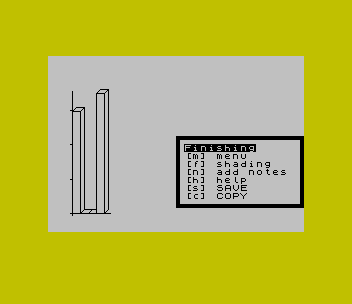
Graphmate takes 4 to 20 values, entered with EDIT and selected with the cursor keys, and draws them as a bar graph with 3D tops, a horizontal bar graph (up to 12 values) or a pie chart drawn with SIN and COS. Its menu boxes are block-graphic strings held in DATA. The gCODE machine code at 63800 stores and restores the screen, fills areas and adds text. The finished chart can be saved as a SCREEN$ and loaded into Word-Master as a graphic.
CONFIG
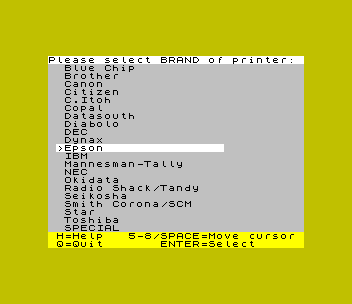
CONFIG offers a menu of 20 printer brands plus SPECIAL, then the model and interface. It POKEs the matching escape sequences into tables in the WM2 code (from 57173) and patches TYPELINER’s line-feed setting. It then saves the configured WM2 and !type files. Separate line ranges hold the commands for AERCO, Larken, Oliger and Zebra disks, chosen by sys.
Notable Techniques
- Graphmate passes a fill pattern to its machine code with
RANDOMIZE USR a$, which puts the address of the user-defined graphic named ina$into SEED. - Graphmate starts its running total at
0.0000000000001rather than zero, which avoids a division by zero in the pie-chart arithmetic. - CONFIG writes printer codes from
DATAlines as length-prefixed 4-byte records into WM2’s customisation table.
Potential Issues
- Graphmate stops with “Number too big” if a vertical or horizontal graph is drawn before any value has been entered, because the scale is divided by the largest value.
- The Oliger edition of WM2 reads and sets the current drive inside the JLO disk ROM when it starts and when drive keys 1 to 4 are pressed. Without that interface it stops with an error.
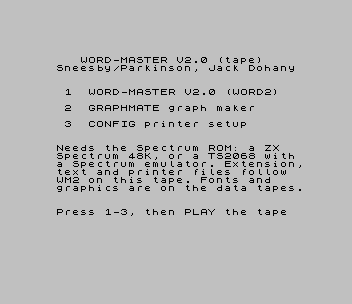
This copy was converted for tape. The “/” disk syntax was removed from WORD2, CONFIG and Graphmate, the disk-only CAT, ERASE and FORMAT statements were dropped, and 8 bytes of WM2 were patched at 54028 and 54052 so that it starts on drive 0, which Word-Master has always used for cassette. A menu loads Word-Master, Graphmate or CONFIG, and the text, extension and print-driver files follow WM2 on the tape. The fonts and the shareware graphics are on two data tapes, and the artists’ postal addresses have been removed from $files. It was tested in ZEsarUX on a ZX Spectrum 48K: loading and editing a text from tape, saving to tape, loading a graphic from the data tape, drawing a Graphmate chart, and running CONFIG.
Image Gallery
Source Code
REM ===== WORD2 =====
    6 POKE VAL "23615",VAL "4": POKE VAL "23561",VAL "30": POKE VAL "23562",VAL "3": POKE VAL "23609",VAL "3"
   10 POKE VAL "23560",CODE "Q": LET d=NOT PI: LET s=d: LET l=d: LET x=d: LET a$="          ": LET b=VAL "54134": RANDOMIZE USR VAL "54052"
   20 LOAD a$CODE s,l: RANDOMIZE USR x
   30 SAVE a$CODE s,l: RANDOMIZE USR x
   40 RANDOMIZE USR x
   50 LET K$=CHR$ PEEK VAL "54226": IF K$="Z" THEN GO TO VAL "300"
   51 IF K$="F" AND d THEN GO TO VAL "60"
   52 IF K$="K" THEN CLS : RANDOMIZE USR b: RANDOMIZE USR (b+VAL "5")
   53 RANDOMIZE USR X
   60 INPUT " FORMAT 80? "; LINE k$: LET t=VAL "40"+(VAL "40" AND (k$="y" OR k$="Y")): INPUT AT NOT PI,NOT PI;(" FORMAT <";d;"> ";t'"NAME: ");k$: IF LEN k$ THEN REM
   61 RANDOMIZE USR x
  100 CLEAR VAL "24733": LOAD "WM2"CODE : RUN
  200 INPUT "Drives: "; LINE k$: IF k$>"0" AND k$<"5" THEN POKE VAL "54617",CODE k$
  201 RUN
  300 INPUT "Zap? "; LINE k$: IF k$="y" OR k$="Y" THEN POKE VAL "65532",PEEK VAL "65506": POKE VAL "65533",PEEK VAL "65507": GO TO VAL "10"
  301 RANDOMIZE USR x
  400 POKE VAL "54225",NOT PEEK VAL "54225": RUN
  500 IF PEEK VAL "24734"=CODE " " THEN SAVE "WORD2" LINE VAL "100": SAVE "WM2"CODE VAL "53930",VAL "11606"
  501 STOP

REM ===== Graphmate =====
    5 BORDER 6: PAPER 6: INK 0: CLS : PAPER 7
   10 PRINT AT 5,11;"Graphmate";AT 7,4;"* 1987 by B M Parkinson"
   20 INPUT "No. of fields for graph? 4-20",,,z
   50 IF z>20 THEN GO TO 10
   55 IF z<4 THEN GO TO 10
   60 DIM a(z): LET yax=0
   80 DATA ":'''''''''''''''''''''''''':"
   82 DATA ": Enter Data   :"
   84 DATA ": EDIT  -alter :"
   86 DATA ": CURS -select :"
   88 DATA ": [m]  -menu   :"
   90 DATA ":..........................:"
  100 CLS : RESTORE 80: FOR n=7 TO 12: READ a$: PRINT AT n,18;a$: NEXT n
  105 PRINT AT 0,0;: FOR n=1 TO z: PRINT n;":";TAB 3;a(n);TAB 18: NEXT n
  110 PRINT OVER 1;AT yax,0; INVERSE 1,
  120 GO SUB 250
  125 IF c=7 THEN INPUT "Enter Data ";a(yax+1): GO TO 105
  130 PRINT OVER 1;AT yax,0; INVERSE 1,
  140 IF c=10 THEN LET yax=yax+(1 AND yax<z-1)
  150 IF c=11 THEN LET yax=yax-(1 AND yax>0)
  160 IF c=109 THEN GO TO 300
  200 GO TO 110
  250 REM getkey
  255 POKE 23658,96
  260 LET c=CODE INKEY$: IF c=0 THEN GO TO 260
  270 RETURN
  300 REM main menu
  310 RESTORE 500: FOR n=8 TO 14: READ a$: PRINT AT n,10;a$: NEXT n
  320 GO SUB 250
  330 IF c=97 THEN GO TO 100
  340 IF c=118 THEN GO TO 1000
  345 IF c=104 THEN GO TO 1500
  350 IF c=112 THEN GO TO 2000
  400 GO TO 320
  500 DATA ":'''''''''''''''''''''''''''''''''''''':"
  502 DATA ": Main Menu          :"
  504 DATA ": [a] alter data     :"
  506 DATA ": [v] vertical graph :"
  508 DATA ": [h] horizntl graph :"
  510 DATA ": [p] pie-chart      :"
  520 DATA ":......................................:"
  900 REM max?
  910 LET tot=0: LET max=0: FOR n=1 TO z: IF a(n)>max THEN LET max=a(n)
  920 LET tot=tot+a(n): NEXT n
  930 LET gdr=1
  940 IF gdr<max THEN LET gdr=gdr*10: GO TO 940
  950 RETURN
 1000 REM vertical graph
 1005 CLS
 1010 GO SUB 900
 1012 LET high=120: REM height of                   graph
 1015 LET fac=high/max
 1020 PLOT 22,18
 1030 DRAW 8+8*z,0
 1040 PLOT 24,16
 1050 DRAW 0,4+max*fac
 1060 FOR n=0 TO max*fac STEP gdr*fac/10: PLOT 23,n+18: DRAW -1,0: NEXT n
 1100 LET x=0: FOR n=1 TO z: LET y=INT (a(n)*fac)
 1120 LET zz=16+n*8: PLOT zz,18
 1122 DRAW 0,y: DRAW 8,0: PLOT zz,y+18: DRAW 4,4: DRAW 4,0
 1124 IF y<=x THEN PLOT zz,y+18: DRAW 0,x-y: DRAW 4,4: DRAW -4,0: DRAW 4,0: DRAW 0,-(x-y)
 1140 LET x=y: NEXT n
 1150 PLOT zz+8,y+18: DRAW 4,4: DRAW -4,0: DRAW 4,0: DRAW 0,-y: DRAW -4,-4: DRAW 0,y
 1200 GO TO 2500
 1500 REM horiz.graph
 1510 CLS : GO SUB 900
 1515 IF z>12 THEN PRINT ''"Too many fields for this graph!": GO TO 300
 1520 LET fac=140/max
 1530 PLOT 22,24: DRAW 4+max*fac,0
 1540 PLOT 24,22: DRAW 0,4+10*z
 1570 FOR n=0 TO max*fac STEP gdr*fac/10: PLOT n+24,23: DRAW 0,-1: NEXT n
 1600 FOR n=1 TO z
 1610 PLOT 24,26+(z-n)*10
 1620 LET y=a(n)*fac
 1630 DRAW y,0: DRAW 0,8: DRAW -y,0
 1660 NEXT n
 1700 GO TO 2500
 2000 REM pi-chart
 2005 CLS : GO SUB 900
 2100 CIRCLE 90,80,60
 2110 PLOT 90,80: REM DRAW 0,60
 2190 LET xs=0.0000000000001
 2200 FOR n=1 TO z
 2210 LET xs=xs+a(n)
 2260 LET ra=(2*PI)/(tot/xs)
 2270 LET op=SIN ra*60
 2280 LET ad=COS ra*60
 2290 PLOT 90,80: DRAW op,ad
 2300 NEXT n
 2500 REM tart-it-up
 2505 GO SUB 2950
 2510 RESTORE 2600: FOR n=10 TO 18: READ a$: PRINT AT n,16;a$: NEXT n
 2520 GO SUB 250
 2530 IF c=109 THEN GO SUB 2700: IF c=121 THEN GO TO 300
 2540 IF c=102 THEN GO TO 3000
 2545 IF c=110 THEN GO TO 3500
 2550 IF c=115 THEN DIM n$(10): INPUT " SAVE name? ";n$: GO SUB 2900: SAVE n$SCREEN$
 2560 IF c=99 THEN GO SUB 2900: PRINT #1;" COPY ": COPY : INPUT 0
 2570 IF c=104 THEN GO SUB 6000: GO SUB 2900
 2590 GO TO 2510
 2600 DATA ":'''''''''''''''''''''''''''''':"
 2601 DATA ": Finishing      :"
 2602 DATA ": [m] menu       :"
 2604 DATA ": [f] shading    :"
 2606 DATA ": [n] add notes  :"
 2607 DATA ": [h] help       :"
 2608 DATA ": [s] SAVE       :"
 2610 DATA ": [c] COPY       :"
 2612 DATA ":..............................:"
 2700 REM yes/no
 2710 PRINT #1;"You will lose this picture y/n?"
 2720 GO SUB 250: IF c=121 THEN INPUT 0: RETURN
 2730 IF c<>110 THEN GO TO 2720
 2740 INPUT 0: LET c=0: RETURN
 2900 REM RESTORE SCREEN$
 2910 RANDOMIZE USR 63975: RETURN
 2950 REM store SCREEN$
 2960 RANDOMIZE USR 63972: RETURN
 3000 REM fill
 3005 RESTORE 3100: FOR n=11 TO 19: READ a$: PRINT AT n,14;a$: NEXT n: PRINT #1;"Select Pattern"
 3010 GO SUB 250: IF c>96 AND c<118 THEN LET a$=CHR$ (47+c): GO TO 3020
 3015 GO TO 3010
 3020 GO SUB 2900: POKE 23617,0: INPUT 0: PRINT #1;"GRAPH-";a$;" f-fill TRUE VIDEO-quit"
 3025 GO SUB 2950: RANDOMIZE USR a$: LET l=USR 63800
 3030 INPUT 0: GO SUB 2950:: IF l=15 THEN GO TO 3000
 3040 GO TO 2500
 3100 DATA ":'''''''''''''''':"
 3102 DATA ": Fill    :"
 3104 DATA ": ABCDEFG :"
 3106 DATA ": abcdefg :"
 3108 DATA ": HIJKLMN :"
 3110 DATA ": hijklmn :"
 3112 DATA ": OPQRSTU :"
 3114 DATA ": opqrstu :"
 3116 DATA ":................:"
 3500 REM notes
 3520 GO SUB 2900: PRINT #1;"Add notes: TRUE VIDEO-quit"
 3530 GO SUB 2950: LET l=USR 63992
 3600 INPUT 0: GO SUB 2950: GO TO 2500
 5980 PRINT #1;"...any key": GO SUB 250: INPUT 0: RETURN
 5990 PAPER 6: CLS : PAPER 7: RETURN
 6000 REM help
 6010 GO SUB 5990
 6020 PRINT "To add the finishing touches to your graph, you can now add     shading & notes to the graphic. "
 6030 PRINT '"When using either of these      functions you can delete a      mistake by pressing [EDIT],     which flips a stored version of the display back to the screen. "
 6040 PRINT '"You can also store the display  by pressing [ENTER].",
 6060 GO SUB 5980
 6100 GO SUB 5990: PRINT "The pointer is moved about the  screen with the cursor keys. If using the ~add notes~ function, pressing any key will print it  to the screen.",,
 6110 PRINT ''"If using the ~shading~ function,you can FILL any enclosed area  by pressing [f].",
 6120 PRINT ''"You can also draw lines by      pressing [x], which marks a     point on the screen with a dot, then moving the pointer and     pressing [d]. A line will now bedrawn between the two.",
 6200 GO SUB 5980: GO SUB 5990
 6210 PRINT "When you are satisfied with the graph, you can save it to tape  with the SAVE function. Micro-  drive owners can alter LINE 2550to save to microdrive instead.  "
 6220 PRINT '"The graph could then be loaded  into Word-Master and printed outas part of a printed document.  "
 6900 GO TO 5980
 9000 REM auto-run
 9005 CLEAR 56575
 9010 LOAD "gCODE"CODE
 9020 RUN
 9030 SAVE "Graphmate" LINE 9000
 9040 SAVE "gCODE"CODE 63800,1736
 9050 STOP

REM ===== CONFIG =====
    1 REM 4-25-91
    5 GO TO VAL "9000"
   10 BORDER e+a: PAPER e+b: INK z
   20 CLS : PRINT BRIGHT a;"Please select BRAND of printer: "
   21 LET n=tt+a: FOR i=a TO n: PRINT "  ";p$(i): NEXT i
   29 REM default configuration
   34 LET dp=z: REM DPI 120/160
   35 LET ej=z: REM 1/216 or 144
   36 LET ea=z: REM 1/72 or 1/60
   37 LET e2=z: REM no ESC 2
   38 LET mr=z: REM no const marg
   40 LET r=41: LET x=p: LET l=z: GO TO 50
   41 LET p=x: IF p=tt+a THEN GO TO 2100
   42 LET n=VAL "70": CLS : PRINT BRIGHT a;"Printer: ";p$(p),"Please select MODEL of printer:",'': GO TO p*t*t
   45 LET x=a
   46 FOR i=a TO n: PRINT "  ";m$(i): NEXT i: LET l=b
   50 PRINT #z;AT z,z; BRIGHT a;" H=Help   5-8/SPACE=Move cursor  Q=Quit       ENTER=Select",
   51 IF x<a THEN LET x=n
   52 IF x>n THEN LET x=a
   54 POKE key,z: PRINT AT x+l,a; OVER a; BRIGHT a;">";TAB tt+b;
   55 IF NOT PEEK key THEN GO TO 55
   57 BEEP .005,t: LET k$=CHR$ PEEK key: PRINT AT x+l,a;" "; OVER a;TAB tt+b;: IF k$=" " OR k$="6" THEN LET x=x+a: GO TO 52
   58 IF k$="7" THEN LET x=x-a: GO TO 51
   59 IF k$="8" THEN LET x=x-e: GO TO 51
   60 IF k$="5" THEN LET x=x+e: GO TO 52
   61 IF r<r4 THEN LET m=x
   62 IF INKEY$<>"" THEN GO TO 62
   63 IF k$=CHR$ 13 THEN GO TO r
   64 IF k$="h" OR k$="H" THEN GO TO tt*d
   65 IF k$="q" OR k$="Q" THEN GO TO 68
   66 IF (k$="C" OR k$="c") AND r<r4 AND p=21 THEN LET m=e: GO TO r
   67 GO TO 54
   68 IF n<tt THEN GO TO t
   69 CLS : PRINT AT t,t;"OK TO RUN "''TAB t-c;"or GO TO 10.": STOP
   70 PRINT AT t,z;"Sorry, ";p$(p)'"is not yet supported."
   71 LET k$="Please press any key"
   72 LET r=t: GO TO r3
   80 CLS : PRINT "This program will configure"'"Word Master v2 and Typeliner foryour printer and interface."
   81 PRINT '"This program does NOT configure"'"the DEMO programs."
   82 PRINT '"You should have an unprotected"'"copy of your Word Master V2"'"PROGRAM disk ready."
   83 PRINT '"If you don't know what choice tomake, just choose arbitrarily."
   84 PRINT '"If your hardware isn't supportedcontact me for help."
   85 PRINT '" Jack Dohany      415-367-7781"'" 390 Rutherford"'" Redwood City, CA 94061"
   86 PRINT '"Also see text file ""$HELP""."
   89 GO TO VAL "71"
   90 FOR i=a TO n: PRINT " ";m$(i): NEXT i
   91 INPUT BRIGHT a;(" Model (1-";n;"):"; BRIGHT z;" ");m: IF NOT m THEN GO TO t
   92 IF m>n THEN GO TO 80
   93 GO TO r
   94 PRINT #z;AT z,z;k$;": "; FLASH a;">";CHR$ 8;
   95 LET k$=INKEY$: IF k$="" THEN GO TO r3+a
   96 BEEP .005,t: PRINT #z;k$: IF k$>="a" AND k$<="z" THEN LET k$=CHR$ (CODE k$-32)
   97 IF INKEY$<>"" THEN GO TO 97
   98 INPUT ;: GO TO r
   99 CLS : PRINT BRIGHT a;"Brand: ";p$(p);TAB 27;dp;ej;ea;e2;mr;"Model: ";m$(m);TAB 27;"LJA2M";"  I/F: " AND LEN i$;i$,,: RETURN
  100 LET n=a: DIM m$(n,t)
  101 LET m$(a)="M120/10"
  110 LET r=120: GO TO r1
  120 IF m=a THEN LET dp=a
  190 GO TO r4
  200 LET n=d: DIM m$(n,t)
  201 LET m$(a)="HR-5": LET m$(b)="M-1009": LET m$(c)="M-1109 Mode I": LET m$(d)="M-1109 Mode II"
  202 IF m=b OR m=c THEN LET e2=a
  210 LET r=220: GO TO r1
  220 IF m=a THEN LET dp=b
  290 GO TO r4
  300 LET n=a: DIM m$(n,t)
  301 LET m$(a)="PW-1080A"
  310 LET r=320: GO TO r1
  390 GO TO r4
  400 LET n=c: DIM m$(n,t)
  401 LET m$(a)="MSP-10/15": LET m$(b)="MSP-20/25": LET m$(c)="GSX140"
  410 LET r=420: GO TO r1
  490 GO TO r4
  500 GO TO n
  600 LET n=a: DIM m$(n,t): LET m$(a)="WH-1200L"
  610 LET r=620: GO TO r1
  690 GO TO r4
  700 LET n=a: DIM m$(n,tt): LET m$(a)="Personal I & II"
  710 LET r=720: GO TO r1
  790 GO TO r4
  800 GO TO n
  900 LET n=a: DIM m$(n,t): LET m$(a)="LA210"
  910 LET r=920: GO TO r1
  990 GO TO r4
 1000 GO TO n
 1100 LET n=b: DIM m$(n,tt)
 1101 LET m$(a)="FX, MX, RX series": LET m$(b)="L, LQ series"
 1110 LET r=1120: GO TO r1
 1120 IF m=b THEN LET ej=a: LET ea=a
 1190 GO TO r4
 1200 LET n=a: DIM m$(n,tt)
 1201 LET m$(a)="Proprinter"
 1210 LET r=1220: GO TO r1
 1220 IF m=a THEN LET e2=a
 1290 GO TO r4
 1300 LET n=a: DIM m$(n,tt)
 1301 LET m$(a)="Spirit 80"
 1310 LET r=1320: GO TO r1
 1320 IF m=a THEN LET dp=a
 1390 GO TO r4
 1400 GO TO n
 1500 LET n=b: DIM m$(n,tt)
 1501 LET m$(a)="ML84 IBM Mode": LET m$(b)="Okimate 20, ML92/93 IBM"
 1502 PRINT AT d,tt+c;"IBM Mode";AT c,z;
 1510 LET r=1520: GO TO r1
 1520 IF m=b THEN LET e2=a
 1590 GO TO r4
 1600 LET n=a: DIM m$(n,tt)
 1601 LET m$(a)="DMP 130 IBM Mode"
 1610 LET r=1620: GO TO r1
 1620 IF n=a THEN LET e2=a
 1690 GO TO r4
 1700 LET n=a: DIM m$(n,tt)
 1701 LET m$(a)="SP-1000A"
 1710 LET r=1720: GO TO r1
 1790 GO TO r4
 1800 LET n=b: DIM m$(n,tt)
 1801 LET m$(a)="D-100": LET m$(b)="D-200/300 Std Mode"
 1809 PRINT AT t,z;"Fastex 80 not suitable."''"D-200/300: DIP 3-4 must be ON.";AT c,z;
 1810 LET r=1820: GO TO r1
 1890 GO TO r4
 1900 LET n=d: DIM m$(n,tt)
 1901 LET m$(a)="Gemini 10X"
 1902 LET m$(b)="SG-10 IBM mode"
 1903 LET m$(c)="SG-10 Star mode"
 1904 LET m$(d)="N series Std Mode"
 1910 LET r=1911: GO TO r1
 1920 IF m=a OR m=c THEN LET ej=a
 1921 IF m=b THEN LET e2=a
 1990 GO TO r4
 2000 GO TO n
 2100 LET x=a: LET n=e: DIM m$(n,tt)
 2101 CLS : PRINT BRIGHT a;" SPECIAL PRINTER CONFIGURATION  ",,
 2102 PRINT AT t,z;"Please see your printer manual."''"ESC L units are in dots/inch."'" 120 dpi =  960 dots/line."'" 160 dpi = 1280 dots/line."
 2103 PRINT '"ESC J units may be 1/216, 1/144"'"or 1/180"". If 180 select 144."
 2105 PRINT '"An ESC 2 after ESC A may or may"'"not be required. Usually NO."
 2110 LET m$(a)="ESC L = "+("120" AND NOT dp)+("160" AND dp)+" dpi"
 2111 LET m$(b)="ESC J = 1/"+("216" AND NOT ej)+("144" AND ej)+""""
 2113 LET m$(c)="ESC A = 1/"+("72" AND NOT ea)+("60" AND ea)+""""
 2114 LET m$(d)="ESC 2 = "+("YES" AND e2)+("NO " AND NOT e2)
 2115 LET m$(e)="CONTINUE!"
 2120 PRINT AT c,z;: LET r=2121: GO TO r1+a
 2121 IF m=e THEN LET m=a: LET m$(a)="Special": GO TO r4
 2122 IF m=a THEN LET dp=NOT dp
 2123 IF m=b THEN LET ej=NOT ej
 2124 IF m=c THEN LET ea=NOT ea
 2125 IF m=d THEN LET e2=NOT e2
 2130 GO TO 2110
 3000 GO SUB s1: PRINT " FUNCTION"," NC  C1  C2  C3 "''" Elite",'" Pica"'" Sub/super  ON",'" Sub/Super  OFF"'" Condensed  ON",'" Condensed  OFF"'" Emphasized ON",'" Emphasized OFF"'" Dblstrike  ON",'" Dblstrike  OFF"'" Wide       ON",'" Wide       OFF"'" Italics    ON",'" Italics    OFF"'" Underline  ON",'" Underline  OFF"
 3001 DIM s$(3)
 3010 LET mi=7: FOR i=z TO mi: GO SUB 3900: NEXT i
 3020 GO SUB 3400
 3030 PRINT AT 5+j+i*2,16+4*k;">"
 3050 POKE key,z
 3051 IF NOT PEEK key THEN GO TO 3051
 3052 LET d$=CHR$ PEEK key
 3055 PRINT AT 5+j+i*2,16+4*k;" "
 3060 IF d$>="0" AND d$<="9" THEN GO SUB 3100
 3065 IF d$="q" OR d$="Q" THEN GO TO 3500
 3070 IF d$>CHR$ 7 AND d$<CHR$ 14 THEN GO SUB 3120+t*CODE d$
 3090 GO TO 3030
 3100 IF k THEN GO TO 3105
 3101 IF d$>"0" AND d$<"4" THEN LET k$=d$: LET s$=k$: GO SUB 3920: GO TO 3210
 3102 GO TO 3240
 3105 LET k$=k$+d$: IF LEN k$>3 OR VAL k$>255 THEN GO TO 3240
 3110 LET s$=k$: GO TO 3920
 3200 IF k=z THEN LET k=c: GO TO 3230
 3201 GO SUB 3260: LET k=k-a: RETURN
 3210 IF k=c THEN LET k=z: GO TO 3220
 3211 GO SUB 3260: LET k=k+a: RETURN
 3220 GO SUB 3260
 3221 LET j=NOT j: IF NOT j THEN LET i=i+a
 3222 IF i>mi THEN LET i=z
 3223 RETURN
 3230 GO SUB 3260: LET j=NOT j
 3231 IF j THEN LET i=i-a
 3232 IF i<z THEN LET i=mi
 3233 RETURN
 3240 BEEP .1,t: GO SUB 3910: LET k$="": RETURN
 3250 GO SUB 3260: LET k=z: GO TO 3221
 3260 IF LEN k$ THEN POKE (57173+i*4+k+32*j),VAL k$
 3270 LET k$="": LET s$=" ": RETURN
 3400 PRINT #z;AT z,z;"NC=number of codes (1 to 3)"'"Q=EXIT   Shifted 5>8 = move >": LET i=z: LET j=z: LET k=z: RETURN
 3500 GO SUB s1: PRINT " FUNCTION"," NC  C1  C2  C3 "''" Draft",'" NLQ"'" Left Margin",'" Skip (unused)"'" n/216 LF",'" Carriage Rtn"'" Line Feed",'" Form Feed"'" Reset",'" n/72 LF"
 3510 LET mi=9: FOR i=z TO mi: GO SUB 3950: NEXT i
 3520 GO SUB 3400
 3530 PRINT AT 5+i,16+4*k;">"
 3550 POKE key,z
 3551 IF NOT PEEK key THEN GO TO 3551
 3552 LET d$=CHR$ PEEK key
 3555 PRINT AT 5+i,16+4*k;" "
 3560 IF d$>="0" AND d$<="9" THEN GO SUB 3600
 3565 IF d$="q" OR d$="Q" THEN GO TO 5080
 3570 IF d$>CHR$ 7 AND d$<CHR$ 14 THEN GO SUB 3620+t*CODE d$
 3590 GO TO 3530
 3600 IF k THEN GO TO 3605
 3601 IF d$>"0" AND d$<"4" THEN LET k$=d$: LET s$=k$: GO SUB 3970: GO TO 3710
 3602 GO TO 3740
 3605 LET k$=k$+d$: IF LEN k$>3 OR VAL k$>255 THEN GO TO 3740
 3610 LET s$=k$: GO TO 3970
 3700 IF k=z THEN LET k=c: GO TO 3730
 3701 GO SUB 3760: LET k=k-a: RETURN
 3710 IF k=c THEN LET k=z: GO TO 3720
 3711 GO SUB 3760: LET k=k+a: RETURN
 3720 GO SUB 3760
 3721 LET i=i+a
 3722 IF i>mi THEN LET i=z
 3723 RETURN
 3730 GO SUB 3760
 3731 LET i=i-a
 3732 IF i<z THEN LET i=mi
 3733 RETURN
 3740 BEEP .1,t: GO SUB 3960: LET k$="": RETURN
 3750 GO SUB 3760: LET k=z: GO TO 3721
 3760 IF LEN k$ THEN POKE (57283+i*4+k),VAL k$
 3770 LET k$="": LET s$=" ": RETURN
 3900 FOR j=z TO a: FOR k=0 TO 3: GO SUB 3910: NEXT k: NEXT j: RETURN
 3910 LET s$=STR$ PEEK (57173+i*4+k+32*j)
 3920 PRINT AT 5+j+i*2,17+4*k; BRIGHT NOT j;s$: RETURN
 3950 FOR k=z TO c: GO SUB 3960: NEXT k: RETURN
 3960 LET s$=STR$ PEEK (57283+i*4+k)
 3970 LET j=i/2-INT (i/2)
 3971 PRINT AT 5+i,17+4*k; BRIGHT NOT j;s$: RETURN
 4000 LET i$="": GO SUB s1: PRINT BRIGHT a;"Please select INTERFACE:",''
 4010 LET n=d: FOR i=a TO n: PRINT "  ";j$(i): NEXT i
 4020 LET x=a: LET l=d: LET r=4030: GO TO r2
 4030 IF x THEN LET if=x: LET i$=j$(x): GO TO VAL "5000"
 4040 GO TO t
 5000 GO SUB s1
 5002 PRINT ''"Would you like a"'"CONSTANT LEFT MARGIN?"
 5004 PRINT '"This feature eliminates the needfor a >margin 8 command at the"'"start of each text file."
 5006 PRINT '"This feature works by defining"'"carriage return as CR TAB"'"      and ESC A as TAB ESC A."
 5007 PRINT '"      CR TAB = 13  9"'"   TAB ESC A =  9 27 65"
 5008 PRINT '"This feature is helpful with"'"printers which lack the usual"'"ESC l command for a left margin."
 5010 LET k$="Constant Margin? (Y/N/Q)": LET r=VAL "5011": GO TO r3
 5011 IF k$="Q" THEN GO TO t
 5012 IF k$="Y" THEN LET mr=a
 5015 IF k$="N" THEN LET mr=z
 5016 IF k$<>"Y" AND k$<>"N" THEN GO TO VAL "5010"
 5020 IF NOT ej THEN GO TO VAL "5040"
 5021 GO SUB s1: PRINT ''"Using this printer, TYPELINER"'"cannot render a square screen"'"box perfectly on paper."
 5023 PRINT '"Therefore, please select:"''"1: Height LESS than width, or"''"2: Height MORE than width, as:"
 5024 PRINT AT t+e,d;"Paper    Square   Paper"'TAB 13;"Screen";'TAB e+a;"1";TAB t+c;"Box";TAB tt+d;"2"
 5025 LET x=56: LET y=66: PLOT 100,y: DRAW x,z: DRAW z,-x: DRAW -x,z: DRAW z,x
 5026 PLOT 28,y: DRAW x,z: DRAW z,-(x-4): DRAW -x,z: DRAW z,x-4
 5027 PLOT 170,y: DRAW x,z: DRAW z,-(x+4): DRAW -x,z: DRAW z,x+4
 5030 LET k$="Select 1 or 2 or Q": LET r=5031: GO TO r3
 5031 IF k$="Q" THEN GO TO t
 5034 IF k$<"1" OR k$>"2" THEN GO TO 5030
 5035 LET ej=VAL k$
 5040 GO SUB s1: PRINT AT t,z;" Please insert unprotected"'" Word Master V2 Program Disk"'" in current drive."
 5041 LET k$="Disk ready? (Y/N)": LET r=5042: GO TO r3
 5042 IF k$="Y" THEN GO TO 5050
 5044 IF k$="N" THEN GO TO t
 5045 GO TO 5041
 5050 GO SUB s1: PRINT AT t,z;"Loading Wordmaster CODE ": LET ret=5051: GO TO 8000
 5051 GO SUB s1: PRINT AT t,z; BRIGHT a;"Configuring... please wait.",
 5052 GO SUB 7000
 5054 LET x=t+b: IF ea THEN LET x=t
 5055 POKE VAL "65465",x
 5056 LET y=VAL "57158"
 5057 IF NOT e2 THEN POKE y,80: POKE y+a,222
 5058 IF e2 THEN POKE y,211: POKE y+a,255
 5060 IF mr THEN RESTORE 7020: LET z2=d: LET y=57303: GO SUB 7050: LET y=57319: GO SUB 7050: LET y=57311: GO SUB 7050
 5070 GO SUB 6000
 5075 IF p=tt+a THEN GO TO 3000
 5080 GO SUB s1: PRINT AT e,z;"READY TO UPDATE DISK."''"Select:"''"1: Update disk"''"2: Check/modify customization"''"3: Start over"
 5081 LET k$="Select 1 TO 3": LET r=5082: GO TO r3
 5082 IF k$="1" THEN GO TO 5090
 5083 IF k$="2" THEN GO TO 3000
 5084 IF k$="3" THEN GO TO t
 5089 GO TO 5081
 5090 GO SUB s1: PRINT AT t,z; BRIGHT a;"Updating program disk."
 5091 LET ret=5100: GO TO 8000+t*sys
 5100 IF dp=b THEN GO TO 5200
 5120 IF NOT dp THEN LET y=2876
 5130 IF dp THEN LET y=2851
 5135 LET ret=5140: GO TO 8040+t*sys
 5140 LET x=c: IF ej THEN LET x=ej
 5141 POKE b1+y,x
 5150 LET ret=5200: GO TO 8090+t*sys
 5160 IF NOT dp THEN PRINT #d: SAVE "!type .CF"CODE b1,5081
 5170 IF dp THEN PRINT #d: SAVE "!t/ibm.CF"CODE b1,5082
 5200 GO SUB s1
 5210 PRINT ''"Configuration is done."
 5211 PRINT '"With this printer you should useonly this version of TYPELINER:"''TAB t;
 5220 IF NOT dp THEN PRINT "Standard"
 5221 IF dp=a THEN PRINT "IBM"
 5222 IF dp=2 THEN PRINT "HR5"
 5225 PRINT ''"Do not use the !custom program,"'"since it will undo changes made"'"with this program."
 5230 LET k$="Load WORD MASTER? (y/n)": LET r=VAL "5231": GO TO r3
 5231 IF k$="Y" THEN GO TO 8190+t*sys
 5240 LET k$="Start over? (y/n)": LET r=5241: GO TO r3
 5241 IF k$="Y" THEN GO TO t
 5250 GO TO 5230
 6000 REM star
 6001 IF p=19 AND m=a THEN POKE 57203,46: POKE 57235,46: POKE 57294,77: GO SUB 6500: GO SUB 6510: GO TO 6540
 6002 IF p=19 AND m=b THEN GO SUB 6520: GO TO 6530
 6003 IF p=19 AND m=c THEN POKE 57294,77: GO SUB 6540: GO TO 6550
 6010 REM blue chip
 6011 IF p=a AND m=a THEN GO SUB 6500: GO TO 6560
 6490 RETURN
 6500 REM no nlq
 6501 LET y=57283: GO SUB 6900: LET y=57287: GO TO 6900
 6510 REM no reset
 6511 LET y=57315: GO TO 6900
 6520 REM nlq 4
 6521 RESTORE 6529: LET y=57283: LET z2=d+d: GO TO 7050
 6529 DATA 2,27,53,0,2,27,52,0
 6530 REM ital I
 6531 RESTORE 6539: LET z2=d: LET y=57197: GO SUB 7050: LET y=57229: GO TO 7050
 6539 DATA 3,27,73,1,3,27,73,0
 6540 REM elite B
 6541 RESTORE 6549: LET z2=d: LET y=57173: GO SUB 7050: LET y=57205: GO TO 7050
 6549 DATA 3,27,66,2,3,27,66,1
 6550 REM nlq B
 6551 RESTORE 6559: LET y=57283: LET z2=d+d: GO TO 7050
 6559 DATA 3,27,66,5,3,27,66,4
 6560 REM no italics
 6561 LET y=57197: GO SUB 6900: LET y=57229: GO TO 6900
 6900 RESTORE 6990: LET z2=d: GO TO 7050
 6990 DATA 1,0,0,0
 7000 RESTORE 7100: LET y=57173: LET z2=64: GO SUB 7050: LET y=57283: LET z2=40: GO SUB 7050
 7010 LET y=65491: LET z2=t: GO TO 7050
 7019 REM const marg
 7020 DATA 2,13,9,0,3,9,27,65
 7021 DATA 2,12,9,0
 7050 FOR i=z TO z2-a: READ x: POKE y+i,x: PRINT AT t+c,t;y+i;" ";x,: NEXT i: RETURN
 7059 REM default customization
 7100 DATA 2,27,77,0,3,27,83,0
 7101 DATA 1,15,0,0,2,27,69,0
 7102 DATA 2,27,71,0,3,27,87,1
 7103 DATA 2,27,52,0,3,27,45,1
 7104 DATA 2,27,80,0,2,27,84,0
 7105 DATA 1,18,0,0,2,27,70,0
 7106 DATA 2,27,72,0,3,27,87,0
 7107 DATA 2,27,53,0,3,27,45,0
 7110 DATA 3,27,120,0,3,27,120,1
 7111 DATA 3,13,27,108,1,0,0,0
 7112 DATA 2,27,74,0,1,13,0,0
 7113 DATA 1,10,0,0,1,12,0,0
 7114 DATA 2,27,64,0,2,27,65,0
 7120 DATA 205,80,222,62,27,215,62,2,215,201
 7999 STOP
 8000 IF sys=a THEN REM
 8001 IF sys=b THEN PRINT #d: LOAD "WM.C2"CODE
 8002 IF sys=c THEN LOAD "WM2"CODE
 8003 IF sys=d THEN LOAD *"WM2.COD"CODE
 8005 GO TO ret
 8010 IF if=a THEN REM
 8011 IF if=b THEN REM
 8012 IF if=c THEN REM
 8013 IF if=d THEN REM
 8015 GO TO ret
 8020 IF if=a THEN PRINT #d: LOAD "<Aerco.C2"CODE
 8021 IF if=b THEN PRINT #d: LOAD "<A&J.C2"CODE
 8022 IF if=c THEN PRINT #d: LOAD "<TasB.C2"CODE
 8023 IF if=d THEN PRINT #d: LOAD "<TasC.C2"CODE
 8025 GO TO ret
 8030 IF if=a THEN LOAD "<aerco2"CODE
 8031 IF if=b THEN LOAD "<a&j2"CODE
 8032 IF if=c THEN LOAD "<tasb2"CODE
 8033 IF if=d THEN LOAD "<tasc2"CODE
 8035 GO TO ret
 8040 IF if=a THEN LOAD *"<aerco2.COD"CODE
 8041 IF if=b THEN LOAD *"<a&j2.COD"CODE
 8042 IF if=c THEN LOAD *"<tasb2.COD"CODE
 8043 IF if=d THEN LOAD *"<tasc2.COD"CODE
 8045 GO TO ret
 8050 IF NOT dp THEN REM
 8051 IF dp THEN REM
 8052 GO TO ret
 8060 IF NOT dp THEN PRINT #d: LOAD "!type .CF"CODE b1
 8061 IF dp THEN PRINT #d: LOAD "!t/ibm .CF"CODE b1
 8062 GO TO ret
 8070 IF NOT dp THEN LOAD "!type"CODE b1
 8071 IF dp THEN LOAD "!type/ibm"CODE b1
 8072 GO TO ret
 8080 IF NOT dp THEN LOAD *"!type.COD"CODE b1
 8081 IF dp THEN LOAD *"!type/ibm.COD"CODE b1
 8082 GO TO ret
 8100 MOVE "WM2.bin",53930,11606
 8101 IF NOT dp THEN MOVE "!TYPE.bin",48000,5081
 8102 IF dp THEN MOVE "!TYPEibm.bin",48000,5082
 8103 GO TO ret
 8110 PRINT #d: SAVE "WM.C2"CODE 53740,11796
 8111 IF NOT dp THEN PRINT #d: SAVE "!type .CF"CODE b1,5081
 8112 IF dp THEN PRINT #d: SAVE "!t/ibm .CF"CODE b1,5082
 8113 GO TO ret
 8120 SAVE "WM2"CODE 53930,11606
 8121 IF NOT dp THEN SAVE "!type"CODE b1,5081
 8122 IF dp THEN SAVE "!type/ibm"CODE b1,5082
 8123 GO TO ret
 8130 SAVE *"WM2.COD"CODE 53930,11606
 8131 IF NOT dp THEN SAVE *"!type.COD"CODE b1,5081
 8132 IF dp THEN SAVE *"!type/ibm"CODE b1,5082
 8133 GO TO ret
 8200 REM  was Oliger-only
 8210 PRINT #d: LOAD "WORD.B2"
 8220 LOAD "WORD2"
 8230 LOAD *"WORD2"
 8990 STOP
 9000 CLEAR VAL "47999"
 9001 LET b1=VAL "48000"
 9002 LET z=NOT PI: LET a=SGN PI: LET b=a+a: LET c=b+a: LET d=c+a: LET e=d+a: LET t=e+e: LET tt=t+t
 9003 LET s1=VAL "99": LET r1=VAL "45": LET r2=r1+e: LET r3=VAL "94": LET r4=VAL "4000"
 9004 DIM p$(tt+a,tt)
 9005 LET p$(a)="Blue Chip": LET p$(b)="Brother": LET p$(c)="Canon": LET p$(d)="Citizen": LET p$(e)="C.Itoh"
 9006 LET p$(e+a)="Copal": LET p$(e+b)="Datasouth": LET p$(e+c)="Diabolo": LET p$(e+d)="DEC": LET p$(t)="Dynax"
 9007 LET p$(t+a)="Epson": LET p$(t+b)="IBM": LET p$(t+c)="Mannesman-Tally": LET p$(t+d)="NEC": LET p$(t+e)="Okidata"
 9008 LET p$(tt-d)="Radio Shack/Tandy": LET p$(tt-c)="Seikosha": LET p$(tt-b)="Smith Corona/SCM": LET p$(tt-a)="Star": LET p$(tt)="Toshiba"
 9009 LET p$(tt+a)="SPECIAL"
 9010 LET p=t+a
 9015 LET key=VAL "23560"
 9020 DIM j$(4,5): LET j$(1)="Aerco": LET j$(2)="A&J": LET j$(3)="Tas B": LET j$(4)="Tas C"
 9025 REM a=aerco  b=larken
 9026 REM c=oliger d=zebra
 9030 LET sys=c
 9040 IF sys=b THEN REM
 9050 GO TO t
Note: Type-in program listings on this website use ZMAKEBAS notation for graphics characters.