
Zunk’s Extra Basic Utilities adds 38 commands and editing keys to TS2068 BASIC: block moves and bank swaps, 16-bit PEEK and POKE, hex and binary conversion, line merging and searching, four sizes of text, a 64-column font and character-set styles. It comes with a demonstration program that shows and lists every command.
Loading
The tape holds four files. The BASIC demonstration program loads first and then loads the other three itself:
| Tape name | Type | Address | Bytes | Contents |
|---|---|---|---|---|
ZEBU38 | BASIC | — | 20,158 | Demonstration and help program; starts itself at line 9510 |
ZEBU38 | CODE | 60000 | 5,360 | ZEBU itself |
ZEBUSCR | CODE | 52730 | 6,912 | A screen used by the LOAD demonstration |
CHANSET | CODE | 51962 | 768 | An alternate (script) character set |
From tape or an emulator
- Insert
ZEBU38.tap. - Type LOAD "" and press ENTER.
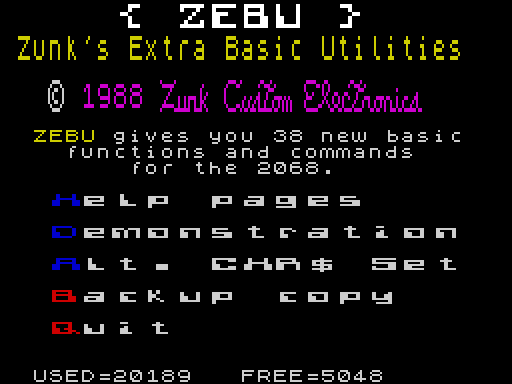
- The screen goes black while the three code files load. The program then sets RAMTOP to 51961, copies its graphics into the UDG area and shows the main menu.
ZEBU runs on a standard 2068 with no extra hardware. Only COPY and MOVE need more: RAM in the dock bank.
Using ZEBU in your own programs
You don’t need the demonstration program to use ZEBU. Protect the memory it uses and load the code on its own:
CLEAR 59647: LOAD "ZEBU38" CODE
ZEBU is not relocatable. It occupies 60000–65359 and builds a 256-byte table at 59648 for the Z80’s interrupt mode 2, so RAMTOP must be 59647 or lower. The demonstration program uses CLEAR 51961 because it also keeps the alternate character set and the ZEBUSCR screen below ZEBU.
| Address | Used for |
|---|---|
| 51962–52729 | CHANSET, the alternate character set (demonstration program only) |
| 52730–59641 | ZEBUSCR screen (demonstration program only) |
| 59648–59903 | ZEBU’s interrupt table |
| 60000–65359 | ZEBU machine code, including its character sets (the ZEBU set is at 63420) |
| 65368– | User-defined graphics, as normal |
The demonstration program
The program turns Caps Lock on when it starts, so press the letter keys on their own. The highlighted first letter of each menu line is its key. The program doesn’t wait for ENTER.
| Key | Option | What it does |
|---|---|---|
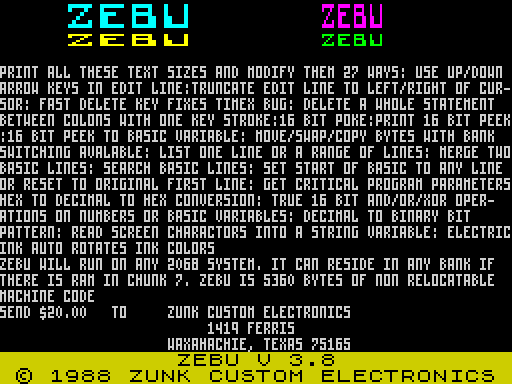
| H | Help pages | Thirteen pages describing every command. N next page, L last page, C copy the page to the printer, Q back to the menu. |
| D | Demonstration | Runs a command, then lists the BASIC line that did it. See below. |
| A | Alt. CHR$ Set | Swaps the alternate character set with ZEBU’s own set at 63420. Large text then appears in a script style. Press A again to swap back. |
| B | Backup copy | Saves ZEBU and its files. See Making a backup. |
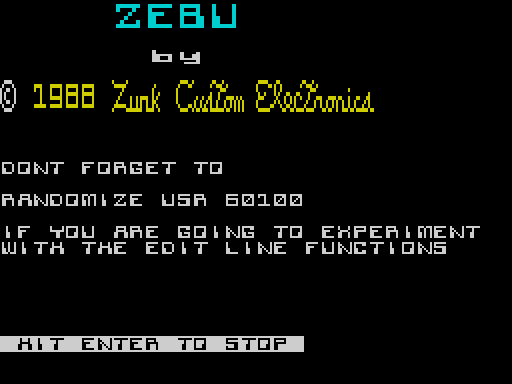
| Q | Quit | Shows the credits. ENTER stops the program; any other key returns to the menu. |
Wherever the bottom line reads [C]= COPY : RETURN TO CONTINUE, press C to print the screen or ENTER to go on.
Demonstration
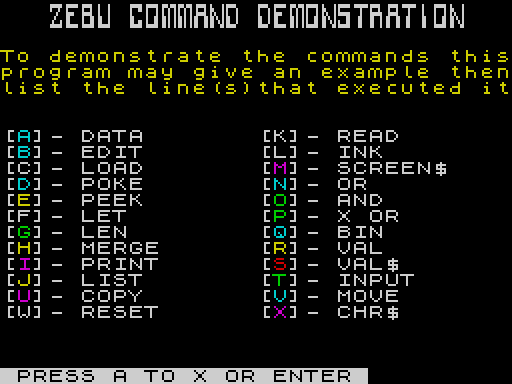
Each letter runs one command, usually followed by a LIST of the line that ran it, so you can see the exact syntax. Most ZEBU commands in the listing are shown in cyan ink.
Three letters show text and no live example. B explains the editing keys, D explains POKE, and W explains RESET. N, O and P all show the same screen of logic examples. U and V share the COPY and MOVE page, which really does swap the screen into the dock bank and back. Run it only if you have dock RAM.
Making a backup
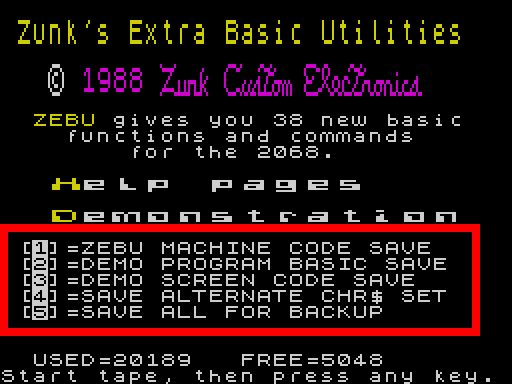
Press B, then choose where to save:
| Key | Saves to |
|---|---|
| 1 | Tape |
| 2 | AERCO disk. Asks for drive A–D. |
| 3 | A&J Microdrive |
Then choose what to save: 1 ZEBU machine code, 2 the demonstration program, 3 the ZEBUSCR screen, 4 the alternate character set, or 5 all four in loading order. On tape, the 2068 asks you to start the tape and press a key before each file.
Answer “press any key” with a letter. SPACE is BREAK and stops the save.
After a tape “save all”, hold ENTER as the last file finishes to start another complete copy.
Quitting
After Q and ENTER the program stops with 9 STOP statement, 7100:1. ZEBU stays in memory and ready to use. RUN brings the menu back.
The statement after that STOP is NEW, so CONTINUE erases the demonstration program. ZEBU itself survives, because it is above RAMTOP.
Giving ZEBU commands
Every ZEBU command is a call to address 60000 followed by a REM. The command is written into the REM using ordinary 2068 keywords (tokens), not spelled out letter by letter:
RANDOMIZE USR 60000: REM : LIST 2210,2999
The REM stops BASIC from reporting a syntax error. ZEBU reads the command after the REM, carries it out, and then lets the rest of the line run. Commands work as direct commands and inside program lines.
Shorter forms
All three of these do the same thing:
RANDOMIZE USR 60000: REM cmdRANDOMIZE USR 6E4: REM cmdRANDOMIZE USR E: REM cmd, withLET E=60000set first. This saves nine bytes every time you use it, and the demonstration program uses it throughout.
Typing the keywords
After REM the cursor is an L. Keywords you normally type in E mode, such as PEEK, VAL, BIN, CHR$, DATA and READ, can be typed straight away. For a keyword that needs the K cursor (LOAD, LIST, PRINT, POKE, LET…), type a colon after the REM first. REM : LIST gives you a K cursor where the colon left off.
Numbers
- Numbers in ZEBU commands can be plain numbers or numeric variables, from 0 to 65535:
REM AND 255,15orREM AND X,Y. - A normal BASIC statement that follows a ZEBU command on the same line must write its numbers as
VAL "255"or use a variable. The editor stores no hidden number forms inside a REM, so a bare255there doesn’t work. The demonstration lines are full ofVAL "..."for this reason.
Where results are printed
Commands that print a result (PEEK, LEN, BIN, VAL, VAL$, and OR, AND and XOR with a number first) print at the current print position. To choose the spot, put PRINT row,column in front of the command, with no AT, no separator, and the command token straight after the column:
RANDOMIZE USR E: REM : PRINT 19,6PEEK 23641
ZEBU ignores a command it doesn’t recognise, and the program carries on. If a command seems to do nothing, check the keyword after the REM.
Editing keys
ZEBU’s first six functions improve the 2068’s line editor. They are not on until you type:
RANDOMIZE USR 60100
ZEBU then prints its banner (ZEBU V 3.8), switches the Z80 to interrupt mode 2, and returns you to the editor. The key click is higher pitched while the editing keys are on. Use it as a direct command: it ends a running program.
| No. | Keys | Does |
|---|---|---|
| 1–2 | CAPS+7 / CAPS+6 (up / down) | Moves the cursor 16 characters through the line. Hold the key to repeat. |
| 3 | CAPS+0 (DELETE) | A corrected delete, without the 2068 ROM’s habit of deleting several characters for one keypress. |
| 4 | CAPS+9 (GRAPHICS) | Deletes everything to the right of the cursor. |
| 5 | CAPS+4 (INVERSE VIDEO) | Deletes everything to the left of the cursor. |
| 6 | CAPS+3 (TRUE VIDEO) | Deletes the statement under the cursor: everything between the colons on either side. |
| — | CAPS+1 (EDIT) | Restores the line. EDIT also turns the editing keys back on after STOP. |
ZEBU takes over the INVERSE and GRAPHICS keys. When you need them, type the STOP keyword (SYMBOL SHIFT+A) to turn the editing keys off. Carry on normally, and the next EDIT turns them back on, even in the middle of a line.
Turning interrupt mode 2 off
The editing keys and Electric INK both run from ZEBU’s interrupt routine. Any of these switches the 2068 back to its normal interrupt mode and turns both off:
- Any ZEBU command,
RANDOMIZE USR 6E4, with or without a command after it. The one exception isINK, which turns its own effect on. RANDOMIZE USR 61350.- The
FREEkeyword typed in the edit line. The help pages give the keys as E cursor, then shift and A.
The help pages advise using STOP if the keyboard starts to rasp while the editing keys are on.
Memory commands
7 · LOAD: block move
REM : LOAD from,to,bytes
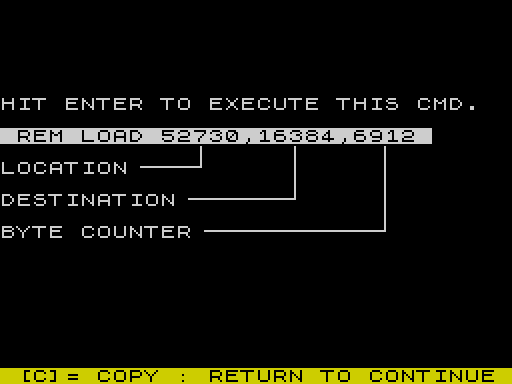
Copies bytes bytes from address from to address to, like the Z80’s LDIR. REM : LOAD 52730,16384,6912 puts the stored ZEBUSCR picture on the screen. The demonstration program’s loader uses LOAD 26715,65368,140 to copy its graphics out of line 1 into the UDG area.
8 and 9 · COPY and MOVE: the dock bank
REM : COPY SC,DC,SA,DA,BC REM : MOVE SC,DC,SA,DA,BC
Both move BC bytes from source address SA to destination address DA. Each can read from and write to the 2068’s dock bank as well as ordinary (home) memory. MOVE copies. COPY exchanges the two blocks, so running the same COPY twice puts everything back.
SC and DC are chunk masks. The 64 KB address space is eight 8 KB chunks, and each bit selects the dock bank for one chunk:
| Bit | 0 | 1 | 2 | 3 | 4 | 5 | 6 | 7 |
|---|---|---|---|---|---|---|---|---|
| Value | 1 | 2 | 4 | 8 | 16 | 32 | 64 | 128 |
| Chunk starts at | 0 | 8192 | 16384 | 24576 | 32768 | 40960 | 49152 | 57344 |
A mask of 0 means home memory. 128 means the dock’s chunk 7, and 240 (16+32+64+128) means dock chunks 4–7, the upper 32 KB.
REM : COPY 0,240,16384,32768,6912swaps the screen with dock memory at 32768. This is what demonstration U and V do, twice.REM : MOVE 0,128,60000,60000,5360copies ZEBU into the dock bank at the same address.
These two commands only work if there is RAM in the dock bank at the chunks you name, from a RAM cartridge or a device such as the TS-Pico. Without it, the first COPY blanks the screen and the second can’t restore it. In this edition both were tested in ZEsarUX with RAM in dock chunks 4–7: the screen swapped out and back intact, and MOVE copied ZEBU byte for byte.
10 · POKE: 16-bit poke
REM : POKE address,value writes value (0–65535) as two bytes, low byte first, at address and address+1.
11 · PEEK: 16-bit peek
REM PEEK address prints PEEK address + 256*PEEK (address+1) at the current print position. REM PEEK 23635 prints PROG, the start of the BASIC program.
12 · LET: 16-bit peek into a variable
REM : LET X=23635 sets X to the 16-bit value at 23635. The variable must already exist, so LET X=0 first.
Program commands
13 · RESET: hide the start of a program
REM : RESET 10 makes BASIC treat line 10 as the first line of the program. Lines before it disappear from LIST and from the program, but they are still in memory. REM : RESET with no number puts things back. Use it to hide a line 1 REM full of machine code that won’t list cleanly, or everything before the block you are working on. Typing the copyright symbol, REM ©, does the same as the RESET keyword.
Before you saveAlways reset to normal before saving a program, or the hidden lines will be missing from the saved copy.
14 · LEN: program length
REM LEN prints the length of the BASIC program (E LINE minus PROG). The USED= figure on the main menu comes from it.
15 · MERGE: join two lines
REM : MERGE 500 joins line 500 and the line after it into one line 500.
17 · LIST: list part of a program
REM : LIST 2210, lists one line; the comma after it is required. REM : LIST 2210,2999 lists a range. The demonstration program uses this to show its own lines.
18 · DATA: memory report
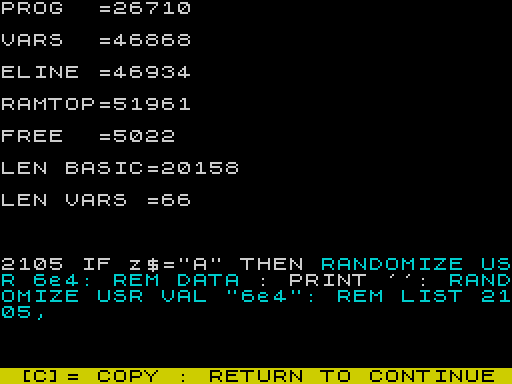
REM DATA prints the program’s vital figures: PROG, VARS, E LINE, RAMTOP, free memory, the length of the BASIC and the length of the variables.
19 · READ: search the program
REM READ text searches every program line for a run of characters and tokens, and prints the number of each line that contains it. Demonstration K searches for PRINT AT and fills the screen with line numbers.
Text and the screen
16 · PRINT: four sizes of text
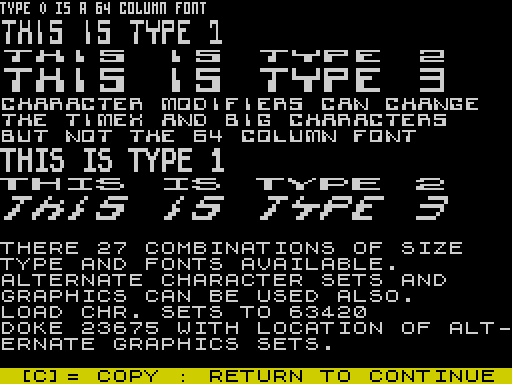
REM : PRINT type,row,column"text"
Prints the text in quotes, or a string variable followed by a closing quote, at row and column:
| Type | Size |
|---|---|
| 0 | 64 columns: half-width characters |
| 1 | Normal width, double height |
| 2 | Double width, normal height |
| 3 | Double width, double height |
Large text is drawn from whichever character set CHR$ 0, 1 or 2 has selected, and changes with the modifiers below. Type 0 always uses the 64-column set and can’t be modified. The demonstration lists 27 combinations of size, type and font.
29–38 · CHR$ 0 to 9: character sets
| Command | Does |
|---|---|
REM CHR$ 0 | Large text uses the Timex character set |
REM CHR$ 1 | Large text uses the ZEBU character set |
REM CHR$ 2 | Large text uses the 64-column character set |
REM CHR$ 3 | BOLD modifier |
REM CHR$ 4 | MODERN modifier |
REM CHR$ 5 | ITALIC modifier |
REM CHR$ 6 | Ordinary PRINT uses the ZEBU character set |
REM CHR$ 7 | Ordinary PRINT uses the modified ZEBU set |
REM CHR$ 8 | Ordinary PRINT uses the 64-column set (at normal spacing) |
REM CHR$ 9 | Ordinary PRINT goes back to the Timex set |
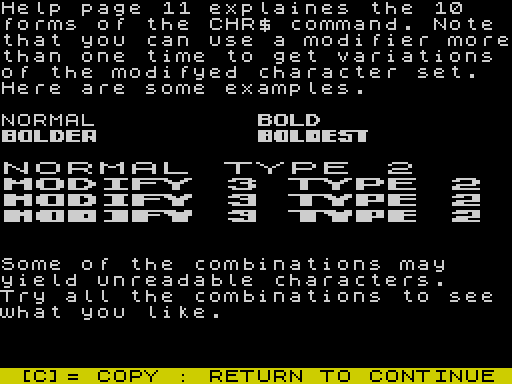
Choose a set with CHR$ 0, 1 or 2 before using a modifier. The modifiers build a changed copy of that set, and you can apply a modifier again to change it further: BOLD twice gives “bolder”, three times “boldest”. Some combinations come out unreadable, so try them and keep what you like.
CHR$ 6–9 change the set used by BASIC’s own PRINT, not just ZEBU’s. Finish with REM CHR$ 9 to get normal text back.
To use a set of your own, load it to 63420 in place of the ZEBU set, as the menu’s Alt. CHR$ Set option does. To use different user-defined graphics, put their address in the UDG system variable at 23675 with a 16-bit POKE.
20 · INK: Electric INK
REM INK takes no parameters. From then on, every character on the screen with the BRIGHT attribute cycles through the ink colours automatically. It runs on ZEBU’s interrupt routine, and the more bright characters there are, the more it slows your program. The demonstration’s main menu runs with it on. Any other ZEBU command turns it off again; a second REM INK doesn’t.
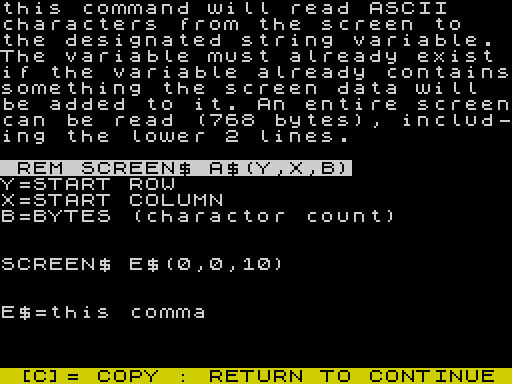
21 · SCREEN$: read text from the screen
REM SCREEN$ A$(row,column,count)
Reads count characters from the screen, starting at row, column, into the string variable A$. The variable must already exist. Anything already in it is kept and the screen text is added to the end, so clear it first with LET A$="". The read can cover the whole screen, 768 characters, including the bottom two lines.
Numbers and logic
22–24 · OR, XOR, AND
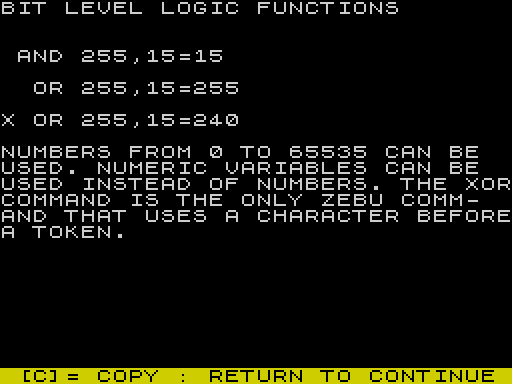
REM OR a,b REM X OR a,b REM AND a,b
16-bit bitwise logic on numbers from 0 to 65535. If the first operand is a variable, the result goes into it. If it is a number, the result is printed at the current print position.
XOR is the one ZEBU command with a character before its token: a letter X followed by the OR keyword.
| No. | Command | Prints or does | Example |
|---|---|---|---|
| 25 | REM BIN n | The 16-bit binary pattern of a number or variable | BIN 60000 → 1110101001100000 |
| 26 | REM VAL hex | The decimal value of a hex number, written directly or held in a string variable | VAL EA60 → 60000 |
| 27 | REM VAL$ n | The hex value of a decimal number or variable | VAL$ 60000 → EA60 |
Each of these prints at the current position, or at a chosen one with the PRINT prefix: REM : PRINT 8,10VAL$ Z.
28 · INPUT: hex and decimal input
REM : INPUT Z$"ENTER DECIMAL # ";Z asks for a decimal number and puts its hex form into Z$.REM : INPUT Z"ENTER HEX # ";Z$ asks for a hex number and puts its decimal value into Z.
The left-hand variable is the destination. Both variables must already exist. Empty the string first, or the hex digits are added to whatever it holds. Don’t use the LINE keyword with this INPUT. Demonstration T runs both in a loop: enter a decimal number, then a hex one, and press ENTER alone to stop.
Command reference
Numbers are the ones used on the help pages. Every command follows RANDOMIZE USR 60000: REM. A colon before a keyword means it needs the K cursor.
| No. | Command | Does |
|---|---|---|
| 1–6 | RANDOMIZE USR 60100 | Turns on the editing keys |
| 7 | : LOAD from,to,bytes | Block move |
| 8 | : COPY SC,DC,SA,DA,BC | Swap blocks between banks |
| 9 | : MOVE SC,DC,SA,DA,BC | Copy blocks between banks |
| 10 | : POKE addr,n | 16-bit POKE |
| 11 | PEEK addr | Print 16-bit PEEK |
| 12 | : LET v=addr | 16-bit PEEK into a variable |
| 13 | : RESET [line] | Move the start of BASIC; no number restores |
| 14 | LEN | Print program length |
| 15 | : MERGE line | Join a line to the next |
| 16 | : PRINT t,y,x"text" | Print in type 0–3 |
| 17 | : LIST a,[b] | List one line or a range |
| 18 | DATA | Print memory figures |
| 19 | READ text | Find lines containing text |
| 20 | INK | Electric INK on |
| 21 | SCREEN$ A$(y,x,n) | Read screen text into a string |
| 22 | OR a,b | 16-bit OR |
| 23 | X OR a,b | 16-bit XOR |
| 24 | AND a,b | 16-bit AND |
| 25 | BIN n | Print in binary |
| 26 | VAL hex | Hex to decimal |
| 27 | VAL$ n | Decimal to hex |
| 28 | : INPUT dest"prompt";src | Hex/decimal input |
| 29–38 | CHR$ 0 … CHR$ 9 | Character sets and modifiers |
| — | RANDOMIZE USR 61350 | Interrupt mode 2 off |
Tips
- Put
LET E=60000at the top of any program that uses ZEBU and callRANDOMIZE USR E. It is shorter to type and saves memory on every line. - Study the demonstration program’s own lines. Quit, stop the program, and use
REM READto find a command you want an example of. - ZEBU commands that follow each other on one line each need their own
RANDOMIZE USR E: REM. Ordinary statements after them run normally, as long as their numbers are writtenVAL "n". - Use
REM DATAbefore and after loading something to check how much room you have left. REM : RESETis handy for working on one routine at a time in a long program, but reset to normal before you SAVE.- If the editing keys get in the way of graphics or inverse characters, type STOP, enter what you need, and press EDIT when you want ZEBU’s keys back.
- Electric INK on a screen with only a few bright characters costs little time. Turn it off with any other ZEBU command before speed matters.
Image Gallery
Note: Type-in program listings on this website use ZMAKEBAS notation for graphics characters.