
A Z80 assembler for people who would rather not work in hex. Type mnemonics with decimal numbers and each line is assembled into memory as you enter it, with labels, a live disassembly, insert and fill, block moves between banks, CALL and JP relocation and a hex/decimal/binary converter.
Loading
The whole assembler is one BASIC program, ASSEMBLER (27,705 bytes). Its machine code is held in a REM at line 0.
- Insert
Zunk Assembler.tap. - Type LOAD "" and press ENTER.
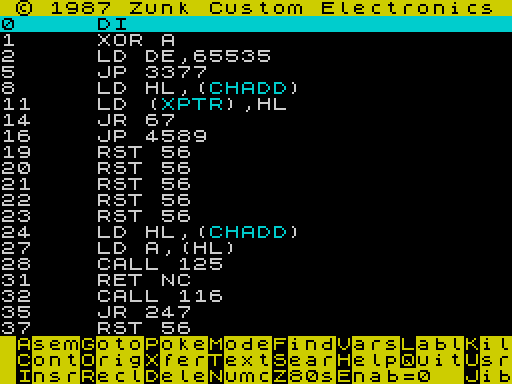
- The program sets RAMTOP to 57343 and starts the assembler. The listing opens at address 0, a disassembly of the ROM.
It runs on a standard 2068 with no extra hardware.
Memory
| Address | Used for |
|---|---|
| 26710–55300 | The assembler (BASIC plus its machine code) |
| 49209–51597 | Label table, inside the assembler; saved by Save Labels |
| 57344–65367 | Free for your machine code, above RAMTOP |
| 65368– | User-defined graphics, as normal |
Assemble your code at 57344 or higher. Below that it would overwrite the assembler or BASIC’s workspace.
The screen
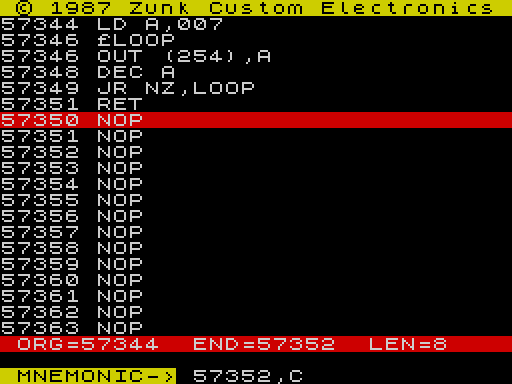
The top 20 lines are a listing of memory. The highlighted line at the top is the current location. While you are assembling, the magenta address marks the end of your code, and a bar shows ORG (where the program starts), END and LEN. A line the assembler can’t understand is shown in red. The three rows at the bottom are the menu: press the highlighted first letter of a command.
Moving through memory
| Key | Does |
|---|---|
| ENTER | Scrolls the listing up a line |
| arrow keys | Step the current location |
| CAPS SHIFT with an arrow | Fast scroll |
| G Goto | Asks for an address and lists from there |
| O Orig | Back to the start (ORG) of the program you’re assembling |
| R Recl | Back to the last address you gave Goto |
| J Jib | Asks for a DISPLAYED OFSET ADDR. and lists from it. The help calls it “changes displayed address”. |
Display options
| Key | Does |
|---|---|
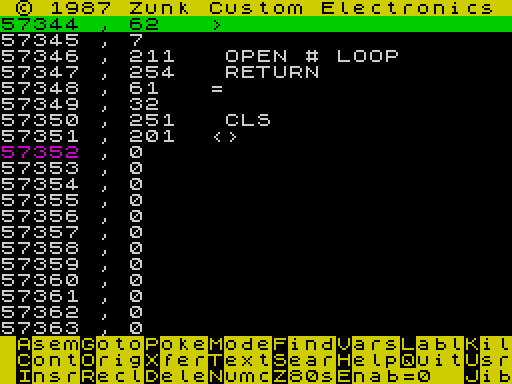
| M Mode | Switches between disassembly and a byte listing: address, decimal value, and the character or keyword that byte would be |
SYMBOL SHIFT+B (*) | Names on or off: LD HL,(CHADD) or LD HL,(23645) |
SYMBOL SHIFT+M (.) | Relative jumps shown as a target address (JR NZ,57346) or as the raw byte (JR NZ,251) |
SYMBOL SHIFT+N (,) | In byte mode, show values as 1 or 2 bytes |
SYMBOL SHIFT+Z (:) | Sends the listing, starting at the top of the screen, to the 2040 printer, scrolling until you press a key |
Writing code
- Press G and type the address to start at, for example
57344. - Press A (Asem). The screen says BEGIN NEW ASSEMBLY PROGRAM and the prompt MNEMONIC-> 57344, shows where the next instruction goes.
- Type one instruction and press ENTER. It is assembled into memory at once and the prompt moves on.
- Press ENTER on an empty line to get the menu back.
C (Cont) picks up at the end of the program and adds more lines (CONTINUE ASSEMBLY PROGRAM).
Rules for what you type
| Write | Meaning | Example |
|---|---|---|
| Numbers | Decimal, and at least three characters long. Pad with zeros or add .0. | LD A,007 · LD B,5.0 · OUT (254),A |
£NAME | Defines a label, 3 to 10 letters, at the current address. Type it on its own line before the instruction it marks. The £ is SYMBOL SHIFT+X. | £LOOP then JR NZ,LOOP |
LET | Gives a label a value | LET POOP=16384 |
BYT | Puts one byte into the code | BYT 230 |
NUM | Puts a 16-bit number into the code | NUM 16384 |
RSV | Reserves n bytes; useful when editing a block | RSV 032 |
TBL | A table of 16-bit numbers or labels | TBL 003,465,DEFIL,5436,LOOP |
IX; IY; | Turns the HL instruction that follows into its IX or IY form | IX;LD HL,(DEFILE) |
" | Puts text into the code | "HIT ENTER |
| Expressions | Simple arithmetic on labels and numbers | LD A,(POOP+5.0) |
Give JR and DJNZ the label of the target and the assembler works out the offset.
Typing the NOT keyword (SYMBOL SHIFT+S) at the prompt throws away the last entry.
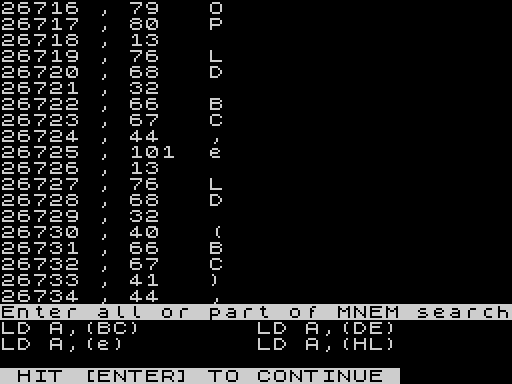
Not sure of the syntax?Press S (Sear) at the menu and type part of an instruction. The assembler lists every form it accepts that matches, with e standing for a number. LD A,( gives LD A,(BC), LD A,(DE), LD A,(e) and LD A,(HL). Z (Z80s) scrolls through the whole instruction set.
Keep entries shortType one instruction per entry. In testing, a very long line of junk (forty-odd characters that weren’t an instruction) overwrote part of the assembler’s own lookup routine, and good instructions assembled as nonsense afterwards. If that happens, reload the program.
Changing code
Insr: insert instructions
Goto the instruction you want to insert in front of and press I. A magenta bar marks the insertion point and the prompt says INSERT MNEMONICS AT CURSOR. Each instruction you type is placed there, and everything from that point to the end of the program moves down to make room.
When you press ENTER on an empty line, the assembler goes back over the program and corrects every relative jump (JR, DJNZ) whose distance has changed.
Check JP and CALL: Absolute JP and CALL targets are not changed by an insert. In testing, a JP 57346 still pointed at 57346 after a NOP was inserted at that address. Correct them by hand, or reassemble those lines.
Dele: fill a block
D asks for address to delete code, the number of bytes and a code, then fills the block with that value. Use 000 to blank it to NOPs. It doesn’t close up the gap.
Poke
P writes numbers at the current location. Each entry goes into the next address. Press ENTER on an empty line to stop. The help describes it as an 8- or 16-bit poker.
Xfer: move a block, between banks too
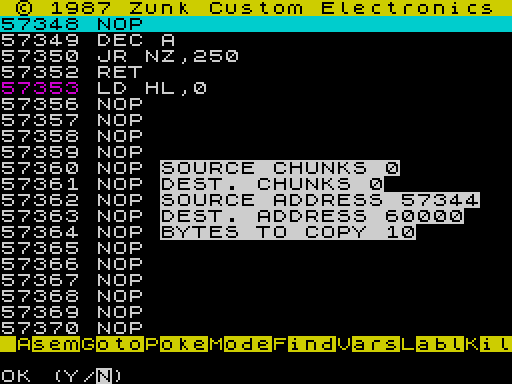
X asks for SOURCE CHUNKS, DEST. CHUNKS, SOURCE ADDRESS, DEST. ADDRESS and BYTES TO COPY, shows them all, and asks OK (Y/N).
The chunk numbers select memory banks in the same way as the 2068’s bank register (port 244). Each bit picks the dock bank for one 8 KB chunk: 1 for 0–8191, 2 for 8192–16383, and so on up to 128 for 57344–65535. Use 0 and 0 for ordinary memory.
Relocating CALLs and JPs
Press SYMBOL SHIFT+R (<), a key that isn’t on the menu. The prompt is RELOCATE CALLs & JPs (0=ABORT). Type the address the program will run at. Every JP and CALL in the program that points into it is changed to match, and the listing then shows the code with its new addresses. The bytes themselves stay where they are, so finish with Xfer to move them. In testing, relocating a program at 57344 to 57345 changed JP 57346 to JP 57347.
0 abortsAnswer 0 to back out. An address that makes no sense (we tried 1) drops you into the file menu. Press ENTER to go back in; your work is still there.
Enab: choose banks
E asks Enable (IN 244,n) TO and sets the 2068’s bank register, port 244, to your number (the help: “enable chunks”). The menu shows the current setting as Enab=. Set it back to 0 for normal memory.
Labels and variables
Labl
L asks for a name. Then NUMERIC POINTER asks for its value. This is the same as LET while assembling.
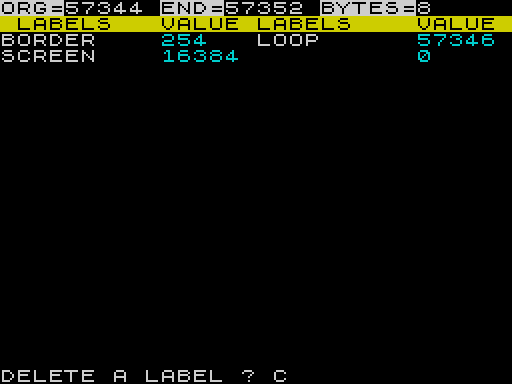
Type a space instead of a name to list all labels in alphabetical order, with the program’s ORG, END and length. The list then asks DELETE A LABEL ?. Type a name to delete it, or press ENTER to leave.
Deleting a label: The first label that begins with what you type is deleted. Typing L deleted LOOP, not a label named L. Type the full name and check the list afterwards.
Kil
K erases every label at once. There is no “are you sure”, so save your labels first.
Vars: a watch window
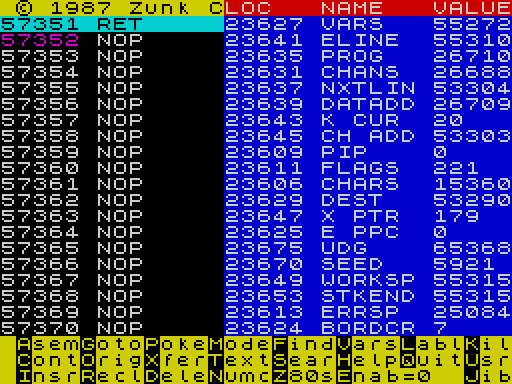
V opens a window of memory locations with names and their current values. It starts with 19 system variables (VARS, E LINE, PROG, CHANS and so on). V again closes it.
While it is open, A (Assign) adds a variable: give a VARIABLE NAME, its VARIABLE LOCATION, and 1 OR 2 BYTE VAR. D deletes one.
Looking around
| Key | Command | What it does |
|---|---|---|
| F | Find | Searches memory for a sequence of byte values. Enter one number per prompt (codes to search for), then ENTER on an empty line to start. The listing moves to the first match. It is slow: a two-byte search took about three minutes. |
| T | Text | Shows memory as characters from the current location. ENTER continues and Q stops. Good for finding messages in code. |
| S | Sear | Searches the assembler’s syntax table for instructions containing what you type. |
| Z | Z80s | Scrolls the whole instruction set in two columns. Any key pauses; Q quits. |
| N | Numc | Number converter. Type a decimal number, or add H for hex or B for binary. It shows the value in decimal, hex, binary, and as low and high bytes. ENTER on an empty line returns to the menu. |
| H | Help | Five pages: input rules, the menu, and the scrolling keys. |
LD A,(.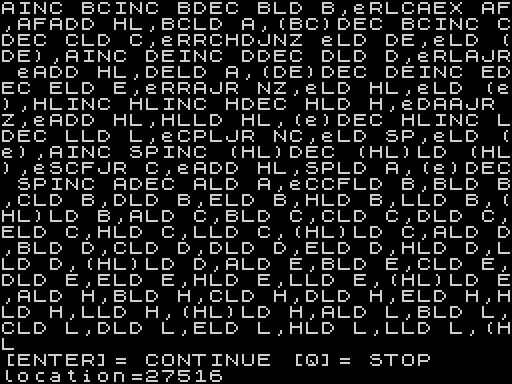
Testing code
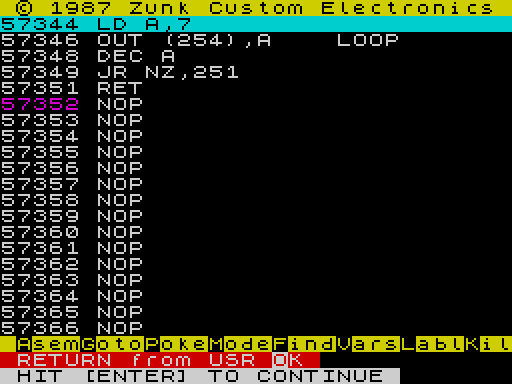
U (UsrC) asks RANDOMIZE USR (0=bort). Type the address to call. When your code returns, the screen says RETURN from USR OK. Press ENTER to carry on.
No safety net: The help warns “tests code! no error traps!”. A routine that never returns, or one that overwrites the assembler, crashes the machine. Save your code and labels first.
SYMBOL SHIFT+U (the OR keyword), also missing from the menu, calls address 60000. That’s where Zunk’s ZEBU utilities live. Don’t press it unless something safe to call is there.
Saving and loading
Q (Quit) leaves the assembler for the file menu at the bottom of the screen. ENTER there goes back into the assembler, with your program, labels and settings as you left them.
| Key | Does |
|---|---|
| L | Load a CODE file from tape |
| S | Save: opens the save menu |
| V | Verify the next CODE file on tape against memory |
| Q | Stop the program. GO TO 10 brings the menu back. |
| ENTER | Back to the assembler |
| R | Not shown on the menu: restarts the assembler as if freshly loaded |
The save menu
S shows SAVE Code Labels Prog File:”name”CODE loc,len. Each save shows the SAVE it is about to do and asks OK (Y/N). Tape names are cut to 10 characters.
| Key | Saves |
|---|---|
| C Code | Asks CODE LOC, LEN CODE and CODE NAME, then saves that block. The assembler remembers it for File. |
| F File | Saves the remembered block again under the same name, with no questions. Handy for saving each new version. |
| L Labels | Saves the label table, 2,389 bytes from 49209, which also records ORG and END. The first time it asks for a name. After that it offers the same name; answer N to choose another. |
| P Prog | Saves the whole assembler as ASSEMBLER, set to start itself. Your labels are inside it, so this is a quick way to keep a working copy. |
Loading
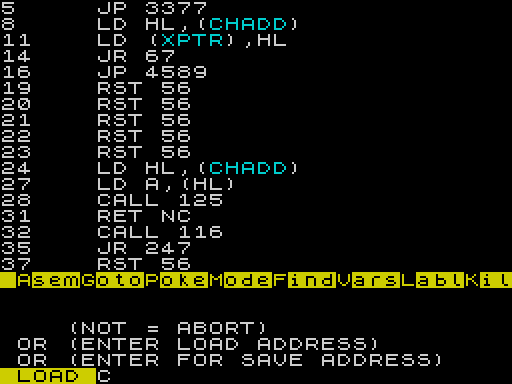
- At the file menu press L. Type the tape name, or press ENTER alone to load the next CODE file that comes along.
- The next question gives three choices: type
NOTto abort, type an address to load there, or press ENTER to load at the address the file was saved from.
A label file loads straight back into the label table at 49209. Load your code file and its label file, press ENTER, and you are back where you left off.
Not SPACE: Answer “Start tape, then press any key” with a letter. SPACE is BREAK and stops the save.
Key reference
| Key | Menu | Does |
|---|---|---|
| A | Asem | Start a new program at the current location |
| C | Cont | Carry on assembling at the end of the program |
| D | Dele | Fill a block with a value |
| E | Enab | Set the bank register (port 244) |
| F | Find | Search memory for byte values |
| G | Goto | List from an address |
| H | Help | Five help pages |
| I | Insr | Insert instructions at the cursor |
| J | Jib | Change the displayed address |
| K | Kil | Erase all labels |
| L | Labl | Add, list or delete labels |
| M | Mode | Disassembly or byte listing |
| N | Numc | Hex/decimal/binary converter |
| O | Orig | List from the program’s ORG |
| P | Poke | Write values from the current location |
| Q | Quit | To the file menu |
| R | Recl | List from the last Goto address |
| S | Sear | Search the instruction syntax |
| T | Text | Show memory as characters |
| U | UsrC | Run code at an address |
| V | Vars | Watch window on or off |
| X | Xfer | Copy a block, between banks too |
| Z | Z80s | Scroll the instruction set |
| SYMBOL SHIFT+R | — | Relocate CALLs and JPs |
| SYMBOL SHIFT+B | — | Names in the listing on or off |
| SYMBOL SHIFT+M | — | JR shown as address or offset |
| SYMBOL SHIFT+N | — | 1- or 2-byte values in byte mode |
| SYMBOL SHIFT+Z | — | Print the listing on a 2040 |
| SYMBOL SHIFT+U | — | Call address 60000 (ZEBU) |
Tips
- Put your first instruction at 57344. Everything from there to 65367 is yours.
- Give names to the addresses and values you use with L or
LETbefore you start. The disassembly then reads like your source. - Use labels for jump targets rather than numbers. Insert keeps relative jumps right, but numeric
JPandCALLtargets need checking after an insert. - Leave a little
RSVspace at the ends of routines so you can add to them later without moving everything. - Save the code with Code once, then press F (File) after each change. Save the labels too; together they bring you back to exactly where you were.
- Add your program’s own variables to the Vars window and check them after a test run with UsrC.
- Forgot how an instruction is written? Sear it before you type it, rather than waiting for a red line.
Image Gallery
Note: Type-in program listings on this website use ZMAKEBAS notation for graphics characters.