
Cartoons, as you know, are made up of many drawings which are flipped one after the other. This flippinng or “page flipping” as it is called on computers, gives the appearance of free flowing movement. Using this same principle, we can do cartoon-like animation on our computer. Although, we can’t do full length cartoons, we can flip forwards or backwards 18 pages.
HOW TO USE
If no drawings are in memory, and you enter a 1 for the menu selection, the computer will ask you how many drawings you wish to draw. This is because the program uses arrays and in order to save in loading and saving time, you should only reserve as many pictures as you will use. Eighteen pages, are the maximum that 16k will hold but if you have more memory the computer will hold more pictures.
I. DRAW
The unshifted arrow keys (5, 6, 7, and 8) are used to move a cursor around on the screen. This cursor begins in the lower left corner. As the cursor is moved it draws a line. You can erase by pressing “9” and retracing a previous line. Pressing “9” again allows you to draw again. When the drawing is complete, press “Q” to quit. When this is done, the screen will go blank for about 30 seconds, after which the menu will return.
II DISPLAY
To display a picture, enter the page number of the drawing you wish to see. After viewing the drawing, press any key but break and the computer will ask if you wish to see another or return to the menu.
III ANIMATE
When you enter this mode, the drawing on page one will appear. By pressing the 7 key, the pages will begin to flip forwards and will stop at the last drawing. By pressing the 6 key, the pages will begin to flip backwards and will stop at the first drawing. To return to the menu, press Q.
VI CHANGE
In this mode, you can call up one drawing, alter it and save it as the next drawing. Also you can use it to edit a drawing and save it under the same drawing number. After entering the numbers, you will be in the drawing mode as before, but your drawing will be on the screen. When you are finished, you can exit in the same way as before by pressing Q and the menu will return.
Let me know if you like this program and if you have any changes or improvements, I would like to know about them.
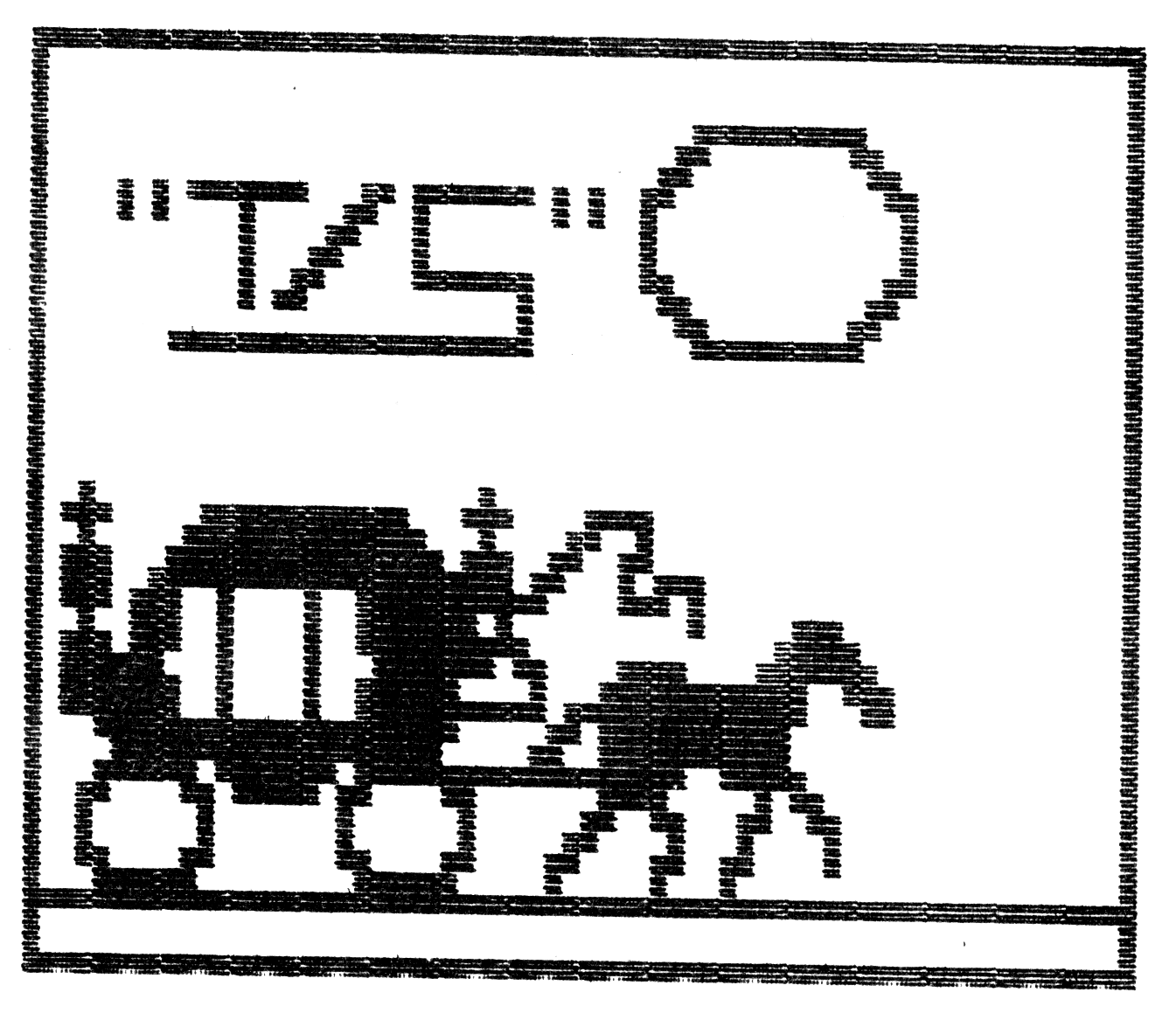
EXAMPLE-“ANIMATE PROGRAM” This graphic was submitted by Steve Douglas of T S Research in Dayton, Ohio. It was done using Steve’s own drawing program. However, it does serve to illustrate the drawings you can make using ANIMATE.
LISTING
  10 REM ANIMATE
  20 LET NP=0
  30 LET D=1
  40 LET PN=1
 100 CLS
 110 PRINT AT 3,12;"MENU"
 120 PRINT AT 6,9;"(1) DRAW"
 130 PRINT AT 8,9;"(2) DISPLAY"
 140 PRINT AT 10,9;"(3) ANIMATE"
 150 PRINT AT 12,9;"(4) CHANGE PIC"
 160 PRINT AT 14,9;"(5) SAVE"
 170 PRINT AT 16,9;"(6) QUIT"
 180 INPUT M
 190 GOTO (1000*M)
1000 REM DRAW
1010 CLS
1020 IF NP>0 THEN GOTO 1070
1030 PRINT AT 5,2;"ENTER THE NUMBER OF PICTURES"
1040 PRINT AT 7,6;"YOU WISH TO DRAW"
1050 INPUT NP
1055 IF NP<1 OR NP>18 THEN PRINT AT 18,10;"[illegible]"
1058 IF NP<1 OR NP>18 THEN GOTO 1050
1060 DIM A$(NP,704)
1070 CLS
1075 LET P=PN
1080 LET X=0
1090 LET Y=0
1100 IF D=-1 THEN GOTO 1140
1110 UNPLOT X,Y
1120 PLOT X,Y
1130 GOTO 1160
1140 PLOT X,Y
1150 UNPLOT X,Y
1160 LET X=X+(INKEY$="8" AND X<63)-(INKEY$="5" AND X>0)
1170 LET Y=Y+(INKEY$="7" AND Y<43)-(INKEY$="6" AND Y>0)
1180 IF INKEY$="9" THEN LET D=D*-1
1190 IF INKEY$="Q" THEN GOTO 1300
1200 GOTO 1100
1300 FAST
1310 LET DF=(PEEK 16396+256*PEEK 16397)
1320 FOR A=1 TO 704
1330 IF PEEK (DF+A)=118 THEN LET DF=DF+1
1340 LET A$(P,A)=CHR$ PEEK (DF+A)
1350 NEXT A
1360 SLOW
1370 LET PN=PN+1
1380 GOTO 100
2000 REM DISPLAY
2010 CLS
2020 PRINT AT 4,5;"ENTER NUMBER OF PAGE";AT 6,7;"YOU WISH TO SEE"
2030 INPUT SP
2040 IF SP>NP OR SP<1 THEN GOTO 2030
2050 CLS
2055 PRINT A$(SP)
2056 PAUSE 2000
2060 PRINT AT 21,0;"DO YOU WISH TO SEEANOTHER (Y/N)"
2070 INPUT B$
2080 IF B$="Y" THEN GOTO 2000
2090 GOTO 100
3000 REM ANIMATE
3010 CLS
3020 LET PA=1
3030 PRINT AT 0,0;A$(PA)
3040 LET PA=PA+(INKEY$="7")-(INKEY$="6")
3050 IF PA>NP THEN LET PA=NP
3060 IF PA<1 THEN LET PA=1
3070 IF INKEY$="Q" THEN GOTO 100
3080 GOTO 3030
4000 REM CHANGE PIC
4010 CLS
4020 PRINT AT 4,2;"ENTER THE NUMBER OF THE PAGE";AT 6,6;"YOU WISH TO CHANGE"
4030 INPUT PC
4040 IF P<1 OR P>NP THEN GOTO 4030
4090 PRINT AT 8,0;"ENTER PAGE NUMBER TO SAVE UNDER"
4100 INPUT P
4105 CLS
4110 PRINT A$(PC)
4120 GOTO 1080
5000 REM SAVE
5010 CLS
5020 PRINT AT 8,4;"START TAPE AND HIT ENTER"
5030 IF INKEY$=CHR$ 118 THEN GOTO 5060
5040 PRINT AT 8,4;"START TAPE AND HIT ENTER"
5050 GOTO 5020
5060 CLS
5065 SAVE "DRAW"
5070 FOR Z=1 TO 20
5080 PRINT AT 10,10;"STOP TAPE"
5090 PRINT AT 10,10;"STOP TAPE"
5100 NEXT Z
5110 GOTO 100
6000 REM STOP
6010 CLS
Note: Type-in program listings on this website use ZMAKEBAS notation for graphics characters.