
 100 REM LKDOS Printer Exercise
 110 RANDOMIZE USR 100: OPEN #4,"dd": PRINT #4: OPEN #3,"lp"
 120 GO SUB 330: PRINT #4: POKE 16094,8: PRINT #4: POKE 16090,63: LPRINT
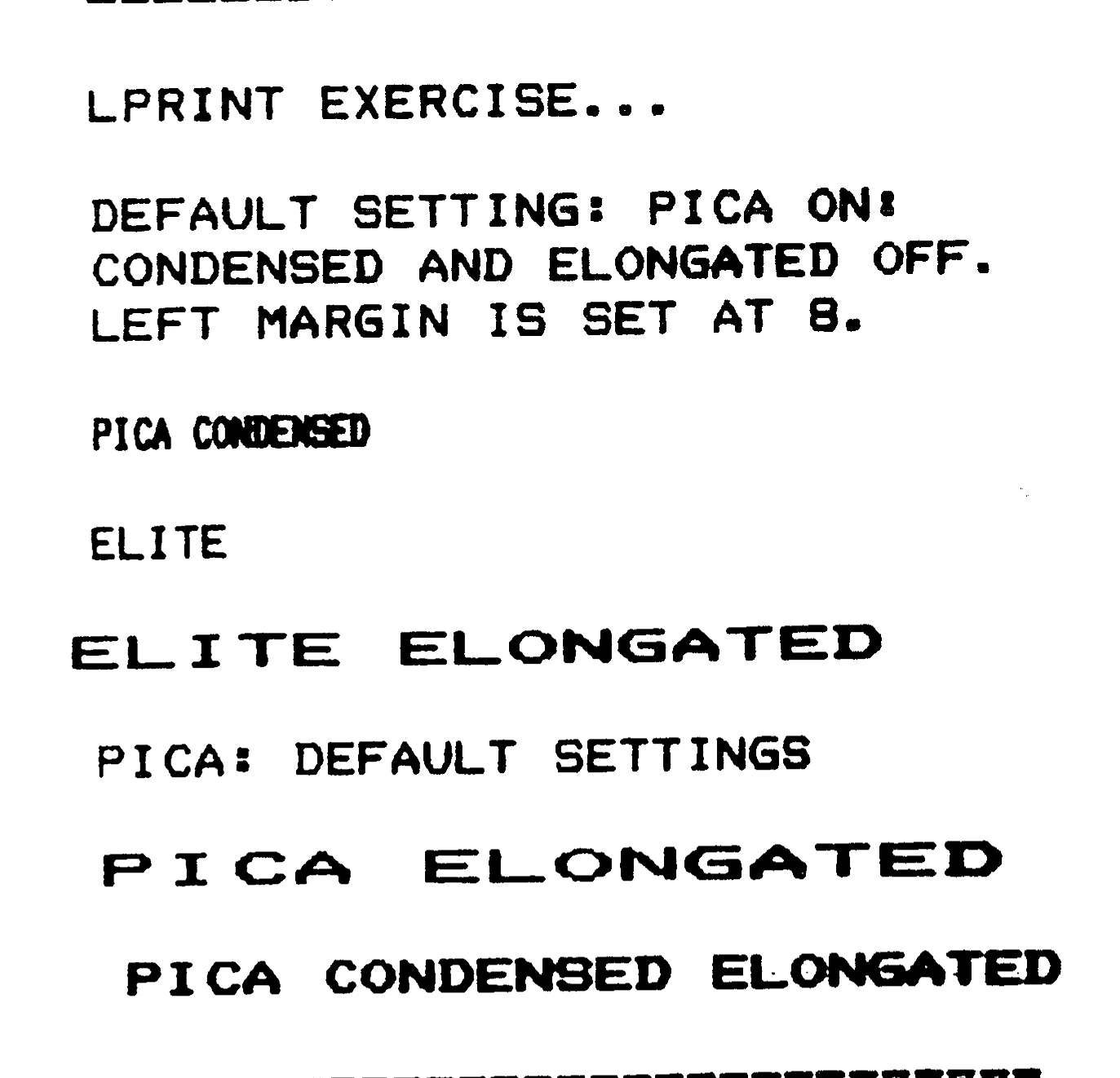
 130 LPRINT "LPRINT EXERCISE..."''
 140 LPRINT "DEFAULT SETTING: PICA ON;"''"CONDENSED AND ELONGATED OFF."''"LEFT MARGIN IS SET AT 8."
 150 GO TO 180
 160 PRINT #4: POKE 16093,32: RETURN
 170 PRINT #4: POKE 16093,0: PRINT #4: POKE 16094,m: RETURN
 180 REM PICA CONDENSED
 190 GO SUB 160: LPRINT CHR$ 27;CHR$ 80: LPRINT CHR$ 15: LET m=14: GO SUB 170: LPRINT : LPRINT "PICA CONDENSED": GO SUB 330
 200 REM ELITE
 210 GO SUB 160: LPRINT CHR$ 27;CHR$ 77: LET m=10: GO SUB 170: LPRINT : LPRINT "ELITE": GO SUB 330
 220 REM ELITE ELONGATED
 230 GO SUB 160: LPRINT CHR$ 27;CHR$ 77: LPRINT CHR$ 27;CHR$ 87;CHR$ 1: LET m=5: GO SUB 170: LPRINT : LPRINT "ELITE ELONGATED": GO SUB 330
 240 REM PICA..DEFAULT SETTINGS
 250 GO SUB 160: LPRINT CHR$ 27;CHR$ 80: LPRINT CHR$ 18: LPRINT CHR$ 27;CHR$ 87;CHR$ 0: LET m=8: GO SUB 170: LPRINT : LPRINT "PICA: DEFAULT SETTINGS": GO SUB 330
 260 REM PICA ELONGATED
 270 GO SUB 160: LPRINT CHR$ 27;CHR$ 80: LPRINT CHR$ 27;CHR$ 87;CHR$ 1: LET m=4: GO SUB 170: LPRINT : LPRINT "PICA ELONGATED": GO SUB 330
 280 REM PICA CONDENSED ELONG.
 290 GO SUB 160: LPRINT CHR$ 15;CHR$ 27;CHR$ 80: LPRINT CHR$ 27;CHR$ 87;CHR$ 1: LET m=7: GO SUB 170: LPRINT : LPRINT "PICA CONDENSED ELONGATED": GO SUB 330
 300 REM FORM FEED
 310 GO SUB 160: LPRINT CHR$ 12: GO SUB 330: BEEP 2,40: LET m=8: GO SUB 170: STOP
 320 REM RESET SUBROUTINE
 330 PRINT #4: POKE 16093,32: PRINT #4: POKE 16094,8: LPRINT : LPRINT CHR$ 27;CHR$ 80: LPRINT CHR$ 18: LPRINT CHR$ 27;CHR$ 87;CHR$ 0: LET m=8: GO SUB 170: RETURN
9000 PRINT #4: SAVE "PR_EX.B1" LINE 100
Points to note:
- If you type in the listing properly and RUN the program, you should get a printout something like the one at the bottom.
- Two subroutines at lines 160 and 170: The first sends all characters to the printer; the second returns to detokenizing. Read your Larken Instructions.
- Check the value of variable <m> as it changes for each type style so as to line up (sort of) the left margin for the copy.
- Subroutine at 330 resets values to default.
- LPRINT CHR$ 12 needs an LPRINT to execute; gets it in 330.
While on the subject of printers, I recently found that my FASTEXT 80 printhead was not returning fully to the left margin on its bidirectional left pass. It gave a very slightly uneven look to the left margin. I examined some printouts from way back and they were OK. Read the printer manual but there was no help there on any kind of maintenance. I dusted off the printhead and the rod then got out the trusty WD40. Sprayed the rod lightly from end to end and tested the printer. Now the left margin was even again. Problem solved.
Regarding re-inking ribbons for this machine. It’s no use just reinking the ribbon; the circular pad inside the cassette has to be fully inked. It never comes well inked, it seems. Re-inking the pad takes quite a good amount before it has a soaked look to it. I use some Printer ink from the ABBA Computer Corporation, 21 Amber St, Unit 4, MARKHAM Ont L3R 4Z3. Their phone is 416-477-4033. The ink sells for just under $20.00 for two bottles.
Bob Mitchell [address omitted]
900708
Note: Type-in program listings on this website use ZMAKEBAS notation for graphics characters.