Provided to TS-2068 UP-DATE Magazine (Revision dated 880229)
Editor’s Note: Bob Mitchell is retired from two professions, a career in the Canadian Armed Forces, and a subsequent career in Geodetic Survey. Presently Bob lives in beautiful Ontario Canada and “Snow Birds it” to Florida during the Winter months. Bob has worked on and purified this major software over a period of about six years, and now gives us this outstanding software which represents countless hundreds of hours of work. It is a masterpiece.
I never anticipated publishing such a long key in project in the pages of UP-DATE, and I would not except for these strong factors: 1. Though many, the program lines are short and easy to key in. 2. “Budget” rates a 10 in the category of usefulness. 3. Budget rates another 10 for educational value in two areas: a. Basic Programming techniques. b. It is a excellent tool for learning to compile basic programs. Finally, 4. Budget is easily used with all disk drives systems, as well as cassette. The program itself has great possibilities for re-dedication to other applications besides its purpose as a Budget software. The spreadsheat data is presented in excellent format and the subject categories can be changed to track other topic areas. This BUDGET software is a real barn burner worth the hours it will take to key in the progam lines. And there are great follow-on things to come.
Because the program listing is long, UP-DATE provides a short appendix at the end of the text to help with the key-in project. Take your time and do the key in over a time period of at least a week, saving the partially completed program often. It will be fun and relaxing that way. While keying in, ponder the program syntax and try using direct commands to see what the syntax actually does. UP-DATE will take questions and publish explanations in the issues to come. If the key in seems tedious, just remeber, Bob has worked on this sofware off and on for six years, and we get it all in a neatly packaged gift. Now I’ll turn you over to Bob to get you going.
BUDGET: Purpose and Scope
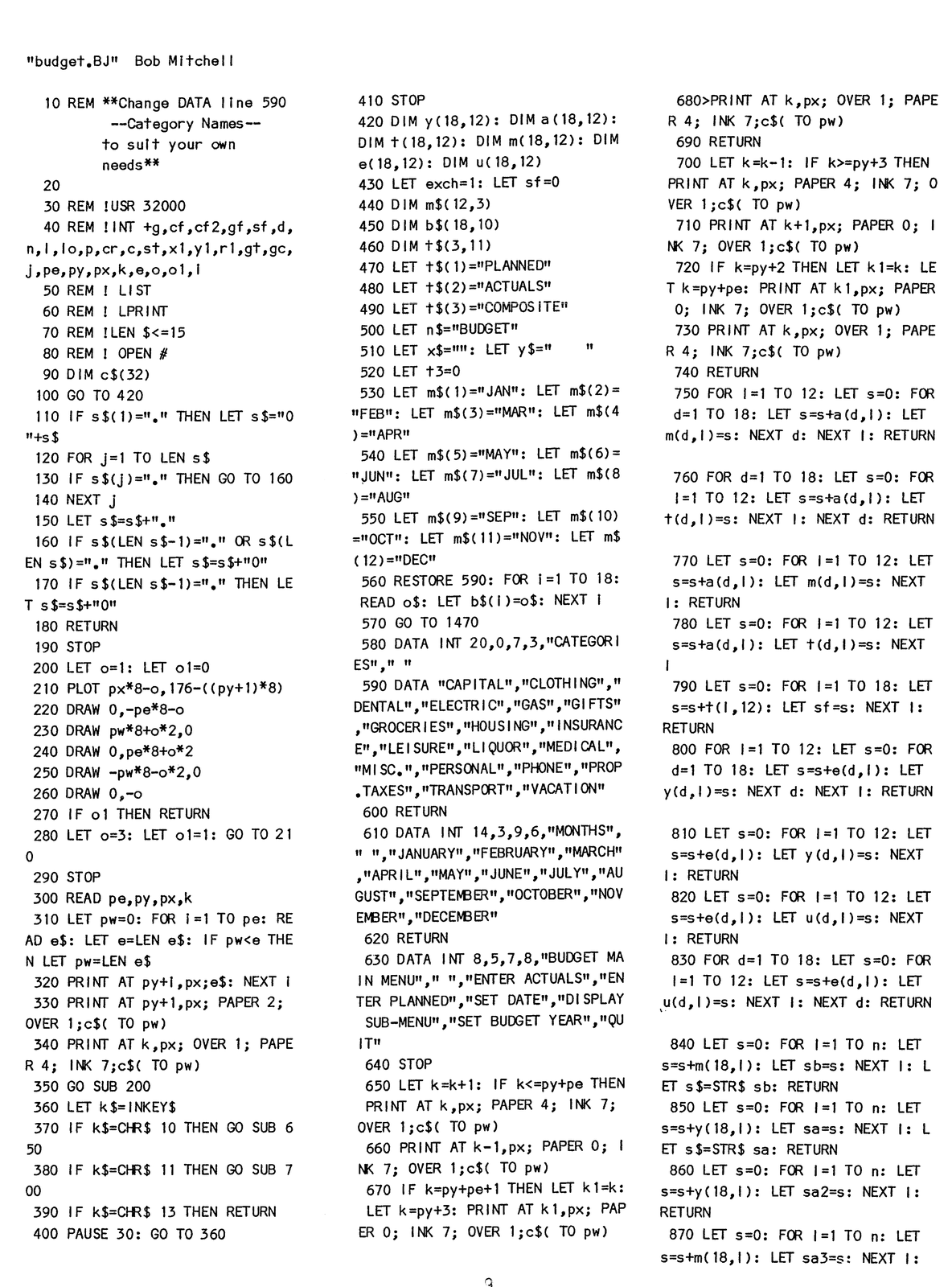
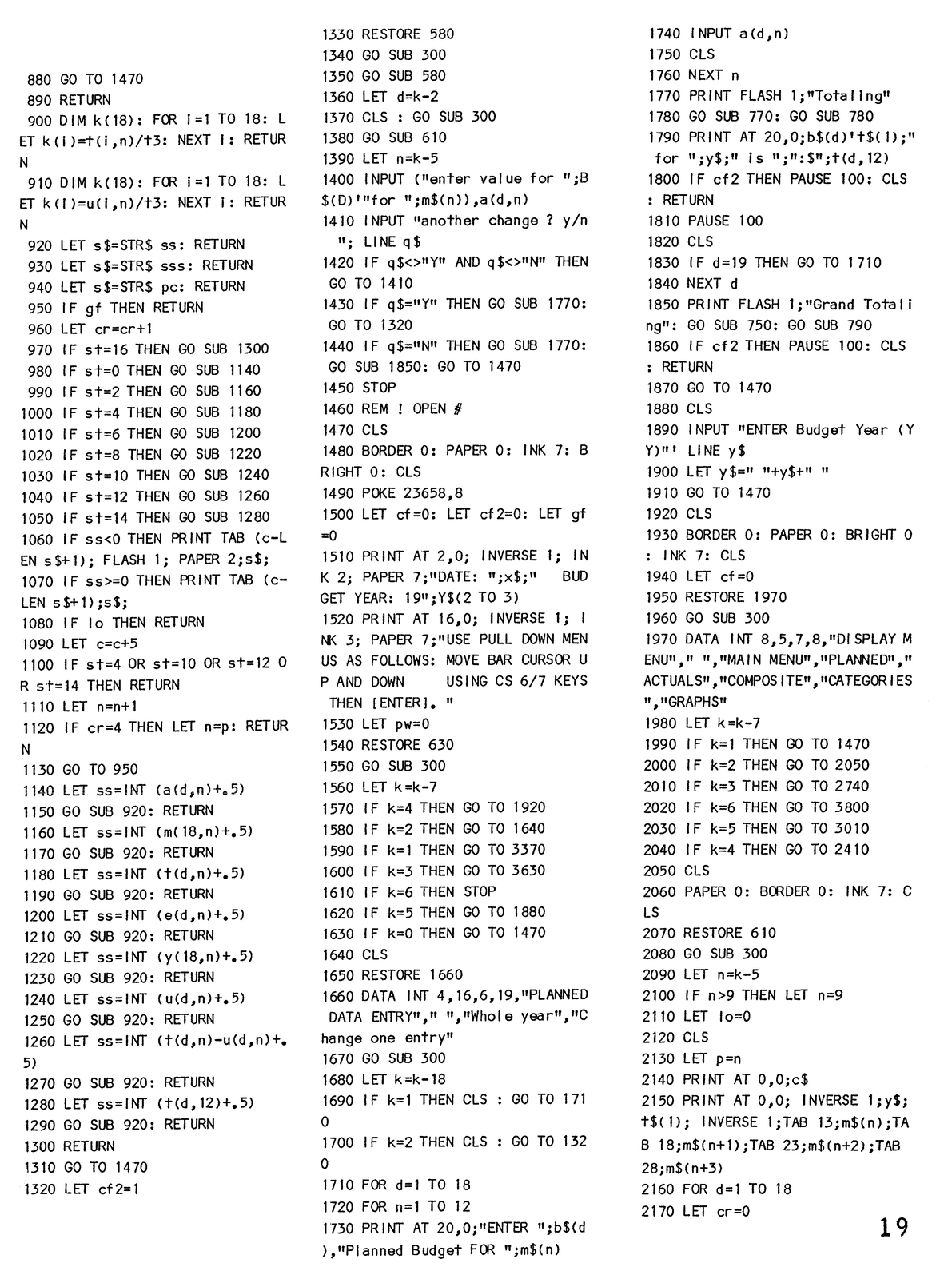
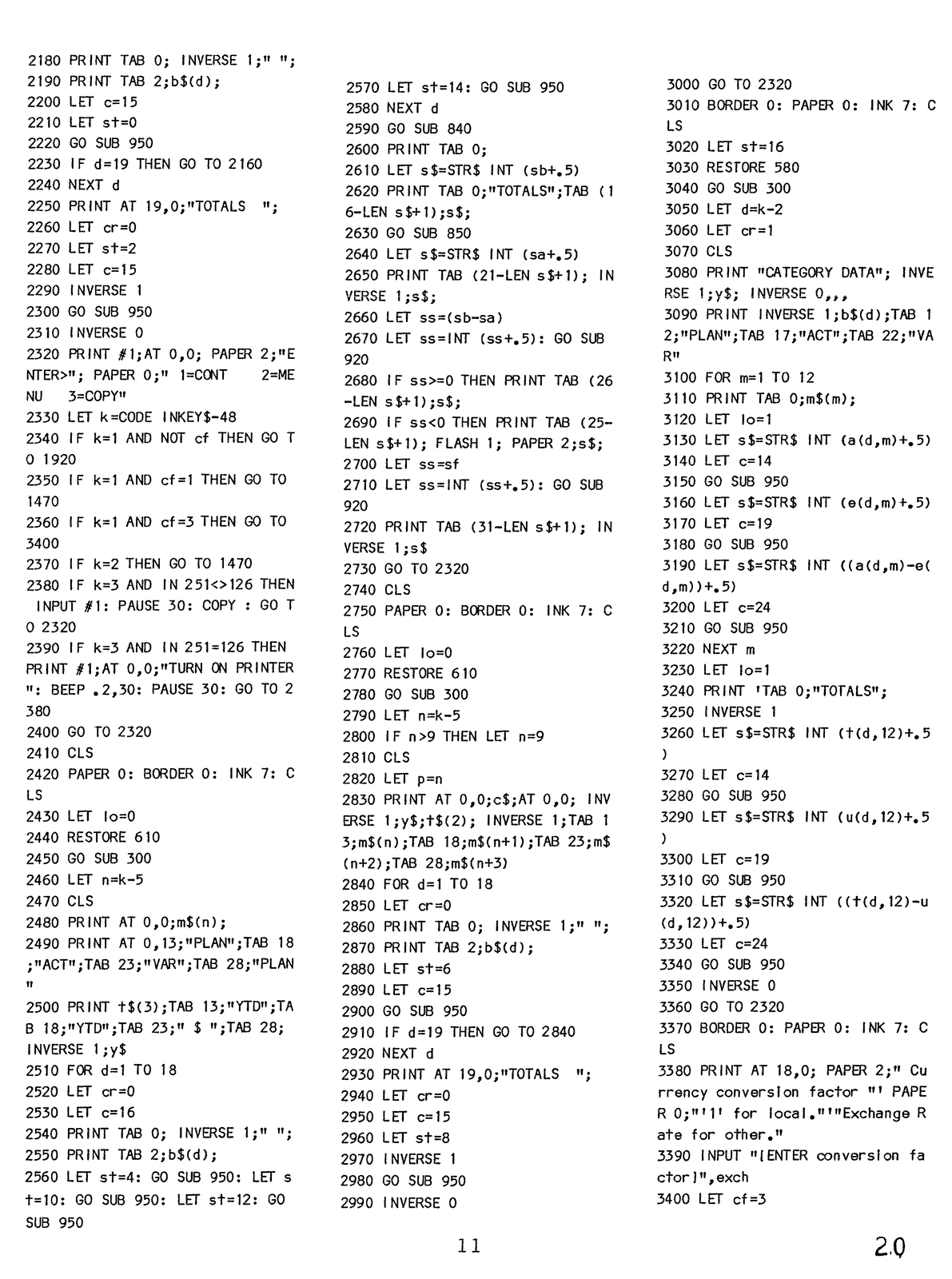
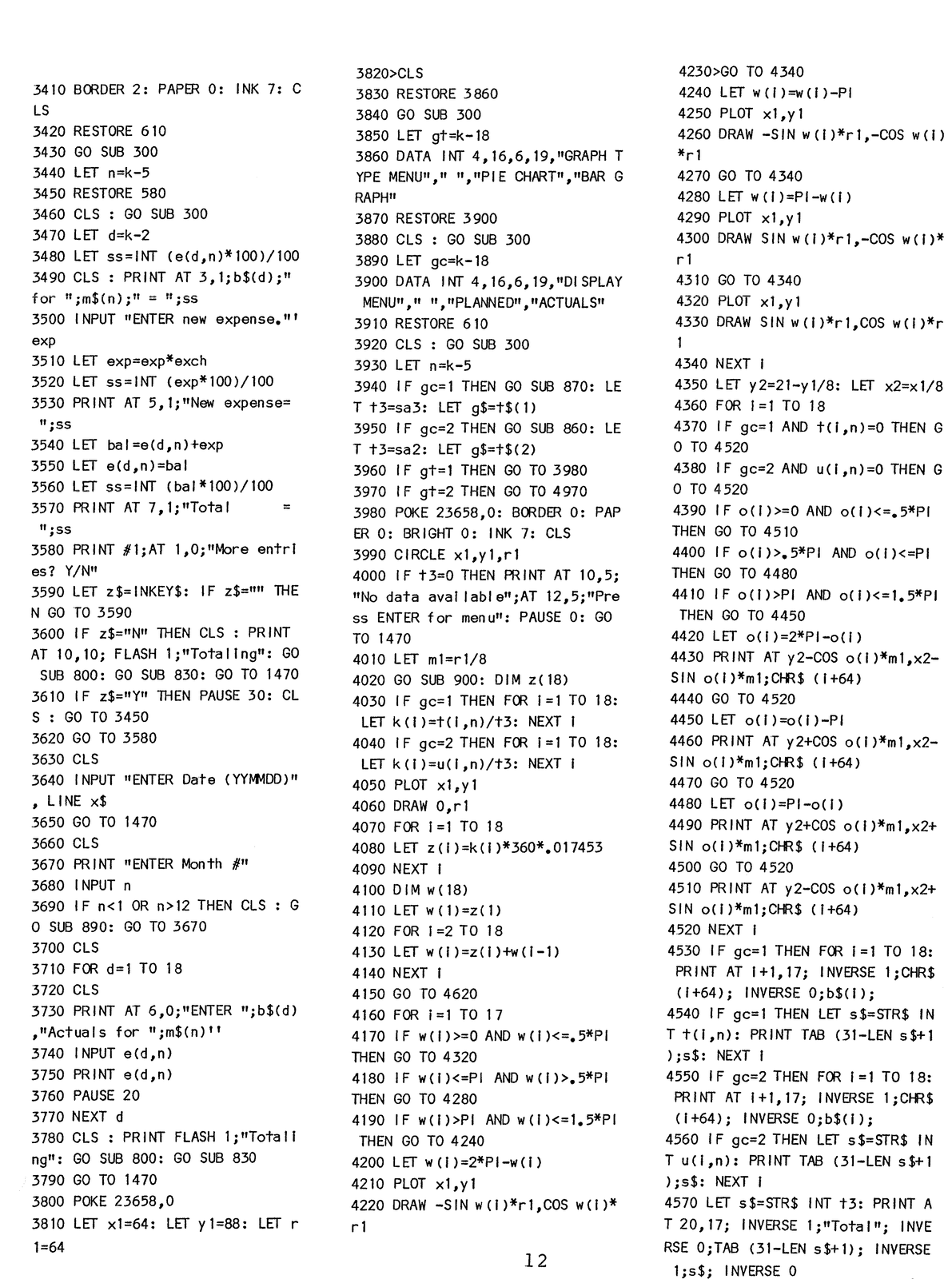
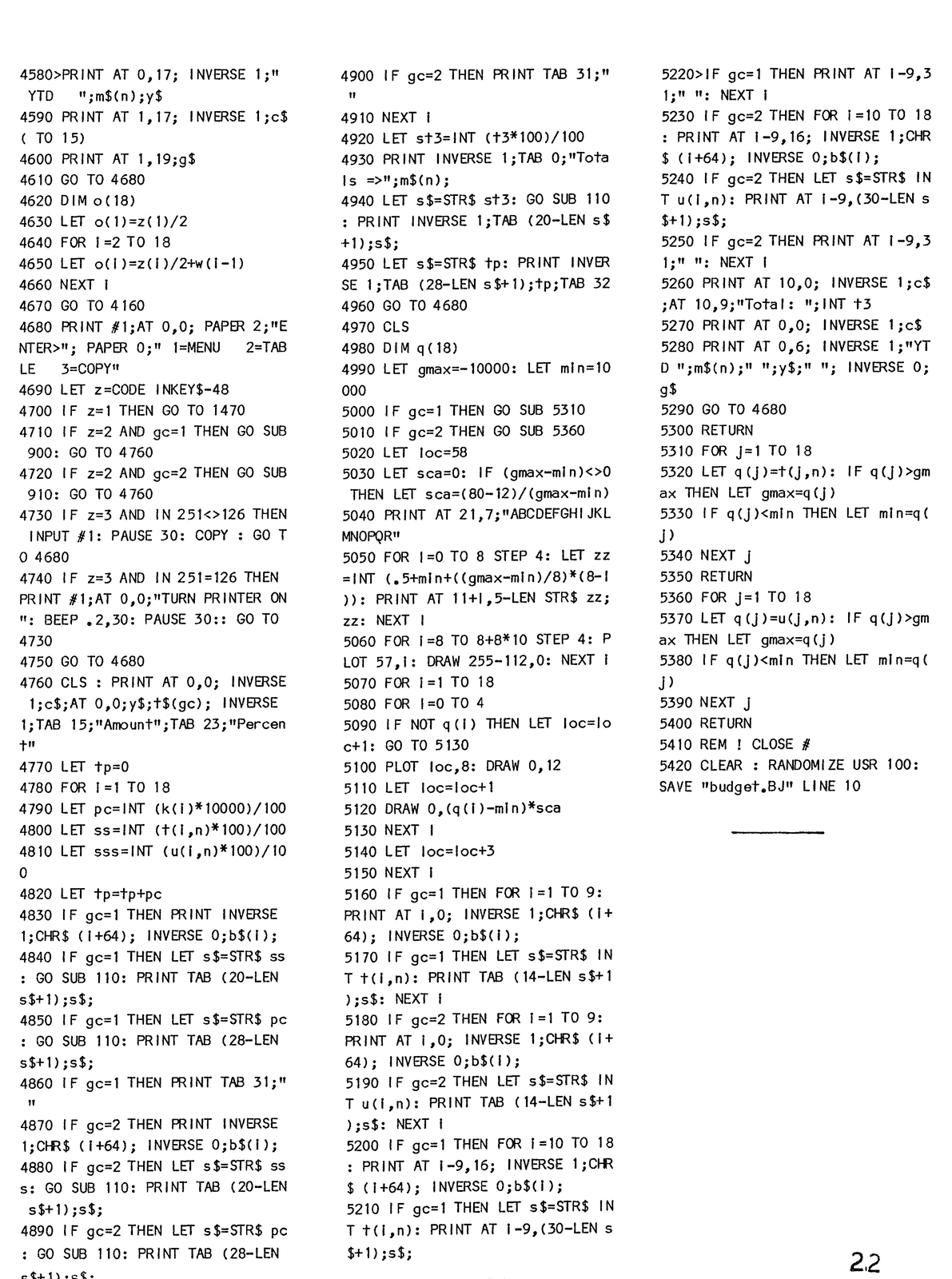
This BUDGET program is in three parts. First the long program in BASIC is given. When the listing is keyed in the program will work right away by RUN. BUDGET is really a Spread Sheet software that has the purpose of planning a annual household budget and then tracking the expenditures, providing various comparisons, and displaying or printing the data. The information products may be printed out with the TS-2040 printer. Follow on parts of the program will be given to allow print out of the data products with Centronics printers.
The second part of the BUDGET program, to be given in the July issue of UP-DATE, is a customized Disk Drive “Loader/Manager”. This Loader program is not essential for operating the Basic program given in this issue and thus will be given in a follow on article. The Loader program customizes the Compiled Basic program to operate with disk drive. There will be versions for Oliger Disk, Larken Disk, and syntax changes for Aerco FD-68, RAMEX, and TOS Disk. One more program addition will be given to provide the spreadsheet print out with wide carriage printers. The Basic program given in this issue prints a 32 column product with the TS-2040 printer and with Oliger disk via the LET/p=o feature.
This issue deals with the main software titled: “budget.BJ”, which is programmed entirely in BASIC. But, there is a unique feature. The program is set up for COMPILING into Machine code by use of the Compiler program “Timechine“. So, you will see the strange syntax “REM !” installed just after the line number of some program lines. This is the syntax needed by Timechine for transforming the Basic Program into a Compiled Machine Code program. If you’ve never done this, dont worry about it because the program will run without compiling it, just slower. Then after you have the program running will be the time to begin the adventure of Compiling the Basic Program. So, go ahead and type in the long listing. Save the program often to either Cassette or disk. When finished, then pick up the operational procedures given next.
PROGRAM OPERATIONS
1. Type RUN to begin operations. When the BUDGET menu appears in a sort of pull-down menu format, follow the instructions on the screen and SET DATE (in international format: YYMMDD) and then SET BUDGET YEAR (just YY).
2. Try entering some amounts into the program. Move the cursor to “ENTER PLANNED” and press ENTER. Follow the prompts on the screen and enter some dummy planned data (ie, how much you plan to spend during the 12 months for each of 18 categories. When you complete this dummy run of the annual budget, it will be time to see the results in various formats.
3. In sequence, press: DISPLAY SUB MENU > PLANNED > JANUARY. (In this tutorial, sequential key presses are separated by a “>”.) Prompts at the bottom of the PLANNED BUDGET FOR JAN-APR gives three choices:
a. Continue with Display Mode.
b. GO TO the Main Menu.
c. Copy the Spreadsheet to the 2040 printer. If your printer is not on the program will detect this and tell you to turn it on, then the COPY routine will work.
4. Try a few commands then go to the Main Menu. If there is an error, such as “number too big” (you wont see this report in the compiled program); you will be back in the loader. (Note: Since we do not yet have the LOADER program, type GO TO 1470 when any stoppage occurs).
Main Program Features
5. Let’s go over some of the main features of this program. First, the line of BASIC that you will want to customize is 590. Edit this line down to the bottom of the screen and change it manually according to the folowing criteria.
6. There are 18 categories and you should set the names carefully to meet your needs over several years. (There is space for up to 10 letters in each of the category names.) If you change the category names from year to year, you will find it difficult if not impossible to make meaningful comparisons for budget planning.
7. Try entering some “actuals”, ie, expenditures. Set the exchange rate if you are dealing with foreign currency. Just enter the proper rate. Enter “1” for local currency. Press JANUARY > GROCERIES and a “worksheet” appears to allow you to enter all of your bills. You can concatenate several entries in each category by entering them at the same time (eg, 134.35 + 27.09 + 48.76). Press “Y” for more entries until you have all of your bills for JANUARY entered and then press “N”. The totaling then takes place and is slow in comparison with the compiled version.
8. Now inspect what you have done via the DISPLAY MENU. Notice that all data are right justified and all are rounded to the nearest whole number, no room for pennies! (The right justification routine slows the BASIC version down and is one reason for providing the set up for compiling.). Your data will be stored in decimal (Floating Point) notation even though it is rounded to the nearest whole number for screen display and for printing with the TS-2040 printer. Storage in floating point is essential so that the calculations performed by the program will produce accurate results, totals, etc. Rounded whole numbers are acceptable for budget display, planning, and tracking.
9. The ADD-ON programs will be given in the July issue of UP-DATE. One addition will retrieve the real values and print them on a wide printer in full decimal format. Another will be the Loader which is the Disk Manager. I’ll also provide a more detailed explanation of the BASIC program with emphasis on the parts with useful sub routines. Also there will be a HELP routine which you can put on disk and call up from an expanded loader: this “HELP” will give suggestions on allocating different types of expenditures to the 18 categories.
10. Try COMPOSITE for January Actuals. You will get a YEAR-TO-DATE (YTD) comparison with variances and planned Year-End Totals. The variances show the differences between the corresponding planned and actual values. If you have spent more than your budgeted amount, the variances will be negative values, and these will be shown in flashing figures (in RED on a colour screen).
11. Take a look at CATEGORIES. Then try GRAPHS > BAR GRAPH > ACTUALS > JANUARY >. Try the table option and you will get a YTD percent table showing the percentage for each category against the total. The percentage total will seldom add up to exactly 100% (due to rounding).
12. Get back to GRAPHICS via the MENU and try the pie chart. Sometimes, depending upon how close the pie segments are, the category codes (A-R) will overwrite one another on the pie chart. I left this that way so that I could keep the pie chart as large as possible. Another view of the data is shown when you call for BAR charts.
13. Now BREAK and make a direct SAVE of the BASIC program to Disk or Cassette. SAVE with a starting line of 1470. The program, when re-loaded will present the main menu and the previously constructed data will be intact for either review or for entry of new data to continue planning and tracking of the annual budget.
Coming Additional Features of BUDGET
Next issue will bring the ancillary programs previously mentioned, plus the procedure for COMPILING the Basic program using the TIMECHINE Compiler program. This application of Timechine represents a case of putting the compiler through its paces. If you dont yet have the “Up-Dated version of TIMECHINE, it is available from several sources including: NOVELSOFT, 106 Seventh St., Toronto, Ontario, Canada M8V 3B4 ($19.95 US plus $3.00 S&H).. Be sure to specify “The AMENDED VERSION that handles D and E routines”. This excellent compiler allows you to compile almost any slower Basic program into compiled machine code to greatly improve operating speed.
Editors Note: To get the advantage of having a faster operating program that has been compiled with Timechine, you have two options: 1. Buy the Timechine software and use it to compile this program. This is the “educational way”. 2. The April UP-DATE Issue Disk will contain ALL programs mentioned (The BASIC un-compiled program, plus the compiled program, plus the additions, “Loader and Centronics Printer annex”. See the yellow pages for ordering.
Bob Mitchell, Willodale, Ontario
UP-DATE Appendix to BUDGET
There are several program lines that start with < REM ! >. This is the syntax for the Timechine Compiler program which does not interfere when you run the program in its BASIC form. DO enter these codes whether you intend to compile the program or not. This is so that the TYPE IN CHECK POINTS given next will be correct. To enter the REM ! syntax, “first omit the REM !” and type the rest of the line of programming. Then back up the cursor to the line number and type REM !.
KEY IN Accuracy Check
Accuracy check points are given as follows: After keying in the lines given in the left column, type CLEAR, then PRINT FREE. If your typing is correct the figure in the right column will be presented on screen. If the screen figure and the number given in the column do not match, then there are type in errors.
LINE  FREE    LINE  FREE    LINE  FREE    LINE  FREE
 100-38385    1500-33346    2900-29260    4300-25601
 200-38163    1600-32926    3000-29081    4400-25305
 300-37896    1700-32621    3100-28820    4500-25025
 400-37601    1800-32353    3200-28612    4600-24434
 500-37328    1900-32145    3300-28415    4700-24150
 600-36641    2000-31840    3400-38086    4800-23616
 700-35988    2100-31620    3500-27836    4900-23132
 800-35362    2200-31316    3600-27460    5000-22820
 900-34823    2300-31133    3700-27264    5100-22327
1000-34580    2400-30672    3800-27039    5200-21854
1100-34622    2500-30369    3900-26723    5300-21343
1200-34041    2600-30124    4000-26322    5400-21143
1300-33821    2700-29793    4100-26051
1400-33625    2800-29574    4200-25773
Last line-5420=21093
“budget.BJ” Bob Mitchell