
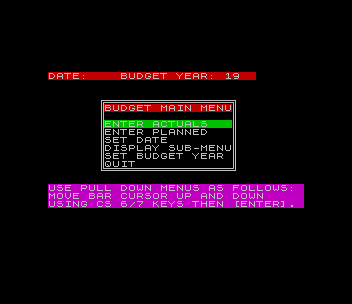
Keeps a household budget for one year across 18 spending categories, comparing PLANNED amounts with ACTUALS month by month. Pull-down menus with a bar cursor, moved with CAPS SHIFT 6 and 7 and chosen with ENTER, lead to entry of planned amounts for the whole year or one item at a time, entry of actual expenses (each added to that month’s running total, with an optional currency conversion factor), and the date and budget year. The display menu shows planned or actual figures four months at a time, a composite month view of year-to-date plan, year-to-date actual, variance and full-year plan, and a twelve-month view of any one category; negative amounts flash in red. Pie charts and bar graphs show year-to-date spending by category, with a table of amounts and percentages, and every screen can be copied to the 2040 printer. Loader option 5 runs a separate spreadsheet printer that prints planned, actual and year-to-date sheets for all twelve months on a wide printer.
The main program and the spreadsheet printer were compiled with the Timachine BASIC compiler; the tape holds the BASIC loader/manager BUDGET.B1, the compiled budget.CJ (25,923 bytes at 32000) and spread.CJ (3,904 bytes at 58400). The documentation, revision dated 880414, credits Bob Mitchell of Willowdale, Ontario, who provided the software to the TS Update newsletter; it was described there in “Budget” and in Bill Jones’s “The Budget Software, Part II”. The zip also has the BASIC sources budget.BJ and spread.BJ as a second tape file, for anyone who wants to change the category names (line 590 of budget.BJ and line 8250 of spread.BJ) and recompile, and the author’s notes as text: compiling and setup instructions, program breakdowns of the budget, spreadsheet and loader programs, and a coding sheet that suggests what belongs in each category. Printing the spreadsheets needs a Centronics interface with the AERCO print code (or the Larken cartridge) and a wide printer.
Program Analysis
Loader
BUDGET.B1 is a short menu: 1 loads budget.CJ and enters it at 32000, which sets up a new, empty year; 2 loads a saved budget.CY and enters it at the second entry point, 37166, which keeps the data; 3 saves the whole code block, data included, as budget.CY; 4 re-enters a budget already in memory at 37166; 5 loads spread.CJ and runs it at 58400. Quitting the budget program returns to this menu. Options 3, 4 and 5 first check that a CALL opcode (205) is present at the entry address, so they do nothing when the budget is not loaded.
Budget
In budget.BJ the planned and actual amounts are held in a(18,12) and e(18,12), with running totals by category and by month kept in four more 18×12 arrays. The REM ! lines are Timachine directives: the entry addresses, a list of variables to compile as integers, and the end of the compiled area at line 5410. A single menu routine at line 300 READs each menu’s size, position and items from DATA, draws a double box around it with PLOT/DRAW, and moves an OVER 1 green bar with the cursor keys until ENTER is pressed; the caller turns the returned screen row into a choice. Lines 950–1130 right-justify integer values in columns and choose the array to show by a type code in st. The pie chart turns each category’s share into radians, draws the dividing radii with SIN and COS, and labels each slice with a letter A–R placed halfway round it; the bar graph scales the 18 values between their minimum and maximum.
Spreadsheet
spread.BJ does not share variables with the budget program. It PEEKs the compiled program’s arrays at fixed addresses, five bytes per number, decodes the Sinclair floating-point and small-integer forms itself (lines 8630–8740), formats each value with a PRINT USING routine to the mask ######.##, and sends the rows to the printer with LPRINT. Pressing ENTER stops a printout. Because the addresses are fixed, the documentation explains how to change them if the budget program is recompiled at a different length.
Notable Techniques
PEEK 32000=205andPEEK 37166=205test for the compiled code’sCALLinstruction to see whether the budget is in memory.- One data-driven menu routine serves every pull-down menu; each menu is just a
DATAline giving item count, row, column and starting cursor row, then the items. - Screen
COPYis guarded byIN 251, which warns “TURN ON PRINTER” when the 2040 is not ready. - The spreadsheet heading is built with string
ANDlogic:("PLANNED" AND i$="P")+("ACTUALS" AND i$="A")+…. POKE 23692,-1before eachLPRINTkeeps the scroll prompt from stopping the printout.
Potential Issues
- Lines 3660–3790 of
budget.BJ, which take a whole month of actuals at once, appear to be unreachable: the ENTER ACTUALS menu item goes to line 3370. - The “another change ? y/n” and “More entries? Y/N” prompts accept only capital Y and N, so a lower-case answer just repeats the prompt.
- On the disk, loader line 310 re-saved the loader with
LINE 330, a line this version doesn’t have (the documented version loaded the AERCO print code there). The tape version saves it withLINE 60instead, so a re-saved loader starts at its menu. - The loader does not load any printer code, so the AERCO print code must already be in place before option 5 is used.
This copy came from an Oliger (JLO SAFE) disk. For tape, the Oliger / was removed from the loader’s LOAD and SAVE lines along with the LET /p printer selections, the Disk Menu option 6 was dropped, option 2 now loads the saved budget.CY file, the bad-key loop at line 150 was fixed to return to the key wait, and the tape autostarts at the menu; the Larken RANDOMIZE USR 100 was removed from the save lines of the two BASIC sources. It was tested in ZEsarUX, where the loader menu and option 1 reached the compiled budget’s main menu.
Image Gallery

Source Code
   10 REM ****BUDGET LOADER****
   20 REM ** See Cclear ** LOAD /"Cclear"CODE
   30 GO TO 60
   40 SAVE /"budget.CY"CODE 32000,25923
   60 ON ERR RESET : CLOSE #2: BORDER 0: PAPER 0: INK 7: CLS : LET /p=t: PRINT AT 4,0;"=======BUDGET INPUT/OUTPUT======"
   65 REM CLOSE #3
   70 PRINT '"  1> Budget [set up]"
   80 PRINT "  2> Budget [load]"
   90 PRINT "  3> Budget [save]"
  100 PRINT "  4> Budget [restart]"
  105 PRINT '"  5> Print Spreadsheets"'"     on Wide Printer"
  110 PRINT '"  6> Disk Menu"
  120 PRINT ''"=========Select option=========="
  130 PAUSE 0
  140 LET k$=INKEY$
  150 IF k$<"0" OR k$>"6" THEN GO TO 150
  160 IF k$="1" THEN GO TO 220
  170 IF k$="2" THEN ON ERR GO TO 60: GO TO 250
  180 IF k$="3" AND PEEK 32000=205 THEN GO TO 40
  190 IF k$="4" AND PEEK 37166=205 THEN ON ERR GO TO 60: RANDOMIZE USR 37166
  195 IF k$="5" AND PEEK 32000=205 THEN CLS : LET /p=o: POKE 23324,0: POKE 23323,132: LOAD /"spread.CJ"CODE : RANDOMIZE USR 58400: GO TO 60
  200 IF k$="6" THEN LOAD /"Menu.B1"
  210 GO TO 60
  220 LOAD /"budget.CJ"CODE
  230 RANDOMIZE USR 32000
  240 GO TO 60
  250 LOAD /"budget.CJ"CODE
  260 RANDOMIZE USR 37166
  270 GO TO 60
  310 SAVE /"budget.B1" LINE 330
  320 GO TO 60
Note: Type-in program listings on this website use ZMAKEBAS notation for graphics characters.