
In this section we will begin a continuing series on problem #1; tape Loading and Saving. If you have a technique which might help others, or problem tape you can’t load, write into TAPEWORMS.
LOADING BALKY TAPES
At the first loading failure experienced, I clean the play head in the tape player with a head cleaning tape and liquid cleaner. This usually clears up any tape loading errors with tapes that I have recorded.
When a tape made by someone else won’t load, no matter how many times I vary the volume control setting on the player, then I make a direct copy using two tape machines and a Winky Board. This never fails to allow loading, with the exception of a cassette with poor quality tape.
A NEAT TRICK
A TRICK FOR SAVING WITH T/S1000 – Dick Wagner
This suggestion is from the OCT. 1984 issue of the newsletter TIMELINEZ. CPT Charles R. Byler suggests this routine: for SAVEing auto-run MC programs just ENTER FAST and then RAND USR 836 and then PLAY to LOAD the tape. Ends with C/0. The program listing is displayed on ENTER so you can find the SAVE line. Copy to a new tape with GO TO line number and ENTER.
RAND USR 836 initiates the LOAD command routine at Hex 344 in ROM.
I tried this with Flight Simulator and it worked.
Thanks to: Clackamas County Area Timex Sinclair User’s Group
CASSETTE LOADING HINTS FOR TIMEX COMPUTERS
By: John Bell
The most annoying problem I have had with my T/S 1000 is not being able to load programs. If you have tried all the suggestions in the manual and still have problems, try the following techniques. Using them I get a good load on the first try nine times out of ten.
- Save your programs on a quality tape. Sixty-nine cent specials may work, but why take chances? I use any quality 45 minute normal bias cassette tape. (Maxell, Memorex, TDK, etc..)
- Try another tape recorder. Some really do work better than others. I’ve found the pocket size machines usually won’t work.
- Keep the cassette recorder clean and demagnetized. A cassette type demagnetizer works fine. Clean the tape heads and pinch roller by hand. Perform these procedures every five to ten hours operating time.
- Run the tape recorder off batteries. Don’t use Nickle-cadmium rechargeable cells. They only put out 1.2 volts compared to 1.5 for regular batteries. That’s over a 1 volt drop for the average tape recorder!
- Keep the computer, tape recorder and cassette tapes at least two feet away from the television, especially when you turn it on. Electrical fields from the set can magnetize tape heads and change bit patterns on program tapes.
- The use of a tape loading device might help. See T/S HORIZONS, issue 3 for plans, or one can be purchased commercially from several sources.
Thanks to: TSH
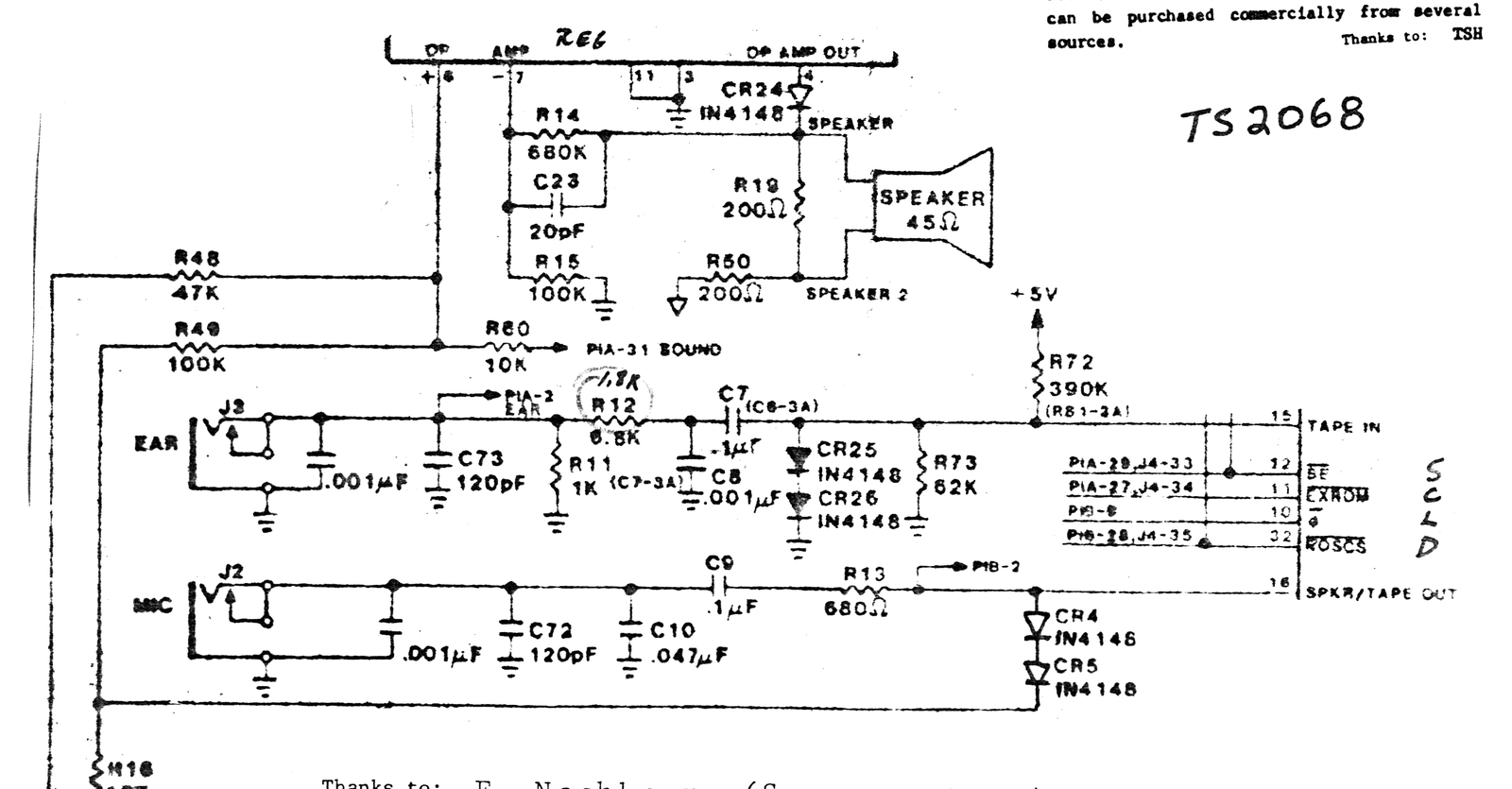
Thanks to: F. Nachbaur (Syncware News): Change R12 (6800Ω) to 1800Ω for better LOADs.