
This is Tasword II used with the Tasman-Serial Interface and the Brother EP-44 printer.
The word processor naturally uses any of the keys on the 2068 that are labelled. I have been wondering for some time if it was possible to access the special keys on the typewriter through the ASCII codes and ESC or CHR$27.
The standard decimal codes for the numbers 0 to 9 are 48 to 57, 58 to 64 are : ; < = > ? @ which are accessible by just typing in those characters using symbol shift.
By redefining the printing codes in the Tasword system it is possible to access the special characters on the typewriter. In the following I have redefined the graphics on keys 1, 2, 3 and 4 to produce the special characters:
1 = Ø 2 = ß 3 = µ 4 = Ä
It is also necessary to set EP-44 for 8 Bit Code for most of the characters. For example the normal characters decimal 160 to 174 ! ” # $ % & ‘ ( ) * + , – . / are redefined in the 8 bit mode as follows:
[illegible] 160   [illegible] 170             Ç 128   ï 139             û 150             ± 241
[illegible] 161             ½ 171   [illegible] 129   î 140             ù 151             ÷ 246
[illegible] 162             ¼ 172             é 130   ì 141             § 152   [illegible] 248
[illegible] 163             ¡ 173   [illegible] 131   Ä 142             Ö 153   [illegible] 253
[illegible] 164             « 174             ä 132   Å 143             Ü 154
[illegible] 165             » 175             à 133   É 144             ¢ 155
[illegible] 166                               å 134   æ 145             £ 156
[illegible] 167             ß 225             ç 135   Æ 146             ¥ 157
[illegible] 168                               ê 136   ô 147   [illegible] 158
          - 169             µ 230             ë 137   ö 148             ƒ 159
                                              è 138   ò 149             Ø 237
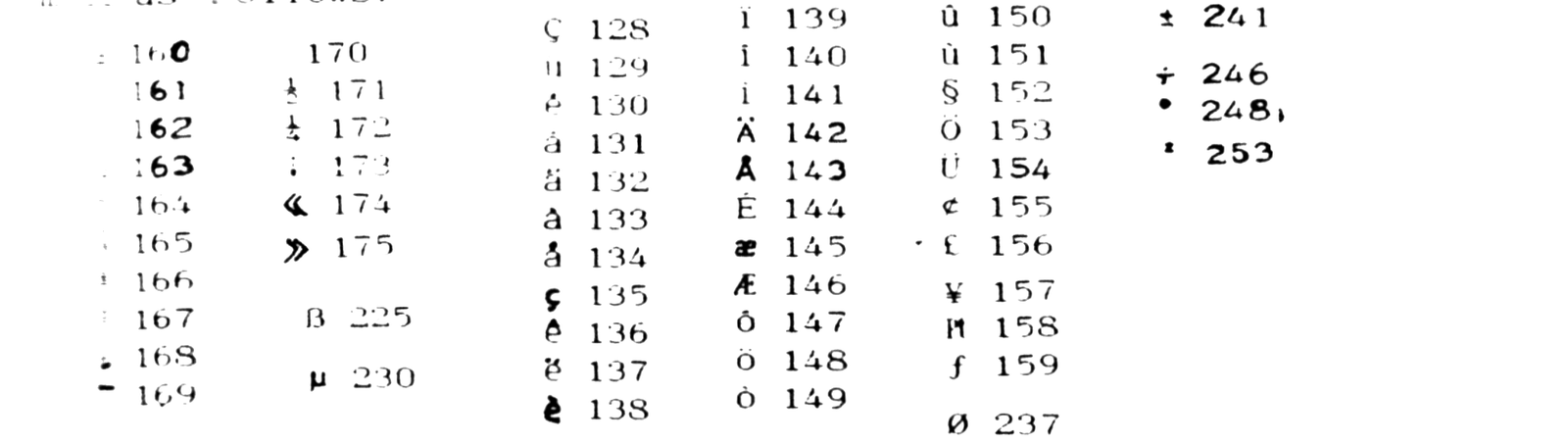
By defining those you want as “graphic symbol 27 dec code” for the graphics you can use them in your wordprocessor text to be printed on the EP-44.
BOB HOWARD, WA6DLI
Paul D. * First define graphics on Keys 1-9 in this form. The above are the decimal codes for all the special characters. I see my sub is up in Jan ’86 so here is my check for $15.00 LIST may be hard to read at times-it is the best stuff around! Bob. L. Howard