
THE QL IN AMERICA
Many of us in recent years have, in anguish, witnessed the demise of first the Timex Computer Corp., then Sinclair Research USA, and finally Sinclair Research Ltd., itself. I say “in anguish” because with their failure went fond hopes of continuing professional support for our computers and dreams of a proliferation of third-party hardware and software. These organizations, blessed with an excellent product and the good will of many thousands of cult followers, just plain “blew it” and, in the event, passed up the opportunity for millions in profits. None seemed to learn from its predecessors. In each case, arrogance and poor customer relations prevailed. Statements like “we don’t really need the U.S. market” and “each Sinclair employee produces millions in earnings” added to the insult of telephone calls that were not returned and letters unanswered. Many recommendations from periodicals, users’ groups, and loyal customers, some based on time consuming research, were spurned. If it was not the company’s idea, it was not, needless to say, a good idea. The outcome, the result of arrogance and delays due to poor management, was probably inevitable.
QL users and would-be users in the U.S. are now dependent on a single distributor offering a limited number of QLs through a dozen dealers–without factory or engineering back-up. Before taking the plunge, would-be QL buyers should be aware of a few things and then satisfy themselves that their QL will be adequately supported. Item–the QL will be replaced in a year or so (perhaps this fall in the UK) by one or more follow-on “QL-compatible” systems that do not use Microdrives. Item–when the present small stock of QLs are gone, no more may be manufactured; this will affect the availability of replacement parts and maintenance and the quantity and cost of future software for the QL. Item–there is a difference in QDOS addressing that causes many software programs to work improperly on U.S. machines: for example, QL Project Planner, QL Decision Maker, GraphiQL, and VROOM! (This problem also affects U.S. software designers trying to get their programs to work on European QLs.) Item–the Psion software programs sold with QLs in the United States are now several versions old and the documentation for these programs is older yet. Item–the QL is poorly documented in the QL User Guide, and scores of books on the QL–all written early on before the operating system was perfected and before peripherals were available–do little to help the situation. (This problem–a major shortcoming of the QL since its launch, and before it the T/S 2068–was ignored by Timex and Sinclair organizations despite urgent pleas and recommendations by QL users.) Item–many QL users are now getting bad advice…better methods of communicating authoritative information regarding the QL are needed.
I do not believe that the QL distributors and dealers are moving nearly fast enough to correct these problems, all of which are capable of easy and inexpensive solution. For this reason, prospective QL and QL software buyers should pressure the distributors and retailers to do something about all of these problems ASAP. In doing so, you would do yourself and them a favor, possibly saving them from a rather predictable self-destruction. Lets have some cards, letters, and calls on this, folks!
The following things should be done soon (and that doesn’t mean “next year”):
a. Supply QLs with the latest version of Psion QL software. (It should cost very little to do this, and buyers would gladly pay an extra cost.)
b. Supply QLs with additional documentation to supplement the inadequate, frequently erroneous, and badly out-of-date QL User Guide. (Making this supplement available to QL owners here and abroad could make this a profitable endeavor.)
c. Devise a universal “patch” which would permit all European QL software to work properly on U.S. QLs. (This is long overdue–a result of inaction.)
d. Insure they are getting good technical advice regarding which QL peripherals and software to market in this country.
e. Decide whether the current U.S. version of the QL, Microdrives and all, should be manufactured further, perhaps with additional built-in or plug-in RAM and RAMdisk software. (An enhanced QL could be profitably marketed in this country for another two to three years.)
f. Make on-the-shelf QLs available with distributor installed disk interfaces, RAM cards, and RAMdisk software.
g. Select and standardize use of a disk interface with the QL and a single DS-DD drive, preferably a 5 1/4″ drive.
h. Establish a toll-free “QL HOT LINE” for three or four hours a day to answer consumer questions.
i. Advertise the improved product. If nothing is done, that is, if things proceed at the present pace, my prognosis for the QL in the U.S. is a slow death.
QL GRAPHICS/CAD SYSTEMS
There are now many types of graphics systems for the QL, ranging from those used to draw pretty pictures to two-dimensional computer-aided design (CAD) programs to three-dimensional graphics design programs. With one exception, I believe the best of these QL graphics programs are discussed below. (The exception, QL Peintre from France, is discussed by Paul Bingham in this issue of TDM.)
Also discussed this month, is a new and excellent font editor and print utility for the QL which I thought you should hear about. Finally, as an update to last issue’s games article, a brief review of VROOM!, the grand prix motor racing game from France.
Q Draw by Psion: Q Draw is the software used by Psion to create the breathtaking graphics for QL Chess and QL Matchpoint. Very user-friendly, Q Draw can be used to create pictorial graphics of all types or to improve upon, or draw from, graphics screens produced by other programs such as GraphiQL, TechniQL, Concept 3D, Easel, or a screen created and saved from SuperBASIC. Q Draw offers four-color, high-resolution graphics as well as the more usual eight-color lower-resolution graphics. (High or lower resolution is not selectable from within the program.) Other features include a variable-width pen (or brush); the exploitation of created “shapes” which may be created or plucked from any screen stored on disk or Microdrive and then manipulated, copied, or stored for later use (a library of useful shapes is included and you may economically create your own library); two screen magnifications; and various cursor forms (a crosshair or screen grid may also be selected). There are no text or curvilinear functions which automatically create arcs, circles, or ellipses. Cursor position coordinates are not available, but this does not seem a great disadvantage in Q Draw. At $25, Q Draw is the least expensive QL graphics program and in some respects it is the best of the lot–another winner from Psion.
GraphiQL & TechniQL by Talent: These two software programs from Scotland are so complex and comprehensive that a complete description of each is impossible in an article of this length. The best I can do is describe their capabilities and differences to help you decide which of these two superb programs, offering overlapping capabilities, should suit you best.
Talent’s designers have had decades of experience in designing CAD/graphics software for mainframe and minicomputer systems. Their microcomputer versions for the QL, while reducing unnecessary complexity, at the same time incorporate several never before seen features.
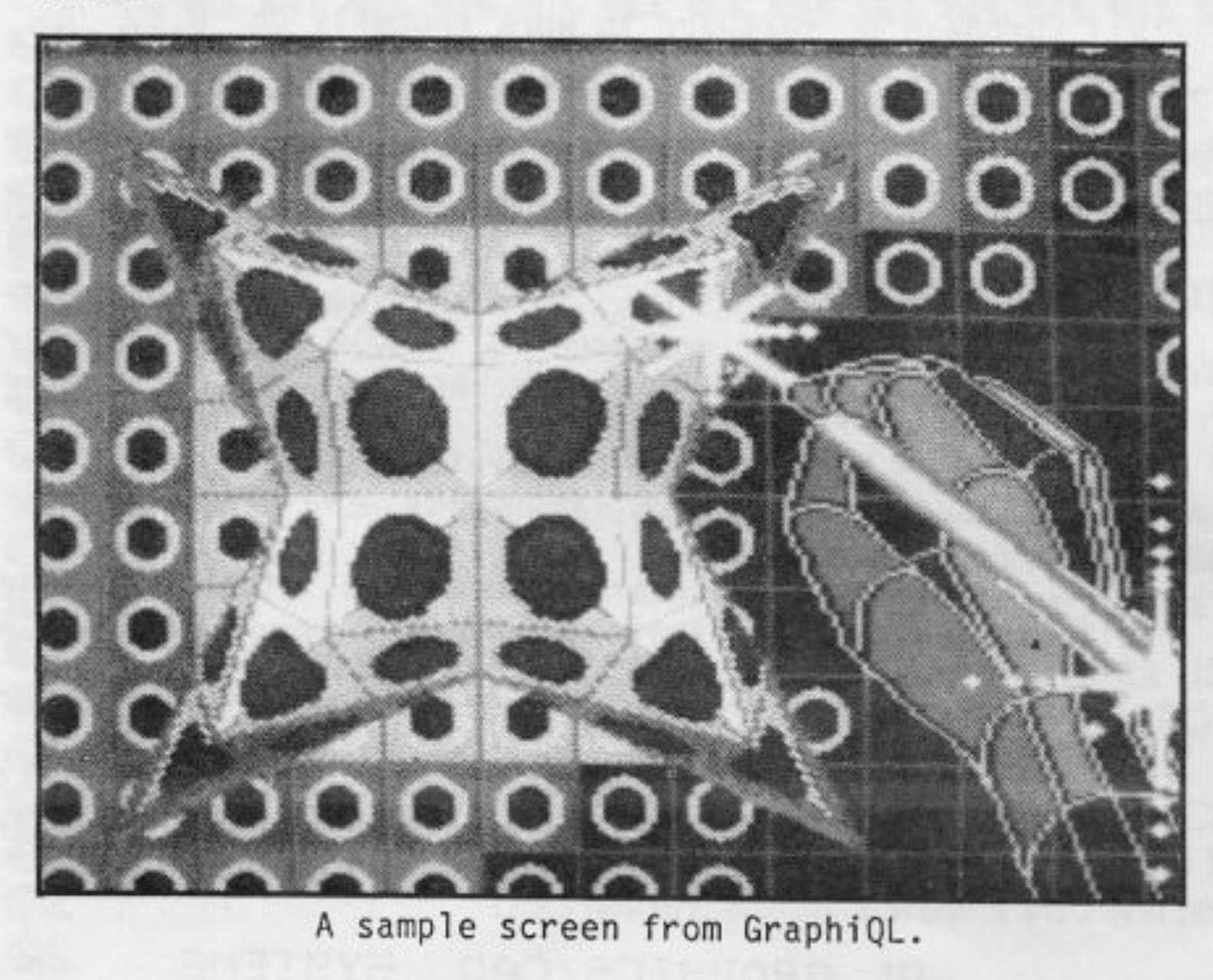
GraphiQL is a graphics design program optimized for the computer artist or illustrator. TechniQL is a two-dimensional CAD (computer-aided design) package optimized for the technical draftsman. Although the two programs have few features in common, each can do a fair job at the other’s tasks with a little extra effort, but GraphiQL pictures are limited to the size of a single computer screen, while TechniQL pictures occupy many screens and be drawn in many layers (analogous to acetate overlays on an engineering drawing). Both programs have good on-screen HELP facilities. Neither has a variable-width pen (brush).
GraphiQL is primarily, a graphic arts program whose forty-six commands and other capabilities can be used for other purposes, including technical drafting. GraphiQL operates only in the eight-color, medium resolution (256 x 256 pixels) mode. Many methods of creating illustrations are possible, and cursor coordinates and other useful data may be displayed, if desired. Other features include texture and airbrush effects, screen magnification (16x), two text sizes, standard drawing shapes, and comprehensive screen/file handling. Available at $50, including a 63-page manual, GraphiQL may be found in an improved Sinclair Research version, QL Paint with icon pull-down menus and a 123-page loose-leaf manual.
TechniQL is primarily a CAD and drafting aid, but with good graphic arts capabilities (except for text-printing which is better on GraphiQL and not available in Q Draw). Additional TechniQL features include the following: four-color, high-resolution and eight-color, lower-resolution graphics selectable from within the program; about forty commands which may be executed from five pull-down menus or by two letter key codes; rapid, multi-sheet printer output; multiple magnifications over a wide range; a RAM-efficient design storage system; the capability of creating and manipulating up to 75 elements (cells) as part of a single design; and comprehensive file storage handling. At $70, TechniQL is the most expensive and comprehensive QL Graphics program.
Concept 3D, distributed by an American software company located in California, is an excellent two- and three-dimensional CAD program, although the distributors do not refer to it as such. Like GraphiQL and TechniQL, Concept 3D is too comprehensive and complex to describe in detail in an article of this length.
Aptly named, Concept 3D offers several new concepts in graphic design (those familiar with Psion’s VU-3D for the T/S 2068 will see some similarities). Operating in three modes, Concept 3D’s capabilities may be described as excellent but with significant limitations, for example, it cannot like TechniQL produce layered designs on multiple printed sheets almost automatically. Concept 3D produces only one screen dump at a time–and that using the screen dump program on the Psion Easel cartridge.
Concept 3D is, despite its complexity, relatively user-friendly. It includes the following features… several which are unique to the QL: about 50 single- or dual-keystroke commands listed on three main menus and other sub-menus; four color, high resolution and eight-color, lower resolution graphics selectable from within the program; three types of 3D modeling, two of which are automated; rotation of objects around three axes, seen from various perspectives; image magnification and reduction over a wide range; five text sizes; hidden line removal and surface modeling; excellent documentation in a 45-page user manual.
At $40, Concept 3D is an ingenious and a well-executed program offering several features which are unique to the QL. My kind-of program!
Inkwell by Palantir: An inexpensive font editor with print utilities for the QL, Inkwell at £10 (£8 to QUANTA members) offers excellent value for money. Eight alphanumeric or symbolic fonts are made instantly available by inserting simple codes in Quill documents. Variable line spacing, print emphasis, inverse printing, and equal or proportional character spacing may be specified for symbols/font characters prepared using a 16×16 font editor. A must for desk-top publishing with the QL.
VROOM! by Pyramide: A grand prix motor-racing simulation by the distributors of 3D Wanderer, VROOM! is potentially more interesting to play than QL Hyperdrive, its QL road-racing rival, but suffers from a fault or two.
VROOM! includes five meandering racetracks of increasing complexity. Pass 10 cars and move on to the next circuit or begin all over again. Graphics and sound effects are fair to good. Your view is from the cockpit of the race-car: the steering wheel and two front wheels are seen to move in unison. Joystick steering at speeds necessary to pass cars and advance to the next circuit is very tricky.
A victim of the QDOS address differences in U.S. QLs discussed above, VROOM! does not accurately or completely depict the plan of the grand prix circuit in use. This may affect player steering: for example, while you are still shown to be on a straightaway, the track begins to curve. A second fault, perhaps related to the first, is that it is too difficult to pass another car at speed without either crashing or going off the road. At $30, $3 more than Hyperdrive, VROOM! is preferable to the former despite its faults.
NEXT ISSUE: “Optimizing QL Quill”. Future articles will deal with one main topic and, typically, discuss new or related software programs.
Note: All QL programs in the article were obtained from CURRY COMPUTER, P.O. Box 5607, Glendale, AZ 85312, 602/978-2902; with the exception of Inkwell, which is available from PALANTIR PRODUCTS, Dept MF1, 60 St. Lukes Road, Bedminster, Bristol BS3 4RX, England.