
MUSIC MAKER is a new editing program that allows you to play music on the 16K T/S1000,ZX81. Up to seven songs can be stored within the program, each up to 200 notes in length. Only one voice is available, however, and this limits the program to playing simple melodies. You control the duration of each note and the tempo of each song.

Entering The Program
The program must be entered in two sections. First, type in Listing 1 for the first program, and run this program. Then delete all program lines except line 0, which contains a machine language routine that makes music; it can’t be deleted, anyway. Here is the assembly language listing:
        LD H,0A       ;tempo
LOOP1   LD L,56       ;duration
LOOP2   LD BC,1301    ;tone code
        PUSH BC
        OUT(FF),A
        CALL PAUSE
        POP BC
        IN A,(FE)
        CALL PAUSE
        DEC L
        JR NZ LOOP2
        DEC H
        JR NZ LOOP1
        RET
PAUSE   INC B
        DEC B
        JR Z CHKC
WAIT    DJNZ WAIT
CHKC    INC C
        DEC C
        RET Z
        DEC C
        JR WAIT
The sound can be heard in three ways. The first is the best:
(1) Connect a high gain amplifier to the MIC lead coming from the computer. A cassette recorder that allows you to monitor what is being recorded is suitable.
(2) Increase the volume of your television. Some retuning may be necessary for the best sound quality.
(3) Place an AM radio near the television while the music is being produced. The radio should be tuned to a very weak station. The music can then be heard through the radio.
To test the machine language in line 0, use one of the above methods to hear the steady buzz of the television, then type RAND USR 16514. This should produce a pitch of A above middle C, or 440 Hz, lasting for about two seconds. While the sound is being produced, a number of thick black bars will be visible on the screen, similar to the patterns produced during LOADs and SAVEs. After the tone has been produced, your normal television picture will reappear.
If you achieved the above results, you may proceed to type in the second program, Listing 2. This is the music editing program. Once it is entered, type RUN, and read the operating instructions.
Operating Instructions
When the program is RUN or LOADed from tape, the menu will be displayed. There are 15 options to choose from; what follows is a description of each.
NEW SONG (press B). This will erase the current song. If the song has been STOREd the stored copy will not be affected. The title of the current song is reset to “NOT LISTED”, and the present tempo is reset to 10.
WRITE (press F). The length of the current song is displayed, along with the last note entered when in the WRITE mode. If no notes have been entered, the last note entered will be displayed as “________”. If the song has been STOREd, or is greater than 199 notes in length, “? SONG FULL ERROR” will be displayed at the bottom of the screen. This is an error message.
Note: If at any time an error message is received, pressing any program to continue. If the song is not full, you will see an input prompt. Each tone and duration that the program can produce has its own code. See the chart accompanying this article for a list of tone and duration codes. Notes are entered using these codes.
For instance, this familiar tune:
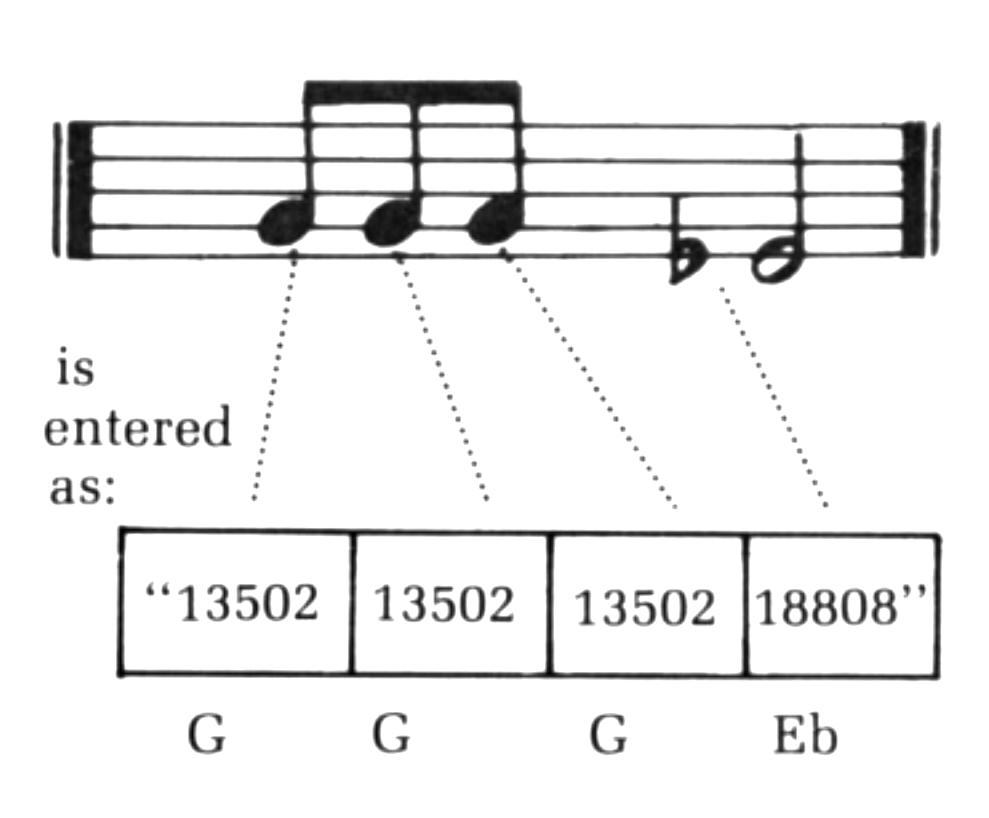
No spaces are entered. A note is entered as a three-digit tone code. The duration code can be a value from one to 99. A string of notes can be entered in one go. However, if any of the notes in the string take up more or less than five characters, “? INCORRECT ENTRY ERROR” will be displayed, and all the notes entered in that string will be lost.
To return to the menu, simply press ENTER instead of entering a note.
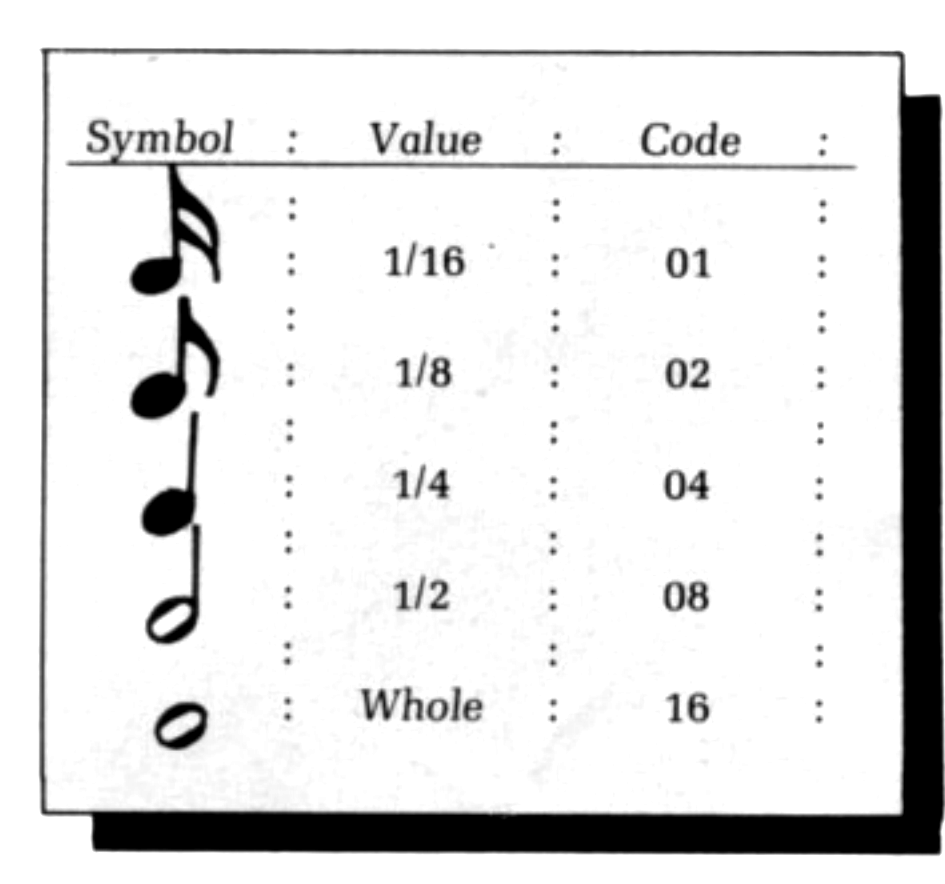
Tone Codes.
                 (High)          Octave           (Low)
Tone      :      1       2       3       4       5
C         :      072     0E8     1D2     3A7     769
C#:DF     :      06B     0DB     1B8     372     6FA
D         :      065     0CF     19F     341     691
D#:EF     :      05F     0C3     188     311     623
E         :      059     0B7     171     2E6     5DA
F         :      054     0AD     15C     2BC     582
F#:DF     :      04F     0A3     148     295     532
G         :      04A     09A     135     26E     4E4
G#:AF     :      046     091     124     24B     49B
A         :      042     088     113     22A     45A
A#:BF     :      03E     080     103     20B     417
B         :      03A     079     0F7     1EE     3E1
C         :      037     072     0E8     1D2     3A7
Rest      :      Off
EDIT (press E). This option allows you to change the tone and duration of a single note. Enter the number of the note that you wish to change. For example, if you wished to change the Eb in the above example, you would enter 4 to indicate the fourth note in the song. END may also be entered if the song has not been stored. END refers to the last note in the song. Expressions such as END — 5″ are also accepted. If the value entered is less than 1 or greater than the length of the song, “? NOTE OUT OF RANGE ERROR” will be displayed. If the entry is within range of the current song, the tone and duration codes for that note will be displayed on the screen. You may enter the new values for this note, using the same format as in the “WRITE” mode. If you do not wish to enter the new values, pressing ENTER will return you to the menu.
DELETE (press H). This option enables you to delete a single note or a group of notes from the current song. The notes specified in the “FROM NOTE” and “TO NOTE” entries will also be deleted. Expressions using “END” are also accepted.
For example, if you wish to delete note four from the current song, enter the value of 4 for both the “FROM NOTE and “TO NOTE” entries. If the notes you enter are out of range, “? NOTE OUT OF RANGE ERROR” will appear.
INSERT (press I). This option allows you to insert a note in the current song. Enter the note before which you wish to insert a new value. Expressions using END are accepted. If the value you enter is out of range, “? NOTE OUT OF RANGE ERROR” will be displayed. Otherwise, you will be able to insert a new note before the specified note.
PLAY (press A). This option will play the current song. The title of the current song will be displayed on the screen. If the song is empty, “? INCORRECT SONG LENGTH ERROR” will be displayed. If the song does exist, however, the preset tempo of the song will be listed next to an input block. If you type in a value from 1 to 99, the song will be played at this tempo; 1 is very fast, and 99 is very slow. If ENTER is pressed instead of entering a value, the song will be played at the present tempo displayed next to the input block. If the title of the song is “NOT LISTED”, the preset tempo will be 10. Values around 10 are suitable for most songs.

LIST (press N). This option enables you to list one or more notes in the current song. Enter from which note and to which note you wish to be listed, and whether or not a printout is required. If either of the note entries is out of range, “? NOTE OUT OF RANGE ERROR” will be displayed.
After the screen has been filled, pressing any key except BREAK will allow you to continue with the listing. At this point, if the printer option was chosen, the screen will be copied onto the printer. After the listing is complete, you will be returned to the menu.
DUPLICATE (press G). This option allows you to duplicate a previously entered section of the current song, to avoid retyping frequently-used phrases of notes. Enter from which note and to which note you wish to be duplicated. These notes will be added to the end of the current song.
STORE (press M). This option allows you to store the current song in the computer’s memory; a maximum of seven songs can be stored within the program. If seven songs have already been stored, “? OUT OF RAM SPACE ERROR” will be displayed when this option is chosen. Otherwise you may enter the name of the current song (up to 25 characters in length), and the tempo at which it sounds best. It will then be stored in the memory.
CHOOSE (press C). This option will list the songs that have been stored so far, and allow you to choose one of them to become the current song. If no songs have been stored, pressing C will have no effect. The titles are listed on the screen and you may enter the number of your choice. If your choice is less than 1 or greater than the number of songs listed, “? UNLISTED SONG ERROR” will be displayed.
REPLACE (press D). If you have EDITed a previously STOREd song, you can replace the stored song using this option. Enter the title of the song that you wish replaced by the current song. If no such title exists, “FILE NOT FOUND” will be displayed; if it does exist, ‘FOUND (name of song)” “REPLACED” will be displayed. The stored song will have been replaced by the edited song. You may enter a new title. If “SAME” is entered, the title will not be changed. A new tempo may then be entered, or, if only ENTER is pressed, the tempo will not be changed, and you will be returned to the menu.
FAST (press K). This will switch the program into the FAST mode.
SLOW (press L). This switches the program into the SLOW mode. When in the slow mode, the program will switch into the FAST mode when necessary.
SAVE (press J). This option will save the program, along with all stored songs, on cassette tape. Type the name that you wish to call the program. Start the recorder recording, and press ENTER. After saving, you will be returned to the menu.
EXIT (press 0). This will break out of the program with the error code of 0/1255.
If the program should ever stop for any reason, do not type RUN to restart it, as this will erase all the stored songs. Type GOTO MENU instead.
Listing 1.
   1 REM 12345678901234567890123456789012345678
  10 LET A$="260A2E56010113C5D3FFCD9C40C1DBFECD9C402D20EE2520E9C90405280210FE0C0DC80D18F8"
  20 LET X=16514
  30 FOR I=1 TO LEN A$-1 STEP 2
  40 POKE X,16*CODE A$(I)+CODE A$(I+1)-476
  50 LET X=X+1
  60 NEXT I
  70 POKE 16510,0
Listing 2.
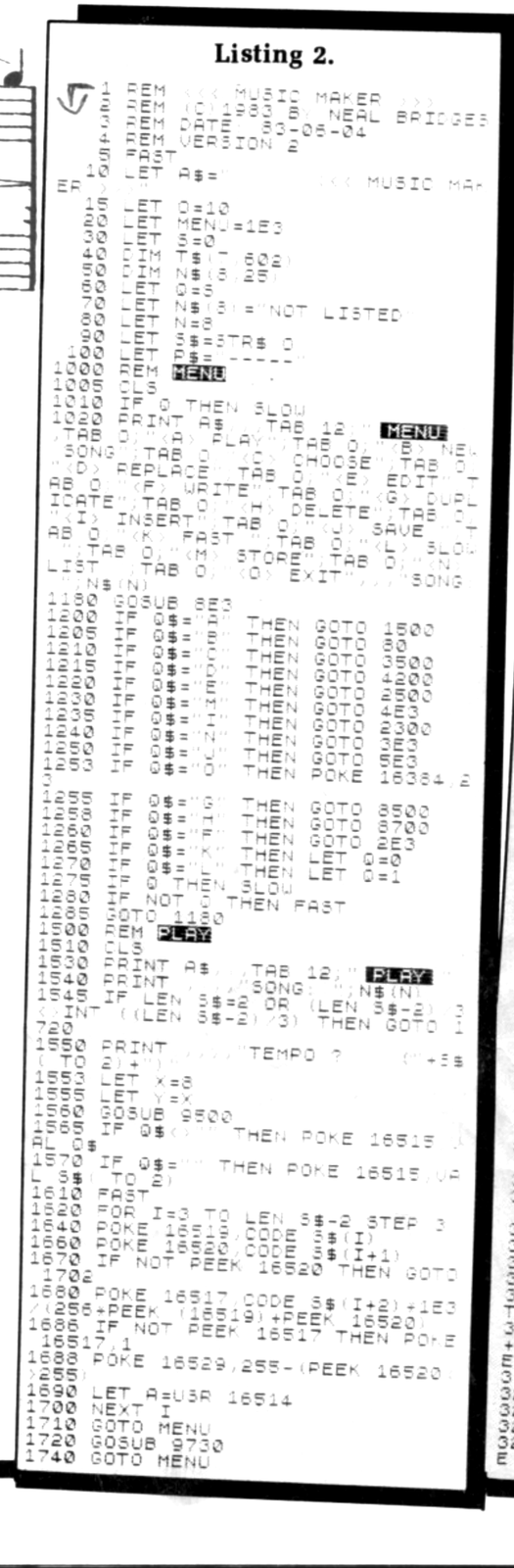


Note: Type-in program listings on this website use ZMAKEBAS notation for graphics characters.