
SCREEN$ is a very useful function on the TS2068 but it has a few limitations that are well known. It has two principal uses. One is to SAVE a screen to tape. This is explained on pages 160 to 161 and appendix A of the manual. From these sources we learn that…
SAVE "PROG" SCREEN$, really means
SAVE "PROG" CODE 16384,6912
The 6912 bytes of memory starting at address 16384 include the entire display file and all of its attributes. Hence all characters, including graphics and color, are SAVEd by this procedure. We may use either of the above lines to do so.
SCREEN$ has a second use and that is to identify individual characters, given their screen line, L, and column number, C, as in…
PRINT SCREEN$ (L,C)Used this way SCREEN$ is color blind and a bit myoptic. It can only recognize single-block characters whose CODE is between 32(space) and 127(copyright symbol). It cannot distinguish between inverse and normal characters, seeing them only as normal, and it does not see graphics at all. These characteristics of SCREEN$ can be demonstrated by the following routine:
  10 PRINT "CHAR- CODE  SCREEN$ CODE  LEN "
  20 PRINT "ACTER  OF    (L,C)  SCREEN$ SCR."
  30 PRINT "      CHAR.         (L,C) (L,C)"
 100 FOR n=5 TO 21
 110 INPUT a$
 120 PRINT AT n,1;a$;TAB 7;CODE a$;TAB 15;SCREEN$ (n,1);TAB 22;CODE SCREEN$ (n,1);TAB 30;LEN SCREEN$ (n,1)
 130 NEXT n
This routine when RUN will ask for the INPUT of a single-block character. Any character may be entered in response: normal, inverse, graphic, etc. The routine in turn will printout a single line of information on such character, all of which concerns its appearance to SCREEN$.
The first two columns confirm the character that was INPUT and show its correct CODE if it has one. Inverses have no CODE and are assigned inverse control CODE 20. The last three columns show the way that SCREEN$ sees this character: what character it sees, what CODE it assigns to the character, and its LENgth. This knowledge enables us to use the function properly.
FIGURE 1 is a screen dump of the results from a number of characters entered. The first character was a solid square made by using graphics mode and the 8-key. The second character was a solid square made using inverse video with the space bar. The third character was made in graphics mode using the 8-key. The fourth was a space from the space bar alone. Note that SCREEN$, by the results in the last 3 columns, sees no difference. In all cases SCREEN$ sees these characters as though all were made by the space bar alone.
Figure 1
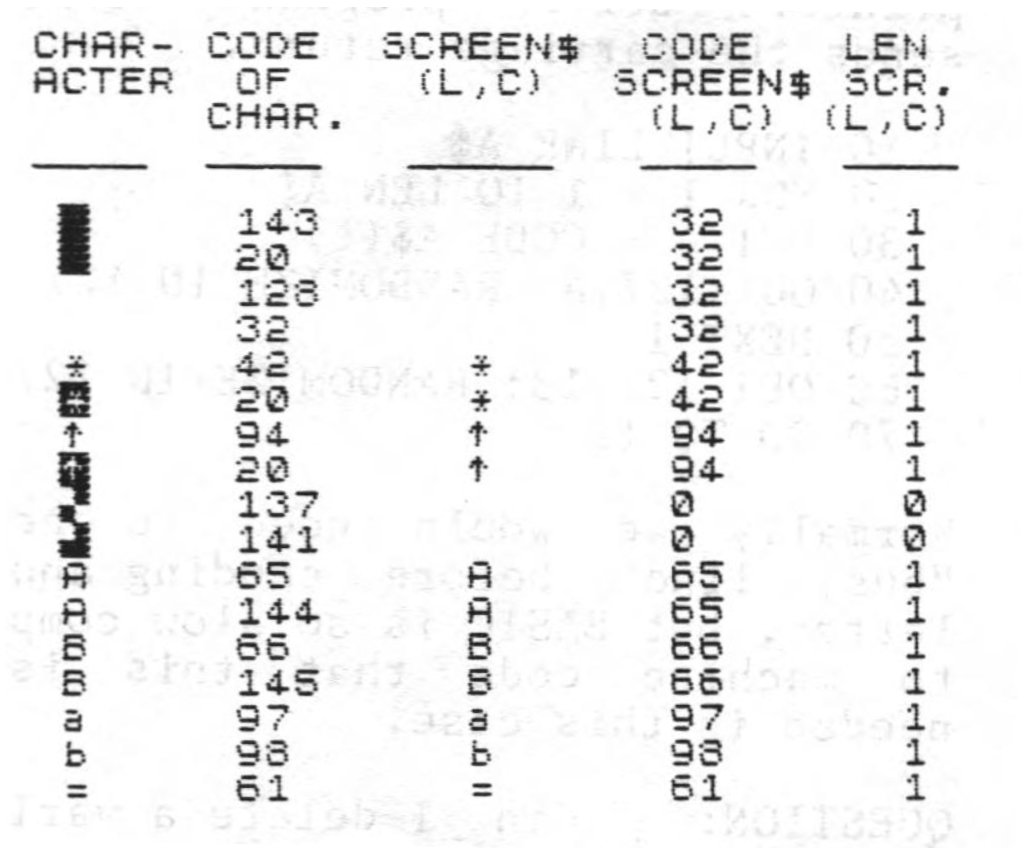
Next there are some mixed normal and inverse characters. To SCREEN$, inverse and normal are both seen as normal. SCREEN$ cannot tell the difference between them.
Then lump all kinds of graphics together. SCREEN$ does not see them at all, because it reports them as having zero CODE and zero LEN, and empty string. Go back to the solid blocks at the beginning of the dump. SCREEN$ saw them all as spaces as it gave them a LEN of one. Nothing at all and space are two different things, so SCREEN$ differentiates to this extent.
SCREEN$ and PRINT POSITION
SCREEN$ is used in many game programs to detect the presence of a particular character in the PRINT POSITION. This is the block on the 32 X 24 grid of the screen where the very next character will be printed. One of the system variables keeps track of this for the computer because the position constantly changes as the program runs.
To demonstrate PRINT POSITION we will start with a simple, common program that does nothing more than move a player’s piece, or puck, around the screen by touching one of the 4 arrow keys. We will call the program FOUR-DIRECTION MOVEMENT…
  10 LET L=10: LET C=15
  30 LET LL=L: LET CC=C
  40 LET L=L+(INKEY$="6" AND L<21)-(INKEY$="7" AND L>0)
  50 LET C=C+(INKEY$="8" AND C<31)-(INKEY$="5" AND C>0)
  60 PRINT AT L,C;
  80 PRINT "*"
  90 PRINT AT LL,CC;" " AND (LL<>L OR CC<>C): PAUSE 0
 100 GO TO 30
Notice that lines 60 and 80 usually appear as a single line reading:
PRINT AT L,C;"*"We have split it into the two separate instructions, where to print and what to print. The reason will soon be clear. Try it out as shown.
We are now ready to include some targets, a single character in this case, designated by b$. The following additional lines will generate upto 35 such targets, distributed randomly over the screen:
   2 INPUT b$
   4 FOR n = 1 TO 35
   6 PRINT AT 21*RND, 31*RND; b$
   8 NEXT n
Now we can RUN the program again and when asked for b$, enter the letter “o” or “X” for the time being. Move the puck about and it will wipe out the targets as it passes over them.
In a game program some additional action is usually taken when the puck hits a target. So we will add another line asking SCREEN$ to look at the PRINT POSITION contained in line 60 and to take some special action if a target happens to be there before the puck is printed over the spot. Again, for the sake of simplicity, the action will be just a BEEP:
70 IF SCREEN$ (L,C)=b$ THEN BEEP .05,25Now RUN the program and enter any character with a CODE of 33 to 127. Enter the character, not the CODE number. Move the puck about and we should get a BEEP each time a character is hit. Try running the program and entering inverse characters or some graphic ones. They do not work, and now you know why.
We can also use SCREEN$ in a negative sense by rewriting line 70 to read:
70 IF SCREEN$ (L,C)<>" " THEN BEEP .05,25Now we can use anything at all for a target as the field has only targets and spaces. There is one drawback. SCREEN$ does not know the identity of the targets. It only knows that they are not spaces. In some game arrangements this is all that needs to be known.
Have you figured out the reason for the PAUSE 0 in line 90? Without it the GOTO construction fills up the PRINT POSITION in line 60 with the puck itself. SCREEN$ reads the wrong character and BEEPs. With PAUSE, the program is held up until an arrow key is touched. In this way SCREEN$ looks at the print position just before the puck gets to print in it. This is the essence of this kind of game program.
Line 70 is usually written in terms of CODE SCREEN$ (L,C) instead of SCREEN$ (L,C). To be consistent with this practice, the CODE number of the target character should be used after the = mark instead of its string counterpart. Either method works.
As we have seen, SCREEN$ is limited in its capabilities. But, the TS2068 has at least four other methods of character identification that can be used in these situations. Some of these are not commonly known but will be discussed in coming issues of QuarTerS.