
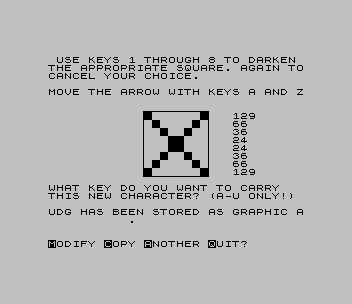
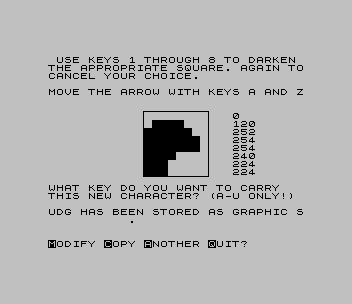
A user-defined graphics designer for the TS2068. You darken squares in an enlarged 8 by 8 box; it prints the eight decimal values and stores the character under any key from A to U, with a choice to modify, copy to the printer, start another or quit.
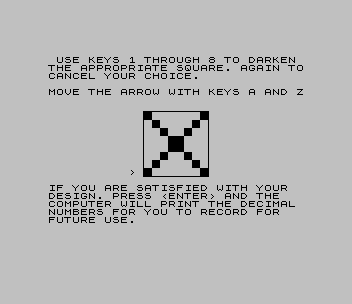
It starts when loaded. Keys 1 to 8 darken or clear a square, A and Z move the arrow, ENTER finishes the design. M modifies the design, starting again from the top row; LET R=1 was added to line 300 for this, because Modify as printed stops with an error. Starting another design refills graphic A with a solid block, so store that letter last. Semicolons are restored in lines 120, 210, 250 and 300. Two of them, in 210 and the second in 250, are guesses from the layout of the article’s Figure 1.
Cedric Bastiaans wrote that it was inspired by programs of John Wentworth (SUN Vol. 2 #3) and Bill Powers (CATS Newsletter, May 1985).
Published in LISTing September 1987 (User Defined Graphics Made Easy).
The author returned to the subject in User Defined Graphics, Revisited (LISTing, January 1988).
Image Gallery
Source Code
   1 REM *** UDGMAKER ***       by CEDRIC R. BASTIAANS, inspiredby JOHN WENTWORTH (SUN VOL.2 #3)and BILL POWERS (CATS NEWSLETTERMAY 85)
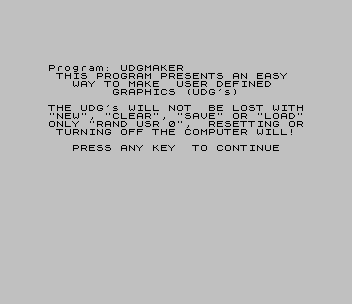
  10 PRINT AT 2,1;"THIS PROGRAM PRESENTS AN EASY";AT 3,1;"  WAY TO MAKE  USER DEFINED";AT 4,8;"GRAPHICS (UDG's)"
  12 PRINT AT 6,0;"THE UDG's WILL NOT  BE LOST WITH""NEW"", ""CLEAR"", ""SAVE"" OR ""LOAD""ONLY ""RAND USR 0"",  RESETTING OR TURNING OFF THE COMPUTER WILL!"
  15 PRINT AT 11,3;"PRESS ANY KEY  TO CONTINUE": PAUSE 0: CLS
  20 PLOT 95,55: DRAW 65,0: DRAW 0,65: DRAW -65,0: DRAW 0,-65
  30 POKE 23658,8: DIM A$(8,8): LET R=1: FOR L=0 TO 7: POKE USR "A"+L,255: NEXT L
 100 PRINT AT R+6,10;">"
 105 PRINT AT 0,1;"USE KEYS 1 THROUGH 8 TO DARKEN THE APPROPRIATE SQUARE. AGAIN TOCANCEL YOUR CHOICE."
 107 PRINT AT 4,0;"MOVE THE ARROW WITH KEYS A AND Z"
 110 PAUSE 0: LET I$=INKEY$
 120 IF I$>="1" AND I$<="8" THEN LET A$(R,VAL I$)=(" " AND A$(R,VAL I$)="\::")+("\::" AND A$(R,VAL I$)=" "): PRINT AT R+6,12;A$(R): GO TO 110
 130 PRINT AT R+6,10;" ": LET R=R+(1 AND I$="Z" AND R<8)-(1 AND I$="A" AND R>1)
 135 PRINT AT 16,0;"IF YOU ARE SATISFIED WITH YOUR  DESIGN. PRESS <ENTER> AND THE   COMPUTER WILL PRINT THE DECIMAL NUMBERS FOR YOU TO RECORD FOR   FUTURE USE."
 140 IF CODE I$<>13 THEN GO TO 100
 200 DATA 128,64,32,16,8,4,2,1
 210 FOR J=1 TO 8: LET L=0: RESTORE 200: FOR R=1 TO 8: READ X: LET L=L+(X AND A$(J,R)="\::"): NEXT R: PRINT AT J+6,23;L: NEXT J
 220 PRINT AT 16,0;"                                                                                                                                          "
 222 PRINT AT 16,0;"WHAT KEY DO YOU WANT TO CARRY   THIS NEW CHARACTER? (A-U ONLY!)"
 225 INPUT B$
 230 FOR J=1 TO 8: LET L=0: RESTORE 200: FOR R=1 TO 8: READ X: LET L=L+(X AND A$(J,R)="\::"): NEXT R: POKE USR B$+J-1,L: NEXT J
 250 FLASH 1: BEEP .5,12: PRINT AT 19,0;"UDG HAS BEEN STORED AS GRAPHIC ";B$
 300 PRINT #1,AT 1,0;"\{20}\{1}M\{20}\{0}ODIFY \{20}\{1}C\{20}\{0}OPY \{20}\{1}A\{20}\{0}NOTHER \{20}\{1}Q\{20}\{0}UIT?": PAUSE 0: FLASH 0: IF INKEY$="M" THEN PRINT #1;AT 1,0;"                          ": LET R=1: GO TO 100
 303 IF INKEY$="C" THEN COPY
 305 IF INKEY$="Q" THEN STOP
 310 FLASH 0: CLS : GO TO 10
 320 SAVE "UDGMAKER" LINE 1
Note: Type-in program listings on this website use ZMAKEBAS notation for graphics characters.