

A Word Processing Program for the Timex Sinclair 1000
Part II
In the last issue of TS HORIZONS, I provided part 1 of this series which provided information to insert the machine code for line 1. As you remember, there are lines 2, 3 and 4 to go. Once all these are entered, you will have a versatile word processing program to work on almost any printer system.
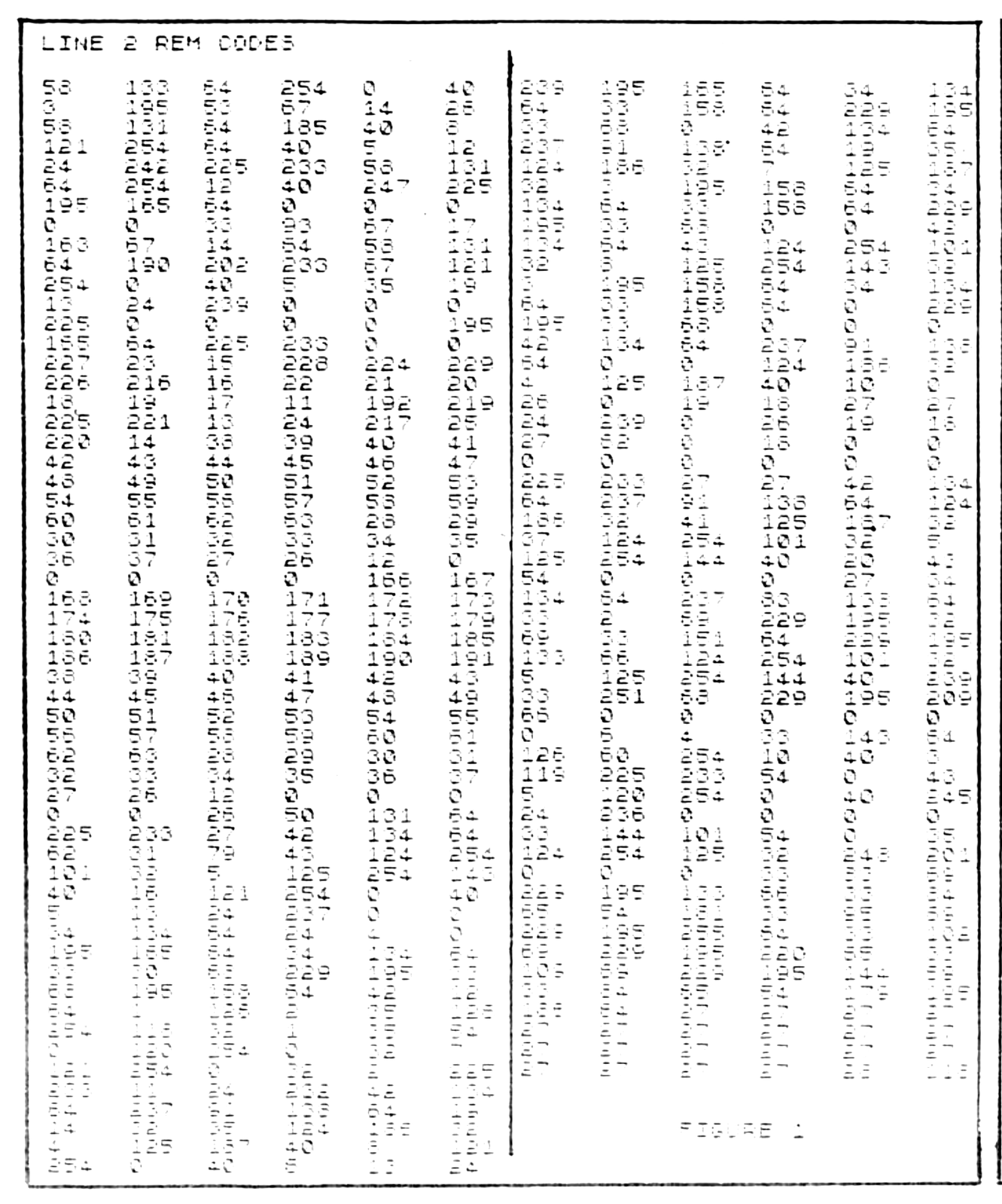
Using the assembler from part 1, change line 9977 to read:
9977 LET N=17161This will prepare you to enter the codes for line 2 (figure 1). Run the assembler program and enter all the codes from figure 1. There are 6 across, so enter the numbers from left to right, top to bottom. Again, be sure to SAVE your work form time to time for protection. Continue until all codes have been entered.
When line 2 has been entered, you can check your work by adding the checksum lines (8000-8005) in figure 3. Run the checksum (add line 8010 STOP to prevent the program from going into the assembler mode). It should print the result: 54186 if all your entries are correct. If so, you are ready to work on line 3.
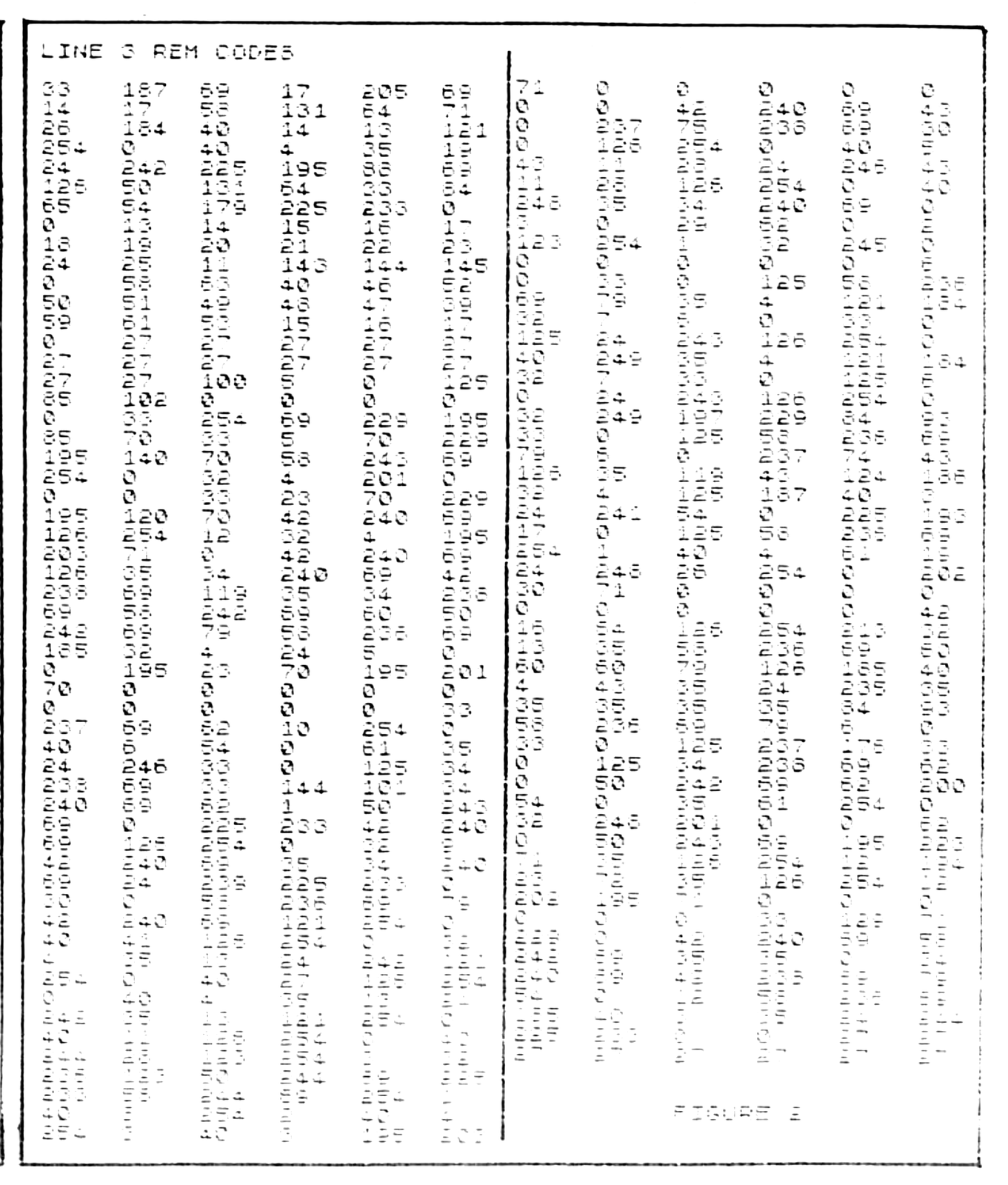
Change line 9977 of the assembler to:
9977 LET N=17808This will configure the assembler such that the codes from figure 2 can be entered to fill REM line 3. Follow the steps just as you did for line 1 and 2. When lines 1-3 have been entered, you have most of the 2K machine code complete. To test your line 3 entries, refer to the checksum portion of the program (figure 4). Again run the checksum. You should get the number 51476 printed on the screen. Figure 5 has the checksum results obtained for lines 2 and 3.
So far there has been nothing exciting about this program for you. Next month I will conclude the “WORM” program with part 3. In it there are about 200 more bytes to enter in line 4 and all the machine code will be complete. Afterwards, only some BASIC lines are required and “WORM” will be ready to use! I have worked on this program for over 4 months and after using it to write this article, I am pleased to share my effort with others who will take the few hours to make it run on their machines.
Also in the next issue, I will show you how to use it. This will only take a few minutes as I have made this as User Friendly as possible. If very many readers are using the TS-2068, I will convert the program later on for that machine.
8000 LET CK=0
8001 FOR N=17161 TO 17801
8002 LET CK=CK+PEEK N
8004 NEXT N
8005 PRINT "LINE 2 CHECKSUM=";CK
FIGURE 3
8000 LET CK=0
8001 FOR N=17808 TO 18440
8002 LET CK=CK+PEEK N
8004 NEXT N
8005 PRINT "LINE 3 CHECKSUM=";CK
FIGURE 4
LINE 2 CHECKSUM=54186
LINE 3 CHECKSUM=51476
FIGURE 5
Note: Type-in program listings on this website use ZMAKEBAS notation for graphics characters.