
A common complaint heard about small computers like the ZX81 or VIC20 is that their memory is too limited and that the computers are therefore unsuitable for serious applications. As a result, some of the most popular peripherals have been 16K, 32K, and 64K RAM packs. The problem is particularly acute with the ZX81/TS1000 because the active BASIC program area is limited to the region between 16K and 48K. Even then care must be taken to avoid having the display file bridge the 32K boundary.
There are two cases in which more memory is desirable. The first is encountered when large amounts of data need to be manipulated. It does not take a very long address list, test file, or stock inventory to fill up all the available memory in a Z80-64K system. The common solution is to provide a secondary memory capability such as a disc drive or at worst a cassette tape recorder. Fast load utilities like SDS or ZXLR8 aid in manipulating data files to and from cassette tape. The AERCO DOS (disc operation system) does the same sort of thing for data files on disc.
The second case occurs when the program itself is too long. In this case the program needs to be segmented in an intelligent way. A similar situation arises when two or more programs are used to operate on the same set of data.
Larger computers, with newer microprocessors like the 6800 or 80186 and with 256K dynamic RAM chips like the 41256 can directly address much more than 64K. Smaller Z80 computers use bank-switching. This way the TS2068, for example, can address up to 16 Mbytes (although how is not clear — its not in the manual!). Incidentally, the new SINCLAIR QL uses both a 68008 and a 8049 with 128K RAM 32K ROM, and two 100K microdrives (for $499).
This article is part 1 of some experimants in memory management for the ZX81/TS1000/TS1500. Both software and hardware will be discussed and any suggestions as we go along will be welcome.
In this install ment we will look at an overall scheme and then examine some of the software required. In part 2 hardware will be discussed.
These articles are intended primarily for the experimenter but should enable a TS1000 user to put together quite a sophisticated bank-switched system at a reasonable price.
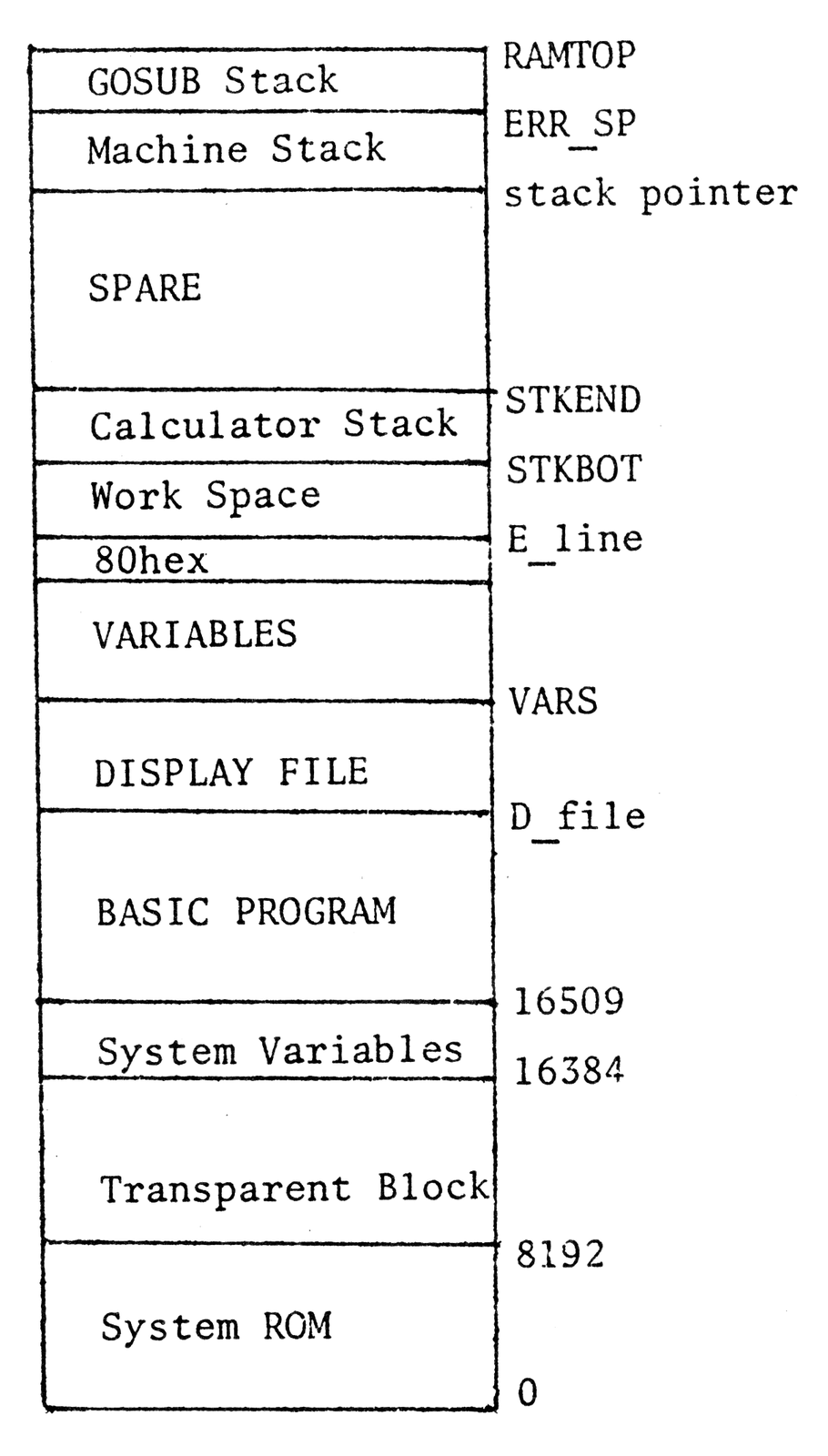
The ZX81/TS1000 memory map is shown in Figure 1 for reference. The three main areas in-and-out of which we might like to transfer data are:
                    LIMITS

PROGRAM         16509      D-file

DISPLAY FILE    D-file     VARS

VARIABLES       VARS       E-line - 1
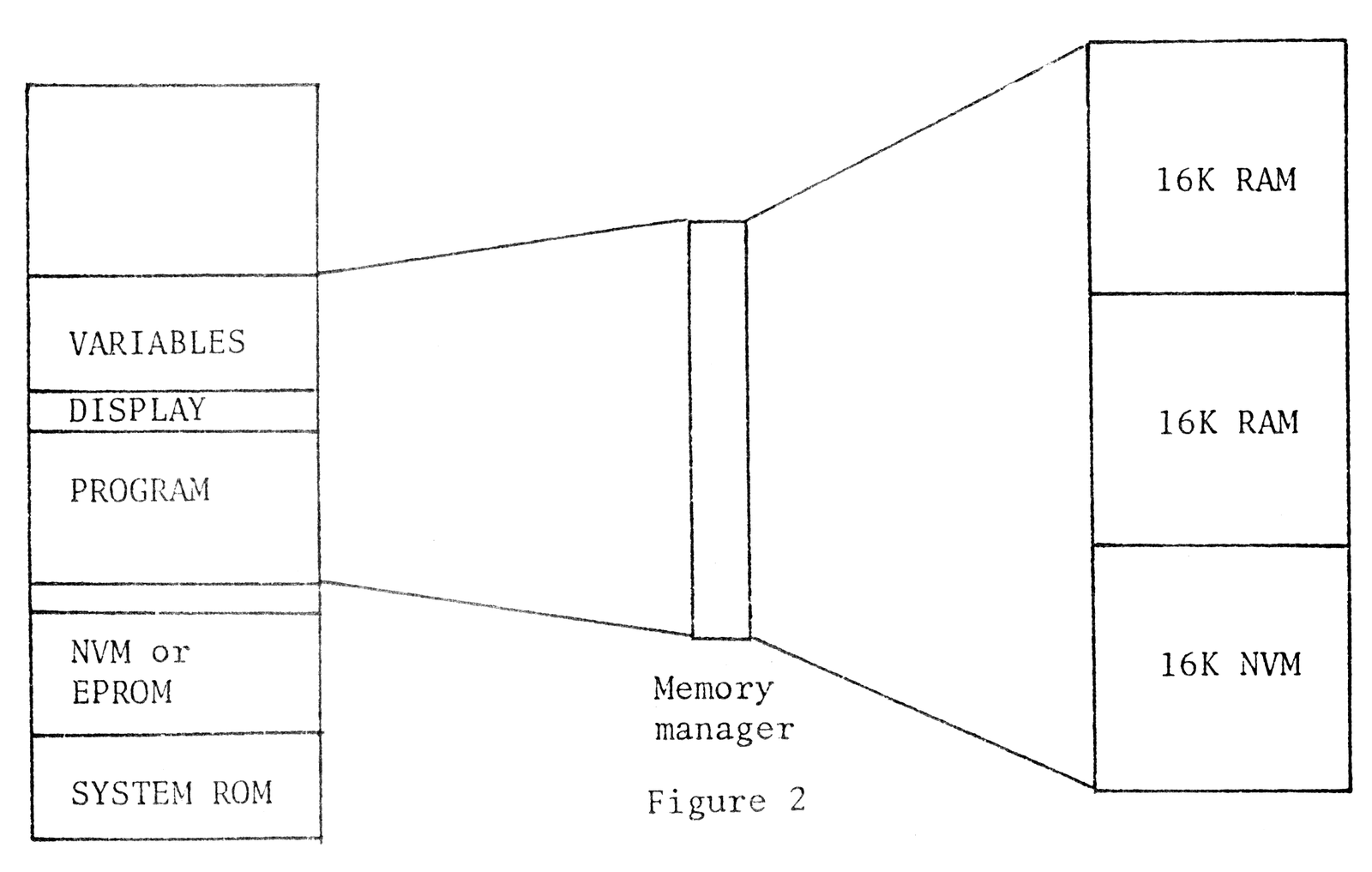
In the system to be described the primary memory will be addressed form 0K to 48K. The secondary memory will be addressed from 48K to 64K. This location is a logical choice because it cannot be used for BASIC programs directly.
The secondary memory will be 48K divided into three 16K blocks although the number of these blocks can be expanded later. Of these three blocks two will be ordinary dynamic RAM but the third will be nonvolatile static CMOS RAM. It is this later block which is potentially the most useful although all of the secondary memory could be normal volatile RAM if desired.
Thus the total system will comprize 8K ROM, 8K EPROM or NV RAM for operating routines kand utilities, 32K BASIC primary memory, 16K nonvolatile secondary memory, and 32K secondary RAM — a total of 96K. This system is illustrated in Figure 2.
Note that programs are only stored in the secondary memory. To be run they must first be transferred to the primary memory. The system routines required to accomplish these transfers are essentially:
RECLAIM    primary memory (clear designated
           block of memory)

LOAD       into primary memory (includes merge)

PURGE      secondary memory (remove unwanted
           data or programs)

SAVE       into secondary memory
Most of these operations apply to all three areas PROGRAM, DISPLAY, and VARIABLES.
There are some other routines such as search for and locate a file, list the directory, switch memory banks, and others which will be needed. First, let’s look at some examples.
Suppose a portion of the primary RAM needs to be cleared to make room for another program or subroutine which is to be loaded from the secondary memory. What’s the procedure? Fortunately there are several routines in the system ROM which make the task easy. The first we’ll experiment with is called LINE-ADDR. It finds the starting location of any line in a BASIC program.
TRY THIS EXAMPLE:
10 REM 1 2 3 4 5 6 7 8 9 0 1 2
20 INPUT A
30 POKE 16519,INT (A/256)
40 POKE 16518,A-256*PEEK 16519
50 PRINT USR 16514
Load the machine language into the REM statement:
                    COMMENTS:
16514 205  35 15 Call FAST
16517  33  lo hi lo&hi are POKED
                 in the BASIC
                 program
16520 205 216  9 Call LINE-ADDR
16523  68  77    Store HL in BC
16525 201        Return to BASIC
Now run the BASIC program. When prompted (line 20), enter a line number such as 10. The result 16509 will immediately appear. Try some other line numbers.
This routine allows us to specify lines in a BASIC program to be deleted or moved. Now let’s look at another system routine called RECLAIM (there are two entry points 1 and 2). As its name suggest, this routine reclaims space in the memory.
TRY THIS EXAMPLE:
Enter any BASIC program such as:
10 REM 12345678901234567890
20 INPUT A
30 INPUT D
40 POKE A,D
50 PRINT A,D
60 LET A=A+1
70 GOTO 30
NOTE: REM must be 20 characters for this particular example. Any BASIC program could be used but this one happened to be convenient because it is used to enter the machine code.
Now enter the machine code into the REM statement.
16514 205  35 15 Call FAST
16517  17 151 64 Load DE with
                 addr. of line20
                 in BASIC prog.
16520  42  12 64 Load HL with
                 loc. of D-file
16523 205  95 10 Call RECLAIM-1
16526 201        Return to BASIC
Now enter as a direct command RAND USR 16514. The BASIC program from Line 20 to the end has been erased but the REM statement containing the machine code is still there. Try it with another BASIC program and try a different line number (use LINE-ADDR to find the location — i.e. combine the two routines together).
A third system routine we will make a lot of use of is called MAKE-ROOM and is located at 2462 decimal. Its funcion is to generate BC spaces at location HL. The fourth routine is not in the system ROM so it has to be written. We’ll call it simply MOVE and its function is to move a program, display file, or variables into or out of the primary memory area. It’s convient to divide the routine into two for the two tasks — we’ll call one MOVIN (into primary) and the other MOVOUT (into secondary from primary).
We’ll continue next month.
Note: Type-in program listings on this website use ZMAKEBAS notation for graphics characters.