
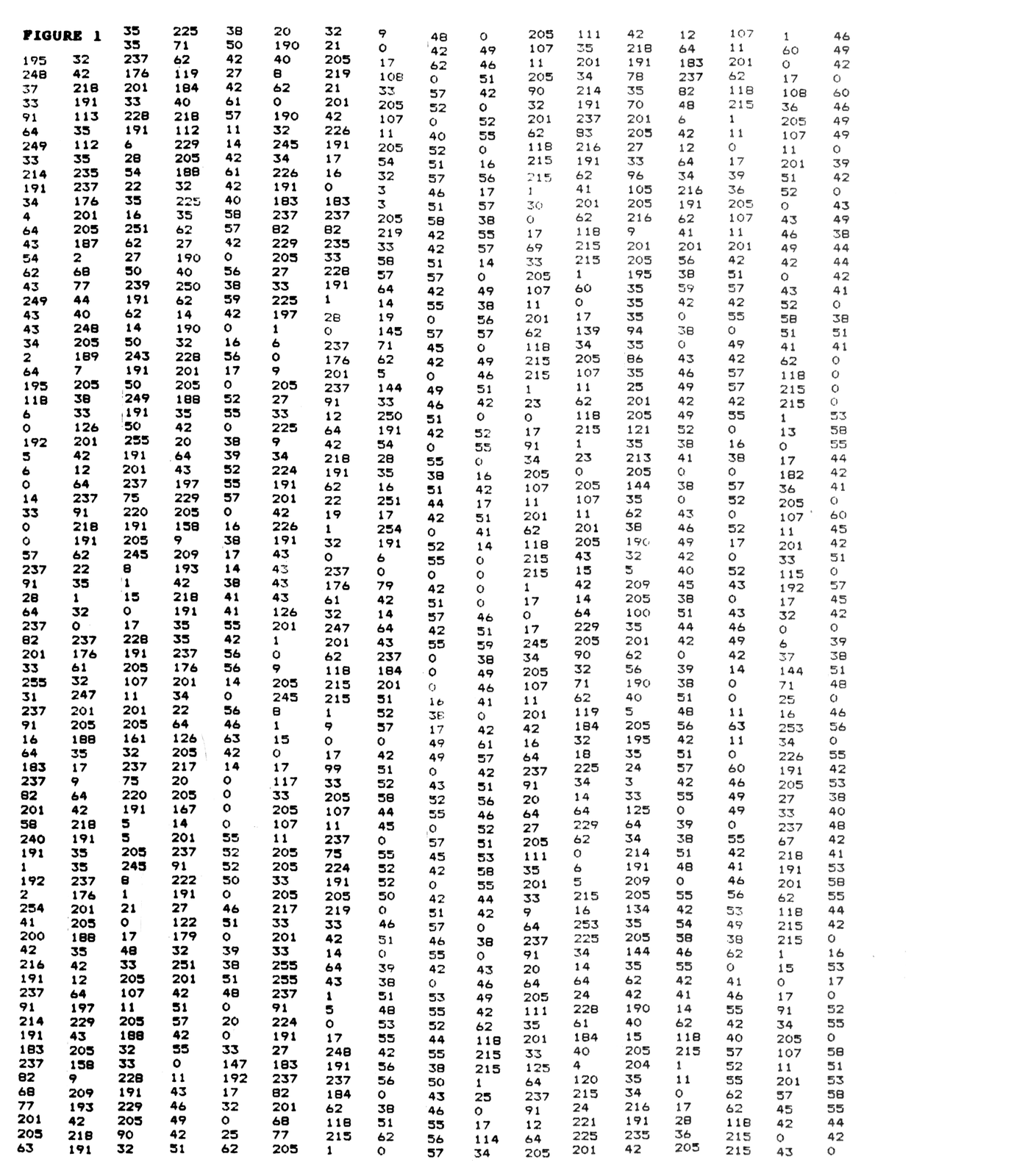
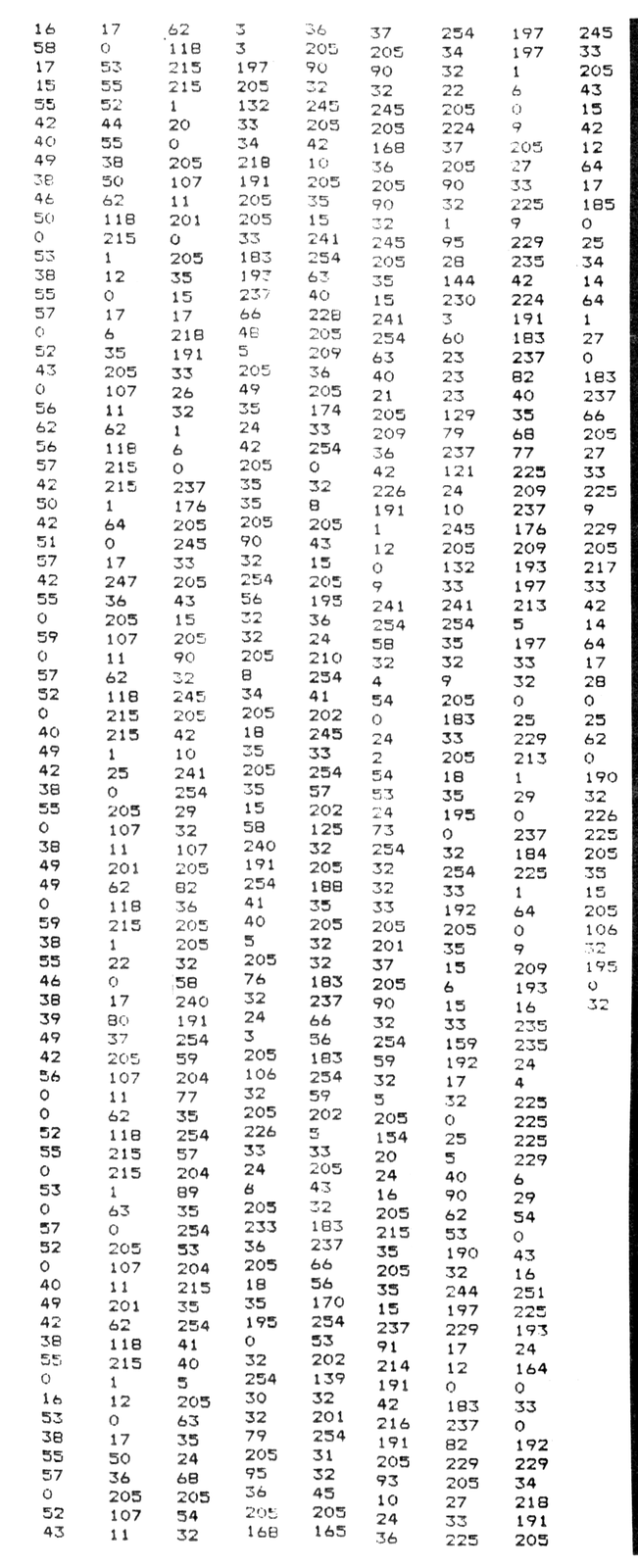
The operating routines for the bank switching and file management system are now moreorless complete. Some changes have been made since last month to fit the program into 2048 bytes and in order to avoid any confusion the entire list is presented in Figure 1. Only the data are listed — the first address is 8192 and the last is 10239. (The memory map will be illustrated next month.) Although all the subroutines are nonrelocatable, the main program from 9720 to 10239 can be moved to any location you wish. It is accessed by a jump from 8192.
The program is suitable for use either with a bank-switched system or with a regular 64K RAM pack. As mentioned last week, a 64K RAM pack may be regarded as a 32K system with a single 16K bank.
The listing is tedious to load accurately by hand and can be obtained from the author on cassette for $10 ppd. (See advertisement for address.) The program on the cassette will autorun on loading to reset RAMTOP to 49110; load the operating system into the 8-10K block; and then load an empty directory into the bank occupying the 49152-65535 block. The directory can be loaded into other banks at this stage. The operating system can then be initiated by executing RAND USR 8192.
One of the changes from last month has been to locate the system variables outside the 8-10K block at 49110-49151. This has the distinct advantage of allowing the operating system to be placed in read-only memory (EPROM, E2PROM, or NVM with write-protect). The new addresses will also be listed next month.
Before describing the use of this system in more detail, I want to mention some of the points raised by you.
POINTS ARISING
The first concerns the physical layout of the hardware. It is important not to spread everything out too much — remember that 10-12 inches is generally the maximum reliable length of data, address, and control lines without proper termination. Note that if you wish to terminate your busses properly there are special termination resistor networks available these days in a SIP configuration which makes the task easy.
Some readers have used larger dynamic memory packs in a switched system. In this regard note that Gladstone Electronics, Inc. (1585 Kenmore Ave. Buffalo, NY14217 (716) 874-5510) currently have their 64K pc board (order no. PCB64/44) with male and female connectors on offer for $9. This is the board described in the last issue of Timex-Sinclair User and is an excellent buy at this price — the connectors alone are worth $6:50. Note that dynamic memory refreshed through row addresses A0-A6 can be selected or deselected using the CAS signal — and therefore can be divided into banks.
Finally, and I am indebted to Robert A. Jenkins of Chicago Heights for ideas along these lines, is the suggestion to control the operating system described herein from within a program. This creates a virtual memory system with a memory size (program or data) limited only by the number of banks and your imagination. The modular nature of the system makes this scheme relatively easy to implement. Since we’re going to run out of space this month these ideas will be developed in the final instalment next month.
THE OPERATING SYSTEM
The initial set-up requires at least 64K of memory with the operating system located at 8-10K. Execution of RAND USR 8195 will reset RAMTOP to 49110. The directory described last month should be loaded at 49152 — at the beginning of the bank. Loading the cassette tape will do all this automatically.
Entry of RAND USR 8192 will start the main program. The first thing to happen is the display of the directory and menu. The program waits for a response (‘1’ through ‘8’). Any key other than ‘1’ through ‘7’ causes a return to BASIC.
BANK 1 DIRECTORY
================================
NO.  NAME      .EXT ADDR  SIZE
---  ----      ---- ----  ----
A: DIRECTORY   .DIR:49152:00704:
B:
C:
D:
E:
F:
G:
H:
I:
J:
K:
L:
M:
N:
O:
================================
1:SAVE  3:PURGE    5:PACK  7:ROOM
2:LOAD  4:RECLAIM  6:BANK  8:QUIT
You could, for example, respond with a ‘7’ to display the amount of available space in the bank:
ROOM IN BANK = 15680
Enter an ‘8’ to return to BASIC and then enter a program to test the system. Run the program to initialize some variables. Use one of your own programs or, for example, enter:
10 REM TEST OF OPERATING SYSTEM
20 PRINT "THIS IS LINE 1"
30 PRINT "THIS IS LINE 2"
40 PRINT "THIS IS LINE 3"
50 LET VARIABLE=11
60 LET T$="T S HORIZONS"
70 PRINT T$;" ISSUE ";VARIABLE
80 PRINT "THIS IS THE LAST LINE"
Now enter RAND USR 8192 and this time choose response ‘1’:
ENTER "FILENAME.EXT":

PROGRAM NO1.PRG
In answer to the prompt, enter a filename — for example “PROGRAM NO1.PRG”. There’s no need to enter the period between the filename and the extension (in fact you shouldn’t). If you make a mistake then the ‘delete’ key will allow you to start again.
The option now presented is to save the entire file (by entering ‘A’) or some part of the file. ‘S’ represents the starting line number of the program in case you forgot (you could enter the number) and ‘E’ represents the last line number. Of course, entry of ‘S’ and then ‘E’ has the same result as entering ‘A’. Let’s save the entire program by entering ‘A’. Then enter ‘S’ to initiate the SAVE and hit any key to redisplay the directory:
BANK 1 DIRECTORY
================================
NO.  NAME      .EXT ADDR  SIZE
---  ----      ---- ----  ----
A: DIRECTORY   .DIR:49152:00704:
B: PROGRAM NO1.PRG:49856:00200:
C:
D:
E:
F:
G:
H:
I:
J:
K:
L:
M:
N:
O:
================================
1:SAVE  3:PURGE    5:PACK  7:ROOM
2:LOAD  4:RECLAIM  6:BANK  8:QUIT
Note that the file is located at 49856 and that it is 200 bytes long. (Actually it’s 198 bytes long plus two bytes to store the size.) Determination of the room left in the bank shows that the available space has been reduced by 200 bytes.
ROOM IN BANK = 15480
While on the subject of saving, try saving the variables (as “VARIABLES 1.VAR” for example) and then the total system (as “TOTALSYSTEM.TOT”). Note that the size of the total system is much larger than the other two files. This is mainly because it includes the display file (704 bytes long). It is more economical in bank space to save the program and variables separately. The screen during a save operation looks like:
SAVE A FILE

ENTER "FILENAME.EXT":

TOTALSYSTEM.TOT

EXECUTE SAVE (S) OR ABORT (A):

ADDRESS: 50086
SIZE:    1138

PRESS ANY KEY TO CONTINUE
Finally, try saving a limited range of lines from the program — for example lines 20-40. In a real application this might be a subroutine. Enter 20 and 40 in answer to the prompts in the save operation. Again, if you make an error, the ‘delete’ key will erase erase the entry and allow you to start again. The directory now appears as:
BANK 1 DIRECTORY
================================
NO.  NAME      .EXT ADDR  SIZE
---  ----      ---- ----  ----
A: DIRECTORY   .DIR:49152:00704:
B: PROGRAM NO1.PRG:49856:00200:
C: VARIABLES 1.VAR:50056:00030:
D: TOTALSYSTEM.TOT:50086:01138:
E: LINES 20-40.PRG:51224:00068:
F:
G:
H:
I:
J:
K:
L:
M:
N:
O:
================================
1:SAVE  3:PURGE    5:PACK  7:ROOM
2:LOAD  4:RECLAIM  6:BANK  8:QUIT
Now let’s answer ‘8’ and return to BASIC. Type NEW to clear the system. Enter RAND USR 8192 and respond with ‘2’ to load a file:
ENTER LETTER (A TO O) OF FILE:
"Z" WILL REDISPLAY DIRECTORY
Enter the file you wish to load (for example ‘B’). If you need to look at the directory then the response ‘Z’ will redisplay it. The screen will blank momentarily as the program requested is loaded and then run automatically:
THIS IS LINE 1
THIS IS LINE 2
THIS IS LINE 3
T S HORIZONS ISSUE 11
THIS IS THE LAST LINE
A LIST produces the program:
10 REM TEST OF OPERATING SYSTEM
20 PRINT "THIS IS LINE 1"
30 PRINT "THIS IS LINE 2"
40 PRINT "THIS IS LINE 3"
50 LET VARIABLE=11
60 LET T$="T S HORIZONS"
70 PRINT T$;" ISSUE ";VARIABLE
80 PRINT "THIS IS THE LAST LINE"
Now delete it (NEW) and try another load (RAND USR 8192 followed by ‘2’). This time choose C — the variables file. The only response on the screen is a 0/0 prompt and a list also produces 0/0. The variables are there however — try for example PRINT T$:
T S HORIZONS
Now enter NEW and RAND USR 8192 again. This time load the total system (TOTALSYSTEM.TOT). Note how the display file at the time of the save is reproduced — not much use in this case. We’ll use the program this time to test the reclaim option.
LIST produces the program. Suppose that lines 50 to 70 are to be deleted. Enter RAND USR 8192 and choose the response ‘4’. The first decision is to choose between clearing the variables or clearing all or part of the program:
RECLAIM PART OF SYSTEM

ENTER V TO CLEAR ALL VARIABLES
OR P TO CLEAR (PART OF) PROGRAM
Choose P and enter 50 and 70 in response to the prompts. (Incidentally, entering the same number for start and end will delete the single line.) The program returns you to the directory and the response ‘8’ will show what’s been done to the program. List it:
10 REM TEST OF OPERATING SYSTEM
20 PRINT "THIS IS LINE 1"
30 PRINT "THIS IS LINE 2"
40 PRINT "THIS IS LINE 3"
80 PRINT "THIS IS THE LAST LINE"
If you have a multi-banked system the BANK routine allows you to change banks and automatically brings up the directory of the required bank. Enter 0, 1, 2, or 3. The program masks the response to avoid any interference with the ZX81 operating system. Note the change in the LED status on the bank switching memory manager board.
Finally the purge and pack options — the two go together. The purge command simply flags a file for purge — it can later be unflagged if you change your mind. The pack command actually does the purging when repacking the files together. Choose option ‘3’ to purge a file:
PURGE A FILE

THE FILE WILL BE FLAGGED AND
PURGED WHEN THE BANK IS REPACKED

PURGE (P) OR UNPURGE (U)?
Let’s choose to purge ‘C’ — the variables file. Enter P first and then C. The directory returns with the flag on the C file:
BANK 1 DIRECTORY
================================
NO.  NAME      .EXT ADDR  SIZE
---  ----      ---- ----  ----
A: DIRECTORY   .DIR:49152:00704:
B: PROGRAM NO1.PRG:49856:00200:
C: VARIABLES 1.VAR:50056:00030:P
D: TOTALSYSTEM.TOT:50086:01138:
E: LINES 20-40.PRG:51224:00068:
F:
G:
H:
I:
J:
K:
L:
M:
N:
O:
================================
1:SAVE  3:PURGE    5:PACK  7:ROOM
2:LOAD  4:RECLAIM  6:BANK  8:QUIT
The pack option will actually do the purge. So there’s no need to remove a file until you’re sure it’s not needed or you need the space. The pack routine was the most difficult to write and consists of four sequential operations. The first (at 10075 for 20 bytes) scans the directory for the first purge flag. The second (at 10095 for 41 bytes) causes the flagged file to be overwritten as all additional files are moved down in memory. The third routine (at 10136 for 45 bytes) removes the directory entry as other entries are moved up in the display. The last entry is simply blanked. A return is now made to the first routine to search for the next flagged file. The fourth and last operation (at 10182 for 57 bytes) is done on the display file itself in slow mode. All addresses in the directory are recomputed (if you watch you will see this happen). Finally the new display file is saved and then redisplayed in fast mode. The directory now looks as follows:
BANK 1 DIRECTORY
================================
NO.  NAME      .EXT ADDR  SIZE
---  ----      ---- ----  ----
A: DIRECTORY   .DIR:49152:00704:
B: PROGRAM NO1.PRG:49856:00200:
C: TOTALSYSTEM.TOT:50056:01138:
D: LINES 20-40.PRG:51194:00068:
E:
F:
G:
H:
I:
J:
K:
L:
M:
N:
O:
================================
1:SAVE  3:PURGE    5:PACK  7:ROOM
2:LOAD  4:RECLAIM  6:BANK  8:QUIT
Next month this series will finish.
Note: Type-in program listings on this website use ZMAKEBAS notation for graphics characters.