
Again this month we’ll start by reviewing comments and suggestions made by some of you who are building a stacked RAM bank like the one described in this series.
Apparently it was not made clear how the memory management circuit (in Part 3 Figure 2) should be connected to the individual RAM packs. The outputs labelled 16-32K; 32-48K; BANK 0; and BANK 1 are connected directly to the A14 pins on the RAM packs. Remember that the A14 pins were left unconnected when the 16K RAM packs were stacked. All other data, address, and control lines are connected to the expansion bus.
It is important to construct a reasonably stable stack of RAM packs — the use of card guides mounted on a rigid board is recommended. A set of RAM packs held together by the 22/44 pin connectors alone invites trouble — slight nudges or wobbles cause frustrating system crashes.
If you do not want to mess around with stacks of RAM packs then construction of one or two dynamic 64K memory boards (see for example John Oliger‘s article in SQ Summer 1983 page 41) is an excellent alternative. Radio Shack has a printed circuit board made especially for memory IC’s (part #276-184; $1.99).
Some later versions of the Computer Continuum board have the traces reversed with respect to earlier ones. This means that all plug-in boards should be reversed as well. What was the diagram for the component side is now the foil diagram for the circuit side and vice versa.
I do not have any 16K RAM packs left for sale but there are alternative sources — see the advertisement on page 7 in last month’s TSH.
I’m pleased that some readers have built this expanded system successfully and should like to thank those of you who have written for your comments.
A DIRECTORY
This month we will create a directory and examine some of the routines used to manipulate and characterize files. Approximately 760 bytes of the operating system are listed in Figure 1 — we will complete the listing next month (I hope) and attempt to keep the size to less than 2K.
You will notice that the addresses start at 8192 — this is simply because the 8-16K region is a convenient place to hold the program. If these addresses conflict with something else in your system then of course the routines can be readdressed. You may wish to put the program (when finished) on EPROM and store system variables in a reserved space above RAMTOP. Alternatively the whole thing can be placed in a REM statement. Note however that the routines are not relocatable without some address changes (although most are straightforward).
This program is equally applicable to an ordinary 64K system (Byte-back; Memotech 64K; etc.). Such a system can be viewed as a 32K BASIC system with one 16K bank. So if you have a 64K RAM pack by all means experiment with some of these routines.
The listing is a collection of MC routines, each of which performs some specific function. The main program will call these routines as needed. The modular nature of the program so far makes the individual functions easy to test, modify, and write in the first place.
The listing starts with some system variables. These variables are data and addresses used by the operating system and some space remains for the future. The variables are listed in Figure 2 with brief descriptions.
The collection of routines starts at 8257. Addresses are listed in Figure 3 with abbreviated names and functions. Some may not be obvious at this stage but the examples which follow should make their meaning clearer.
Remaining space in the program is taken up with various character strings which represent prompts and messages to be sent to the screen. The strings and their addresses are shown in Figure 4.
Entry of the machine code is tedious but unavoidable — it takes about 25 minutes using a routine (in FAST mode) such as:
10 INPUT A
20 INPUT D
30 POKE A, D
40 PRINT A; TAB 6; PEEK A
50 LET A = A + 1
60 GOTO 20
Having entered the code it’s worth saving just in case of an error which causes a system crash. The code must be moved up into the system in order to do this. A convenient place to put it is in a giant REM statement containing 760 characters. (Don’t attempt to insert or delete any line following a long REM statement — the system will crash). Enter the program:
10 REM........(760 characters)...
20 LET D = 16514
30 FOR N = 8192 TO 8950
40 POKE D, PEEK N
50 LET D = D + 1
60 NEXT N
Run in FAST mode and then save on tape. Upon reloading from tape, change line 40 to POKE N, PEEK D, enter FAST, run, and then enter NEW. There are faster ways to do this using machine code routines — if you’re interested please write.
Having entered the machine code the various routines can be tested. We’ll do this by stepping through them in much the same way as the main program will when it’s written. First enter the program:
 10 PRINT "BANK 1 DIRECTORY"
 20 PRINT "================================"
 30 PRINT "NO.   NAME    .EXT  ADDR  SIZE"
 40 PRINT "---   ----    ----  ----  ----"
 50 PRINT "A: DIRECTORY  .DIR:49152:00704:"
 60 PRINT "B:"
 70 PRINT "C:"
 80 PRINT "D:"
 90 PRINT "E:"
100 PRINT "F:"
110 PRINT "G:"
120 PRINT "H:"
130 PRINT "I:"
140 PRINT "J:"
150 PRINT "K:"
160 PRINT "L:"
170 PRINT "M:"
180 PRINT "N:"
190 PRINT "O:"
200 PRINT "================================"
210 PRINT "1:SAVE  3:PURGE   5:PACK 7:ROOM"
220 PRINT "2:LOAD  4:RECLAIM 6:BANK 8:QUIT"
230 POKE 8199,0
240 POKE 8200,192
250 RAND USR 8297
Now enter FAST, and run the program. The directory is loaded into a bank at address 49152 (see line 230 and 240: 192 x 256 + 0 = 49152). Now clear the BASIC system by entering NEW, reset RAMTOP to 49152, then in FAST mode enter RAND USR 8693. The directory will come back into the system and be displayed:
BANK 1 DIRECTORY
================================
NO.   NAME    .EXT  ADDR  SIZE
---   ----    ----  ----  ----
A: DIRECTORY  .DIR:49152:00704:
B:
C:
D:
E:
F:
G:
H:
I:
J:
K:
L:
M:
N:
O:
================================
1:SAVE  3:PURGE   5:PACK 7:ROOM
2:LOAD  4:RECLAIM 6:BANK 8:QUIT
The directory has space for 15 entries. Subdirectories can be added if you wish — more on this later. Up to 11 characters (any printing character including a space) are allocated for each file name followed by an extension which tells the operating system what kind of file it is. Allowed extensions are:
DSP or DIR   for a display file
PRG          for a program
VAR          for a variables file (data)
TOT          for a total system
You may wish to add other extensions (eg. BIN for a binary file). The directory display, as you have probably noticed, also serves as the menu. Choices are:
1: SAVE    : move file from system to bank
2: LOAD    : load file from bank into system
3: PURGE   : remove a file from the bank
4: RECLAIM : delete a portion of the system
5: PACK    : repack files in a bank
6: BANK    : change banks
7: ROOM    : check space available in bank
8: QUIT    : return to BASIC
Not all options are available yet so for the moment just imagine that you wish to save a file. First enter some addresses to indicate the start and end of the file in the system (the main program will eventually do this automatically).
POKE 8195, 35
POKE 8196, 93
POKE 8197, 10
POKE 8198, 103
Now let’s see how much space is available in the bank. Enter RAND USR 8587 and then enter PRINT PEEK 8205 + 256*PEEK 8206 — the result is 49856. This number represents the first available byte in the bank after the space taken by the directory file (ie 49152 + 704 = 49856). Now enter RAND USR 8631 — the result is 15680. This number is the space available (ie. 65536 – 49856 = 15680 bytes).
Now let’s enter the name of the file. Suppose the name is ADDRESSLIST and that it’s a data file. Enter SLOW and then enter RAND USR 8397. Follow the instructions on the screen and enter the name with the extension VAR. If you make a mistake then press the delete key to start over (try it anyway). If the debounce period is too short then increase the delay parameter in 8203 from 12 to a higher number (16 or 20). The routine automatically ends with the last character. As we’ll see later, the name is stored in the data string at address 8229.
The main program at this point will ask for confirmation. You can test the string printing routine by entering RAND USR 8923.
If the file is a program file, then the system will ask for starting and ending line numbers. The response ALL will result in the entire program in the system being saved. The size of the file must also be checked to see if it will fit.
Now enter RAND USR 8712. The address and size of the file is calculated and printed (the file, being an imaginary one in this test, is not saved). To illustrate the data now stored in the data-string at 8229 enter the program below and run it. Note that the size is now right justified in its field with leading zeros.
10 FOR N=8229 TO 8256
20 PRINT CHR$ PEEK N;
30 NEXT N
ADDRESSLIST.VAR:49856:02535:
Now let’s put the data into the directory and have a look at it. So:
RAND USR 8674
RAND USR 8693
The directory is now:
BANK 1 DIRECTORY
================================
NO.   NAME    .EXT  ADDR  SIZE
---   ----    ----  ----  ----
A: DIRECTORY  .DIR:49152:00704:
B: ADDRESSLIST.VAR:49856:02535:
C:
D:
E:
F:
G:
H:
I:
J:
K:
L:
M:
N:
O:
================================
1:SAVE  3:PURGE   5:PACK 7:ROOM
2:LOAD  4:RECLAIM 6:BANK 8:QUIT
If you now call the ROOM routine at 8631: RAND USR 8631, you will see that the space left in the bank has been reduced to 13145 (the original 15680 less the size of the new file 2535). We’ll continue next month.
FIGURE 1


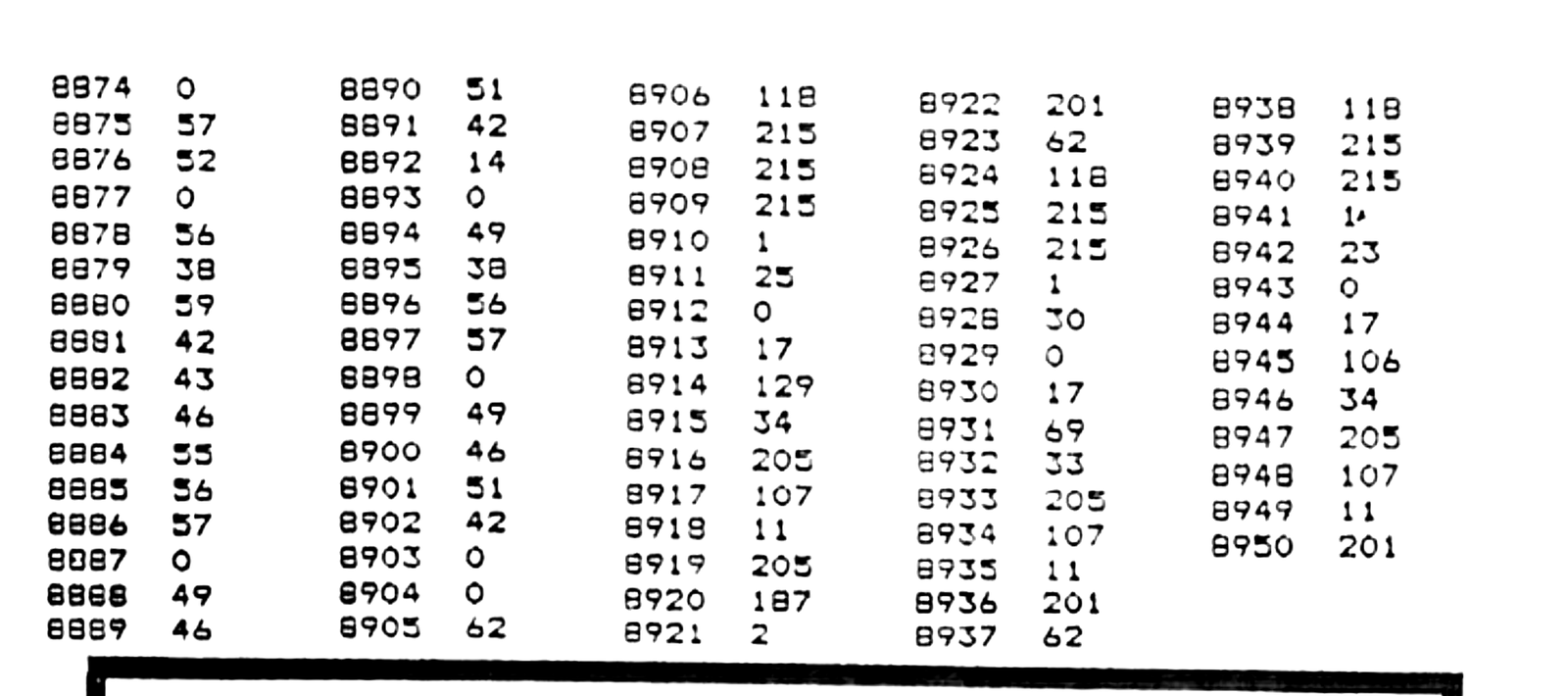
FIGURE 2 SYSTEM VARIABLES
FILE-START   8195   System address of a designated file or segment of a file
FILE-END     8197   The address of the end of the designated file
STORE-LOC    8199   Storage location of the file in a bank
PRINT-POS    8201   Print position on the screen (line; column)
DELAY        8203   Delay parameter for keyboard (default values 0/12)
FIRST-BYTE   8205   The first free byte in a bank
DIR-ENTRY    8207   Address for the next entry in the directory
DATA-STRING  8229   String containing filename, address, and size
FIGURE 3 MEMORY MAP
8257  FILE-SIZE      Determines size of a file in the system
8270  MOVOUT         Moves a file from system to bank
8284  KEYBOARD       Scans keyboard and puts character code in A
8297  DSP-OUT        Moves display file from system to bank
8316  TOT-IN         Loads entire system from bank
8332  PRG-IN         Loads a program into system from bank
8354  CLR-NAMESTR    Clears the name-string buffer
8370  PRT-NAMESTR    Prints the name-string buffer
8387  TIMEOUT        Delay loop for keyboard debounce
8397  INP-NAMESTR    Inputs name-string from keyboard
8456  VAR-IN         Loads variables file from bank
8481  STR-TO-BC      Finds value of numeric string
8587  FIND-BANKEND   Finds first free byte in bank
8624  SIZE-TO-BC     Puts size of stored file into BC
8631  PRT-ROOM       Prints space available in bank
8653  ROOM-LEFT      Calculates space available in bank
8665  PRINT-IT-1     Prints value in HL
8667  PRINT-IT-2     Prints value in BC
8674  ENTER-NAMESTR  Puts data string into directory
8693  DSP-IN         Loads display file into system
8712  PRT-ADDR/SIZE  Prints bank file address and size
8905  PRT-PROMPT     Prints prompt message on screen
8923  PRT-CONFIRM    Prints confirmation request
8937  PRT-OVERFLOW   Prints overflow message
FIGURE 4 CHARACTER STRINGS
8492  SAVE
8496  ENTER "FILENAME.EXT":
8517  EXECUTE SAVE (S) OR ABORT (A):
8547  FILE SAVED
8557  ADDRESS:
8566  SIZE:
8575  ROOM LEFT =
8810  NOT ENOUGH ROOM IN BANK
8833  PRESS ANY KEY TO CONTINUE
8858  ENTER LINE RANGE TO SAVE
8882  FROM LINE:
8893  TO LINE:
Note: Type-in program listings on this website use ZMAKEBAS notation for graphics characters.