
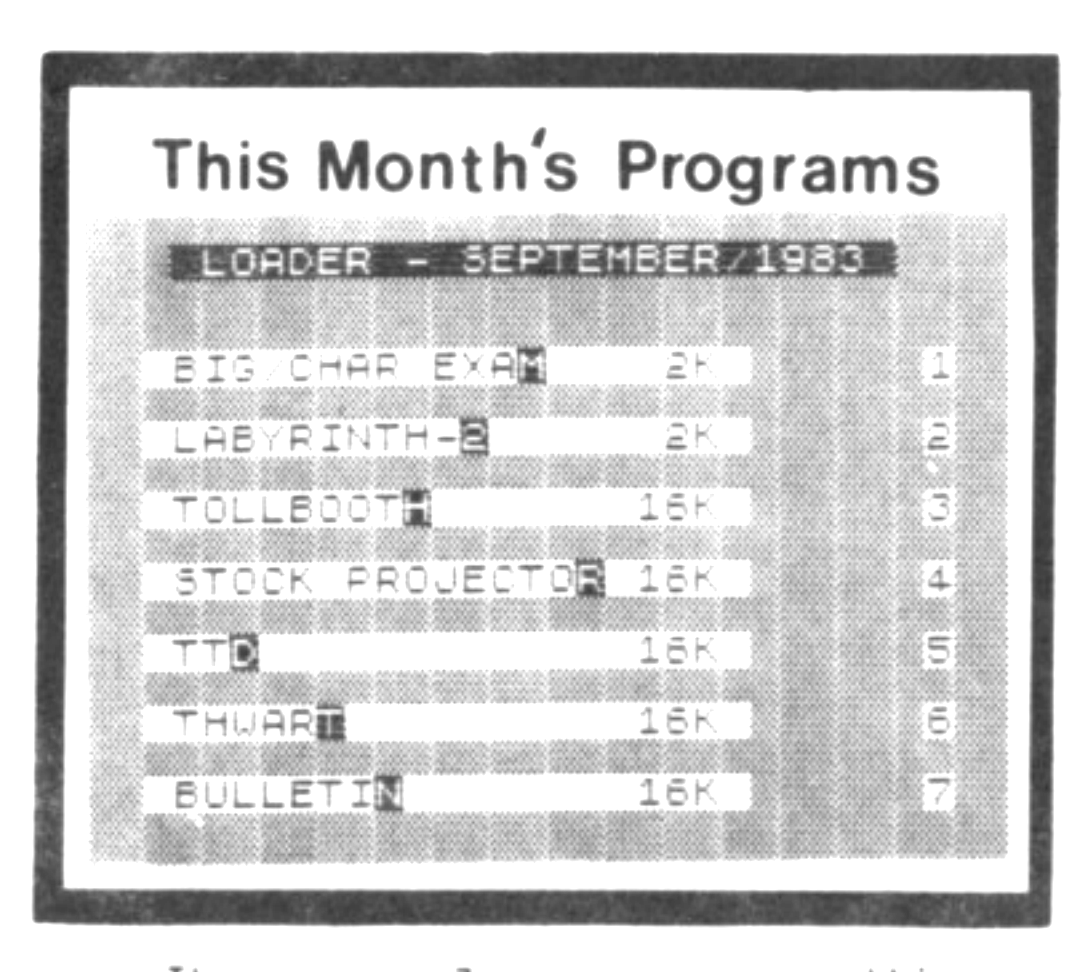
There are 7 programs on this month’s cassette, not counting the LOADER program which loads in 28 seconds.
The program names are as they appear on the above menu, which is similar to what will appear on the screen when the LOADER program is running.
Each program is recorded only once on each side of the cassette. The first programs that can be LOADed will be of the small size followed by the larger sizedprograms. For example, this month’s cassette has the first two programs recorded as 2K programs. The rest are 16K. The other side of the cassette is a duplicate of the first side.
For you new subscribers who aren’t familiar with LOADing procedures for cassette programs, follow these directions:
A – Make sure that the volume setting of the recorder is set at about 80 % maximum.
B – If you have a Bass and/or Treble control on the recorder, make sure the Treble is at maximum and the Bass is at minimum.
C – To LOAD the first program, type in LOAD “” and press the ENTER key on the computer. Then press the PLAY button of the recorder. The lead time on the APR/83 cassette is about 10 seconds until the first program begins.
The time needed to load the LOADER program is 39 seconds. When the program is loaded, a list of this month’s, programs will appear automatically.
Shut off the recorder when the LOADER program is loaded. Any of the listed programs can now be loaded into the computer by pressing the appropriate number on the keyboard and then pressing the PLAY key on the recorder. The loader program loads by searching for the name of the program you want and ignoring any of the other programs it may encounter along the way.
If you want to go directly to a program without waiting, we suggest you first find the tape location of the beginning of each of the programs with your recorder counter. This can be done as you go through the programs the first time, noting the tape location on the counter as each one is being loaded.
If you don’t have a counter, approximate the tape position with the fast forward key just before where the program would start, and then LOAD the program with the name of the program using the format LOAD “NAME OF PROGRAM”.
Some of our subscribers have told us that they could not get the programs to load by name but they would load with the double quotes. Others have told us that the loader program wouldn’t load certain programs. Most have told us that all the programs could be loaded either way. Every customer’s cassette is made from the same master tape, so the programs on everyone’s cassettes are identical. We feel it is most probably a problem of volume adjustment or recorder design. We have noticed this situation on some of our recorders.
PROGRAMS (all programs this
month are self-running
except “BANK SHOT”.
– program’s name has inverse
last character if self-running
RT = run time/LT = load time)
There is an approximate, 7 to 20 second pause between programs
“BIG CHAR/EXAM” LT = :14
This program creates characters 8 times normal size by examining the memory locations of ROM starting at decimal 7688. Four characters may be entered per line and then a SCROLL will occur to allow the next line to be entered.
Each character is represented by eight memory locations. Try entering graphic symbols or inverse characters. The result will not be what you suspect.
“LABYRINTH-2” LT = :22
The program starts with the <L> cursor at the bottom of the screen. You are to enter a number which represents the difficulty level (<1> is easiest) you want to play at. You might want to start with <0> (BREAK & RUN when ready to restart). This will produce no obstacles but will enable you to get the feel of moving your car through the obstacle course. <1> moves the car left and <0> to the right. Level 2 can be quite difficult and anything higher, almost impossible. If you hit an obstacle, the game is over, the <L> cursor will appear again asking for the next difficulty level.
“TOLLBOOTH” LT = 1:12
Perhaps you have heard of computer simulations. This program draws a graphic representation of a Highway Tollbooth Exchange. In the center is a meter that totals the cash collected. Cars pay 30 cents and trucks pay 60 cents. The booths on the left accept coins and the booths on the right have attendents. Trucks always have to go on the right.
The vehicles enter the exchange one at a time and the cars have a 50/50 chance of going left or right. Enter any amount of vehicles you wish and observe the effects.
“STOCK PROJECTOR” LT = 2:17
Here is a neat little program that can help you analyze stock or bond trends. It can also do the same for sales or any other type of chronologically kept data.
Here’s how it works: it is designed to have inputted at least 28 data items (daily stock or bond quotations, weekly or monthly sales figures, etc.). The program will then take any of the data items, starting with the third and ending with the third to last, add to that figure the two data items before it and the two data items after it and divide the total by 5.
This gives what is called a five point moving average. The program now takes the lowest and highest of these figures and plots a bar graph to the screen. It also elongates the distance of the bars to include the maximum amount of screen space.
If we were to use a stock, for example, that fluctuated between 64.00 and 67.25, an actual graph would harldly show any difference between peaks and valleys. By using the moving average to smooth out the peaks and valleys and having the graph chart from the lowest peak to the highest valley and elongating the chart, the peaks and valleys are dramatically diplayed.
The observer can now look for trends by the displayed dates. The program will allow 999 data inputs and with the TS-2040 printer, the entire graph can be printed.
Prompt #1 allows the data inputs of which 28 have to be entered before the graph can be displayed. Prompt #2 allows the PEAK/VALLEY search and displays the graph with the printout option. Prompt #3 allows 20 days of data entry to be dsplayed with the user specifying the beginning day. If less than 20 days of data exist from that date, the remaining days will be displayed. Prompt #4 cancels out all the data so that a new file can be entered. Prompt #5 allows the data to be saved on tape and prompt #6 allows incorrect data to be edited.
“TTD” LT = :58
Originally titled “THINGS TO DO“, this program employs a rather simple concept taken from an idea that was worth to the originator one million dollars. The story is kind of sketchy but here it is anyway.
It seems that years ago, around the turn of the century, a man had achieved the height of riches and power. He alone controlled an empire that was diversified to the point where it would rival any major corporation today.
One day, he was being visited by a friend who asked him about his business. The man replied that he found it extremely difficult to organize all the things that had to be done to keep his empire operating. He did not have the time to delegate authority or teach any of his employees the necessary tasks that would allow him any time for himself. He found it faster and easier to do the necessary things on his own. He spent many hours at work and had little time for his family and friends.
He said he would pay anything to be able to find a way to organize his business where he could have some time to himself.
The friend took this as a challenge and told him he believed he had the answer. He explained his organizing concept to him and told him to use it for a period of time and then pay him what he thought it was worth.
Some time later the friend returned to see how the man was doing. The man said that he had used the idea and handed the friend an envelope. Inside, he said, was what he felt the idea was worth.
Inside was a check for a million dollars!
The man told his friend that for the first time in years, his business was organized. He had time for family, friends and social events. Here is the idea that was given to him:
On a sheet of paper, write down all the things that you have to do, to the best of your memory, whether they are paying bills or taking out the garbage or anything else. Now, scan the list and decide which one of these items is most important or has to be done first. Write this item down on a second sheet of paper, number it “1” and cross it off on the first sheet. Now scan the first sheet again and of the remaining items, decide which is most important. Write it down on the second sheet under the first item, number it “2”, and cross it off the first list. Repeat this procedure until all the items have been transferred.
Now, throw the first sheet away, and pursue the fulfillment of the first item. When that is accomplished, cross it off the list, go on to the second item, etc. Do not attempt to skip an item unless the situation for that item demands a time delay.
In the “TTD” program, you can enter or add up to 22 items (prompt #1), restructure the order or set priorities of these items (prompt #2), delete these items as they are accomplished (prompt #3), clear them all out to start a new file (prompt #4), see or print the items (prompt #5) and save them on tape (prompt #6).
I don’t expect to see any checks in the mail for a million dollars but any donations will be graciously accepted.
“THWART” LT = 6:04
This game gives a fairly challenging contest where either the user or computer can move first. Played on a 4 X 4 grid, the combatants take turns dropping their markers into the lowest available square by entering the letter (A to D) of the column. Three in a row, up/down, sideways or diagonal are needed for either side to win. The program offers the appropriate sarcastic remarks and is harder to beat if the computer goes first.
“BULLETIN” LT = 2:23 RT = 9:52
Our bi-monthly Bulletin Board Program. “P” will PAUSE the scroll, “B” will move it backward and “F” will move it forward again.